Sunday Morning Reading

The line between Winter and Spring can be as confusing as it is normal. That fine line between confusing/normal runs through most this week’s Sunday Morning Reading. Enjoy!

It’s a Spring Sunday morning in Chicago. Nippy temps frustrate the daffodils that keep brushing off the snowflakes. As confusing as the weather may be, it’s also quite normal. That fine line between confusing/normal runs through a lot of this week’s Sunday Morning Reading. Mostly tech, some music, some marketing, some fear, and a troll or two, Enjoy!

The big tech news this week was the U.S. going after Apple as a monopoly. It’s brought out the the explainers and turned legions of Apple fan boys into anti-trust lawyers. Even the lawyers are going to need lawyers to figure this one out in my view. One of the best early inning reactions to this was from Jason Snell at Six Colors in U.S. versus Apple: A First Reaction.

When Marketing is everything, everything eventually gets reductive. Doc Searls of The Cluetrain Manifesto fame tackles this in Getting Us Wrong, a piece from December that recently resurfaced in my feeds and is always a timely read. So too is The Cluetrain Manifesto

The Disparity Between Fear And Progress by David Todd McCarty strikes a chord (actually chords) that I think many of us hear vibrating these days. 

Grim Tales, Fairy Dusts And All That Makes Us Gullible At Bedtime by NatashaMH jumps into the space between wanting to know and suspending disbelief. An interesting troll on it’s own. 

Social Media always seems to be at war with itself over most things, misinformation being one in a long list. I’m not sure Social Media presents more or less of that than other means of socialization, but Scott Duke Kominers and Jesse Shapiro think It’s Time To Give Up On Ending Social Media’s Misinformation Problem.

Joan Westenberg thinks the creator economy is a dead end for most creators. Is there an alternative? Check out The Creator Economy Trap: Why Building On Someone Else’s Platform Is A Dead End.

Musician and composer Stan Stewart thinks it’s dangerous to explain something before he does it, but he does so anyway in I’ve Got Some Explaining To Do. With all that’s going on in the world there’s something cooking up inside of Stan and I’m looking forward to the music that comes from this. 

Christopher Mims spent a couple of weeks using AI tools to do his work and comes out convinced we’re on the cusp of a ‘Cognitive Revolution.’ As he puts it: “Here’s my verdict: The last time I had an experience this eye-opening and transformative was after I bought my first smartphone.” Check out his thoughts in Want To Know If AI Will Take Your Job? I Tried Using It To Replace Myself.

If you’re interested in just what the heck Sunday Morning Reading is all about you can read more about the origins of Sunday Morning Reading here.  You can also find more of my writings on Medium at this link, including in the publications Ellemeno and Rome.

Apple and the DOJ: You Can Do Anything You Want As Long As You Don’t Get Caught

You can do anything you want in the land of the free and the home of the brave. As long as you don’t get caught. Or as long as you have enough cash in the bank to hire the right legal beagles. That’s the American way. Always has been. The bigger you are the more you can toss around your weight. That works more times than it doesn’t. In the case of the United States vs. Apple, Inc, not so much. Thus far.

The Department of Justice swooped in on Apple charging that the iPhone is the crown jewel of an illegal monopoly. You can read the lawsuit here. I’m not going to get in to all of the legal issues. Not really my game. As to that lawsuit I’ll take the liberty of saying the following:

  • I don’t understand the equation that led to the monopoly designation. It seems odd given similar such cases in history. The fact that different percentages for different types of valuations is being tossed around in all of the first reactions I think bears that out.
  • I’m in deep in the Apple ecosystem. I use the hardware and software. I enjoy the tech (when it is working as designed), and I hope they’ll continue to make the high quality products and software they do. Having used hardware and software from other makers, I find Apple’s superior and better for my needs. When and if that changes so will I. 
  • For the most part I buy Apple’s pitch about security and privacy. There are times I think the marketing around security and privacy leans too much towards myth-making, but in my experience the myth seems to have some foundation.
  • I’ve listened to the complaints from developers and other users through the years and find most of those I understand justified. Apple may have indeed created problems by creating and running the App Store the way it has. I personally don’t feel victimized by that, but I understand the issues presented by those that see it differently. 

Bigger picture I will say the following. Apple, like some other familiar tech giants of note (Microsoft, Google, and Amazon), largely brought this on itself with a too big for its bank account britches attitude. 

Arrogance and swagger isn’t just a feature of big tech companies. It’s a bug that infects any company or anyone who gets too greedy for their own good. I’ve seen it happen too many times.

History is full of these stories and many American myths are built on that foundation. You work hard, you make your pile, and you do it your way. The world beats a path to your door and you think you own the path and the world. You made your own rules along the way and bent some existing ones to your will. Perhaps broke a few.

That mythical song of good old American capitalism has been sung so often everyone knows the tune and the lyrics. When it comes to Apple’s stanza, you add in a chorus about Apple’s rise from an almost near-death experience and it becomes a siren song with a powerful resonance.  

In my view, limited as it may be, Apple could have easily made some adjustments along the way and possibly avoided this current mess. But the powers that be obviously thought different. They also thought they could swagger their way through and beyond this. That may well prove out in the years to come. And it will take years. 

Meanwhile, here’s some good early inning commentary on this story so far. I’m sure there will be much more ahead.

John Gruber on Daring Fireball

Jason Snell on Six Colors

M.G. Siegler on Spyglass.org

Stephen Robles on Beard.fm

You can find more of my writings on a variety of topics on Medium at this link, including in the publications Ellemeno and Rome.

At The Mercy of The Backend

Part of the Information Super Highway traveled some rough road this morning. Meta experienced an outage in all of its services today that took down Facebook, Threads, Instagram, Messenger, and I imagine everything else in the Metaverse. A source told the Daily Mail that the company’s internal systems were also down. Boomshakalaka, another day on the Internet.

We’re somewhat accustomed to Internet outages. In much the same way we’re sadly becoming accustomed to extreme weather events. Some are caused by malicious hacks, some by incompetence, some by rodents chewing through cables. Internet connectivity has made so much of our current world more convenient and convenience always comes with a cost. It’s a cost that those who own the servers, the services, and the connections, sometimes don’t want to pay for, leaving users stranded at times. It’s apparently tough to value an ounce of prevention on the Internet.

We hear about these outages when big ones hit. That’s sensational news. But far too often there are “backend” issues that happen that we never hear about. Those are the ones that only affect “a small percentage of users” or companies that don’t command the public’s day in day out appetite for connectivity.

Intriguingly enough, those charged with communicating with users when problems do arise sometimes never hear about them either, or if they do are they are told not to talk about them. Again, nothing surprising.

The corporate PR pros may or may not issue lawyered up responses, but rarely do users get any nuts and bolts answers as to what went wrong. Vague apologies, promises to do better, free credit monitoring when user info is hacked, etc… We’ll’ hear the now-clichéd “small percentage of users” modifier trotted out whenever things get righted. It’s funny/not funny how we all just move on.

Earlier this morning I was chatting with some folks on Threads who were seeing issues with Apple’s Weather app not updating as designed on their Apple Watches. I casually replied that it was probably an issue with iCloud’s backend and how it was associated with the provider Apple uses to offer up weather info. These issues with Apple always seem to manifest as they are rolling out new operating system updates, so my guess is more than a guess. (Apple rolled out iOS updates today.)

I’ve been going round and round with Apple for almost two years now trying to solve what is apparent to me, after much effort and investigation, an iCloud related issue. It’s not just apparent to me, there are several other users experiencing the same issues I’m having, as well as other users with other iCloud related issues in similar but different veins.

When I talk to Apple Support (a regular occurrence) we’ve developed this coded, often unspoken, acknowledgment that the issues are iCloud related. But as I said in this post, Apple needs to allow its support personnel to acknowledge directly what the problems are. And in my case, and those of others, so far that continues to not happen.

(Side note for those who might read the links above or are familiar with the situation: I’ve discovered a workaround to sometimes get things back to normal thanks to Dwight Silverman. Signing out of Messages and then back in works about 8 times out of 10. Otherwise I just have to wait it out.)

The problem is bigger than a social media network going down, or a streaming service buffering out during the big game for lack of bandwidth. Those may be frustrating but in the grand scheme of things merely inconveniences. But the more connected our daily lives become to our banks, our medical institutions, our governments, etc… the more reliant we become on services being well run, well maintained, and frankly just available and working as advertised.

I think of it as I think of streets and roads. We’re reliant on them and need them well maintained. The big difference is we see the potholes and understand the inconvenience we’re about to experience when the construction barriers go up.

When Apple, Microsoft, or Google releases a software update, they are not just updating the bits and bytes on your device. Corresponding updates happen on the backend as well. When your favorite app updates the same thing occurs. If that app provides a service, whether it be a social network, streaming media, or checking your bank balance something’s cooking on the backend.

And that’s just the backend updates we’re at least peripherally aware of. Perhaps we need better signage on the Information Super Highway.

You can find more of my writings on a variety of topics on Medium at this link, including in the publications Ellemeno and Rome

Apple Vision Pro: Thoughts After the Demo

They say you can’t teach an old dog new tricks. That may be so. But this old dog is certainly willing to try out a few new things, tricks or not. And the Apple Vision Pro certainly qualifies as a new thing. It is certainly not a trick. Understand I don’t own one. I’m not currently contemplating owning one. But I did schedule a demo at a local Apple Store and I’m very glad I did. These are my thoughts about the demo and after.

First, let’s talk about the demo. If you’re remotely interested and live close enough to make a trip to an Apple Store I’d highly recommend you do so. Certainly to check out the device and the limited look at the technology Apple lets you experience for 30 minutes, but also because in the end it’s as much fun as any entertainment experience you might put on your calendar. It’s also free. It’s well done and it’s a no pressure to buy interaction.

I equate it to the first time I attended an IMAX screening back in the day when that was a brand new thing (old dog here, remember.) The number of IMAX screens was small and the brand actually meant something beyond a higher ticket price. I remember marveling at the pre-show demo revealing all of those speakers and the technology more than I remember whatever movie I watched. The Apple Vision Pro demo is that sort of experience. At least it was for me.

As I mentioned, the demo is indeed limited. You don’t get to watch the entire movie. You learn the basics of using the device and what it feels like to strap this thing on your face. After your face is scanned with an iPhone to get the right fit, the device is shortly served up to you on a wooden platter with a panache that feels like you’re being served in a fine dining establishment.

It might feel like the main course, but think of it instead as being served up a large Charcuterie or a Mezza. You get to sample bits of the magic: 3D/Spatial video and photo experiences, the pass through mode, and moving windows up down and around. You don’t get a full course meal. For example, you don’t get to experience using it with a Mac which is understandable, but also a disappointment.

On the day I had my demo there were two folks completing demos in front of me and two waiting when I finished up. I was in a smaller Apple Store, so your experiences may vary depending on where you go. It will be interesting to see how this goes in the days and weeks ahead once the novelty has worn off.

So, those are my  thoughts on the demo. Again, my recommendation is to do it if you’re even mildly interested. It’s worth the 30 minutes and whatever travel time it takes to get to an Apple Store. And it’s the only way you’re really going to discover whether or not this device and what it may or may not offer might be right for you. It’s also a lot of fun.

Now that I’ve experienced this small taste here are some of my thoughts about this new thing.  Again, these are based only on the demo and along with what I’ve read, viewed and listened to online. I mention that because by and large I think most of the reviewers and early adopters are being quite fair in their praise and criticism of the Apple Vision Pro. Sure, there’s some over the top excitement, but that is well tempered with some realistic descriptions of issues and pitfalls that some are experiencing.

I included some links to early reviews in a prevous post after the review embargo dropped and I’ll include a few more below that have come out since. I don’t think you’ll go wrong checking these out because folks are putting this device and its operating system in what I view as the proper context: something brand new that’s attainable now, but is largely undefined as to its future.

And undefined it remains for me. If I lived alone I could see the Apple Vision Pro as how I possibly would choose to watch entertainment. In this first version it offers a very cool way to do so whether you’re in the immersive experiences or not. Even with the demo’s soupçon of this viewing magic it’s easy to see the appeal and be drawn to it. But that’s not enough alone for me to make the investment in this first generation.

I think the isolation factor many have mentioned shouldn’t be overlooked. I can see it being very easy to get lost in the world of spatial computing. That may be just fine for some, but this old dog wants to spend some time with friends and grandkids, sharing experiences and not keeping them to myself. How that part of Apple’s “vision” plays out is yet to be seen or really discussed in these early days, but it will need to be sooner rather than later in my opinion.

That said, the opposite could also be very true when it comes to providing shared experiences for folks already living in an isolated situation. For example, I was out of town on a gig for portions of December and most of January, with travel plans to be back home for a break during the holidays. COVID intervened and I spent the holidays on the road in isolation until the illness resolved. I can imagine folks in similar isolated situations, being able to share spatial videos or photos in the future. And yes, those are amazing, and indeed somewhat emotional experiences. But we’re far from that being even close to our current reality of quickly firing up a Zoom or FaceTime session and sitting in as a talking head during a holiday dinner.

As for the interface and working with the device, Apple has made it pretty easy to get acquainted with controling what you see with your eyes and gestures. The eye tracking worked as advertised with a few quirks. I expect it is only going to continue to improve. So that’s a win.

The biggest adjustment (and a number of reviewers have mentioned this as well) is that you have to keep your eyes focused on what you want to manipulate in order to excercise control with gestures. Certainly that probably becomes second nature with longer use, but it is certainly different than the way I use a trackpad, keyboard, or touch in relating to what’s on a screen. In the limited demo I found that I had to slow myself down in order to make selections, zoom, or move windows about and was encouraged to do so by the Apple rep guiding me. I do often use a multiple screen setup and this is a different way of working from how I may take a glance at one thing on one window, while scrolling through another almost without thinking about it.

As I mentioned earlier the demo understandably doesn’t offer a chance for you to see how the Apple Vision Pro will work with a Mac. There are plenty of videos and reviews online that discuss this in good detail. Many describe how effortlessly this works with Universal Control, using a keyboard and trackpad to go back and forth between a Mac and the Vision Pro. That’s encouraging, although I hope that doesn’t fall prey to some of the iCloud related issues with Universal Control that I’ve been experiencing for quite some time now that Apple doesn’t seem to have an answer for.

Honestly, this would be a headline feature for me and from what I’ve read it is designed and works well enough to warrant that sort of headline. Couple that with entertainment viewing and the Apple Vision Pro might be a bigger temptation for me a generation or two down the road, and again, I see this feature only getting better in versions ahead.

Apple Stores are very well lit. Much better than the environments where I work and how I actually prefer to work. In those bright light conditions everything I saw was crisp and easily readable. However, there was a noticeable difference between the brightness of the real world before and after putting the headset on. It does feel as if you’re entering into a darker place. I’ve read that in low light conditions the visuals aren’t quite as crisp or stunning, but there’s no way to verify that from the my participation in the demo.

As to the comfort of the device there’s no doubt it is something heavy on your face. We checked the fit several times in my demo, but the device kept wanting to slide down my face slightly. I was wearing the Solo Band. When that occured I had to constantly adjust my neck and viewing angle in much the same way I used to do with my eyeglasses back when I wore progressive lenses prior to catarct surgery several years ago. That adjustment felt minor with eyeglasses. It felt a bit more burdensome with the Apple Vision Pro. I’ve read and heard that the Dual Loop band included in the package that fits over the head might prevent that sort of slippage. I had no opportunity to try that out in my demo.

I hesitate to share this next bit of info because it’s very personal and it’s not necessarily something that can be attributed directly to the Apple Vision Pro. Later in the day of my demo I experienced some dizziness and disorientation that turned into what my doctors described as a Vertigo episode. I have never had or been diagnosed with anything resembling Vertigo previously. Because my blood pressure also rose significantly I ended up in the ER that evening. I was quite disorientated and out of whack.

Again, I am not saying there is a direct correlation here with the Apple Vision Pro. I have other health issues that could be the cause and it could very well be coincidental. I am in the process of doing quite a few tests to try and figure out the cause as some of the issues still persist. That said, Apple does have a support document about motion sickness, dizziness and nausea and I did take note that it mentions it can take up to 30 minutes for symptoms to start. My symptoms began well after that time frame, but when something scary like that happens you consider all external and unique possibilities and circumstances leading up to the event.

The point of including this info here is that it is just possible I fit one of the pre-existing medical conditions that might make me more susceptible to motion sickness symptoms as Apple mentions in the support document. So, while I encourage follks to take advantage of the free demo Apple is providing, I’d also urge them to follow Apple’s guidance and check with your medical provider if you have any of the conditions mentioned in this other document. The larger point here is that as much potential as the Apple Vision Pro offers, it may not, at least in its current form, be a device for everybody. Especially if you’re an older dog with some existing medical issues.

Is there a future here in Apple’s Vision Pro? I think so. I don’t know what it is or will be. I don’t know who it’s for or not for. I doubt Apple actually does either and is anxious to find out in the months ahead. What is certain is the elements of something exciting is here and we’re living in a time when we can experience that as its story reveals itself in the years to come. Note I said “years to come.” I think it will take awhile. But this is now. Take advantage of the demo if you can or are able. It’s a chance to see and try something brand new for yourself. Trust this old dog, that doesn’t happen every day.

Here’s some additional review links that are worth your time::

Jason Snell in Six Colors: Eyes On The Future

Brian Heater in TechCrunch: Apple Vision Pro review: The Infinite Desktop

Matt Birchler: Like Buying an iPhone in 2007

MKHBD: Apple Vision Pro Review: Tomorrow’s Ideas…Today’s Tech!

Upgrade (podcast): Leap the Uncanny Valley

Stephen Robles: Should Anyone Buy Apple Vision Pro?

Christopher Mims in the Wall St. Journal: Apple’s New Face Computer Is for Work.

You can find more of my writings on a variety of topics on Medium at this link, including in the publications Ellemeno and Rome and check out The Lehman Trilogy Diaries here. 

Apple Vision Pro Thoughts After Release to Reviewers

Well now. I wish I could say I’m surprised. But I can’t. After reading and watching reviews of Apple Vison Pro there weren’t many suprises in the many lists of pros anc cons. Well, maybe one. I’ll still be looking forward to real users trying it out and posting their reactions, along with the tech press that didn’t get in on the review cycle.  But by and large everything I’ve seen confirms what I’d already imagined..

It’s a terrific piece of tech by all accounts, albeit a bit heavy. Yes, there’s some intriguing tech and quite a few innovations. Yet it is still a very version 1.0 device that I’m perfectly happy to let others discover the ins and outs of as Apple continues to advance this new platform. $3500-$4000 is a steep price for beta hardware and a software eco-system, no matter how much of a new paradigm it seeks to introduce. The interesting thing to watch will be how many developers work to create for the device.

The other interesting theme that runs through these early reviews is that while Apple Vision Pro might open up new worlds it only does so for the wearer. It’s a solitary device. There’s no escaping that this is a device for isolating yourself in those worlds separate from the one around you.

The one surprise I mentioned is that Apple marketing apparently goofed big time when they rolled out the device regarding the EyeSight feature. You know the one when someone can see your eyes, or rather a digital representation of your eyes. Those pictures were everywhere, and apparently the reality is most of the reviews indicate that the feature doesn’t match the hype. No wonder there have been rumors that the EyeSight feature might not survive into future versions.

As for me, I’ll journey to an Apple Store and try it out at some point. Meanwhile I’m stting this one out for who knows how long. I still find the spatial computing concept intriguing and promising. I imagine that might be the way long after I’m gone. In the meantgime I hope it actually turns into something useful beyond just watching entertainment. But maybe that will be enough.

That said, here are some links to some of the reviews and articles, (one featuring Tim Cook wearing the thing), that I found worthwhile. There are plenty more out there. There’s a combination of writing and video, so pick your poison. The first two links really offer comprehensive coverage. Or as comprehensive as you can get this early in the game. The real story will be told down the line.

Apple Vision Pro Review: Magic, Until It’s Not from The Verge

MKBHD’s video look at the device.

The Vision Pro from John Gruber

Apple Vision Pro Review: A Revolution in Progress from Tom’s Guide

Why Tim Cook Is Going All In On The Apple Vision Pro from Vanity Fair

Apple Vision Pro Review: The Best Headset Yet Is Just A Glimpse of The Future by Joanna Stern

You can find more of my writings on a variety of topics on Medium at this link, including in the publications Ellemeno and Rome and check out The Lehman Trilogy Diaries here. 

Apple Vision Pro Excitement Running Hot

Apple started taking pre-orders for the Apple Vision Pro this morning and the excitement from those jumping into the pond for this first generation new device is running hot. It’s fun to see. I’m glad to see it. I’m not jumping in. I’ll be anxious to see how real users report their experiences as opposed to all the very clever and promotional marketing Apple has released. 

Apple released a couple of videos about the experience that I’ll share below. Slick stuff. But I’m more interested in the real world impressions and wondering just how those are going to be conveyed on the web. Since those who pre-ordered will start seeing deliveries in February it’s going to make that an interesting month to follow the news on this device.

This next one is a “Making Of.”

Don’t get me wrong, I’m not doubting that this is a cool new thing, but just like with the first gen iPhone I’m not gonna early adopt (especially at these prices) until we’ve got some real world feedback. Or is that virtual world?

The iPad Is My Perfect Theatre Rehearsal Tool

For some the iPad can be a strange beast. For some the iPad is just what they need. Of course that depends on which iPad you might have or use. That’s where the “strange” comes in. Most of the follow the leader tech press thinks the iPad lineup is confusing. Following along, I happen to agree to an extent. If you know what you’re looking for it’s not that difficult a choice. But if you are in the market for the first time it can be confusing. There’s size differences. There’s iPad Pros, iPad Airs, just plain iPads, and then there’s the iPad mini.

Apple hasn’t helped with the confusion because it’s sent mixed signals along the way. I’m not one to be that concerned because my needs are clearly defined. I’m not looking to use an iPad as full computer replacement, though there have been times I’ve used it as such and reliably well. I’m in the game for mobility for both work and play. Frankly, while the lineup may seem confusing to the easily distracted,  the variety in the lineup does offer an array of choices.

My family is one example. For my wife an iPad is primarily a content consumption device. For me it serves that purpose, and is also an indispensible work platform. I keep up to date with current hardware. That’s my gadget geek side. My wife is still quite happy with a much older version. (It still has a Home button!) My wife defines the case for many that frustrates the “must have new hardware” and “growth at all costs” crowds. For lack of a better analogy, she sits in the larger main section of the theatre often referred to as the orchestra. I sit in the “always ready for the new thing” smaller mezzaine or balcony. That analogy flips the pricing equation on its head, given that the main floor tickets are usually higher priced, but I think it holds in terms of numbers.

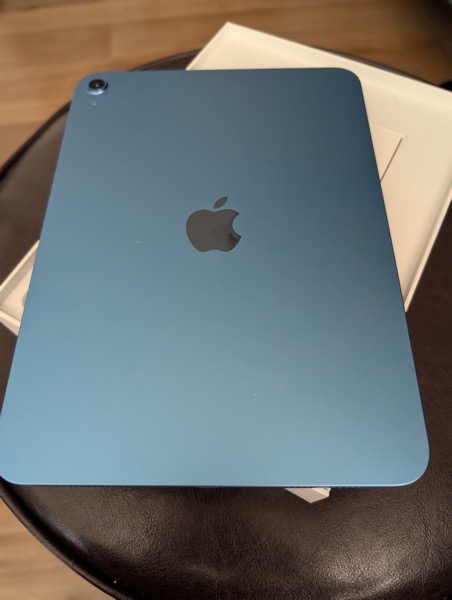
I own the latest models of an 11-inch iPad Pro and also an iPad mini. Love them both. I use them in similar but different ways, fitting the tool to the job of the moment. I may be a gadget geek, but I’m primarily a theatre professional. Most of my work is directing plays. Both serve me well in my job. Currently, I’m working out of town on staging The Lehman Trilogy. Both the iPad Pro and the iPad mini suitably fill my down hours with entertainment and are reliable work horses for the gig. To be honest, their roles as tools are so familiar that to call my usage “rote” would be accurate.

Background

Back in the day I was a Tablet PC fan boy. I used them primarily as a work device in the theatre. I was at one time a Microsoft MVP for Tablet PC. Those devices allowed me to quit using paper scripts in rehearsal and write my notes directly into a digital script. I could set aside my beloved yellow legal pads and not so beloved folders of research and have everything handy in digital format on a Tablet PC. The debates then were over slates versus convertible Tablet PCs.

Microsoft screwed the pooch with Tablet PCs leaving the door open for Apple. And along came the iPad. It certainly wasn’t perfect for my work initially, but it offered promise. I can’t remember  how many different stylus solutions I went through (from Adonit to Zagg) until the Apple Pencil came along. Along the way I’ve tried most of the other tablet solutions but as far as my work needs are concerned the iPad is hands down the only viable choice. I include Microsoft’s Surface tablets in the reject pile.

My Work

When I’m doing a show, work includes reading and working from scripts; research gathering and consumption; using, taking and making notes in rehearsal as well as on the research. Working with scripts, once a page gets too filled with my indescipherable scribbles, I simply open another copy and start afresh. GoodNotes is my app of choice for this. (I’ve tried them all.) It’s an easy solution for scribbling notes in the margins of a script in prep or in actual rehearsal. It also provides a way for me to archive scripts once I’m done with a show.

As a director I often walk into rehearsal with a clean copy of the script so that I’m more focused on the actors and the text and less on my notes. It’s a snap (swipe?) to switch back and forth when I need to reference my notes or research. Time is money and a limited commodity in rehearsal and I have to maximize what time I’m given.

In the early days of staging I’m primarily using the iPad Pro. It’s a Goldilocks device as far as size goes. The text and my notes are large enough to read at a glance and the size of the device is easy to tote when I move around the theatre or rehearsal room. In the stages of rehearsal when I’m mostly taking notes as the actors rehearse what we’ve done, I switch to the iPad mini for even more mobility and a bit of discretion.

My research is ongoing, but primarily done prior to rehearsals beginning. I do some of that on the iPads, but use a Mac for quite a bit of it. Apple Notes is my app of choice for all of that research gathering, though I’ve tried many others and still do. Prepping for a day’s rehearsal when I may need specific research I’ll create a note with links to those notes, the research directly, or a work list and have them handy via Slide Over. I’m still not a fan of Stage Manager although I’ve given it several attempts to win me over.

Marshall McLuhan coined the phrase “the medium is the message” in the 1960’s about human communication. For me, the same is true with my work tools. When I’m staging and working scenes the larger iPad Pro is the medium of choice and feels natural as I’m moving actors and scenery from moment to moment. When I’m watching and note-taking as the actors move through scenes on their own, the smaller iPad mini serves to remind me that I’m an observer, not a participant in the moment. If I move about the theatre while the actors are working it can be distracting if they see me a take a note. They can fall out of the moment and into a “what did I do wrong” mode of self-monitoring. So I try to be as discreet as possible.

Once we’re down to the final days of rehearsals and I have limited hours for giving notes I’ll actually return back to my Mac for preparation and organizing my notes for efficiently relaying them via email or in note sessions with the cast. Often I’ll use the Notes app on my iPhone when giving those notes in person. Once we invite the audience in for previews, I’ll stick with the smaller iPad mini for taking those notes, again for discretion purposes. When you tell an audience to put away their smartphones it’s not a good look to see a larger iPad light up while the director is taking notes. There was a time that I used a Samsung Galaxy Note in this scenario using OneNote or Evernote as the note-taking app. But those days are gone as my routine has become more focused.

For this current gig, we conducted some early table work and read-throughs of the script using Zoom. I’d be on my Mac, but have my script on the iPad Pro. My actors were using iPads for their scripts as well.

My work also consists of a lot of meetings and since I’m a now happily a freelance director I often travel for work. That means I’m often doing pre-production virtually using whatever video conferencing app the theatre uses. I’m also auditioning actors in virtual auditions. Video submissions also play a significant role. Both devices serve well in those aspects of the job, though I typically prefer the iPad Pro in those cases.

Play

Throughout this article I’ve also mentioned that I use both iPads for play as well as work. That is indeed the case. There’s downtime, and like many I use an iPad for consuming media and reading. I read a lot of scripts. The iPad mini is perfect for this whether I read the scripts as PDFs imported into Apple’s Books app, (my preference), in the Kindle app or in a PDF reader. As I’m working on this article on my Mac, I’m watching two football games in the background, one on the iPad Pro and one on the iPad mini.

Stall Surfing

Back in the day I often spoke and wrote about Tablet PCs as great Stall Surfing devices. Yeah, Stall Surfing. That thing you do when sitting on the toilet. You know you do it, whether it’s on a smartphone or a tablet. I’m here to tell you, that if nothing else, the iPad mini is the perfect Stall Surfing device. It’s sure beats reading scripts in paper or bound versions. I doubt we’ll ever see a marketing campaign featuring Stall Surfing, though.

Future Wishes

If I had a wish list for future iPads (both Pro and mini) it would be simple. I’ve heard talk that Apple might be moving away from the 11-inch size of the Pro models, thinking the Air liineup might be sufficient for most who need that size. I hope that’s not the case. It’s the perfect size and power house for my line of work. Sure, improve the larger Pros or make even larger ones, but don’t forget those of us who move around while we work and want a document sized device to work from that offers us power when we need it.

As for the iPad mini, I’d love to see that power up a bit in the next generation with an M-series processor. As to the design of both, I know new iPads without significant design changes can be boring to many. I’m not in that camp. I’d be content with these hardware designs for quite awhile to come. Both work exceptionally well for me as is. But I’m sure I’ll jump at the next models that come out regardless.

After all, I’m both a gadget and theatre geek.

An Apple Christmas Wish List for 2023

Dear Santa Tim Cook,

I’m writing you to let you know what I would like from Apple for this Christmas. It’s not new hardware. The amount of Apple gear I own is more than enough and I’m quite happy with it. So thank you for that, and thanks ahead of time because I’m sure Apple’s vision is to keep cranking out new hardware in the future.

This is a wish list about a number of nagging things that I think you and your elves need to pay more attention to in your operating systems and software. Let’s call them fixes. Most of these nagging issues have been around for a while and oft-reported so it’s surprising you’d allow them to hang around for the users who love your products. I, and many others, have been reminding you of them quite frequently and for quite a while.

I know your elves are busy, but if they could find some time to address these things it would be one of those gifts that gives all year long, and for years to come.

So, here’s my wish list for iOS and macOS.

iCloud

This is the big ticket item on my wish list. You’ve tied so many services and functionality to iCloud and a user’s AppleID. That makes good sense for the eco-system and when it works it’s great. When it doesn’t it causes problems for users, your support personnel, and completely diminishes much of the good it intends to provide. I’ve been on the hunt for solutions to my iCloud woes for quite some time now. I won’t go into detail here, but you can follow the links in this article that chronicle my journey.

But just so you know, the issues aren’t resolved, aren’t closed to being resolved, and tend to pop up with some sort of Santa-like omniscience, knowing when we users can least afford a problem.

Your elves I’ve spoken with thought this had been resolved with Sonoma and were quite disappointed to find out that wasn’t the case. So they’re as perplexed as your users.

These iCloud issues affect features like Handoff/Continuity and Sign in with Apple Watch not working. They also include Photos not syncing, Shortcuts not syncing, Mail not syncing, Reminders not syncing, iMessages not syncing, and the list goes on. To be fair, Photos, Shortcuts, Mail, Reminders and iMessages eventually do sync and catch up. But when they randomly don’t and you’re counting on them it’s like receiving a hastily scribbled note in your Christmas stocking telling you the gift you were expecting will be arriving later. Certainly survivable, but disappointing and certainly not magical.

While, at times, the reoccurrence of these issues seems random, there seems to be some predictability about it. They far too often (not always) crop up just before or just after an update is released whether it be the next official OS release or the beta for the next version. My hunch, after months of observation, and talking with other users and your elves, is that each time you issue a software update for devices (beta or official), whatever accompanies that on the back end keeps stacking problems on top of unsolved problems.

To be quite honest it feels more and more like regardless of if we run OS betas or not, (I do not), non-beta users are subject to the same vagaries that any beta can bring and/or fall prey to back end operations that are required by these updates.

Mac Notifications in General

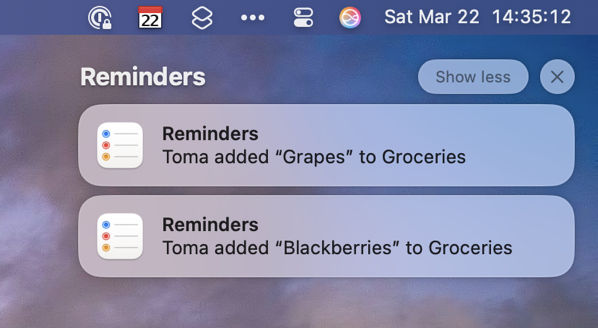
Please, oh, please. We all know notifications are tricky. We all know they are a mess. But please, oh, please give Mac users a way to bail out and dismiss all notifications with one button the way we can on iOS devices. Or at least time them out.

Reminder Notifications

I’m very pleased with the continual progress in the Reminders app. I like using Reminders for shared lists with my wife. But the notifications when adding a shared Reminder to a list need to at least follow the same rule as other Reminder notifications do and disappear after a short time, waiting to be recalled. I used to find it humorous that my wife could add a Reminder to our shared grocery list while I was on the way to the store. But not so funny after I picked up the item and cleared the item in the Reminders app, had returned home and placed the item in the fridge only to find the shared Reminder still showed up on my devices. I let some of these linger for a day once. And they never disappeared until I manually removed the notification.

Stand By

This is a nice new feature that I like quite a bit. Please fix it so the widgets I choose to show stay on the screen and don’t change randomly after I’ve set up my preferences. This feature either needs to be less smart or much more intelligent.

Apple Mail

I use Flags and Rules in Apple mail to help me manage my Mail workflow between projects. Different projects have different colored Flags. That works well most of the time switching between Macs. But not always. In fact currently the counts are so drastically off between my two Macs that it’s a little ridiculous. And it’s always changing.

I watch over a course of days how those numbers can change trying to sync up. When the counts get off so drastically, it tells me something is happening server side on the back end. That doesn’t help when I am attempting to use this organization structure to accomplish a task. By the way the differences in numbers is more often than not off between Mac and OS devices also.

I’d also like to be able to more easily track via color distinction those same Flags in iOS by having another menu drop down allowing access to the different color categories instead of just a list of emails with all of the different colored Flags.

When I’m triaging email I’d like to be able to choose a colored Flag after using the swipe gesture to Flag an email instead of having to go back and choose the correct color later.

Consistency Across Platforms

I know things are different between macOS and iOS. And yet, it seems like you keep trying to bring them into more and more into sync. (“Sync” might be a poor word choice there, given all the syncing issues you have. Or maybe it’s just too darn appropriate.) In trying to sync some things up you’ve created some cognitive dissonance and user frustration. These issues cut across Apps and Services like Shortcuts, the Share Sheet, Mail, Notes, Reminders, even Apple Music, Apple TV+ and Apple News. Features are almost the same, but not quite the same enough.

There are times when using a feature on one platform is just a small enough degree different than on the other that it creates a logjam in getting things done and makes me think I’ve lost track of how to perform the task. At times it makes me wish things were more separate and not less. But I know that’s not the goal much less the desire.

Wrapping Up

So that’s it. With the exception of the issues related to iCloud, I think it’s  a manageable list. Here’s hoping Apple’s vision for the future includes cleaning up these longstanding nagging issues before adding new ones on top of the old.

Merry Christmas!

Sunday Morning Reading

Some culture, some politics, some tech, and some fun to share in this week’s Sunday Morning Reading. There’s also a bit of Picasso tossed into the mix. I’m in Memphis starting rehearsals for The Lehman Trilogy at Playhouse on the Square so life’s rhythms are a bit fractured currently, but life’s slower on the Mississippi.

Kicking it off, David Todd McCarty in We Could Be Heroes asks what do we do when mystery no longer sustains us after we’ve moved past enlightenment? I’m thinking the answer is either drink more or drink less. Pick your poison. Also check out his weekday daily columns here.

Susan B. Glaser, Jane Mayer, and Evan Osnos explain How The American Right Came to Love Putin. My $.02? It’s simple. It’s not about Left and Right in the traditional sense. It’s about take what you can because the good guys have proven they can’t really stop you.

Ray Naler in Time Magazine has an excellent piece on Artificial Intelligence called AI and The Rise of Mediocrity. We’ve been rising/sinking to that level for awhile now. The pace is quickening.

Speaking of quickening, what was Twitter continues to quickly plunge into past tense. The Verge has an excellent and fun piece called Elon Musk Killed Twitter from a team of writers.

More and more journalism these days seems to be telling us what we already suspected, already surmised, or already knew. Jodi Kantor and Adam Lipton fill in a few blanks on how the disaster that was the Roe v Wade decision came down in Behind the Scenes at the Dismantling of Roe v Wade.

Jason Snell makes a case for Apple to develop its own clipboard manger for macOS. He’s right.

NatashaMH in The Madness of Pablo takes a walk into the wildside with Pablo Picasso.

Continuing on the art beat to wrap things up this week, have you ever asked What’s With Those Hilarious Medieval Portrayals of Animals? Well Elaine Velie did and wrote all about it.

If you’re interested in just what the heck Sunday Morning Reading is all about you can read more about the origins of Sunday Morning Reading here