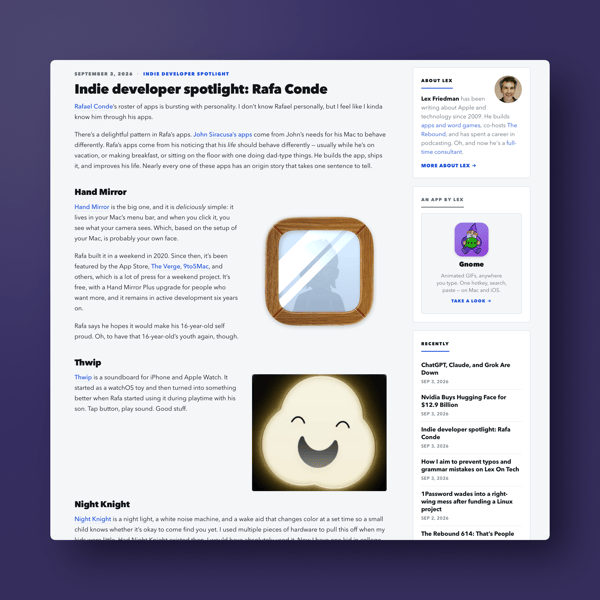
Here’s a recommendation for those who use Apple products. Lex Friedman has recently launched Lex On Tech, a website to feature news about mostly Apple tech. More to the point of my recommendation he’s spotlighting info on developers and apps.
Friedman has been writing about Apple tech for quite some time while involved in a variety of tech related exploits himself, which you can read more about on his site. He’s developed a few apps himself and he’s also a pretty funny guy based on my listening to him on The Rebound Podcast.
The Apple community is in need of new voices, though given his storied career I wouldn’t call Lex a new voice strictly speaking. That said, given the lack of coverage about new apps and developers these days, something that used to be a staple of Apple coverage, it’s good to see a new, yet knowledgeable voice highlighting apps and developers as a big part of his coverage.
Things are certainly transitioning with Apple. In my opinion within the coverage about Apple as well. In the early going, Lex On Tech feels like a breath of fresh air. Here’s hoping Lex On Tech continues providing that breath of fresh air at a time when Apple coverage feels like it needs one.
Thanks for reading. You can subscribe to this blog if you care to.You can also find more of my writings on a variety of topics on Medium at this link, including in the publications Ellemeno and Rome.I can also be found on social media under my name as above. This site does not use affilate links.
Here’s something I’ve been recently thinking about software. There’s really nothing new under the sun. And the skies have been cloudy for a good while. It feels like we’ve reached a point where the only difference between apps within a category boil down to execution and design. Often not even then.
Perhaps we’ve exhausted all of the ideas for what software can do and we’re just looking for a better iteration of what we already have at hand.
I’m talking on a consumer level. Beyond whatever AI supposedly offers, and the explosion of social media apps that happened when Twitter x-ed itself out, I can’t name an app or piece of software in the last few years that wasn’t a different version of something that already existed. Even AI software feels like it’s more of the same, just at a quicker pace.
Certainly there are nuances. But over time they tend to blur. As an example, take weather apps. They’ve all recently followed the leader (I don’t know which app that was) to display variable forecasts from different weather sources. It’s a good feature given that weather services can offer different forecasts. But as most weather apps have quickly adopted similar features, once again there isn’t much of a differentiator between them. Unless Carrot Weather’s bell weather use of insults is your cup of tea.
Don’t get me wrong. Execution and design can (and should) go a long way. Even more so when all things seem much the same or serve the same purpose. Beyond price, that’s really the only big differentiator.
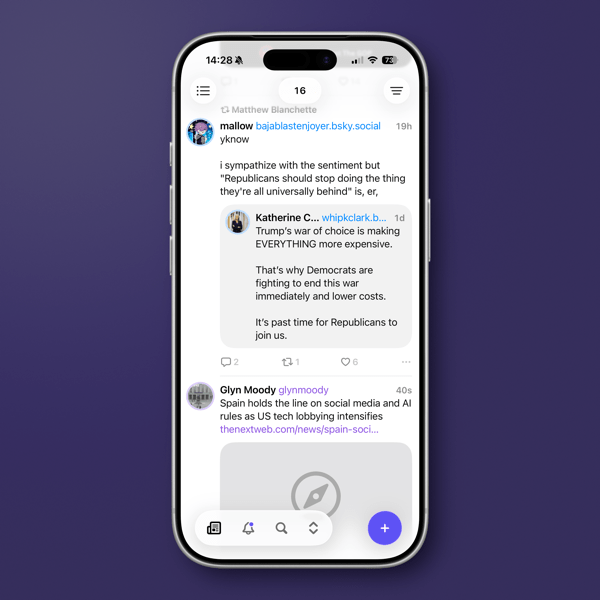
It’s why I’ll try out an app that looks like it doesn’t offer anything beyond what I already have. Within that personal scope, let me say that the new social media browsing and crossposting app Indigo is worth your attention if its functionality fits how you use social media.
Indigo is the creation of Soapbox, the developers who created crossposting app Croissant. (I wrote about it when it released.) While Croissant allows you to cross post to Mastodon, Bluesky, and Threads, (functionality I find useful), Indigo is meant primarily to merge and scroll through a single timeline of your Mastodon and Bluesky feeds. You can also crosspost to both if that’s your desire. Threads isn’t included, as it doesn’t allow for viewing its timelines in the same way, which is curious as it is supposedly federated with Activity Pub.
If scrolling social media feeds is your thing, Indigo is certainly worth a look. It’s very well designed, and easy to discover its functionality.
It’s a first version of the app, and as one of the developers, Aaron Vegh says on his blog, “The Indigo we’re shipping today is going to be the worst version.” For the worst and first version, I believe Aaron and Ben McCarthy have done an excellent job. (You should read both Aaron’s and Ben’s blog posts. Ben’s describes the functionality quite well.) Having followed the development of Croissant since its release, I’ll say that the care they’ve used in the past with that app points to the same for the future of Indigo.
If you use both Mastodon and Bluesky, once you sign in to both through Indigo, you see your feeds merged together. You don’t need to use both social networks. The functionality is the same if you prefer only one of the two social networks. So, if you’re user of only one, it could replace whatever app you might currently be using.
One of the nicest design touches, and obviously an essential one, is that it’s easy to distinguish where things are coming from if you merge your timelines. Mastodon links are purple and those from Bluesky are, well they’re blue.
You can tell if a post is crossposted between the two networks, and another nice feature is that Indigo will merge the two in some cases (timing plays a part) so you don’t see them twice. You can switch between each version and take actions like quoting or replying to both at the same time.
If you’ve used Croissant to crosspost, doing so on Indigo will feel very familiar. Notifications, should you choose to receive them on your device, work as you would expect. The Notification tab in the app is quite well done and easy to understand.
The app is available for the iPhone, iPad, and Mac, and a single subscription covers you across devices. There is a free tier that’s read-only. If you’re interested in Indigo, the free tier is read only. That’s good way to determine if the excellent design of the app appeals to you.
If you use both social networks and would like to combine your feeds into one timeline I think Indigo is worth a look. Let me say this about Indigo and my social media usage. The single merged timeline feature has its attraction, but it’s not something that’s a high priority for me and that brings me back to the beginning of this post.
I like to keep my eye out for developers who focus on good design and good functionality. That’s the case with Indigo. As in this case, an app may not fit my needs, but I’ll remember the developers or company behind it. It’s much the same way I follow good theatre or film directors, and good writers.
I don’t see many new ideas or new needs to fill coming down the software or app pike in the near future. That may say more about me than it does the software market these days. Even so, that view of mine has me paying even closer attention to those who care about the look and feel of what they produce.
(image from the author)
You can also find more of my writings on a variety of topics on Medium at this link, including in the publications Ellemeno and Rome.I can also be found on social media under my name as above. This site does not use affilate links.
Everyone has rituals they follow around the turning of the New Year. For some it’s making resolutions. For some it’s breaking them. Among other household chores and family obligations, those chores include doing some tech cleanup, archiving, and discarding some of the digital detritus that has accumulated over the last year.
I’ll be paying closer attention to cleaning things up during this year’s ritual as I anticipate moving from the M1 iMac 24 I currently own to the M4 version sometime in the first quarter. My iMac is the center of my computing tasks. External storage that I use throughout the year hangs off of that, it’s the one device I use where I don’t Optimize Photo Storage, and I download some, not all, of my music there as well. I can easily fill up 750GB of 1TB of SSD disk space throughout the course of a year, sometimes more.
That external storage contains ongoing archives and backups, as well as ripped (legally) videos I maintain that I can access on other devices, such as the Apple TV at or iPad via the app Infuse. I’m still old fashioned enough in my work habits that if I’m working on a project I keep its files local, even though I may routinely back them up to the cloud so I have access to them if I’m on the road.
Below are some things I do in the week following the turn of the new year.
Clean Up Photos
I take a lot of photos throughout the year, mostly just for fun. Typically I’ll take multiples of the same shot, especially of my grandkids. That means there are a lot of duplicates. I’ll get rid of most of those via manual examination. That happens on my iMac. I don’t quite trust Apple’s deduping process, but I may give that a go this year.
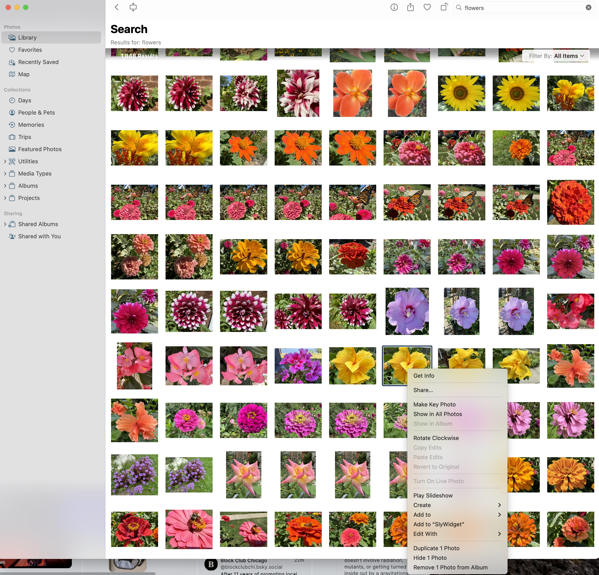
This year Apple vastly improved its search capability in Photos and I find it works quite well. Unfortunately though it delivers the results to what I assume is a “smart album.” Regardless, the problem with that is that you can’t delete a photo or series of photos from that result unless you first enlarge each photo and delete each one directly. You can remove one or multiple photos from the album created, but I would think that possibly changes whatever algorithm Apple is using to group these photos.
As you can see in the image below I take lots of pictures of flowers.
While there are direct duplicates, there are others when I vary the shot slightly enough that it’s not an exact duplicate so any dedupe tool won’t work. Being able to delete those I don’t want from that search result would be a terrific time saver.
Clean Up Videos
With two young grandkids we take a lot of videos. Most of the family uses iPhones so much of what’s taken and shared gets stored in Photos. I’ll go through the videos accumulated there throughout the year and put them on external storage that stays attached to my iMac so as to somewhat reduce the size of my Photo library before it inevitably expands again during the next year. That also allows me to store them alongside the videos from non iPhone family members of nieces and nephews. You never know when you’ll need one of those childhood videos to embarrass a younger relative in front of their significant other in the future.
Change Passwords
Passwords are necessities in our digital lives, though there’s hope that Passkeys will take a firmer hold going forward. That hasn’t happened with many of the websites I use routinely yet and I wish it would. I do change passwords at the beginning of every year as a routine, one I’d love to not have to do. Of course I change various passwords throughout the year as well, which leads to me deleting some that have accumulated throughout the year.
Since I still rely on far too many passwords, I continue to use One Password for password storage, but I am increasingly transitioning to Apple’s new Passwords app. Of course that means I’ve increased my task load of changing passwords this year to make sure what’s stored is properly reconciled between the two apps.
Archive Files
Each year there are always projects I complete and don’t need to have immediate access for those files and assets. I’ll clean up my day-to-day working environment by archiving those files both in the cloud and on local external storage media.
For local storage it’s a multi-year process. I’ll archive files to attached external storage so I can easily retrieve things if the need arises during the next year or so. Once a series of project files have aged two-years I’ll move them to local storage on a drive that is then archived and stored away separately. At some point I’ll have to think about getting rid of some of those older archives on older drives, but I haven’t felt the need (or discovered the patience) to reexamine and accomplish that chore.
For digital archiving I primarily use Dropbox, but I won’t sync those archived files and folders to my desktop going forward. I can always go and fetch them if needed. I’m a little more rigorous with that digital archive in that I examine it for files I can delete every year, and typically delete a good portion of those remaining digital archives two years after a project is completed.
Delete Apps I’m No Longer Using
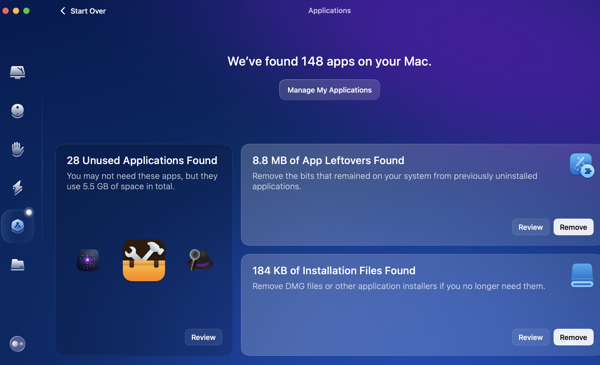
My pace of downloading apps has slowed down quite a bit, primarily because I seem to think I have most of the tools I need already. That doesn’t mean I won’t try out a new apps each year. A few will stick, but most don’t. I’ll delete those during this digital housekeeping phase. I use Clean My Mac and it provides a good utility for telling me how long it’s been since I’ve used an app, along with the other tools it includes in its suite of utilities.
In App Archiving
I use several apps to collect webpages and articles to read later. The two I primarily use are Goodlinks and Instapaper. I used to use Pocket quite a bit for this, but its owner, Mozilla, has essentially ruined that app for me. I’ll go through and delete any articles or links that I’m not interested in keeping and archive those I do want to keep. Instapaper provides a handy archive function. I use tags in Goodlinks to organize what I want to hang on to and a folder structure in Instapaper for things I want to keep quicker access to.
Cancel Subscriptions
Typically I’m pretty on top of things throughout the year regarding the subscriptions I use for apps and services. Even so, I still take an inventory at the beginning of each year. While that rarely leads to a cancellation at that point, it does put me on notice to see if I think a subscription will be worth continuing as the year goes on. I’ll set reminders 10 days before a subscription is due to be renewed and if it hasn’t provided value since the beginning of the year I’ll make sure to cancel or not renew at that point.
Clean Up Contacts
I have to admit I’ve gotten lazy here. I blame Auto-Complete in email and messaging clients, even though they are not always 100% accurate. I’ll still do a quick once through, but I’m afraid my reliance on Auto-Complete in this area has not only made me lazy, but might make me recoil at what I see if I ever had to get serious about this again.
Clean Up Cables
I don’t routinely change cables for the sake of changing them and I am not one of those in a rush to replace the few devices requiring Lightning connectors with newer USB versions. It’ll happen when it happens. But I do check out what I’ve got plugged in and cabled to to make sure everything looks in good working order and to take an inventory on whether or not I need to keep an eye out for deals on any cables I think might need replacing throughout the year. Throughout the last two years I’ve eliminated a lot of cable clutter around my desk by using MagSafe chargers.
Check UPS Status
I review the warranties for the Uninterruptible Power Supplies (UPS) that I use to gauge if any look like they might need to be replaced during the coming year.
Printer Check
We use an Epson ET-2760 EcoTank printer and have for a couple of years now. Our printing needs continue to diminish, but they do come in spurts, and we haven’t ordered ink since we bought the thing. Once a month I’ll check the ink supply and print a few things to make sure everything stays in good working order, but I’ll do a through maintenance check using the printer’s on device tools at the beginning of each year regardless.
Roomba Maintenance
This is a relatively new one. We use a Roomba and it’s now become a part of our Christmas ritual that I give my wife a parts replacement kit that contains filters and brushes as a gift. Not sexy I know, but we both have routine gifts we exchange in a similar fashion.
You can find more of my writings on a variety of topics on Medium at this link, including in the publications Ellemeno and Rome.I can also be found on social media under my name as above.
Complex pieces, whether successful or not, dominate my end of year list for 2024
2024 was a complex year on many fronts in my life. We moved. Politics and culture seemed to daily turn the world upside down and inside out. And for some reason the movies, TV, and books I enjoyed the most were, while not necessarily the top of class, very complex.
I certainly didn’t see or consume everything during the year. Heading into the holiday movie release schedule I found myself thinking it had been a better year for streaming TV than it had for movies. I think that still holds. Some titles may have been released prior to 2024, but they didn’t cross my radar until this year soon to pass, so they get included.
For the record I don’t believe in “Best of.” As I continue to say, there’s too much good being created by too many good (and some not so good) folks out there, that I pick what attracts and holds my attention.
This year that leaned towards complex pieces that may or may not have been utterly successful. There’s also just some well done entertainment. There is still lots of mediocrity out there, but here’s the complex cream that rose to the top of my list. If I wrote something about the titles, there will be a link.
I’m not sure where to put YouTube videos on this list, but this presentation of Ubu and The Truth Commission by the Handspring Puppet Company was high on my list of favorite viewing this year.
Books
James by Percival Everett
The Mighty Red by Louise Erdrich
Tyranny by Timothy Snyder
On Freedom by Timothy Snyder
The Freaks Came Out To Write by Tricia Romano
Infinite Detail by by Tim Maughan
Apps
Either I’m slowing down or software App development is. There’s only one new App that landed on my devices that I would recommend:
Croissant. A social media cross-posting app by Ben McCarthy and Aaron Veigh. It’s still got some quirks, but it is handy enough that I use it frequently hoping they’ll work the kinks out.
Have a Happy New Year!
You can find more of my writings on a variety of topics on Medium at this link, including in the publications Ellemeno and Rome.I can also be found on social media under my name as above.