macOS 26.1 Seems To Have Fixed the iconservicesagent Memory Leak

A bug fix. But who did the fixing?

A little follow up.

A few weeks back before Apple released the non-beta version of macOS 26.1 I wrote up some observations about macOS 26. One of those observations was about memory leaks.

Cleanshot 2025 10 17 at 09.35.13402x.

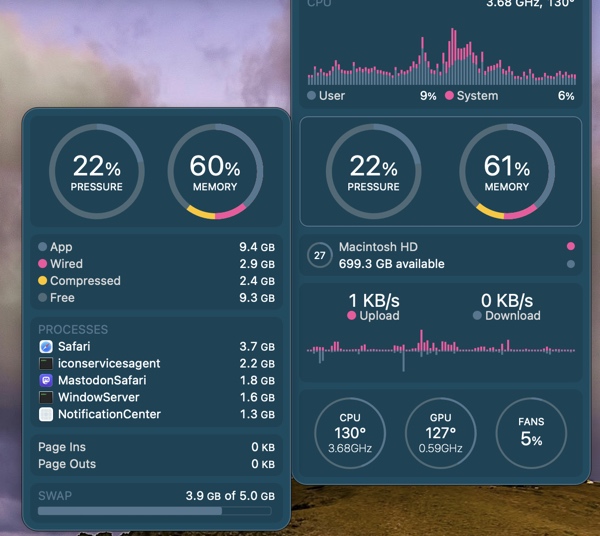
I cited one example I was seeing frequently with iconservicesagent, a process that the system uses to read and generate icon images. When it goes awry because of a corrupted icon or corrupted icon cache then the memory leak occurs. You can kill the process and it will restart, but that wasn’t fixing the problem and the memory leak would reoccur.

Tracking down what might be a corrupted icon is beyond my skill level, so I was hoping this was a bug that would eventually get fixed by Apple, or an app developer who might clean up an errant icon.

Apparently that happened because I haven’t seen the memory leak reoccur since installing macOS26.1. Of course quite a few apps have updated in the meantime as well. So, there’s no way for me to really know whether the fix was on Apple’s end or an app developer’s without doing some digging I don’t have time for. Nor would most users.

Keep in mind, Apple created an entirely new method for developers to build icons this year. Some developers have used the new Icon Composer already, some have not. It’s caused a few developer headaches, especially for app developers who offer multiple icon choices as a part of their app and general disgruntlement with the icons Apple itself has released. Note Apple hasn’t as of yet updated all of its own icons.

I’m glad the bug has been fixed. Whether the fault was on Apple’s end or a developer’s it points to the catch up that Apple has to do to solidify things in macOS 26 Tahoe with app developers having to follow behind as it does so. We’ll see how many other bugs get quashed in the months ahead with macOS 26.2 presumably coming sometime before the end of the year and successive  point releases following in the first half of the next year.

You can also find more of my writings on a variety of topics on Medium at this link, including in the publications Ellemeno and Rome. I can also be found on social media under my name as above.

Apple Peelings

Like it or not, Apple locks us all into perpetual betas

A concerned reader asked me a question the other day. She wondered why I always seem so down on Apple even though I use lots of Apple gear.

Shutterstock 2366050051.

I have many reasons to be down on Apple. I’m not fond of how Tim Cook has sucked up to the Trump regime. I think Apple’s monopolistic policies harm developers and users alike. I think Apple can’t live up to the pace it has put themselves and us on. Apple’s “It just works” mantra long ago faded into the dustbin of history the same way Google’s “Do no evil” did.

That last one is the one that gets me riled up the most.

Things don’t “just work” anymore. They work sometimes. Sometimes they don’t. Sometimes after working for a while they just stop. Sometimes they return to working. Sometimes not. I chalk this up to the fact that every Apple user is essentially running beta software whether or not they have opted into betas. (I don’t run betas.) As I’ve stated here often, when beta software arrives for beta users on their devices, beta software is also being introduced behind the scenes on Apple’s servers. Beta users expect there to be issues. That’s the price of admission. Non-beta users do not. And in my view, they shouldn’t be exposed to those same “take your chances” experiences.

Most users aren’t aware of this and some of the signals that are easily missed are so common place that they are easily ignored.  For example, if you use an Apple Watch to log in to a Mac, every now and then you’ll see a message on your Mac that you have to sign in with your password to make that Apple Watch feature work again. Typically, that happens around the time Apple releases a new beta version. Or you may see that a notification that a device you’ve owned for quite some time has suddenly signed on as a new device to your iCloud account as a new device.

Things get muddier still as most Apple coverage is about what’s happening with each new beta and ignores the problems that backend issues may cause for non-beta users. At least I rarely see it and I try to stay current. Apple coverage is also spending as much time looking to the future as it does the current moment. That begs the question, are we just bored with the present and if so, why?

Apple is on what seems to me like a far too haphazard and perhaps reckless pace of advancing software development that is leaving users and developers playing catch up, while it does the same. It’s one thing to play catch up, it’s another to play catch up when you’re adding new features into the mix at the same time. I get it. The pace of tech, fed by the AI bubble/boom/bombast is forcing everyone into a high stakes race. But it sure isn’t taking care of the potholes on the racetrack.

The last few years there’s been a period in the spring each year where things have settled down somewhat before they start ramping up again for the next year’s betas to be released at Apple’s WWDC. That typically comes after a .3 or .4 release of that year’s current operating system. That’s typically in the Spring and often feels like a breath of fresh air. I like the Spring. I also like the Fall, but while I eagerly look forward to the leaves changing color, I approach Apple’s annual Fall operating system releases more and more with trepidation knowing that some of the Summer’s beta issues will continue as we head into Winter.

A big part of this in my opinion is Apple’s fortunate position of taking a long view in its hardware and software development. Apple may be working several generations ahead of whatever they are selling at the moment, but I don’t believe they are paying enough attention to what’s happening in the moment the majority of its users are living.

But, back to that original question. After some of the bigger issues I mentioned earlier became prominent enough to make me question my use of Apple products I did some looking around and some self examination. Given that I support a number of folks who use Apple products as well as products from other makers it was easy enough to do. The simple sum that all added up to is that Apple’s hardware is, in my opinion, the best of what’s on the market, and no one else has come up with software solutions any more reliable than Apple at the moment. I chalk that up to the AI rat race that feels more and more likely to keep companies and users frustrated for sometime to come while everyone chases promises that more than likely won’t pan out they way they were sold.

Sure, I could try to work my older geek muscles back into shape and chuck it all and buy cheaper equipment to run Linux, etc…and that has had some romantic appeal. But in the end, I am no longer that romantic and will admit to the compromise that I need something that works reliably most of the time, if not all of the time.

The fact that I felt very uncomfortable typing the phrase “most of the time” in that previous sentence is I guess the best answer to the user question I opened this post with.

In a different context, but to the same point, since I pay for the hardware and the services I use, I feel I have every right to complain when something doesn’t work reliably or as advertised. It’s no different than complaining to my grocer or my auto mechanic when they don’t live up to service I initially signed on for. Sad to say, my realization is that it’s easier to change grocers or auto shops if things don’t change for the better. And that’s the compromise I’ve let Apple (and the rest of the tech sector) force me into.

I write about my experiences mostly. I don’t regurgitate Apple’s PR for clicks and then comment how problematic something might be on a podcast down the road when something new is rolling out. If I’m having a bad experience I’m betting others are too. So, I share what’s at my fingertips, on my screen, and occasionally running rampant in a memory leak.

(Image from zebronit on Shutterstock)

You can also find more of my writings on a variety of topics on Medium at this link, including in the publications Ellemeno and Rome. I can also be found on social media under my name as above.

OS 26 First Impressions

Early thoughts on OS 26 versions

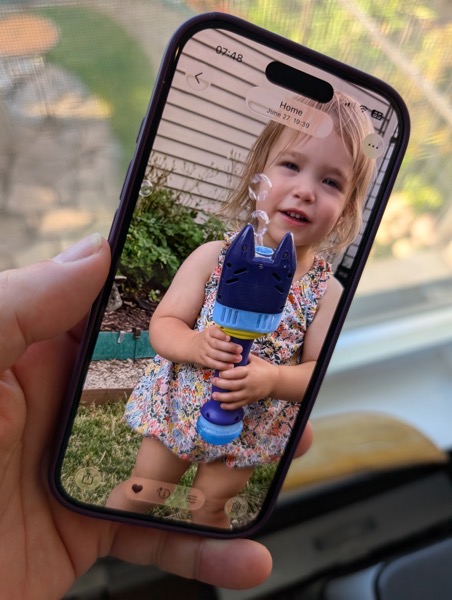
Bubbles. My grandkids love bubbles. It’s a kid’s delight. Apparently bubbles also delight some Apple designers. My first impression of the look of iOS 26 on the iPhone was bubbles.
PXL 20250916 124836790.

I watched the OS 26 round of operating system betas over the summer as things evolved and have now installed the first release on all my devices. I’ve seen and heard the reactions so I was reasonably prepared for what would happen once the updates occurred. These are some first impressions after taking a look.

Liquid Glass

I’m not putting down bubbles. Bubbles are fun, whimsical, and joyful. But my overwhelming impression on the iPhone 16 Pro with iOS 26 installed was that the Liquid Glass design language, (that supposedly isn’t a design language,) felt very bubbly and child-like. To my eye I associate it more with bubbles than I do glass, liquid or not.

I also thinks Liquid Glass looks and feels better on the iPad Pro than it does on the iPhone. There’s more space for the chunkier, bubblier UI elements to float around. By and large things look cleaner on the iPad.

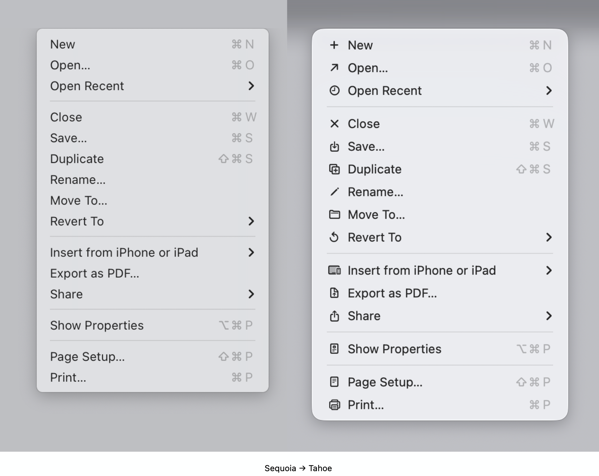
On the Mac, Apple didn’t go quite as far with Liquid Glass as they did with the iPhone and iPad regarding transparency and bubbly things, but there is still a more cartoonish feel to macOS 26 than the previous version. I think most of that is due to the rounded corners, rounded buttons and tab bars. I will say in this early going, I miss what I felt was a cleaner design in Sequoia on the Mac than what I see in this early going with Tahoe.

Bubbles are also messy things. Messier than glass in solid form certainly. Perhaps applying liquid properties to this glass like interface provides a license to keep things messier. That’s certainly true in some cases on the iPhone. For example, in the Phone app the reflective (or is it refractive) qualities around the buttons make it feel like light is leaking through a misapplied sticker than I think was the intent.

New Shareshot.

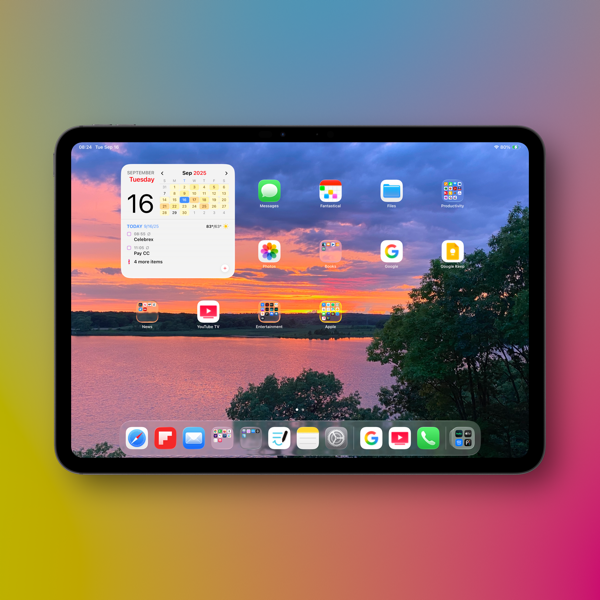
On both the iPad and the iPhone you’ll have to be careful what you choose for a wallpaper, because that same light leaking through means photos that have many colors or light contrasts within them appear more distracting than pleasing. (I like to use my own photography for wallpapers).
New Shareshot.

The issues of legibility have been discussed quite a bit over the summer, and I don’t think Apple has a complete solution for that yet when it comes to complex backgrounds, other than seemingly to force users to make simpler choices with wallpaper backgrounds. In early use, I think what we see on iPhone and iPad completely renders useless the statement of letting your content shine through. It might bleed through, but if it shines it does so in a distracting manner.

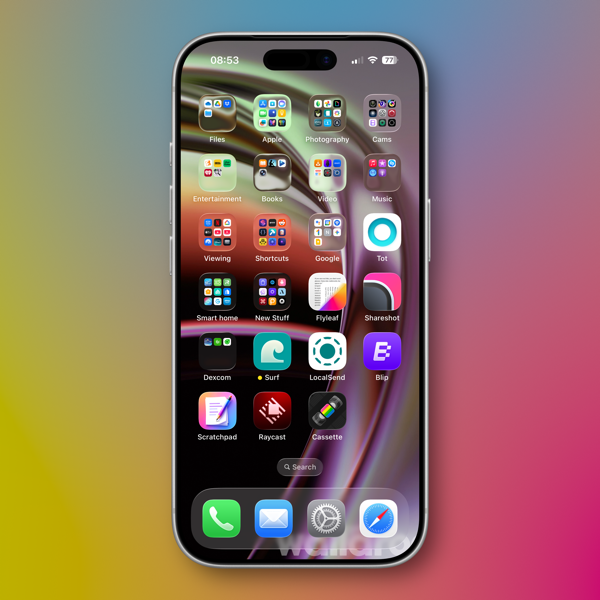
Here’s an example of one of my Home Screens that I think makes things look more bubbly than Liquid Glassy, especially in the upper two rows of folder icons.
New Shareshot.

Alan Dye, the VP of Human Interface Design, the Apple guy who spearheaded this UI change, is quoted as saying that Liquid Glass is “the foundation for new experiences in the future.” All well and good when you have a fuller view of the future as one assumes he would. But for those looking at their devices today, that means as much or as little as any tech promise or vision that have been dropped on us these last few years.

Liquid Design, in my very early looks is not to my taste. It may be to yours. the good news is that everything still appears to be functional. But to me, it’s a child-like appliqué on sophisticated devices that seem to beg for something more mature. I’m sure Liquid Glass will evolve, but until it does, I don’t think these bubbles will be popping soon.

Other Changes

I haven’t explored many of the new features of any of these new operating systems, only attempting to get things up and running. Most things appear to be running well.

A few changes I like include:

I prefer this iteration of the Photos app in iOS

I like the big multi-tasking changes for iPad and look forward to working with them more, although count me as one who will miss Slide Over. It was handy in my work in rehearsals.

I like the new Trash Can icon on the Mac. That’s the kind of whimsy I can support.

CleanShot 2025-09-16 at 07.18.24@2x.

I love the wrist flick gesture on the Apple Watch.

Things I’m not a fan of:

On the Mac I miss the Shortcuts item in the menu bar. Yes, you can add one, but instead of getting a straight drop down of clickable Shortcuts, it now opens a new window that requires not only the selection of the Shortcut you want to execute, but another separate action to run the Shortcut. Adding clicks isn’t much of a shortcut to me.  I see where Apple is going with this, trying to move things out of the Menu Bar into the Control Center. That’s going to require developers to make that move successful.

CleanShot 2025-09-16 at 10.04.19@2x.

I’m not a fan of some of Apple’s redesigned icons.

I tried out the Tinting feature for icons. I could see myself using this, if the feature didn’t tint widgets. What’s the point of a tinted Photos widget?

New Shareshot.

Some things I’m on the fence about:

I’ve previously used independent apps Bartender and Ice to control the large number of Menu Bar icons I like to have available. Both are currently in beta so I’m testing out Apple’s  feature to hide the Menu Bar until things change on those fronts. Simply put, that means the Menu Bar disappears until I hover over or click on it, revealing the icons. In using this feature when windows are at the top of the screen, Menu Commands sometimes disappear requiring some window rearrangement. This doesn’t happen consistently, so I’m guessing it’s a bug. I’m not sold on this in the early going but I’m giving it a try.

I’ve been using Raycast as an application and Shortcut launcher, along with some of its other features. I’m giving Apple’s new Spotlight features a try including the long overdue Clipboard Manager. This will require some muscle memory retraining, and it might mean leaving Raycast behind. It would be easier to do so if that Clipboard Manager copied across devices.

It’s early going. For me, as well as these new operating systems. I’ll discover more as I go along. I’m hoping the evolutionary pace for this software from Apple and most certainly developers will come close to matching mine in the days to come. I’m guessing it’s going to be sometime in 2026 before we can really evaluate what’s what in these OS 25 releases.

You can also find more of my writings on a variety of topics on Medium at this link, including in the publications Ellemeno and Rome. I can also be found on social media under my name as above.

Things Apple Won’t Fix In The Next Round of OS 26 Updates

I’d bet money these issues persist after new OS releases

Apple is announcing new iPhones, Apple Watches and possibly other things today. They’ll also announce the release date for the operating systems for all of those new devices and previous generations already in use. All of the focus is going to be on everything new, improved, changed and Liquid Glassed.

55b31eb4ba867b00263c62f538280311 XL.

I’m sure I’ll write about some of that down the road. For today I’m writing about the things I’m thinking Apple won’t address in any of the new operating systems. These are lingering issues that in some cases have not been corrected over the life of multiple operating systems. As much as I get excited about a new software release I remain frustrated year after year when Apple steps forward while dragging its feet on correcting existing problems.

Believe me, I get that Apple has created such a large ecosystem that it is impossible to pay attention to every detail and correct every mistake. I get it, but I don’t sympathize with it. Introducing new operating systems pumped out on what seems like an impossible to meet annual cycle creates other issues that need to be addressed and it is apparently too easy to just let the older ones go unattended. And from what I’ve seen from developers I follow, there are going to be a host of new issues that are going to need to be resolved over the next year. Or longer. The longer you let an existing issue hang around without attention, the more the “control the whole widget” promises seem not quite in control.

Certainly it’s a question of priorities. How the priorities are set makes me question the priorities of those that set them.

Some of these issues I’ve highlighted before, others I have not. Here are a few that continue my questioning of Apple’s priorities. I’m sure there are some that others experience that fall into the same category of hoping Apple pays attention to them someday.

Syncing

I’ve seen a decrease in syncing issues with iCloud in general. That’s a good thing. But Apple still insists on syncing Photos on its own schedule. Whether it’s battery life optimization or system optimization the delay is never optimized for the user experience.

Shared Reminder Notifications

I’ve written about this before. The fact that this one hasn’t been corrected since Shared Reminders became a thing undercuts all of the very good work Apple has done with the Reminders app in general.

Bluetooth Weirdness

I don’t know how else to describe this other than it’s just weird. There are times when Bluetooth connectivity works as designed with my AirPods and other peripherals. There are times when things just go bonkers especially with AirPods. Things will work as designed for days on end, then they won’t. AirPods switch between devices as designed, but then stop doing so. Adaptive Listening will work well sometimes and sometimes not. Connectivity with my car works well and then it doesn’t. My car isn’t smart by any stretch of the imagination and gets no software updates so it makes sense to me that it’s a Bluetooth issue on the iPhone. Note that it happens at random times unrelated to iOS updates or those mysterious AirPod firmware updates. The Magic Trackpad works 98% of the time. Then not. It’s weird.

Shortcuts

It’s become either a legend or a joke that every time Apple releases a new update (full release or point release) something goes wrong with Shortcuts. Either way it’s a problem for “the future of automation.” I particularly love it when a Shortcut just hangs with no indication that there’s a problem after working well for days on end. This inconsistent problem is consistent.

The App Store

Apple’s biggest retail outlet is the slowest loading and buggiest piece of software it has ever designed. It’s also designed abysmally.

Focus Modes

I use very few Focus Modes. I do not share them between devices. Sometimes they work. Sometimes they don’t. I’ve never set a Sleep Focus on my iMac. Yet one mysteriously appears at random during the day about twice a month. The Focus I’ve set for listening to Podcasts inconsistently fails to kick in.

Mail Rules

I think Apple has just given up on Mail Rules because the ones I’ve built just don’t work anymore.

Apple News

I enjoy that on my Mac I can choose to open an article in Safari or that I can open a webpage in Apple News. I don’t understand why that can’t happen on the iPhone.

Notification Summaries

I long ago turned Notification Summaries off because they were just confusing and caused more work than just dealing with the Notification. I recently turned them back on to check and see if there had been any improvement. There has not.

As I said, I don’t anticipate Apple fixing any of the above with all of the new ’26 releases. I’ve learned to work around them the same way I work around the passenger side backdoor on my car won’t open from the inside and I have to open it from the outside whenever I’ve got a back seat passenger. It’s a walk around workaround. It’s not ideal. And each time I have to do it I’m reminded just how imperfect things are and can be. I’m sure it will diminish the value of the car when I do decide to trade it in, but it’s already reduced the value of it in my mind.

I feel the same way when Apple doesn’t address longstanding issues that I and others have brought to their attention. Here’s hoping Apple addresses some of these issues. Here’s hunching they won’t.

You can also find more of my writings on a variety of topics on Medium at this link, including in the publications Ellemeno and Rome. I can also be found on social media under my name as above. 
Random Thoughts and Links Looking Ahead to an Apple Beta Summer

A summer of viewing betas from the sidelines.

We’re already several weeks deep in Apple’s beta season for all of its operating systems. As of this writing the second developer betas have been released. We’re due to see the first public beta this month and that’s when things will really heat up. I’m not a developer and I no longer run betas on any of my Apple hardware, choosing to live vicariously until the official releases this fall.

Apple WWDC25 iPadOS 26 hero 250609.

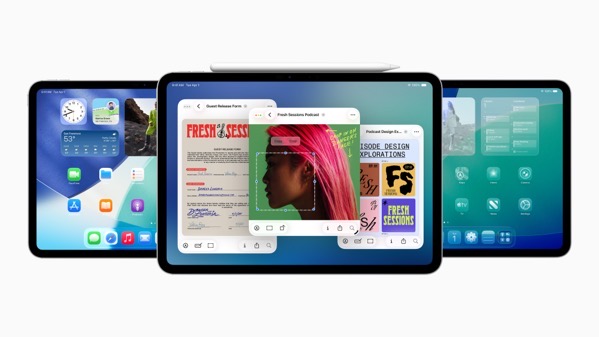
I have to admit though that I was tempted to pick up another iPad given the changes to iPadOS 26 and the general early positive reactions to it. But I stuck to my guns and will look forward to what some trusted sources have to say over the course of the summer.

Speaking of, if you’re interested in following how the new operating systems develop and evolve over the summer, I’m going to list several links to sources you might want to follow, if you don’t already. That list will come at the end of this post.

As to my random thoughts I have three.

First, it looks like Apple’s big Liquid Glass design change will indeed garner most of the focus this year. That was certainly the intent, and from what I’ve seen Apple is on the way to pulling it off, certainly on the iPhone and the iPad. The jury is still out for the Mac at this early juncture in the beta season. Even so, it appears Apple has managed to add a shiny new coat of paint that won’t confuse most users when it comes to familiar functionality of their devices.

Second, as I said previously I’m excited to see the changes in iPadOS 26. Depending on the job at hand, and whether or not I’m home or away, I jump between Macs and iPads frequently. I’m looking forward to what these changes mean when I’m primarily working on an iPad away from home.

Third, the deeper integration of Shortcuts with Apple Intelligence (whatever that may come to mean) and also with Spotlight has me intrigued. I don’t use a ton of shortcuts and currently rely on Raycast as a launcher for those I do use. If I had two wishes on this I would hope that this plays out the way it proposes to do, and I would hope Apple could finally find a way to keep what happens behind the scenes with Shortcuts from constantly breaking. Giving app developers access to the App Intent Framework and the Foundation Models Framework promises good things, if Apple can avoid the infrastructure hiccups of the past. Although I’m sure that will usher in a different sort of hiccups going forward.

Good Apple, Bad Apple

On another note, I, like many this year, have had a hard time reconciling my views about what I consider wrong moves from Apple the corporation with my preference for Apple hardware and software. I’ve thought long and hard about it and at the bottom of that deep well of thought the decision to stick with my current Apple tool set comes from the fact that I support a lot of friends, family members, and a few small businesses that use Apple products. I have no desire to abandon that part of my life personally, even if Apple’s actions pisses me off to the point where I’m occasionally ready to chuck gear into the trash. Convincing those I support to shift gears would mean saying goodbye to that part of the relationship for the most part (I’ve explored this) and neither they nor I am ready for that.

Is that a trap? Perhaps, depending on your point of view and I won’t argue against that. Am I talking out of both sides of my mouth? Also, perhaps. But I think using and enjoying products of a company gives you a bigger license to criticize.

So, I’m sticking with things for the moment, but I will say that I’m paying close attention to folks like Denny Henke who’ve made different choices than mine. I admire their approach and am always learning. I’m also paying close attention to how Apple handles things going forward. I despise this dilemma.

Links

I’m going to link to a few specific articles from which you should be able to get back to the homepages of the various sources, some are just the homepage links.

Michael Tsai’s Blog always contains an excellent collection of links to various sources worth following. In fact, it may be the one stop source for quite a bit of Apple News.

Six Colors is an excellent source for information and reviews. This is one source to look to when the first public betas drop for good reviews of what we will know at that time. Jason Snell, Dan Moren, and now with Glenn Fleishman as a contributor, always provide excellent coverage.

Speaking of reviews, MacStories is another go to site when reviews of software drop. While they cover a range of gadget topics beyond Apple, the coverage there is quite good, even if it sometimes is aimed more at advanced users.

Parker Ortolani has recently started blogging and his thoughts are always worth a look.

If you’re looking for a developer’s perspective check out Craig Hockenberry’s furbo.org. Craig is a founder of the iconfactory, which is responsible for a number of apps including, Tapestry, Wallaroo, Linea Sketch, Tot, and more including the original Twitterrific for Macs and iPhones.

Craig Grannell’s blog, Stuff, is also a good source to add to your reading list or RSS reader.

Myke Hurly has also started blogging in addition to his many podcasting chores. Check out his blog, The Enthusiast.

Louie Mantia, Jr. is an artist and designer who lends that perspective to his writings about Apple and its designs.

John Gruber’s Daring Fireball is always a must read.

There are certainly more that are worth your time, but the ones I’ve linked to here continue to provide me with not only good information, but some good and deeper thoughts beyond the surface news. It’s going to be an interesting beta season viewing it from the sidelines.

You can find more of my writings on a variety of topics on Medium at this link, including in the publications Ellemeno and Rome. I can also be found on social media under my name as above. 
Apple Opts Out of John Gruber’s Talk Show Live at WWDC

Is Apple simply missing an opportunity or heading into the bunker?

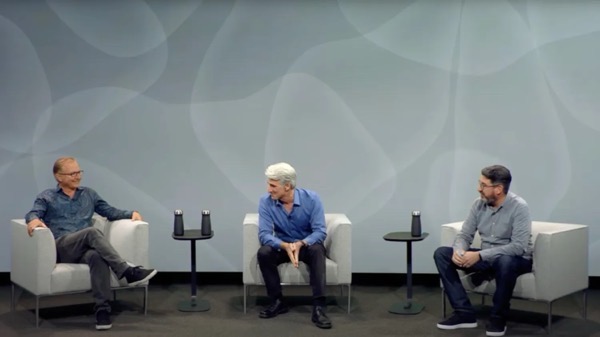
This is significant. Apple — under fire from many directions — is opting out of having executives participating in a now decade-long tradition on John Gruber’s The Talk Show Live podcast. Gruber made the announcement on his blog, Daring Fireball. 

The talk show wwdc.

On the one hand, given the number of fires the folks at Cupertino are fighting at the moment, it’s easy to say you can’t fault the decision. To my way of thinking though, that’s an injured hand you’re afraid to show. If it were my decision — and granted I certainly do not know what the folks at Apple know — I’d use the other hand, with a whip in it.

Here’s why.

There’s nothing that each of the audiences Apple plays to at WWDC aren’t aware of. Who are those audiences? There are the fans, the developers, the media, and Wall Street. Like it or not each of those audiences already have enough awareness of Apple’s problems delivering Apple Intelligence, tariff battles, developer relations, and court and regulatory actions. They each come in with their own set of expectations and agendas.

I would also suggest that those paying attention at WWDC — and who have read Patrick McGee’s new book Apple in China — will be approaching whatever Apple announces this year and going forward in a new context. That book not only alters the Apple narratives; in my opinion, it forces a reset.

Already I’ve seen several in the community respond to the news that Apple is forgoing an opportunity to put on a human face and connect in the midst of all that’s going on.  Here’s Marco Arment and Parker Ortolani to link to two.

These Talk Show Live events have indeed been a welcome side show — an opportunity to catch a glimpse of a bit of the humanity behind the corporate front. By and large I think the history of the Gruber’s event has been a net positive. Think of it like seeing the filmmakers on stage after a screening. To a certain degree I also think those days are over with the current leadership.

In this moment of high stakes on so many fronts, Apple has obviously calculated that not putting its executives in the relatively warm seat  — no offense to Gruber, but the past questions and follow up have usually not been too tough — is the better bet than attempting to meet things head on.

Again, I’d argue for the head-on approach. If you ignore what your audience is already thinking you essentially ignore (and further offend) them. If ever there was a crowd that might be receptive to some honesty (admittedly PR-coached,) Gruber’s forum would be the place to find it. Does Apple need to issue some mea culpas? Maybe, maybe not. But even well coached honesty in a discussion can go a long way to creating good will. If you ask me, Apple needs more than a little of that presently.

In my professional life I’ve faced some high-stakes presentations. None on this level certainly. I may have been working to save a theatre or two, but my success or failure never had a large piece of the world’s economy depending on it. Still, the minute stakeholders assemble for such an event you only have several choices. Distract. Deny. Or be honest.

WWDC is going to happen. Arms among the audiences will be crossed, waiting for answers and clues. Apple will certainly have enough well-packaged announcements to distract at WWDC. They can’t deny their way out of the problems they brought on themselves. Being honest, however, can’t cause any more damage than has already been done.

I certainly wouldn’t want to be involved in the planning or presenting of this year’s WWDC event — even if it is pre-taped and packaged within an inch of its life. Apple has made its choice for The Talk Show Live. While the big packaged show always takes precedence, this year seems very ripe for a side show that clears the air a bit. As Parker Ortolani says, not having that will speak volumes. It is already a very loud signal about how things might play out going forward.

You can find more of my writings on a variety of topics on Medium at this link, including in the publications Ellemeno and Rome. I can also be found on social media under my name as above. 
Decorate Your Mac For The Holidays with Festivitas

Decorate your Mac for the holidays with Festivitas.

In case you hadn’t noticed, ’tis the season for holiday decorations. (Although we’ve put up our tree without decorating it yet.) For those who might feel a bit grumpy after staring at their screens all day and want a little holiday distraction on their Macs, Simon B. Støvring has created a clever little app that allows you to bring a little holiday cheer to your Mac. It’s called Festivitas.

CleanShot 2024-12-04 at 10.07.37@2x.

Festivitas allows you to string some lights on your screen by adding strings of blinking lights along your Menu Bar and/or dock. You can configure various settings including the size of the lights, the cable thickness, the distance between lights, and the patterns and speed that the lights do their blinking, as well as the colors. You can hang the lights from your Menu Bar and have them float above your Dock, or choose one or the other.

Festivis Mac App displaying lights on your Mac task bar and dock

You can check out the App at this link and pick it up for a song.

Clever stuff from Simon and a nice little holiday treat, because we could all use a little whimsy and a bit of delightful distraction this holiday season.

You can find more of my writings on a variety of topics on Medium at this link, including in the publications Ellemeno and Rome. I can also be found on social media under my name as above. 
Sunday Morning Reading

From deep in the heart of the frozen South here’s some Sunday Morning Reading to share. A slimmer list of links this weekend as we head into the final week of rehearsals for The Lehman Trilogy fighting the cold, burst water pipes and other winter wonders. Looking forward to putting the tech touches to this show and heading home to Chicago. Oh, wait. It’s winter there too. Meanwhile stay warm and enjoy this week’s Sunday Morning Reading.

As someone who wakes early, even in the crazy late night weeks of directing a play, Scott-Ryan Abt’s What Do You Do at 3am? feels very familiar.

Richard Zoglin takes on all the pre-movie promotional stuff tossed at movie goers in When Is This Movie Really Going To Start? I’ve Been Here Half an Hour. My going to the movies habit began changing long before the pandemic because of this.

NatashaMH takes us on a tour of life through a visit to a bookstore in Small Wonders In A Big World.Wonderful.

David Todd McCarty takes us the long way around in telling this story about story telling in ‘Round The Outside. He’s also wondering Where Have All The Hitmen Gone?

Steven Levy takes us through the evolution of the Mac in Apple Shares The Secret Of Why The 40-Year-Old Mac Still Rules.

Lulu Garcia-Navarro interviews Kevin D. Roberts the head of the Hertiage Foundation in Inside The Heritage Foundation’s Plans for ‘Institutionalizing Trumpism.’ If you want to know where the crazy comes from on the right, talk to Kevin.

If you’re interested in just what the heck Sunday Morning Reading is all about you can read more about the origins of Sunday Morning Reading here.  You can also find more of my writings on Medium at this link, including in the publications Ellemeno and Rome.

Apple Taking Heat for 8GB Base Configs on New M3 Hardware

If you have to a discussion about whether 8GB of memory is enough in Apple’s latest M3 Mac hardware, then 8GB is not enough. And there’s a discussion going on. Apple’s latest Mac hardware comes with 8GB of memory in the starting configurations of the various machines. Quite a few folks think that’s not enough. Especially at the price Apple charges for larger memory capacities. And also in regards to our seemingly unstoppable AI future. I’m in that camp.

CleanShot 2023 11 08 at 07 56 26 2x

Apple is touting its new GPU Dynamic Caching on the M3 machines as industry leading and why 8GB is enough. But as Jacob Roach says nobody knows exactly how it works. He’s got a pretty plausible theory that’s worth a read.

Jason Cross takes Apple to task in this MacWorld article in a piece that focuses on the marketing and the pricing and less on the tech.

But Apple is defending its choices with an interesting statement sure to keep the discussion fires burning. MacRumors quotes a recent interview with Chinese ML enginner and content creator Lin YilYi in which Apple’s VP of worldwide product marketing Bob Borchers says this:

Comparing our memory to other system’s memory actually isn’t equivalent, because of the fact that we have such an efficient use of memory, and we use memory compression, and we have a unified memory architecture.

Actually, 8GB on an M3 MacBook Pro is probably analogous to 16GB on other systems. We just happen to be able to use it much more efficiently. And so what I would say is I would have people come in and try what they want to do on their systems, and they will I think see incredible performance. If you look at the raw data and capabilities of these systems, it really is phenomenal. And this is the place where I think people need to see beyond the specs, and actually go and look beyond the capabilities, and listen to trusted people like you who have actually used the systems.

People need to look beyond the specifications and actually go and understand how that technology is being used. That’s the true test.

That may well be true on some levels and for some users. I’m not buying it big picture though. We can talk about smaller memory allocations clogging up with browser tabs and heavy duty, poorly coded applications all we want today. That’s still real. Tomorrow’s memory migraines are all about AI as its going to be the culprit gobbling up GPU cycles going forward.

From a PR perspective it’s a dropped ball by Apple. It’s like that old saying in politics, if you’re defending you’re not winning.

Apple WWDC Thoughts

Beginning June 5 Apple kicks off its annual World Wide Developers Conference, (WWDC). Apple will introduce new versions of its operating systems for current devices, but all of the excitement is focused on Apple’s AR/VR headset and the operating system that will run the thing. Mixed reality, augmented reality, virtual reality… who knows. I’m sure whatever it will be will somewhat unreal. I’ll certainly be interested to see how Apple tries to make it real, but it’s from a very backseat perspective. I just don’t see myself as being in the market for this kind of device/experience.

Apple WWDC 2023 770x433 jpg

Let’s face it, the next period of time is going to be focused very much on the headset and what it offers. Even though whatever Apple announces is probably going to be a years long effort towards what the product will eventually become. How that interacts with the existing ecosystem will be much more interesting for me.

To be honest, I’m not expecting much from iOS or macOS or any of their siblings. And I’m not sure anyone should. For better or worse these operating systems are quite mature. Sure there will be some new things, but for my money I’d prefer to see Apple keep tidying things up. Refining and striving for consistency are higher priorities for me than whiz bang new features.

I don’t have many big “wishes” for what I’d like to see. But I do have a few minor ones that would make my time in the orchard a bit easier.

Notifications are still problematic. Especially on the Mac. For goodness sake give us a button that allows us to bulk dismiss notifications like we can on iOS.

Last year saw some syncing up of features in Apple Mail between iOS and Mac. Keep it up. Also, make Rules work better and more consistently.

It’s time for a Clipboard Manager in the operating systems.

Bring Automations to Shortcuts on macOS.

Get rid of the consistent inconsistency with iCloud.

Fix Siri. Just do it.

The App Stores make much money for Apple and developers. It’s supposed to be a showplace. Clean it up. It should also run more efficiently than it does.

I’m hoping there will be some clarity and cleaning up of Stage Manager given that it feels very much like a building block for the AR/VR vision.

That’s it. That’s my wish list. Whatever reality we end up in after Monday I hope some of the above gets addressed.