Thoughts On The MacBook Neo

A palpable hit

The MacBook Neo is a nice piece of kit. If you’re in the market the price is right, the build is very good, and in my first impressions the laptop is a delight. Any of the complaints and concerns you’ve probably read or heard from those who own more kitted out Macs can be easily dismissed. At the moment. I’d venture to say that for the vast majority of everyday computer users the MacBook Neo will be a nice fit.
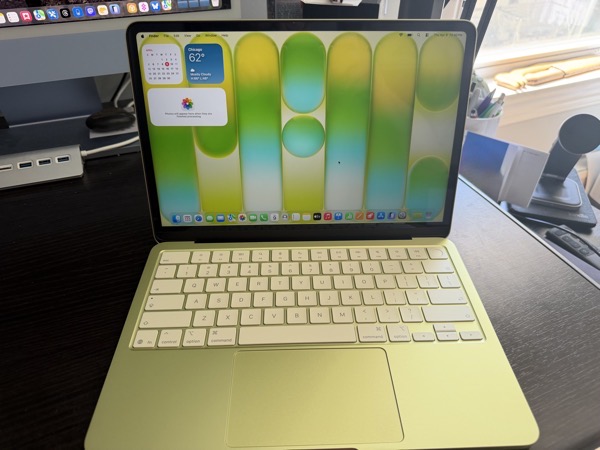
One of the folks I support reached out and said they wanted to obtain one, so I picked one up and did the drudge work of installing the OS update and some of the initial setup last week. We later spent some time together getting it set up the way they like. Moving from an M1 MacBook Air bought in 2022, they opted for a Citrus colored 512GB model with TouchID. The good news is there’s no real learning curve for this client when it comes to features and using the device. There is no bad news.

When I say “in the market,” my client is what I consider one of the perfect customers for the MacBook Neo. A retired senior that began using a computer later in life, later jumping on the iPhone train with the iPhone 5.

They do most of their computing on an iPhone and use a laptop for email, messaging, shopping, FaceTime, and some occasional writing. Occasionally they use Photos on a MacBook Air to manage photos, but still do most of that on an iPhone.

Of the fancy new features Apple has released over the last few years the only one they really rely on is seeing notifications from their iPhone on their laptop screen when they are using the laptop. There’s a currently a problem with that, which I’ll address later.

Given their computing needs and desires, they could probably get by without a laptop, but due to decreased finger flexibility, they feel more comfortable using a laptop for apps like Messages and Apple Mail when they are home. The only thing they connect to a port is power.

Hardware

As to the device itself, it feels great and a bit whimsical. As a MacBook Air user (13-inch, M4) I have to say that I’d love to see the guts of the Air in this form factor. They weigh the same, and the Neo is slightly smaller, but it feels tinier and more totable. You give up a bit of screen real estate with the slightly smaller display, but there is no notch. Apple may have cut features now considered defaults on the MacBook Air, but it didn’t skimp on the look and feel quality. In my opinion that and the price point are what sells the device.

We’ve long since reached a point where computing devices, whether in traditional form, or smartphones and tablets, all come with so many features that even power users don’t need or use some of what’s possible. Innovation has always curved towards adding more possibilities, as it should. In my opinion, it’s a good thing to flatten the curve a bit, offering products that don’t need all the bells and whistles.

Color

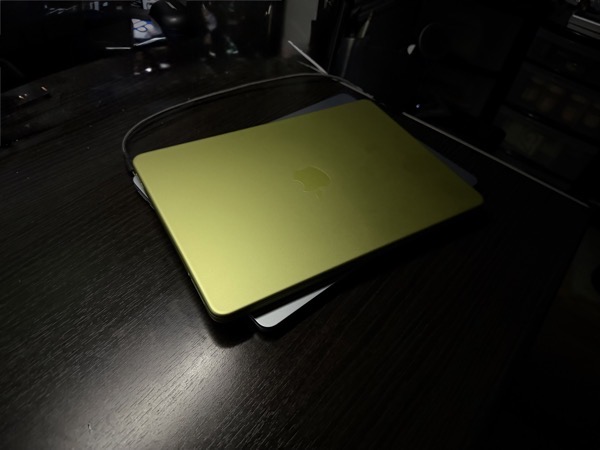
Apple is taking larger steps towards bolder color choices these days, and the Citrus color scheme for the Neo certainly is another big stride into that orchard. I personally wasn’t that attracted to it when it was unveiled, but after having the Neo around for a bit, I have to say that it not only adds to the novelty, but makes the tool feel a bit more fun. At night under a desk lamp the damn thing gives off an almost otherworldly glow.
One of Apple’s trends of the last few years is to match up UI color schemes and themes with the color chosen for the hardware. Highlights, buttons, and some text reflect and complement the color of the shell. The tinted keyboard of the Neo takes that a further step forward on the fun factor scale. That said, the citrus Neo’s color scheme, bold as it is, often leaves some text harder to read, certainly for older eyes.
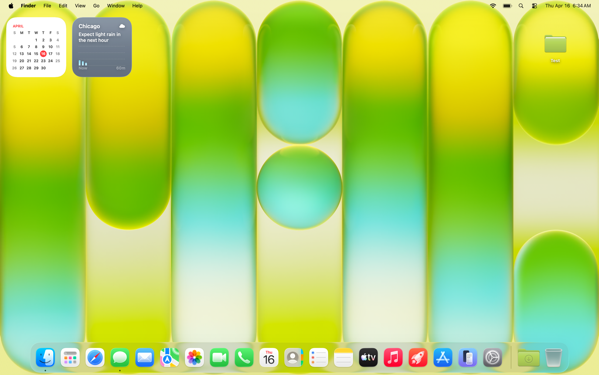
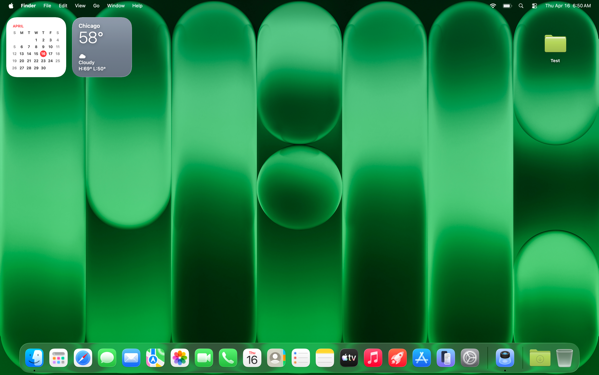
We settled on choosing the dark version of the Citrus wallpaper for my client to solve this.
Another example of hard to read text with this theme.

The A18 Pro Chip

Apple raised eyebrows announcing and releasing this new laptop powered by an iPhone chip. An older and binned A18 Pro chip. In my limited time with the Neo I haven’t noticed anything but good performance.

I’ve heard and read others state that the setup process was slower than they have experienced on M-series Apple laptops. That wasn’t my experience. Things moved along readily enough If you count the number of times you have to accept and click on permission popups as something that’s desirable in an out-of-the-box experience. But that’s unfortunately true of any of Apple’s computers.

Again, I’m experiencing this only through setting up and doing a few tutorials for my client, but the performance I’m seeing feels more than adequate to met their needs.

One thing I did notice throughout my hands on time is that the Neo takes longer to connect to a WiFi network than either my MacBook Air or iMac (both M4 devices.) In fact, it feels very much like how long an iPhone sometimes does connecting to WiFi when rebooting. That makes sense on a smartphone when a device immediately connects to a cell signal, but in an age when everything is expecting an Internet connection one way or another, (on setting up a new device one of the first things required is to establish a WiFi connection) it seems like there should be a way to not start reaching out on a previously set up, non-cellular device until after a connection is made.

Battery Life

Setting up any new computer or smartphone puts a load on battery life. That continues during the first day or so after initial setup as things sync up. After performing the first OS update I didn’t use the Neo much until after my client was with me, but even after continuing setup and tweaking a few things there was 68% battery life left. Time will tell how that goes, but given my client’s usage I don’t anticipate them having battery life issues.

Memory Management

Much was also made about the one size fits all 8GB memory cap, regardless of the storage model one chooses. My client doesn’t run a heavy load of applications or keep many tabs open, so I’m not the best judge of how good the swapping out of memory to the SSD works. Apple’s Unified Memory Architecture seems to be working as designed in my limited view. I do wonder how well it does with devices that only have a 256GB SSD if they contain a lot of data.

Screen Size

I prefer the More Space option on displays I use. My client prefers the default view. Even with More Space selected, the Neo feels very much like a one app at a time computer to me, which generally lines up with my client’s needs. I always set up a Hot Corner Shortcut with Mission Control to make window navigation easier, and that feels more necessary on the Neo in the default display mode.
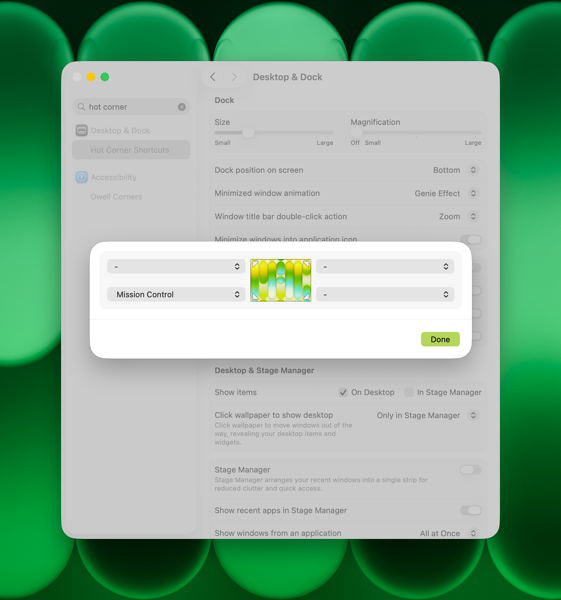
Apple has a feature that allows you to click the wallpaper and move all open apps off of the screen. You can choose to do this all of the time, or only in Stage Manager. I don’t recommend Stage Manager to my clients, and I typically recommend turning off the click wallpaper to show desktop feature. In this case my client likes this fly away feature, and sees it as a bit of whimsy. Even though they prefer to keep the Dock and Menu Bar always visible. So we’ll leave it on.

Trackpad

The Neo has a different trackpad than other current MacBooks. From what I’d read previously I expected to feel more of a difference between it and the trackpad on the MacBook Air. There’s a difference certainly, but it doesn’t feel like that big of one to me. I moved back and forth between the two devices without even really thinking about it.

Notifications from iPhone

I mentioned an issue earlier with iPhone notifications flowing through to the MacBook Neo. This is a feature I use myself. It’s set up through iPhone Mirroring, which you have to open at least once in order to set up.
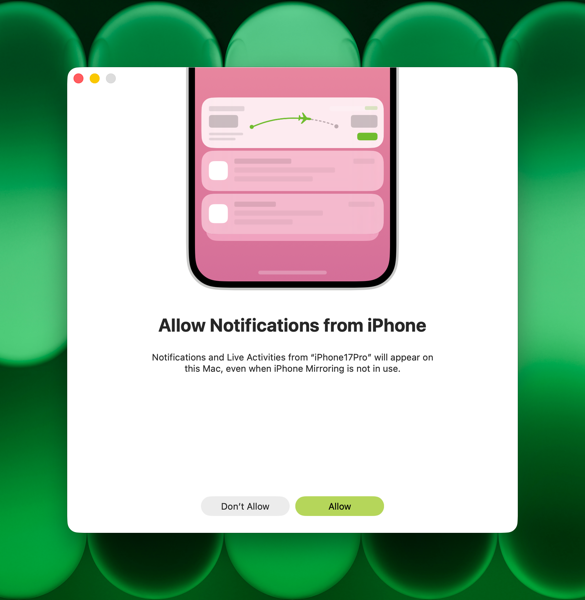
One of the nifty things about this feature is that you’re allowed to pick and choose which notifications flow through and those you block either on your iPhone, or on your Mac. If you choose to use this feature and set it up, you’ll see an option in your Mac’s settings to allow these notifications.
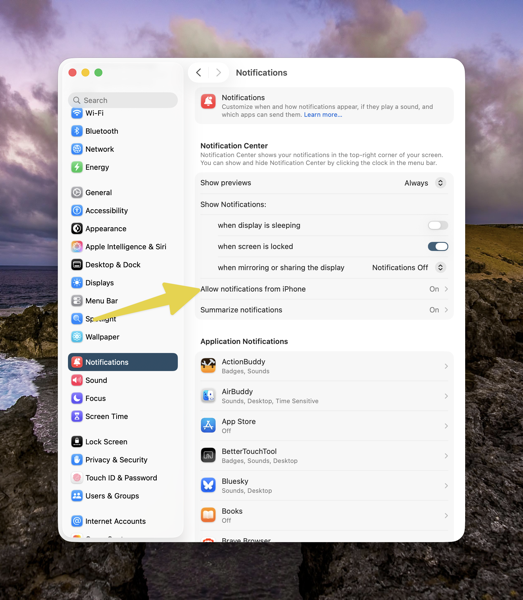
CleanShot 2026-04-15 at 16.49.

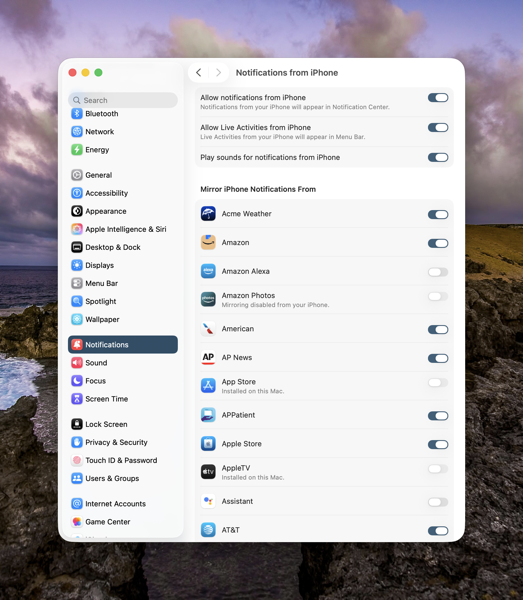
If you click on Allow Notifications from iPhone, you’ll be taken to another screen. Below the three Allow options here, you’ll see a list of any notifications you’re allowing to flow through or not from your iPhone, and whether you’ve turned them off on your iPhone, or they are coming through from an app installed on your Mac. As a reference, the screenshot below is from my iMac.
CleanShot 2026-04-15 at 16.48.

On my client’s Neo, no apps appeared initially. The section above that begins with Acme Weather is blank on their Neo. There shouldn’t have been many. Regardless none were there. We called Apple Support and opened a ticket. Luckily on the first call we got a senior advisor who understood the issue. After doing some checking the situation turned into something Apple is really interested in tracking down. These are a new line of devices after all. So we were off into the land of running sysdiagnoses. We’re expecting a call back on Friday with any discoveries or solutions Apple may have come up with. Fortunately we have time still left in the return window.

At the Moment

In the opening paragraph of this post I also used the phrase “At the moment.” Two thoughts there.

First, as I’ve described my client, they are not a heavy laptop user. Those who might be looking into the MacBook Neo who are, might have a different experience in both the short or long term. I’ve never yet met a computer that doesn’t slow down over time. I doubt the MacBook Neo will be any different. The difference in any performance degradation between the Neo and other Mac laptops is yet to be seen. My hunch is this first MacBook Neo will still be a winner for at least a few years, certainly if you’re a not a heavy user.

Second, the rumors are that the Neo is such a success that Apple might be running out of the binned A18Pro chips it’s using to power the MacBook Neo. Speculation on what happens if that’s true is rampant, and who really knows. Current demand has already caused a delay in shipping times, and I know that secondary retailers Walmart, Target, and Best Buy have plenty of signs, but very limited or no stock. My hunch here is that Apple will be selling MacBook Neos for quite some time, even though it might take you a while to get your hands on one.

Summing Up

To conclude, let me say that I’ve thought since Apple’s announcement of the MacBook Neo that it would prove to be a hit and a palpable one to the laptop market in general. In my brief experience setting up this one for my client and seeing their delight at the form factor, coupled with the high demand, I’ll more than double down on that thinking.

Personally, as I anticipate my computing needs becoming less in the more quickly than I’d like years to come, I could easily see myself relying on a MacBook Neo in the future.

You can also find more of my writings on a variety of topics on Medium at this link, including in the publications Ellemeno and Rome. I can also be found on social media under my name as above.

Looks Like Thaw Will Be A Good Menu Bar Manager Solution For Mac OS 26

Melting the Ice

I use a lot of Menu Bar apps on my Macs. It looks like I may have found a new solution to managing those apps.

CleanShot 2026-04-03 at 17.10.

I had previously used Bartender to manage those, especially on the MacBook Air with a notch. But since the release of macOS 26, Bartender had run into some difficulties. I gave macOS 26’s new way of handling Menu Bar items a try, and that just didn’t work for me. I experimented with a few other Menu Bar managers and for a while settled on Ice.

Like Bartender, Ice also had its issues, and its developer has since halted updates. Turns out there’s an app that melts those issues away. It’s called Thaw.

Thaw, created by stonerl, is an open source fork of Ice, so much of what it offers is familiar and you can import your Ice settings. This article by Jannis explains why Ice, and I presume Bartender, ran into difficulties managing Menu Bar items.

So far things are working as expected. The idea is to hide Menu Bar icons that I don’t access frequently, yet make them available with a quick cursor flick to the Menu Bar.

As a side note on this, with the debut of macOS 26, it appeared Apple made was beginning to shift users away from using Menu Bar apps, favoring the Control Panel instead. I could easily get on board with that shift, but very few apps I use actually make Control Panel access available without creating a Shortcut to launch the app. That seems like a waste of time, but perhaps more apps will make accessing them through the Control Panel possible when we move to macOS 27.

You can also find more of my writings on a variety of topics on Medium at this link, including in the publications Ellemeno and Rome. I can also be found on social media under my name as above.
 

Apple Pulls The Plug On The Mac Pro

Something, something, something about writing on the wall

Apple is finally pulling the plug on the Mac Pro, long after the water was drained out that tub.

Id mac pro 2019.

According to reports the Mac Pro no longer appears on Apple’s website and Apple has confirmed to 9to5Mac that it has no plans to offer that line of hardware going forward.

The end of the product line is less of a surprise than the fact that Apple was still selling Mac Pros up until today. It’s a move that has been obvious ever since the advent of the Mac Studio in the Apple silicon era began replacing the high end desktop for high end customers.

Farewell and adieu.

You can also find more of my writings on a variety of topics on Medium at this link, including in the publications Ellemeno and Rome. I can also be found on social media under my name as above.
 

MacBook Neo-ing

Neo newness

On an errand with my wife I happened to be in the neighborhood of one of the two Apple Stores closest to me and decided to drop in and take a look at the new MacBook Neo. 

The Citrius MacBook Neo on display at the Apple Store

I’m decidedly not in the market for one of these, but I imagine one of the folks I support will find this more than suitable for their next computer. My intent was to just handle the machine a bit and see if the build felt as nice as most of the very raving reviews say it does. Bottom line, it does. 

As I said in an earlier post, I think all things being not equal, the price point is the feature of note for this device. And based on reviews I’m seeing, I think that more than holds.

Speaking of, you might want to check out Sam Henri Gold’s thoughts in This Is Not The Computer For You. I concur with his points on the impact this move by Apple is going to have. Here’s a brief excerpt:

Somewhere a kid is saving up for this. He has read every review. Watched the introduction video four or five times. Looked up every spec, every benchmark, every footnote. He has probably walked into an Apple Store and interrogated an employee about it ad nauseam. He knows the consensus. He knows it’s probably not the right tool for everything he wants to do.

He has decided he’ll be fine.

Lots of people are going to be fine with the MacBook Neo. And that’s fine.

It was tough to snap any good pictures that captured the colors of the new Neos (is that redundant?) on display because the Apple Store lighting, the new colors, and iPhone photography just weren’t working that well together. But I fired off the camera for a few you can see in the gallery below.

It’s a good thing they provided matching tinted display pads for each different color, except the Indigo model in the first picture. Almost as if they knew.

The next two shots in the top row feature the Blush and Citrus versions from the front and behind. The larger one show the size different between the Citrus flavored Neo and the MacBook Air.

On the way out of the store as we were passing the iPhone display, we noticed that the iPhones were synced to run the same ads for F1 that you see before any Apple TV offering of the moment. The different ad images race across each of the separated screens. Neat effect, but it made my wife, who, like I, is sick and tired of seeing these already, stifle a curse until we got out of the store.

You can also find more of my writings on a variety of topics on Medium at this link, including in the publications Ellemeno and Rome. I can also be found on social media under my name as above.


Apple’s MacBook Neo Will Probably Hit Many Sweet Spots

The sweet spot that matters most is the price

I support a number of folks, both older and younger, who only use computers in the same basic way they use their smartphones. I’m thinking Apple’s new MacBook Neo, with a starting price of $599 will hit many of their sweet spots. 

Apple MacBook Neo color lineup

Of course, we’ll all have to wait for the reviews after the first wave of reviews, the ones that real users take the time to share before we really know what’s what. But if nothing else the pricing is going to be one of, if not the, winning feature. If the build quality lives up to what Apple usually provides I’m guessing it will be a hit, and sell millions, adding new opportunities for Apple Services revenue growth.

I saw someone somewhere yesterday say that you can buy an also newly introduced iPhone 17e alongside a MacBook Neo for the same price of the base MacBook Air. They are not far off. The number of iPhone users I know who have shied away from Mac computers, simply because of price, will I’m sure will be checking this out, especially since you’ll be seeing them on sale at Walmart, Best Buy and other outlets. Certainly given that possible customers will be able to see these computers in locations no where near Apple Stores.

Online chatter is about as you’d expect with both positive and negatives responses to the announcement. The negatives focus on what Apple did not include and lesser specs than existing MacBook lines. But in the end, the spec that matters is that $599 starting price. My guess is the online chatter and the reviews are going to be largely irrelevant regarding the success of this product.

You can watch Apple’s clever product intro video below.

You can also find more of my writings on a variety of topics on Medium at this link, including in the publications Ellemeno and Rome. I can also be found on social media under my name as above.


Nikita Prokopov Takedown of macOS Tahoe Icons Is Iconic

Apple should be embarrassed. It won’t be.

Nikita Prokopov takes Apple’s macOS Tahoe designers to task over their use of icons in menus in a a terrific, yet saddening post called It’s Hard To Justify Tahoe’s iCons. It’s an iconic takedown over what I also find an unnecessary and distracting visual change in Tahoe. Set aside that I think it’s unnecessary and unattractive, it’s just implemented so poorly it makes me wonder how many resources Apple devoted to something this poorly done, and how many more resources it will have to devote to hopefully cleaning it up.

CleanShot 2026-01-05 at 16.39.47@2x.

Prokopov’s post is filled with examples that points up inconsistencies and confusing metaphors. It is illustrated extremely well with enough examples that anyone at Apple should find the cataloging of it embarrassing.

In his conclusion he states:

In my opinion, Apple took on an impossible task: to add an icon to every menu item. There are just not enough good metaphors to do something like that.

But even if there were, the premise itself is questionable: if everything has an icon, it doesn’t mean users will find what they are looking for faster.

And even if the premise was solid, I still wish I could say: they did the best they could, given the goal. But that’s not true either: they did a poor job consistently applying the metaphors and designing the icons themselves.

It’s well worth a read, but I tell you this, as bad and as distracting as I thought this macOS Tahoe design feature was, Prokopov’s post is full of so many examples that it actually makes Apple’s choices even more distasteful.

(Image from Propokov’s post)

You can also find more of my writings on a variety of topics on Medium at this link, including in the publications Ellemeno and Rome. I can also be found on social media under my name as above.
macOS 26.1 Seems To Have Fixed the iconservicesagent Memory Leak

A bug fix. But who did the fixing?

A little follow up.

A few weeks back before Apple released the non-beta version of macOS 26.1 I wrote up some observations about macOS 26. One of those observations was about memory leaks.

Cleanshot 2025 10 17 at 09.35.13402x.

I cited one example I was seeing frequently with iconservicesagent, a process that the system uses to read and generate icon images. When it goes awry because of a corrupted icon or corrupted icon cache then the memory leak occurs. You can kill the process and it will restart, but that wasn’t fixing the problem and the memory leak would reoccur.

Tracking down what might be a corrupted icon is beyond my skill level, so I was hoping this was a bug that would eventually get fixed by Apple, or an app developer who might clean up an errant icon.

Apparently that happened because I haven’t seen the memory leak reoccur since installing macOS26.1. Of course quite a few apps have updated in the meantime as well. So, there’s no way for me to really know whether the fix was on Apple’s end or an app developer’s without doing some digging I don’t have time for. Nor would most users.

Keep in mind, Apple created an entirely new method for developers to build icons this year. Some developers have used the new Icon Composer already, some have not. It’s caused a few developer headaches, especially for app developers who offer multiple icon choices as a part of their app and general disgruntlement with the icons Apple itself has released. Note Apple hasn’t as of yet updated all of its own icons.

I’m glad the bug has been fixed. Whether the fault was on Apple’s end or a developer’s it points to the catch up that Apple has to do to solidify things in macOS 26 Tahoe with app developers having to follow behind as it does so. We’ll see how many other bugs get quashed in the months ahead with macOS 26.2 presumably coming sometime before the end of the year and successive  point releases following in the first half of the next year.

You can also find more of my writings on a variety of topics on Medium at this link, including in the publications Ellemeno and Rome. I can also be found on social media under my name as above.
Apple Peelings

Like it or not, Apple locks us all into perpetual betas

A concerned reader asked me a question the other day. She wondered why I always seem so down on Apple even though I use lots of Apple gear.

Shutterstock 2366050051.

I have many reasons to be down on Apple. I’m not fond of how Tim Cook has sucked up to the Trump regime. I think Apple’s monopolistic policies harm developers and users alike. I think Apple can’t live up to the pace it has put themselves and us on. Apple’s “It just works” mantra long ago faded into the dustbin of history the same way Google’s “Do no evil” did.

That last one is the one that gets me riled up the most.

Things don’t “just work” anymore. They work sometimes. Sometimes they don’t. Sometimes after working for a while they just stop. Sometimes they return to working. Sometimes not. I chalk this up to the fact that every Apple user is essentially running beta software whether or not they have opted into betas. (I don’t run betas.) As I’ve stated here often, when beta software arrives for beta users on their devices, beta software is also being introduced behind the scenes on Apple’s servers. Beta users expect there to be issues. That’s the price of admission. Non-beta users do not. And in my view, they shouldn’t be exposed to those same “take your chances” experiences.

Most users aren’t aware of this and some of the signals that are easily missed are so common place that they are easily ignored.  For example, if you use an Apple Watch to log in to a Mac, every now and then you’ll see a message on your Mac that you have to sign in with your password to make that Apple Watch feature work again. Typically, that happens around the time Apple releases a new beta version. Or you may see that a notification that a device you’ve owned for quite some time has suddenly signed on as a new device to your iCloud account as a new device.

Things get muddier still as most Apple coverage is about what’s happening with each new beta and ignores the problems that backend issues may cause for non-beta users. At least I rarely see it and I try to stay current. Apple coverage is also spending as much time looking to the future as it does the current moment. That begs the question, are we just bored with the present and if so, why?

Apple is on what seems to me like a far too haphazard and perhaps reckless pace of advancing software development that is leaving users and developers playing catch up, while it does the same. It’s one thing to play catch up, it’s another to play catch up when you’re adding new features into the mix at the same time. I get it. The pace of tech, fed by the AI bubble/boom/bombast is forcing everyone into a high stakes race. But it sure isn’t taking care of the potholes on the racetrack.

The last few years there’s been a period in the spring each year where things have settled down somewhat before they start ramping up again for the next year’s betas to be released at Apple’s WWDC. That typically comes after a .3 or .4 release of that year’s current operating system. That’s typically in the Spring and often feels like a breath of fresh air. I like the Spring. I also like the Fall, but while I eagerly look forward to the leaves changing color, I approach Apple’s annual Fall operating system releases more and more with trepidation knowing that some of the Summer’s beta issues will continue as we head into Winter.

A big part of this in my opinion is Apple’s fortunate position of taking a long view in its hardware and software development. Apple may be working several generations ahead of whatever they are selling at the moment, but I don’t believe they are paying enough attention to what’s happening in the moment the majority of its users are living.

But, back to that original question. After some of the bigger issues I mentioned earlier became prominent enough to make me question my use of Apple products I did some looking around and some self examination. Given that I support a number of folks who use Apple products as well as products from other makers it was easy enough to do. The simple sum that all added up to is that Apple’s hardware is, in my opinion, the best of what’s on the market, and no one else has come up with software solutions any more reliable than Apple at the moment. I chalk that up to the AI rat race that feels more and more likely to keep companies and users frustrated for sometime to come while everyone chases promises that more than likely won’t pan out they way they were sold.

Sure, I could try to work my older geek muscles back into shape and chuck it all and buy cheaper equipment to run Linux, etc…and that has had some romantic appeal. But in the end, I am no longer that romantic and will admit to the compromise that I need something that works reliably most of the time, if not all of the time.

The fact that I felt very uncomfortable typing the phrase “most of the time” in that previous sentence is I guess the best answer to the user question I opened this post with.

In a different context, but to the same point, since I pay for the hardware and the services I use, I feel I have every right to complain when something doesn’t work reliably or as advertised. It’s no different than complaining to my grocer or my auto mechanic when they don’t live up to service I initially signed on for. Sad to say, my realization is that it’s easier to change grocers or auto shops if things don’t change for the better. And that’s the compromise I’ve let Apple (and the rest of the tech sector) force me into.

I write about my experiences mostly. I don’t regurgitate Apple’s PR for clicks and then comment how problematic something might be on a podcast down the road when something new is rolling out. If I’m having a bad experience I’m betting others are too. So, I share what’s at my fingertips, on my screen, and occasionally running rampant in a memory leak.

(Image from zebronit on Shutterstock)

You can also find more of my writings on a variety of topics on Medium at this link, including in the publications Ellemeno and Rome. I can also be found on social media under my name as above.
OS 26 First Impressions

Early thoughts on OS 26 versions

Bubbles. My grandkids love bubbles. It’s a kid’s delight. Apparently bubbles also delight some Apple designers. My first impression of the look of iOS 26 on the iPhone was bubbles.

PXL 20250916 124836790.

I watched the OS 26 round of operating system betas over the summer as things evolved and have now installed the first release on all my devices. I’ve seen and heard the reactions so I was reasonably prepared for what would happen once the updates occurred. These are some first impressions after taking a look.

Liquid Glass

I’m not putting down bubbles. Bubbles are fun, whimsical, and joyful. But my overwhelming impression on the iPhone 16 Pro with iOS 26 installed was that the Liquid Glass design language, (that supposedly isn’t a design language,) felt very bubbly and child-like. To my eye I associate it more with bubbles than I do glass, liquid or not.

I also thinks Liquid Glass looks and feels better on the iPad Pro than it does on the iPhone. There’s more space for the chunkier, bubblier UI elements to float around. By and large things look cleaner on the iPad.

On the Mac, Apple didn’t go quite as far with Liquid Glass as they did with the iPhone and iPad regarding transparency and bubbly things, but there is still a more cartoonish feel to macOS 26 than the previous version. I think most of that is due to the rounded corners, rounded buttons and tab bars. I will say in this early going, I miss what I felt was a cleaner design in Sequoia on the Mac than what I see in this early going with Tahoe.

Bubbles are also messy things. Messier than glass in solid form certainly. Perhaps applying liquid properties to this glass like interface provides a license to keep things messier. That’s certainly true in some cases on the iPhone. For example, in the Phone app the reflective (or is it refractive) qualities around the buttons make it feel like light is leaking through a misapplied sticker than I think was the intent.

New Shareshot.

On both the iPad and the iPhone you’ll have to be careful what you choose for a wallpaper, because that same light leaking through means photos that have many colors or light contrasts within them appear more distracting than pleasing. (I like to use my own photography for wallpapers).

New Shareshot.

The issues of legibility have been discussed quite a bit over the summer, and I don’t think Apple has a complete solution for that yet when it comes to complex backgrounds, other than seemingly to force users to make simpler choices with wallpaper backgrounds. In early use, I think what we see on iPhone and iPad completely renders useless the statement of letting your content shine through. It might bleed through, but if it shines it does so in a distracting manner.

Here’s an example of one of my Home Screens that I think makes things look more bubbly than Liquid Glassy, especially in the upper two rows of folder icons.

New Shareshot.

Alan Dye, the VP of Human Interface Design, the Apple guy who spearheaded this UI change, is quoted as saying that Liquid Glass is “the foundation for new experiences in the future.” All well and good when you have a fuller view of the future as one assumes he would. But for those looking at their devices today, that means as much or as little as any tech promise or vision that have been dropped on us these last few years.

Liquid Design, in my very early looks is not to my taste. It may be to yours. the good news is that everything still appears to be functional. But to me, it’s a child-like appliqué on sophisticated devices that seem to beg for something more mature. I’m sure Liquid Glass will evolve, but until it does, I don’t think these bubbles will be popping soon.

Other Changes

I haven’t explored many of the new features of any of these new operating systems, only attempting to get things up and running. Most things appear to be running well.

A few changes I like include:

I prefer this iteration of the Photos app in iOS

I like the big multi-tasking changes for iPad and look forward to working with them more, although count me as one who will miss Slide Over. It was handy in my work in rehearsals.

I like the new Trash Can icon on the Mac. That’s the kind of whimsy I can support.

CleanShot 2025-09-16 at 07.18.24@2x.

I love the wrist flick gesture on the Apple Watch.

Things I’m not a fan of:

On the Mac I miss the Shortcuts item in the menu bar. Yes, you can add one, but instead of getting a straight drop down of clickable Shortcuts, it now opens a new window that requires not only the selection of the Shortcut you want to execute, but another separate action to run the Shortcut. Adding clicks isn’t much of a shortcut to me.  I see where Apple is going with this, trying to move things out of the Menu Bar into the Control Center. That’s going to require developers to make that move successful.

CleanShot 2025-09-16 at 10.04.19@2x.

I’m not a fan of some of Apple’s redesigned icons.

I tried out the Tinting feature for icons. I could see myself using this, if the feature didn’t tint widgets. What’s the point of a tinted Photos widget?

New Shareshot.

Some things I’m on the fence about:

I’ve previously used independent apps Bartender and Ice to control the large number of Menu Bar icons I like to have available. Both are currently in beta so I’m testing out Apple’s  feature to hide the Menu Bar until things change on those fronts. Simply put, that means the Menu Bar disappears until I hover over or click on it, revealing the icons. In using this feature when windows are at the top of the screen, Menu Commands sometimes disappear requiring some window rearrangement. This doesn’t happen consistently, so I’m guessing it’s a bug. I’m not sold on this in the early going but I’m giving it a try.

I’ve been using Raycast as an application and Shortcut launcher, along with some of its other features. I’m giving Apple’s new Spotlight features a try including the long overdue Clipboard Manager. This will require some muscle memory retraining, and it might mean leaving Raycast behind. It would be easier to do so if that Clipboard Manager copied across devices.

It’s early going. For me, as well as these new operating systems. I’ll discover more as I go along. I’m hoping the evolutionary pace for this software from Apple and most certainly developers will come close to matching mine in the days to come. I’m guessing it’s going to be sometime in 2026 before we can really evaluate what’s what in these OS 25 releases.

You can also find more of my writings on a variety of topics on Medium at this link, including in the publications Ellemeno and Rome. I can also be found on social media under my name as above.

Things Apple Won’t Fix In The Next Round of OS 26 Updates

I’d bet money these issues persist after new OS releases

Apple is announcing new iPhones, Apple Watches and possibly other things today. They’ll also announce the release date for the operating systems for all of those new devices and previous generations already in use. All of the focus is going to be on everything new, improved, changed and Liquid Glassed.

55b31eb4ba867b00263c62f538280311 XL.

I’m sure I’ll write about some of that down the road. For today I’m writing about the things I’m thinking Apple won’t address in any of the new operating systems. These are lingering issues that in some cases have not been corrected over the life of multiple operating systems. As much as I get excited about a new software release I remain frustrated year after year when Apple steps forward while dragging its feet on correcting existing problems.

Believe me, I get that Apple has created such a large ecosystem that it is impossible to pay attention to every detail and correct every mistake. I get it, but I don’t sympathize with it. Introducing new operating systems pumped out on what seems like an impossible to meet annual cycle creates other issues that need to be addressed and it is apparently too easy to just let the older ones go unattended. And from what I’ve seen from developers I follow, there are going to be a host of new issues that are going to need to be resolved over the next year. Or longer. The longer you let an existing issue hang around without attention, the more the “control the whole widget” promises seem not quite in control.

Certainly it’s a question of priorities. How the priorities are set makes me question the priorities of those that set them.

Some of these issues I’ve highlighted before, others I have not. Here are a few that continue my questioning of Apple’s priorities. I’m sure there are some that others experience that fall into the same category of hoping Apple pays attention to them someday.

Syncing

I’ve seen a decrease in syncing issues with iCloud in general. That’s a good thing. But Apple still insists on syncing Photos on its own schedule. Whether it’s battery life optimization or system optimization the delay is never optimized for the user experience.

Shared Reminder Notifications

I’ve written about this before. The fact that this one hasn’t been corrected since Shared Reminders became a thing undercuts all of the very good work Apple has done with the Reminders app in general.

Bluetooth Weirdness

I don’t know how else to describe this other than it’s just weird. There are times when Bluetooth connectivity works as designed with my AirPods and other peripherals. There are times when things just go bonkers especially with AirPods. Things will work as designed for days on end, then they won’t. AirPods switch between devices as designed, but then stop doing so. Adaptive Listening will work well sometimes and sometimes not. Connectivity with my car works well and then it doesn’t. My car isn’t smart by any stretch of the imagination and gets no software updates so it makes sense to me that it’s a Bluetooth issue on the iPhone. Note that it happens at random times unrelated to iOS updates or those mysterious AirPod firmware updates. The Magic Trackpad works 98% of the time. Then not. It’s weird.

Shortcuts

It’s become either a legend or a joke that every time Apple releases a new update (full release or point release) something goes wrong with Shortcuts. Either way it’s a problem for “the future of automation.” I particularly love it when a Shortcut just hangs with no indication that there’s a problem after working well for days on end. This inconsistent problem is consistent.

The App Store

Apple’s biggest retail outlet is the slowest loading and buggiest piece of software it has ever designed. It’s also designed abysmally.

Focus Modes

I use very few Focus Modes. I do not share them between devices. Sometimes they work. Sometimes they don’t. I’ve never set a Sleep Focus on my iMac. Yet one mysteriously appears at random during the day about twice a month. The Focus I’ve set for listening to Podcasts inconsistently fails to kick in.

Mail Rules

I think Apple has just given up on Mail Rules because the ones I’ve built just don’t work anymore.

Apple News

I enjoy that on my Mac I can choose to open an article in Safari or that I can open a webpage in Apple News. I don’t understand why that can’t happen on the iPhone.

Notification Summaries

I long ago turned Notification Summaries off because they were just confusing and caused more work than just dealing with the Notification. I recently turned them back on to check and see if there had been any improvement. There has not.

As I said, I don’t anticipate Apple fixing any of the above with all of the new ’26 releases. I’ve learned to work around them the same way I work around the passenger side backdoor on my car won’t open from the inside and I have to open it from the outside whenever I’ve got a back seat passenger. It’s a walk around workaround. It’s not ideal. And each time I have to do it I’m reminded just how imperfect things are and can be. I’m sure it will diminish the value of the car when I do decide to trade it in, but it’s already reduced the value of it in my mind.

I feel the same way when Apple doesn’t address longstanding issues that I and others have brought to their attention. Here’s hoping Apple addresses some of these issues. Here’s hunching they won’t.

You can also find more of my writings on a variety of topics on Medium at this link, including in the publications Ellemeno and Rome. I can also be found on social media under my name as above.