Rough Perpetual Beta Season

Nothing is just local anymore.

The way tech happens these days it seems like things are always in beta. Even if you’re not running beta software.

A rounded white capsule badge displaying the word "BETA" in grey sans-serif text against a dark background.

I haven’t run betas the last few years, and so far this year I haven’t either. I did pick up a MacBook Neo to perhaps give macOS Golden Gate a try. Following my own advice to never install new software, especially betas, if you’re traveling (and I’ve been traveling a lot) so far I’m still beta free, though I have been touched by some issues relating to the betas.

These days, not running the betas doesn’t keep Apple users from suffering some of the headaches that can come during beta season for those who do. Several things are at play.

First, as Apple is rolling out betas for testing on devices, it’s also making changes behind the scenes with iCloud. Since just about everything touches iCloud in one way or the other, strange things can happen.

Second, developers are busy trying to further their apps along to be ready for the fall release. At times that leads to time and resource conflicts when it comes to maintaining existing software for prior releases.

Third, Apple might make a major change that affects an entire class of software. Menu Bar managers, the software some use to keep track of apps that offer functionality from clicking on an icon in the Menu Bar, took a big hit last year with Tahoe that never really got solved. From what I hear that continues with the Golden Gate betas as well.

It’s one thing to chalk things up to it being beta season. It’s another for those who aren’t really technically inclined to find software they are comfortable with not working, seemingly out of the blue.

I’ve been saying that we’re living in the land of perpetual beta software for some time now. Beta season used to be a window of time during the summer months and through the first point release of Apple’s new operating systems in the fall. I could usually count on things being relatively solid from about December through May each year. But that window is opening wider given the pace of things and that wider window continues to let in a lot of bugs that can’t seem to be swatted away.

At this point, we’re close enough to the official release of Apple’s new operating systems that I’ll most likely remain beta free. I doubt the Menu Bar issue will get resolved before the official release happens, so I imagine Menu Bar users will be dealing with those issues throughout the fall and into next summer, if not longer. I’ve also experienced issues with some Shortcuts that I rely on and that continues to be the case.

One other interesting note on this year’s beta season. Apple’s operating systems ending in OS 26.6 apparently included a head start on indexing users’ devices to prepare for Apple Intelligence and Siri AI in the fall. I, and several of the users I support, saw some weirdness during that indexing period following those 26.6 updates in Mail, Photos, and Messages. Mail, messages, and photos seemed to disappear or not load. That weirdness seemed to have worked out after the indexing concluded, but it did cause some consternation among several of the users I support.

That’s the thing in our always tethered to the cloud tech lifestyles. You never know what might happen on your local device when someone flips a switch to “fix bugs and improve reliability” on the backend.

Thanks for reading. You can subscribe to this blog if you care to. You can also find more of my writings on a variety of topics on Medium at this link, including in the publications Ellemeno and Rome. I can also be found on social media under my name as above. This site does not use affilate links.


 

Looks Like Thaw Will Be A Good Menu Bar Manager Solution For Mac OS 26

Melting the Ice

I use a lot of Menu Bar apps on my Macs. It looks like I may have found a new solution to managing those apps.

CleanShot 2026-04-03 at 17.10.

I had previously used Bartender to manage those, especially on the MacBook Air with a notch. But since the release of macOS 26, Bartender had run into some difficulties. I gave macOS 26’s new way of handling Menu Bar items a try, and that just didn’t work for me. I experimented with a few other Menu Bar managers and for a while settled on Ice.

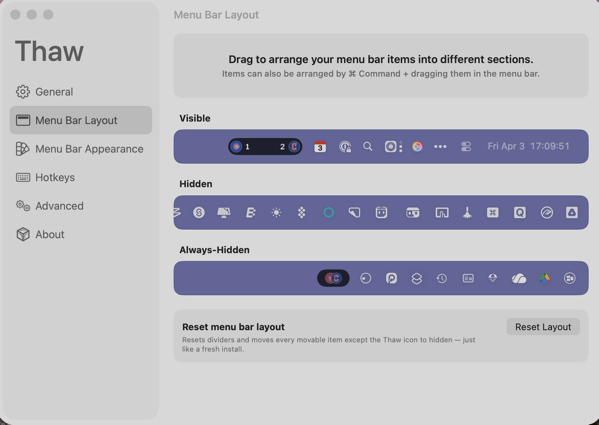
Like Bartender, Ice also had its issues, and its developer has since halted updates. Turns out there’s an app that melts those issues away. It’s called Thaw.

Thaw, created by stonerl, is an open source fork of Ice, so much of what it offers is familiar and you can import your Ice settings. This article by Jannis explains why Ice, and I presume Bartender, ran into difficulties managing Menu Bar items.

So far things are working as expected. The idea is to hide Menu Bar icons that I don’t access frequently, yet make them available with a quick cursor flick to the Menu Bar.

As a side note on this, with the debut of macOS 26, it appeared Apple made was beginning to shift users away from using Menu Bar apps, favoring the Control Panel instead. I could easily get on board with that shift, but very few apps I use actually make Control Panel access available without creating a Shortcut to launch the app. That seems like a waste of time, but perhaps more apps will make accessing them through the Control Panel possible when we move to macOS 27.

You can also find more of my writings on a variety of topics on Medium at this link, including in the publications Ellemeno and Rome. I can also be found on social media under my name as above.


macOS 26.1 Seems To Have Fixed the iconservicesagent Memory Leak

A bug fix. But who did the fixing?

A little follow up.

A few weeks back before Apple released the non-beta version of macOS 26.1 I wrote up some observations about macOS 26. One of those observations was about memory leaks.

Cleanshot 2025 10 17 at 09.35.13402x.

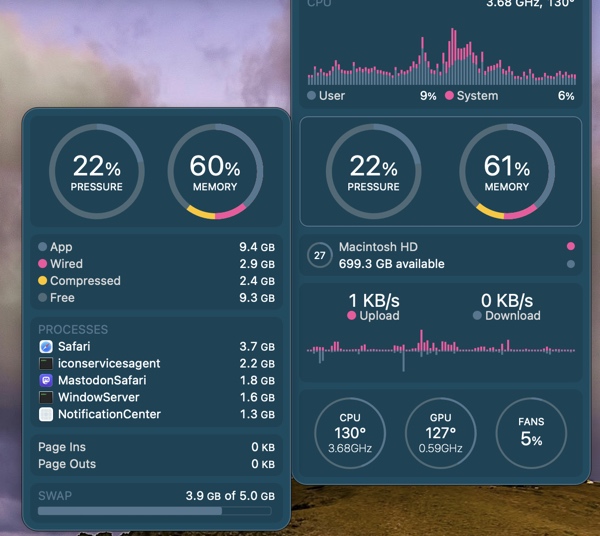
I cited one example I was seeing frequently with iconservicesagent, a process that the system uses to read and generate icon images. When it goes awry because of a corrupted icon or corrupted icon cache then the memory leak occurs. You can kill the process and it will restart, but that wasn’t fixing the problem and the memory leak would reoccur.

Tracking down what might be a corrupted icon is beyond my skill level, so I was hoping this was a bug that would eventually get fixed by Apple, or an app developer who might clean up an errant icon.

Apparently that happened because I haven’t seen the memory leak reoccur since installing macOS26.1. Of course quite a few apps have updated in the meantime as well. So, there’s no way for me to really know whether the fix was on Apple’s end or an app developer’s without doing some digging I don’t have time for. Nor would most users.

Keep in mind, Apple created an entirely new method for developers to build icons this year. Some developers have used the new Icon Composer already, some have not. It’s caused a few developer headaches, especially for app developers who offer multiple icon choices as a part of their app and general disgruntlement with the icons Apple itself has released. Note Apple hasn’t as of yet updated all of its own icons.

I’m glad the bug has been fixed. Whether the fault was on Apple’s end or a developer’s it points to the catch up that Apple has to do to solidify things in macOS 26 Tahoe with app developers having to follow behind as it does so. We’ll see how many other bugs get quashed in the months ahead with macOS 26.2 presumably coming sometime before the end of the year and successive  point releases following in the first half of the next year.

You can also find more of my writings on a variety of topics on Medium at this link, including in the publications Ellemeno and Rome. I can also be found on social media under my name as above.