More Thoughts On iOS 26’s iPhone App Changes

Still very much a work in progress

Back last fall I wrote about the changes Apple made to the iPhone’s Phone app in iOS 26. I thought they were both helpful and confusing. I followed that up a month or so later suggesting that smartphone makers needed to make delete and report spam buttons more of a priority.

New Shareshot.

I still maintain the points I made in both of those posts, but here are some more thoughts after having used the Phone app since.

Regarding the Hold Assist Detection feature what I said earlier very much still applies.

It makes me think that the designers of this feature have never used the Phone app to call a pharmacy or a doctor’s office where the person answering the phone is so busy that when they answer they speak so fast that you can’t understand what they’re saying. In my experiences attempting to use this feature in cases like those, the person on the other end just hangs up and I have to make the call again.

Recently I spoke with a receptionist at one of my medical providers about this feature and her response I sums that up well from the other end of the line. Simply put she said, “I have no time for such nonsense.”

She said essentially the same thing about the Screen Unknown Callers feature that allows the call recipient to see who is calling or leaving a voicemail. As I previously mentioned I have the Ask Reason for Calling option selected. Early on there were a few callers that actually left a voicemail, but that seems to have diminished over time. My speculation is that those doing the calling have caught on and just continue down their call lists. With this same medical provider I missed several calls because she was using a different number assigned by their phone system than I had placed in my contacts and the call logged as Unknown.

As to making spam reporting a more prominent UI feature not buried under a series of menus and taps, if Apple (and others) were really serious about making life easier for their users they’d add a Delete and/or a Delete and Report Spam option to the notification of a call. I mentioned in that earlier post that this Call Filtering feature would probably lead to a whack-a-mole game with spam callers. Based on the increasing frequency of spam calls I’m receiving I think the spammers are currently on a trajectory to win that game.

I still don’t know why all phone calls I receive, welcome or unwelcome, are listed as a Priority Notification. Since last autumn I’ve changed my lazy habits with contacts and been diligent about providing good contact metadata for doctors and others I do business or social interactions with. At that point that appeared to be the best way to try and take advantage of the newer features. But honestly I don’t think it matters much at this point based on what I’m seeing.

I support several elderly relatives who use their iPhones for basic needs, communication being the primary one. Having had a chance over the holidays to physically examine their devices, I noticed little usage of the delete function in the Unknown Call Callers section of the Missed Calls list. There were long lists of unknown callers. I imagine at some point we’ll see articles on how to clean up those lists.

In summary, I’d say the new Phone app features are still helpful and still confusing. Like everything else with Apple these days they should be categorized as a work in progress.  Here’s hoping we won’t be on hold too long before we see progress happen.

You can also find more of my writings on a variety of topics on Medium at this link, including in the publications Ellemeno and Rome. I can also be found on social media under my name as above.


The Power Users Have With Subscriptions

Unsubscribing is a vote

I was not a fan of app subscriptions initially. I long ago rethought my position. I continue to think it’s the best option for users. That belief is becoming more entrenched now that we’re entering into whatever the future will be with Artificial Intelligence and it takes constant cash to continue to burn the planet.

Apple Creator Studio hero_571x321.jpg.large.

Whether it’s this week’s flavor of AI chatbots, Apple’s new Creator Studio, or any other new app or service, most now require a subscription to take advantage of new features as they roll out. In most cases the offer is pay $XX a month or $XX a year, with the yearly price being discounted by the cost of a month or more. Even so, we’re already seeing premium subscriptions that add on costs for more features and I think that trend will only accelerate. Welcome to the land of upsell.

Although much less than I used to, I will subscribe to a new app or service that attracts my interest for a month to check it out. I’ll set a reminder a few days before the end of the month and then take a little inventory to see if it’s worth continuing. If not, I’ll unsubscribe.

If the app or service is truly worth my while I may subscribe for the yearly price after determining it’s something I value, but that’s becoming rarer. Frankly, there just aren’t many new apps and services that seem worth even a monthly try out these days, much less paying for a yearly subscription. There have been a few apps that, although they didn’t really fit my needs, I have paid for a yearly subscription to support the developer. But that’s even rarer.

In those cases with apps, newsletters and other services, I think of those more as tips or a donation than I do entering into an ongoing relationship. I’ve even subscribed on occasion and immediately canceled with just that thought in mind. I’m all for supporting good work by good people. I admit it’s a bit unfair to a good app that doesn’t fit my needs, but it’s still a signal that I think is worth sending.

Here’s the key. Large companies (Apple, Microsoft, Google, etc…) and independent developers, writers, etc, notice when the turnstile rotates in reverse because someone unsubscribes. It’s a metric they pay attention to. They count on inertia and waning attention spans. You might think they don’t notice, but they do. As a user I look at unsubscribing as my vote up or down. Again, maybe unfair, but as I said, it’s a signal worth sending.

With the recent release of Apple’s Creator Studio suite of apps I found it remarkable that much of the commentary included mentions that users could try things out and turn off the subscription payments if they didn’t find things suitable for their purposes. Or, if they needed one of the apps for a short project that they could check in and out of the bundle for the duration of the project. I highly recommend that kind of thinking.

For what it’s worth I chose not to subscribe and try out the new Creator Studio. I thought about it, but have long since discovered other tools that fit what I might need from those apps.

In this hyper political age, we talk a lot about voting. That’s always a choice. Using the choice to subscribe and unsubscribe from apps and services can be one as well.

You can also find more of my writings on a variety of topics on Medium at this link, including in the publications Ellemeno and Rome. I can also be found on social media under my name as above.


Matt Gemmell on “The Fallen Apple”

Dissatisfaction with the familiar breeds contempt

Matt Gemmell begins with an understatement. “It’s a troubling time to be a long-term Apple customer.” It doesn’t get any easier to read after that. Nor should it.

Shutterstock 1478322374.

Like many Apple users these days, including myself, Matt is expressing his dissatisfaction with Tim Cook’s Apple. Misery loves company. So does commiseration.  The Fallen Apple is a powerful read, and I suggest you do so.

Yes, he points to Cook’s knee-bending and kowtowing that betrays much of the carefully cultivated culture Apple spent untold sums creating over the years, now tossed aside like a decaying FineWoven iPhone case. Perhaps with a sparing nod to rationality Gemmell calls it an act of “corporate sacrifice.”

But this paragraph is particularly damning:

I sometimes think about the full-page, black-background Steve Jobs memorial on the Apple site, with the list of tributes you could send submissions for. Then I try to imagine the same thing for Cook, and I find that it only cheapens the original. The Tim Cook of the Trump era is the erasure of a man who previously could do little wrong, but I think that ultimately it has also laid bare a person whose goals and even motives are as far from Apple’s erstwhile values as it’s possible to be. While Jobs gets to be remembered with artful aphorisms and elaborate hagiographies, surely Cook’s epitaph must be something along the lines of “another record quarter”.

Corporate rationality, like it or leave it, is often as distasteful as it is easy to comprehend. But in my view it requires the wrong kind of different thinking when you’ve built a company on creating an emotional connection with your users.

One thing leads to another. Gemmell points not just to the cultural upheaval and downward spiral, but also to a future that appears uncertain. As he puts it, “More perniciously, Apple is also hemorrhaging people and knowledge.” It makes one wonder if Apple University is still in existence.  If so, what exactly are they teaching these days?

But, and to the larger point, he correctly states Apple isn’t hemorrhaging profit.

I hope very much to be wrong, but I fear that Apple’s skyrocketing revenue masks a steep institutional decline that is already well underway, propelled by the fact that success itself, improperly managed, is a poison.

It must be something for folks like Cook, Trump, Musk, etc… to sit atop such vast piles of money, knowing how much dislike and distaste they engender and how it undermines the thrones they cling to. Apples ripen and fall. Unless they are harvested. Either way, there’s an end.

Read the rest here.

(image from Johann Lensless on Shutterstock

You can also find more of my writings on a variety of topics on Medium at this link, including in the publications Ellemeno and Rome. I can also be found on social media under my name as above.


Tim Cook Captured, Trapped, and Caged

Tough to be a performing monkey in a cage

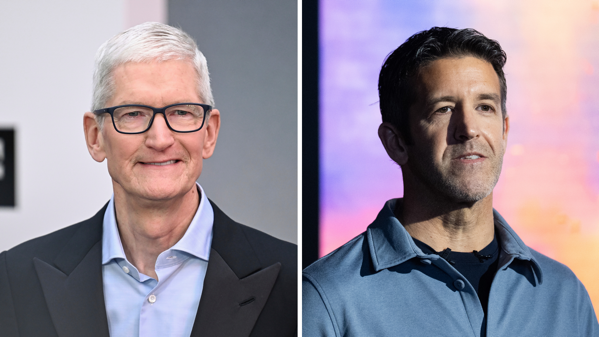
Om Malik has a great piece about Tim Cook and Apple’s current fail mode when it comes to dealing with the Trump administration called A CEO, Captured. M.G. Siegler sees Cook as trapped in his post Aside From That Mr. Cook, What Did You Think of the Movie?

Artem bryzgalov DaC_1AZEscY unsplash.

If you haven’t been paying attention, Cook has indeed seemingly been captured by his efforts to hang onto Apple’s success in the face of the Trump administration’s intent to drag everyone into his ever increasing cesspool view of the world. Attending the premiere of the Amazon produced film Melania on the night that Alex Pretti was murdered in Minneapolis is just the latest in a series of what can politely be called missteps by Cook, but in my view more appropriately called sucking up out of naked and unabashed fear.

Cook, hearing the large number of complaints about his latest knee bending issued a memo to Apple employees expressing his heartbreak over the events in Minneapolis and notes that he had a good conversation with the president about trying to deescalate the situation. From the reactions I’ve seen nobody is buying it. Issuing memos designed to be leaked is another cowardly PR move, certainly from a company once admired for its supposed civic conscience.

Sure, corporations are corporations and do what they need to do to protect their market share and shareholders. You can make that argument with assurance until the MBAs are all penned up in the same pasture. But when you’ve built much of your success by heavily marketing civic engagement, and I dare say a civic conscience, it becomes not just a dent in that hard earned reputation, but a tougher row to hoe going forward. But we are living in the age of melting myths and laughing at legends.

Malik posits:

When your company is worth more than most nations, you cannot afford principles that inconvenience presidents. The moral equation changes. What once seemed unthinkable becomes necessary. Cook learned this the hard way after he skipped a presidential photo op and was thrown back under the tariff bus. So now he shows up. He sits in the front row. He claps when expected. This is what happens when valuation becomes destiny.

Siegler says Cook should have pulled out of the event and “has lost his way,” and probably should wait out Trump or the GOPs defeats before passing on his dimmed torch.

I don’t disagree with Malik or Siegler. But if you carry the captured analogy further it makes one wonder if reaching the top doesn’t just turn you into just another zoo animal behind bars.

I wonder if they teach that in business school.Photo by Artem Bryzgalov on Unsplash

You can also find more of my writings on a variety of topics on Medium at this link, including in the publications Ellemeno and Rome. I can also be found on social media under my name as above.

Chatbots, Pins, and Other Talking Distractions

The world of talking to chatbots just isn’t for me

In the end everything boils down to a question of taste or a matter of preference. In the beginning everything bubbles up in a hot tub with the jets on high. That’s kind of how I’m viewing all the bubbling around chatbots, AI Pins , possible AI earbuds, AI glasses, and any other kind of method or gadget folks are devising to talk to computers — those with screens, and those without.

Conversational AI Chatbots.webp.

Apple rumors popping like champagne corks are going to turn up the heat on discussions about chatbots, especially since Apple had been previously saying they weren’t interested in creating a chatbot for its Apple Intelligence portfolio. Fortunately most of those discussion will be between humans.

Mark Gurman reports that we’ll see changes to what we currently think of as Siri this spring, but stay tuned for a revamped version that offers the back and forth conversational approach that existing chatbots offer, codenamed Campos,  later this year.

Almost simultaneously, MacWorld reports that Apple employees are being encouraged to use a chatbot called Enchanté in their work. So, it sounds like Apple is seeding the ground for what’s to come.

For the record, I’m not big on voice computing. Yes, I use my Apple Watch to ask Siri to set a reminder or send a text message, but that’s about the extent of what my experimenting with voice computing has boiled down to.

I’ve tried some of the existing chatbots on smartphones and on computers, and I’ve been in the company of others who enjoy using voice as their primary method of interacting with smartphones. I don’t begrudge anybody using voice as their input method if that’s their preference, and I certainly don’t if it makes computing accessible to those who can’t type. But it’s just not for me.

Part of it is I find myself being more accurate when I can type, and part of it is the social aspect. While microphone technology continues to improve to allow better pickup in noisy environments I find it awkward when someone pulls out their smartphone and starts talking to it with others around. I feel compelled to silence myself while they are doing so. I couldn’t imagine using it in my theatre work, compared to using an iPad with pen to take notes, because my talking would be distracting to everyone else in the rehearsal hall. Goodness knows being in a room with small children laughing/crying/talking at the top of their lungs doesn’t strike me as a suitable environment.

I spent a good portion of this fall watching the Chicago Bears on their improbable run, while texting back and forth on several chains with my nephews and others. I can’t imagine doing that in my local sports pub trying to do so via voice input.

I won’t get into a conversation about how some are using existing chatbots for social interactions like therapy and companionship except to say that I’m guessing if those trends continue as voice input as chatbots proliferate, we’ll eventually see similar reactions to curtail that type of usage similar to what we saw back in the day about decreasing smartphone and screen time usage.

There are some interesting questions out there though. OpenAI has already announced its inevitable move into advertising for ChatGPT. I’m sure the others aren’t far behind. I’m not sure how viable advertising really is in a voice chat environment, whether it’s a smartphone, pin, or set of headphones. I certainly wouldn’t want a “conversation” interrupted with an ad. Amazon certainly doesn’t seem to have come close with its Alexa products.  To my way of thinking, ads in chatbot conversations will give new meaning to the clichés about intrusive advertising.

I’m also of the opinion that while the non-smartphone AI devices might be clever gadget accessories, I don’t see them ever replacing smartphones or significantly denting that market. Too much of everyday life has become so inextricably linked to smartphone usage that requires a screen that I just don’t see voice chatbots replacing it. Someday your voice may be your password, but I think we’re a long ways off from that for interacting with the businesses and other institutions we deal with daily.

But who knows where this is all headed. Quite frankly, I don’t think anybody does. Including the chatbots.

You can also find more of my writings on a variety of topics on Medium at this link, including in the publications Ellemeno and Rome. I can also be found on social media under my name as above.

Apple’s New Siri Will Be Google’s Gemini

Giving Up The Chase

In news you wouldn’t need AI to hallucinate, Apple and Google  in a joint statement to CNBC announced that Apple will be using Google’s Gemini to power Apple’s long anticipated and delayed New Siri in a multi-year deal.

Screen shot 2020 09 01 at 11 11 53 am.png.

You can call it a surrender. It is. You can call it an admission of failure. It is. Even if Apple rarely admits mistakes.

Stating that the new models will continue to run on Apple’s private cloud compute in a joint statement, (published on Google’s news blog and to my knowledge not in any Apple press release), the statement said,

Apple and Google have entered into a multi-year collaboration under which the next generation of Apple Foundation Models will be based on Google’s Gemini models and cloud technology. These models will help power future Apple Intelligence features, including a more personalized Siri coming this year.

After careful evaluation, Apple determined that Google’s Al technology provides the most capable foundation for Apple Foundation Models and is excited about the innovative new experiences it will unlock for Apple users. Apple Intelligence will continue to run on Apple devices and Private Cloud Compute, while maintaining Apple’s industry-leading privacy standards.

Given the delay in releasing the promised and once heralded update to Siri, this isn’t really news and  has been thought to be the path Apple would adopt for quite some time. Speculation is that users might see this as early as this spring, but I’m still thinking it won’t roll out until WWDC 2026 this summer.

For what it’s worth, the statement to business network CNBC tells everyone who the audience is for this news that isn’t news and I’m guessing the complete retrenchment from Apple’s initial endeavors to try and create a AI powered Siri is quite a blow and the fallout won’t blow over soon.

Saying “Apple determined…” is quite some shade from Google, even in a joint statement.

I doubt this is the end of this saga, but in the end, does this really matter? Who knows. But given the C-suite shakeups at Apple, whatever happened with Apple Intelligence and New Siri has changed how iPhone users, investors, and probably a bot or two view Apple going forward.

For future curiosity purposes it will be interesting to see how Apple’s New Siri/Gemini will respond if someone prompts it to generate a summary of this news.

You can also find more of my writings on a variety of topics on Medium at this link, including in the publications Ellemeno and Rome. I can also be found on social media under my name as above.

The Taint of X

Elizabeth Lopatto calls out Apple and Google

With the pretense, facades, and myths we’ve all lived with for some time being stripped away in most areas of our lives, we’re also beginning to see more and more folks finally calling things like they actually see them.

Just a quick post here to highlight Elizabeth Lopatto’s epic Verge post called Tim Cook and Sundar Pichai Are Cowards. She’s talking about the fact that Elon Musk’s X social network is still up on both app stores as of this writing, given that he’s not only allowing deepfake porn, which violates guidelines on both app store platforms, but in some bizarre twist of reality, somehow paying to post that kind of heinous crap apparently should ameliorate any concerns.

The bottom line has always been the bottom line and knows no morality when it comes to shoring it up. There’s no new bottom here, just the same old greedy capitalistic depravity.

Just remember allowing this to continue is essentially working as a pimp. I don’t care what your business model is, that’s the business you’re in.

You can also find more of my writings on a variety of topics on Medium at this link, including in the publications Ellemeno and Rome. I can also be found on social media under my name as above.

Nikita Prokopov Takedown of macOS Tahoe Icons Is Iconic

Apple should be embarrassed. It won’t be.

Nikita Prokopov takes Apple’s macOS Tahoe designers to task over their use of icons in menus in a a terrific, yet saddening post called It’s Hard To Justify Tahoe’s iCons. It’s an iconic takedown over what I also find an unnecessary and distracting visual change in Tahoe. Set aside that I think it’s unnecessary and unattractive, it’s just implemented so poorly it makes me wonder how many resources Apple devoted to something this poorly done, and how many more resources it will have to devote to hopefully cleaning it up.

CleanShot 2026-01-05 at 16.39.47@2x.

Prokopov’s post is filled with examples that points up inconsistencies and confusing metaphors. It is illustrated extremely well with enough examples that anyone at Apple should find the cataloging of it embarrassing.

In his conclusion he states:

In my opinion, Apple took on an impossible task: to add an icon to every menu item. There are just not enough good metaphors to do something like that.

But even if there were, the premise itself is questionable: if everything has an icon, it doesn’t mean users will find what they are looking for faster.

And even if the premise was solid, I still wish I could say: they did the best they could, given the goal. But that’s not true either: they did a poor job consistently applying the metaphors and designing the icons themselves.

It’s well worth a read, but I tell you this, as bad and as distracting as I thought this macOS Tahoe design feature was, Prokopov’s post is full of so many examples that it actually makes Apple’s choices even more distasteful.

(Image from Propokov’s post)

You can also find more of my writings on a variety of topics on Medium at this link, including in the publications Ellemeno and Rome. I can also be found on social media under my name as above.

My Year In The Apple Fruit Basket 2025

Not a good fruit crop yield for Apple

2025 was an odd year toiling in Apple’s orchard.

Shutterstock 1478322374.

Getting this out of the way upfront, it was a year that Apple’s corporate behavior, personalized by Tim Cook, made me think seriously about looking to fill my computing needs and habits elsewhere. That’s an ongoing discussion I’m having with myself. As it rattles around my brain, I don’t see an alternative that is any better or any worse from a corporate posture point of view. Apple has plenty of company.

From a technology point of view I also don’t see any better alternative beyond reliving my past hobbyist days with Linux that I’m far too old to contemplate. I used to be that geek. I’m not anymore. Aside from communal political knee bending, every tech company’s plunge into the Artificial Intelligence swamp has mucked up everything, everywhere all at once, in one way or another.

I have to touch Windows now and again and every time I do I feel like I need to take a purgative and wash my hands. I feel much the same about Google’s products. Life as a geek was already becoming increasingly more distasteful in the days when it was just the algorithms that enshittified everything, but adding Artificial Intelligence into the mix has created a slop that even hogs are beginning to turn away from. I know that’s all here to stay and I’m honestly sad that it is.

Hardware

This was the first year that I didn’t upgrade much Apple hardware. I don’t think it was a conscious choice correlating with Apple’s corporate behavior, but I won’t rule out my subconscious working against my small contribution to Apple’s bottom line. Let’s put it this way, I didn’t feel the usual gadget lust tugs and twinges over anything Apple announced this year.

I did upgrade to an iPhone 17 Pro and didn’t even think twice about taking a serious look at the iPhone Air. Apparently I wasn’t the only one. There’s nothing really remarkable to say about the 17 Pro. It’s as good and solid as it’s predecessor and if that’s incremental, than incremental is more than enough for me. I think that’s also true for most users.

I did pick up a pair of AirPods Pro 3 and wrote a quick review that you can read here. The battery life on the AirPods Pro 2 was approaching end of life, so it was time, and I use AirPods a lot.

I also upgraded to the Apple Watch Series 11 from the Series 10. It’s not that the Series 11 does anything more remarkable from a technology perspective. It doesn’t. But I’m in sort of a trap of upgrading every year due to the technology I use to monitor my diabetes.

I use the Dexcom G7 sensor that pairs with both my iPhone and Apple Watch to show me and my doctor how I’m doing with my blood sugar readings. I’ve come to rely on the constant monitoring on the Apple Watch app more than I do on the iPhone. But the two devices and their apps are married. On the Apple Watch that constant monitoring takes a heavy toll on Battery Life and Battery Health. Since I’ve been using that technology Battery Health can degrade at or below 70% in a year. That’s enough for me to upgrade every year.

That is an excellent example of one of the pitfalls of Apple’s development pace that drops new operating systems annually, but trickles out fixes over the course of a year. Dexcom developers take quite a bit of time to catch up with new hardware and software. They have to. They are a medical device company. That lag is certainly more acute with a device that monitors medical conditions, but this year’s round of operating system changes have been challenging for developers in all software categories leading us all into a perpetual year of beta software.

Summing up what I feel about Apple’s 2025 hardware releases I’ll leave it this way. Apple continues to make good improvements with each hardware iteration. Quite frankly, I’d be content to see Apple continue iterating the way it has since the dawn of the M-series chip change, but the many voices continually calling for something newer and bolder seem like they’ll have their day in the next few hardware cycles.

The current crop of Apple hardware has matured into the best I’ve seen on the market. Here’s hoping all that’s rumored continues that trend. That said, I don’t really see the appeal of a vastly more expensive folding iPhone beyond it being a regressive retro move and small enough to make it easier to stuff in a pocket. I guess the next big retro innovation will be to bring back mechanical keyboards. But, hey the Commodore 64 also made a come back this year. I’m guessing a folding iPhone will be enough to excite the faithful. For a few months.

Software

Software provided the real color on Apple’s fruit plate this year with what they shipped and what they still haven’t. The Apple Intelligence slices are browning around the edges, leaving an unappetizing anticipation for what may or may not be unveiled. I say “may not” because in Apple’s announcement last spring delaying the rollout of how Apple Intelligence integrates with the “new Siri” there was an important word that most seem to have overlooked. Here’s the statement:

“Siri helps our users find what they need and get things done quickly, and in just the past six months, we’ve made Siri more conversational, introduced new features like type to Siri and product knowledge, and added an integration with ChatGPT. We’ve also been working on a more personalized Siri, giving it more awareness of your personal context, as well as the ability to take action for you within and across your apps. It’s going to take us longer than we thought to deliver on these features and we anticipate rolling them out in the coming year.”

The key word in that statement is “anticipate.” Most conventional assumption makers believe whatever Apple is working on will roll out sometime in the first half of 2026. But that word “anticipate” is a great hedge that only a PR professional or lawyer could love. I don’t doubt the pressure is on to release something. I wouldn’t bet a dime on it happening before WWDC 2026.

As for what Apple Intelligence is currently, it’s still nothing to write home about. Notification summaries remain a comedy gold mine. I think I’ve touched the Writing Tools a few times, but fall back on other proofreading habits and tools. Whatever Siri is or is not doing, it’s gotten worse and even less predictable than it was before. Every time an accidental touch of the camera button light’s up the border of the screen it’s more a reminder of what’s not there than what it was promised to do. Whatever Apple is planning, the current iteration feels like it’s been largely abandoned like a rotting piece of fruit.

Liquid Glass was the feature that did ship. Countless words have proliferated around the Internet about the design change. I’ve written a few myself. My take at year end is that Liquid Glass is neither here nor there.

Legibility issues and design disasters need lots of work and attention, most of which won’t come while the number 26 is still affixed to the operating systems. Devices still work, even though I’m seeing more and more haphazard weirdness as app developers try to play catch up while Apple itself is still trying to chase down its own problems.

Given the leadership turmoil within Apple who knows what Liquid Glass may or may not become in the future. But then who knows what it was actually intended to be in the first place, beyond a distraction from the Apple Intelligence miss. It certainly wasn’t designed to fulfill anything Apple’s marketers thought it might. If there’s harmony in trying to unify things across platforms, someone needs a basic course in music theory.

While I don’t hate Liquid Glass my continuing impression is that it still feels childish in a bubbly sort of way that doesn’t jive with the sophistication that the advanced hardware platforms seem to beg for. That was my first impression when Liquid Glass rolled out, and it was solidified after spending a large junk of time with my grandkids and other relatives’ kids watching them play children’s games on their non-Apple tablets over the holidays.

CleanShot 2025-12-30 at 15.43.21@2x.

It may look cool to some, but it feels like undercarriage lighting on a car to me.

There Were Some Good Things

The most important operating system change that Apple made was iPadOS 26, finally instituting, and then continuing to iterate on, a much better windowing system for iPads. 

And, the best new feature on any of the Apple devices I use the most is the Wrist Flick to dismiss a notification on my Apple Watch. It’s simple, it’s effective, it makes sense on all levels. It should have existed earlier. And it should be what Apple aspires to with everything it creates.

Spotlight was given an overhaul offering new features like a clipboard manager. I’m still experimenting with it, but can see how it might replace Raycast in the future if Apple continues iterating on it. It’s a good addition that still needs work.

I think Apple is on to something with the changes it made for the Phone app to try and help alleviate spam calls. I hope they continue to improve this, because as good an effort as it is, I and others still find it confusing. 

Perhaps the best thing about the OS 26 releases beyond that is that all of my devices are working as I anticipate if I look past (not through) Liquid Glass and avoid Apple Intelligence.

Summing Up

In the end, I think 2025 will be considered a lost year for Apple. I maintain that Apple’s ability to take the long view strategically hindered more than it helped. And I think that some of the executive level changes reflect that. But the fact that it takes a long time to see any new substantial change in an already crowded and confused orchard didn’t argue well for the year to be a success. The political posturing alongside the product missteps has led to my personal disgruntlement and I know it has for many others as well.

One of the many Apple mantras that we’ve become accustomed to is that Apple designs its products for 90% of its users. That may indeed still be true. As much as I feel comfortable with steady iteration in hardware and software, it feels to me increasingly that Apple is reaching more and more for innovations that excite the remaining 10%. I get that. And to a degree it’s commendable. But in my experience with the users I support, the majority of those in that 90% probably never even attempt to use many of these new innovations. It’s not a case of reach exceeding grasp in my opinion. Rather, it’s reaching in the wrong direction.

Apple has already made some noise that the next OS versions will be more fixing and futzing rather than feature rich. How could it not be? By the same token, how could it be if, I as feel is increasingly likely, it will be the first time we see what the new Siri and Apple Intelligence will really offer.

I also think Apple and the other tech companies need to pay attention to the warning signs that are starting to bubble up about Artificial Intelligence. I think most of the growing distaste of AI comes not from what these tech companies are offering on computing platforms, but from the day to day encounters people are experiencing in their daily lives as more and more non-tech companies roll out versions of AI support. The way I’m hearing and feeling it, jokes and complaints about AI at holiday gatherings this year are starting to compete in numbers with ones about government and politics.

I don’t think that’s an accomplishment that augurs well.

(First image from Johann Lensless on Shutterstock)

You can also find more of my writings on a variety of topics on Medium at this link, including in the publications Ellemeno and Rome. I can also be found on social media under my name as above.