Instagram Shows Up Very Late to the iPad Party

What’s the point and who cares?

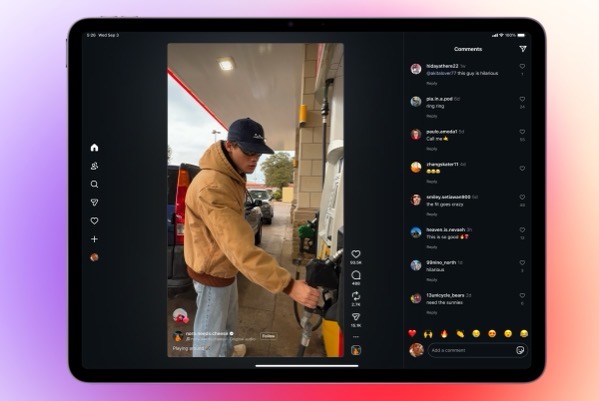
The folks at Meta must have something up their sleeve. The reason I say that is they have finally, after all of these years released an iPad version of the app, long after most folks just figured it would never happen. Other than speculating on what might be behind the late to the party move, at this point it begs the question, Who cares?

Reels with Comments 16_9.

I’m sure plenty do care. I’m not one of them. Instagram is one of a few apps that I begrudgingly use. Begrudgingly because I hate it. I use it because my family on all sides continues to do so and it’s a way to keep up with grandkids, nieces, nephews, and other family news. But I honestly despise that I have to. Believe me I’ve tried to wean them off onto other apps and services, but it never sticks.

Every time I do open Instagram I have to block somewhere between 5 and 10 spam accounts (too often porn or ridiculous come ons.) And of course the algorithm doesn’t show me what I want to see, but what it wants me to see. There’s even an increased sense of desperation from both Instagram and Facebook sending out notifications telling me someone replied, is waiting for my reply, or commented on something I haven’t seen yet. It’s like begging in the street. Apologies to those who might actually need to do so.

Sure I could turn off the notifications, but sadly, that’s the least worst way to use the app to keep up with family happenings.

I’d say that since it took 15 years for Meta to finally roll this out that perhaps the adolescents in charge finally are growing up. But then, there are those porn accounts that pop up with the frequency like prepubescent zits.

I won’t be putting it on my iPad. It’s troubling enough that I still have it on my iPhone. And as I watch the over excited coverage rolling in, I haven’t seen any image of the iPad version that makes it look the least bit appealing. It’s like Meta didn’t really care based on what I’ve seen so far.

So, Instagram is on the iPad. What’s the point and who cares?

You can also find more of my writings on a variety of topics on Medium at this link, including in the publications Ellemeno and Rome. I can also be found on social media under my name as above. 

Two Interesting Takes on iPadOS 26

iPadOS 26 beta reactions are making me think twice about installing

As I continue to live vicariously, watching from the sidelines through this summer’s Apple beta season, two interesting takes on iPadOS 26 have crossed my radar and are worth sharing.

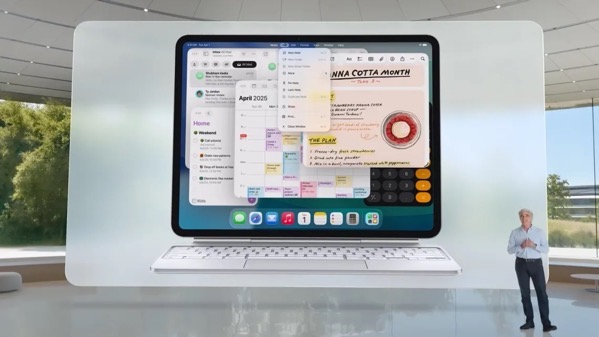
IPadOS 26 WWDC_a.

First up, Harry McCracken says what most using iPadOS 26 are saying that Apple has made the iPad more Mac-like. But he also wonders where that might lead?  Check out his post here.

Follow that up with M.G. Seigler’s post. He thinks Apple might have created sort of a Mac, Jr. His post is from prior to the release of the public beta.

Both gentlemen delve deeper than the “what’s a computer?” discussion into other facets of the betas and both posts are worth your time, if iPads are your thing.  That “what’s a computer?” question is going to probably be with us through most of the next year.

FYI. I’m adding an iPad category to this little corner of the web. I have a feeling we’re going to be talking quite a bit about iPads in the months to come.

You can find more of my writings on a variety of topics on Medium at this link, including in the publications Ellemeno and Rome. I can also be found on social media under my name as above. 

Through A Glass Darkly: Apple’s Liquid Glass Future Isn’t Clear

Continuing to watch Apple’s Betas from the sidelines.

Apple’s adventures with its new Liquid Glass design language reminds me of the title of a terrific, yet gloomy, Ingmar Bergman film, Through a Glass Darkly. Keep in mind that I’m not running the beta and living vicariously through the reactions of those whose opinions I trust. That said, based on some of those opinions of the recently released 4th developer beta, the future of Apple’s new design approach appears less than clear. 

Image from @davemark on Mastodon

From most accounts it’s a battle between legibility and the “coolness” of the design’s featured transparency that overlays content with the intent for the content below to bleed through. The challenge seems to be finding the right amount of bleed through that also allows users to easily read a notification or a control. 

In my view, the challenge with that challenge seems to be one of fighting things you can’t control. Holding liquid in your bare hands without spilling a drop might be easier. Every website and app designer has their own preference and approach. Even Apple apparently has difficulty as some of their own apps with background bleed through obscuring text. 

Image from @viticci on Mastodon

Since Apple announced Liquid Glass there have been three iterations of the approach. In a sort of Goldilocks and the Three Bears adventure with Apple dialing transparency features back and forth. Now in the 4th version of the developer beta reengaging more transparency. Searching for a “just right” solution doesn’t yet seem to be yielding any clear direction. But then, Apple’s ambitions, perhaps by design, have created a lose-lose short term future. The eventual product will never please everyone with this design change. But to be fair, that’s always the case with design changes and the folks at Apple knew that going in.

There are other usability issues as well, including things like making it easy to tell which tab or control is in focus, and having to tap multiple times to perform a function that used to be one tap to name a couple I see repeatedly mentioned.

But the clear focus of complaints (and some praise) is Liquid Glass. I would venture that for users it’s still too early to judge, but supposedly the Public Beta is due soon and the consensus is that what we see there will be pretty close to what we see in the Fall. Developers on the other hand are increasingly worried about Apple’s search for a “just right” solution while they try to find a path forward to have their own apps ready for the big release alongside or close to the release of this new wave of operating systems. 

CleanShot 2025-07-24 at 08.38.27@2x.

The problem becomes magnified when designing for the lowest common denominator with so many users. From my perspective of supporting clients and family members, most folks just want to pick up their devices and do what they want or need to do. They don’t want a new learning curve getting in the way. They certainly don’t want legibility issues to get in the way. There’s a real tension between what Apple needs to do to keep the cash registers ringing and the familiarity users want that I don’t think the folks in Cupertino understand given the annual pace they seem locked into. 

Image from @jsnell on Mastodon

The Bigger Picture

From where I sit on the sidelines, I think Apple has also created some real and perhaps less transparent problems beyond how Liquid Glass eventually rolls out.

Coming on the heels, and at least somewhat intended as a distraction from last year’s Apple Intelligence and Siri woes, Apple needs to create a clear narrative surrounding Liquid Glass in order to sell this year’s new crop of iPhones. (I imagine the commercials have already been scripted if not filmed.)

That already seemed like quite a challenge given that the only big hardware news this year is the rumored introduction of a smaller, lighter, apparently with less features iPhone Air. I don’t imagine that Apple’s traditional iPhone lineup is going to have new features to tout that makes those familiar device form factors must haves or must upgrades. 

If you’re counting on a flashy UI design change as the distraction that gets criticized as much as the issue you’re trying to distract from you’re magnifying your problems. Unless of course, you bank on criticism of the distraction further distracting from bigger issues.

Adding to that, the larger narrative has somewhat already passed by this year’s iPhones to what comes next year, with just about everyone assuming Apple’s version of folding iPhones will be the new focus. 

Sum all of that up and this is starting to feel potentially like a lost year for Apple. Sure, Apple will sell lots of iPhones, but if it can’t capture the imagination the way Apple usually does, much of the narrative will be wait ’til next year. Apple historically takes a long view. Time will tell if they have lost control of the visible horizon.

iPadOS 26

That said, somewhat under the radar, iPad beta users continue to trumpet the success of changes made in iPadOS 26. I’m looking forward to seeing that myself. That said, as much as those potential changes will be welcome, I can’t imagine that’s the tentpole Apple wants to rely on to create excitement this year.

CleanShot 2025-07-23 at 07.19.00@2x.

I mentioned the film Through A Glass Darkly in the opening of this post. The story of that classic film is about a family that gathers to try and heal after a member diagnosed with schizophrenia is released from an asylum. If you ask me, the challenges we’re seeing at Apple with design changes, Apple Intelligence and Siri among other things demonstrate that there are multiple personalities exhibiting control at various times within Apple, at a time when some turnover at the top is already underway, with quite a few calling for more.

As always, I recommend Michael Tsai’s Blog as a good source to keep track of how all of this continues to develop.

And with that, I’ll leave this update from the sidelines with this. 

CleanShot 2025-07-24 at 08.29.28@2x.

Update: The public betas for all of Apple’s new operating systems were released shortly after this post was originally published.

You can find more of my writings on a variety of topics on Medium at this link, including in the publications Ellemeno and Rome. I can also be found on social media under my name as above. 

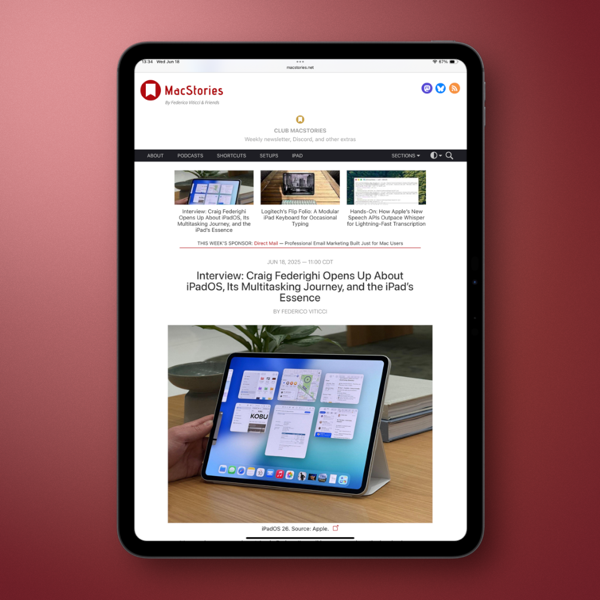
Federicio Viticci and Craig Federighi Go One on One about the iPad

A great article and interview for iPad users.

If you’re an iPad user (or even if you’re not) this post is just a quick link to recommend that you check out an excellent article containing an interview by MacStories’ Federico Viticci of Craig Federighi.

New Screenshot.

There has been much consternation and tension among iPad fans over the last few years. Viticci has long been an iPad advocate and had, like many seen his ardor cool while Apple seemingly was cooling its jets on the platform. Federighi sitting down with Viticci is quite a PR move on Apple’s part.In and of itself is a signal by choosing the iPad’s most ardent supporter and vociferous critic.

There’s a chance Apple has jumpstarted those jets a bit based on the iPadOS 26 announcements at WWDC, and from some of the early reactions we’ve seen from some developers and users. While those reactions seem genuinely positive, we’ll need to see how things shape up as the summer beta season rolls along.

The one thing is certain, there will be new life in the iPad discussion after iPadOS 26. Viticci’s article has laid great groundwork on which that discussion can take place.

Load it up on your iPad and give it a read.

You can find more of my writings on a variety of topics on Medium at this link, including in the publications Ellemeno and Rome. I can also be found on social media under my name as above. 

Apple Beta Season Is Upon Us and iPad Debates Are Around the Corner

Changes look promising. Wait and See is the operative condition.

Apple announced what it has in store for the next versions of all of its operating systems during it’s annual World Wide Developers Conference this week. Or rather Apple put out a pretty nice commercial for some of what it has in store. But that’s the way of these things whether pre-taped or live. The beta testers and pundits are off and running looking into every nook and cranny of the code, celebrating, criticizing, and screenshotting. That will go on deep into the summer.

Apple WWDC25 iPadOS 26 hero 250609_big.jpg.large_2x.

The biggest, most observable change is the new design language, Liquid Glass, that is intended to bring all of Apple’s operating systems into a more unified look and feel, sorta, kinda based on the Vision Pro. Who knew that headset would provide new Vistas ahead?

They also unified the current OS numbering system, ditching the previous version numbers. Now each operating system will increase by the last two digits of each year ahead, as in iOS 26, watchOS 26, etc… We’re going to get to iOS 50 sooner than we thought.

I no longer play the beta game with my devices so I haven’t seen anything first hand, beyond the reactions of others that range from it’s terrible to the best thing since sliced bread. Keep in mind that any reactions you see following the release of the first developer beta should always include the caveat that what you see now will probably evolve over the course of the summer. Wait and see is the operative condition that needs to be set.

As far as I’m concerned the big news was about the iPad and what iPadOS 26 is promised to offer. There has been lots of back and forth about trying to define the iPad ever since there have been iPads. But certainly since Apple, in the pre-M1 chip era, put out the What’s a Computer campaign in 2018. There were quite a few loud voices always wanting more than Apple delivered in terms of making the iPad more like a Mac. And in recent conversations many of those loud voices were putting down their megaphones and were moving on from those iPad as their main computer dreams.

But this year Apple seems to be promising most of the changes those users have been clamoring for. They include a multiple windowing UI, much more similar to MacOS than any of the previous multi-tasking attempts. There’s even a menu bar, the inclusion of a new Preview app and more Finder-like functionality in the Files app. Better background processing and enhancements to the audio system are sure to make podcasters happy. There are a host of other new tidbits as well. There are also casualties. Many are already mourning the loss of Slide Over.

To give you an idea of how big a deal this change is, noted Windows advocate, Paul Thurrott ended his first look piece with “I may need to get a Smart Cover. Or whatever it’s called. This changes everything.”

The cynic in me has to say that the depth and breadth of these new iPad features makes me suspicious as to why Apple didn’t take this path earlier. It seems obvious that it had been thought through. The hardware has certainly been capable. Regardless of those suspicions, Apple has set up another new iPad story to keep us chattering.

So, iPads are being dusted off again. Soon, and more importantly deeper into the summer, we’ll hear how successful these features may be in fulfilling the desires of those who want the iPad to be more like a Mac. What we won’t have to wait for is the debates around the iPad to heat up.

I’ve never been one that felt disappointed by the iPad’s less than Mac-like features. For my work it has always served me well and gotten better in doing so over its evolution. Stage Manager was never my thing, but Slide Over worked well for my usage as my primary multi-tasking metaphor. Will I miss it? I’m sure I will. But I’ll wait and see what this new multi-tasking UI offers before rendering judgment.

But that’s me and I’m not everybody. So, as I look forward to living vicariously through the summer as others poke around these new changes, let me close with this. Regardless of whatever differences exist between the iPad and the Mac they always had one great similar strength that these new changes appear poised to make stronger still. Different users with different needs can use an iPad or a Mac for just about anything they want and need to do.

You can find more of my writings on a variety of topics on Medium at this link, including in the publications Ellemeno and Rome. I can also be found on social media under my name as above. 

Dan Moren Questions What It Means To Be An Apple Fan These Days

Core questions for Apple users

The headline of Dan Moren’s final column for MacWorld says it all: I’m An Apple Fan In 2025. What Does That Even Mean?

Apple fanboy.

Moren has been writing for MacWorld and been a sensible voice inside the Apple community for close to 20 years. He’s signing off his regular column gig for MacWorld, but he’ll still be around on the likes of Six Colors, podcasts, and I’m sure other places. Which is good, because his voice is an important and reliable one.

In his farewell, he raises the question many are asking of themselves, and the questions many are asking of Apple in its current state and our own state of affairs. As he puts it in a nutshell of a statement:

As Apple started becoming more and more successful, I’ve become increasingly skeptical that one should ever really consider oneself a “fan”of a company.

It’s a well thought out and well reasoned post and one that I think should be read by anyone considering themselves a fan, or a no longer fan, or even someone who just doesn’t care for Apple or its products.

A big part of the self-examination I know quite a few folks are going through in assessing their current relationship with Apple deals with issues bigger than just the products. For lack of a better description call them corporate issues. Even using that label — corporate — feels dirty to type in ways that seem damning in more dangerous ways these days. But that’s a fungible feeling and thinking that’s becoming increasingly tangible.

Here’s the thing. Technology advances. Humans advance. Nothing that feels foundational or allegiance adhering, or even worth being infatuated about is going to ever stay the same. Nor are our feelings about what we first might have fallen in love with, regardless of how the object of that affection itself grows and changes. Change is constant.

Microsoft had my allegiance back in the Tablet PC days because they won it when those much maligned devices provided a better, more productive way to do my work. Microsoft changed. I did too. iPads replaced what Tablet PCs were for me in my work and my play, and those are the tools I still use today. Do I think that will be forever? Not a chance. I mourned the loss of Tablet PCs. I’m sure if Apple stopped making iPads, I’d go through a similar grieving process. But again, that’s change. That’s life.

That’s also growth. But growth on the human side of the ledger rarely equals growth on the corporate side. In my brief time on this planet the two have never added up to successful equation that yields anything other than diverging results. That’s one thing I don’t ever expect to change.

Kudos to Dan on a job and career well done, (and still going) and kudos for a lovely farewell column in MacWorld.

You can find more of my writings on a variety of topics on Medium at this link, including in the publications Ellemeno and Rome. I can also be found on social media under my name as above. 

Shared Apple Reminders That Never Disappear

A bug in Apple’s Reminders app.

Maybe one day Apple will find time to fix this bug with shared Reminders. Maybe not, given all that it keeps piling on its seemingly overflowing plate these days.

Here’s the thing. Apple has a nifty feature to share lists and Reminders in the Reminders app. It allows you to create a list and share it among family, friends, or perhaps even National Security officials but I haven’t heard of it being used that way. Yet.

It works as advertised when it comes to actually sharing a Reminder. My wife and I use it for grocery and other shopping lists. If she’s doing an inventory through the cabinets prior to a grocery run, I’ll get notifications of the Reminders she adds to the list.

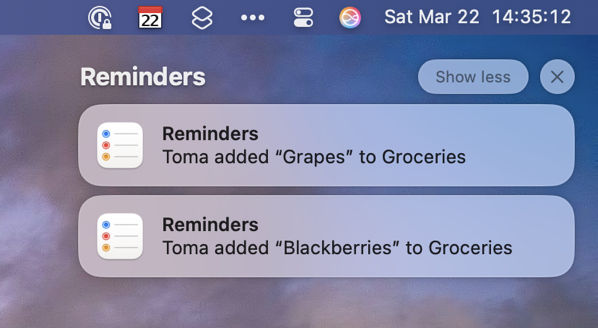
The problem pokes its head up after those Reminders are completed.  Those notifications don’t disappear the way non-shared Reminders do. They hang around. Seemingly forever. At least in my case, sometimes for hours.

The two Reminders in the image above are from my iMac. My wife added them after I had already headed to the store on a day of errands. They were still there hours after I had checked them off in the Shared Reminders list on my iPhone. The notifications still remained on my iPhone as well.

You have to manually get rid of these Shared Reminder notifications, which seems like a silly bug to me. It’s been around since Shared Reminders was introduced in iOS 13. It’s a shame it’s been around so long because Apple has done a good job over the years evolving the Reminders app into something that’s really useful.

Perhaps Apple Intelligence will figure out a way to fix this somewhere down the line. I won’t set a shared Reminder to check on that though.

You can find more of my writings on a variety of topics on Medium at this link, including in the publications Ellemeno and Rome. I can also be found on social media under my name as above. 

Am I Blue?

Blue is in the eye of the beholder. Or maybe in the lens of the camera.

I took a trip to the Apple Store today to pick up a new iPad for my mother-in-law. Her older iPad 8 had run out of storage space and would no longer update. Picked it up. Set it up. No hassle. She’s off and running. 

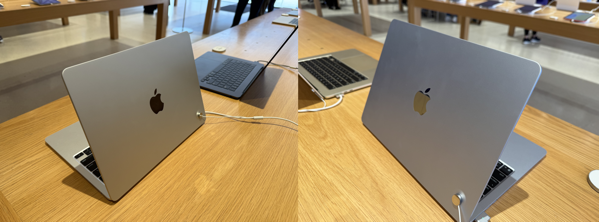
While there I thought I’d take a look at the new M4 MacBook Air and other new hardware that might be on display. In looking at the MacBook Air I thought for sure I was looking at the silver colored version for a while. (Pictured below next to the Starlight version.)

When a rep popped by I asked him if they had any of the SkyBlue models on display, he said the one I was looking at was the Sky Blue version. 

Surprised, I asked if he had a silver version on display and he pointed me to the other end of the table. Walking back and forth, my eyes could not distinguish any real difference between the two colors. But as the photos below show, the camera picked up the slight difference better than my naked eyes could. (Sky Blue is on the right.)

CleanShot 2025-03-14 at 12.57.58@2x.

I asked the rep if other folks who may have better eyesight than I were equally confused  and his reply was, “Apple doesn’t know what blue is, so why should we expect customers to figure it out.” I asked him further why they were positioned so far apart on the table and he said they were given specific orders to put as much distance between the Sky Blue and Silver variants as possible. 

Well, ok then. 

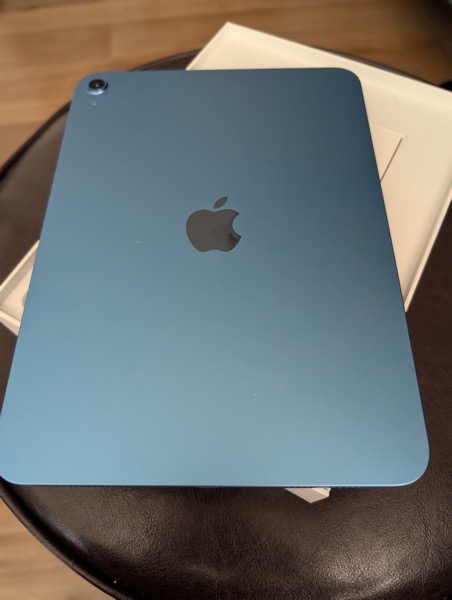
By the way, my mother-in-law’s iPad is closer to what I’d call Sky Blue, and yet the cameras tend to make it appear less saturated than it is in person.

PXL 20250314 180015349.

Colors can be weird.

You can find more of my writings on a variety of topics on Medium at this link, including in the publications Ellemeno and Rome. I can also be found on social media under my name as above. 

My Year With Apple: A Mixed Fruit Basket

It’s been quite a year toiling in Apple’s orchard.

For those who know me, they are familiar with my use of Apple products. Typically when I pick up a new piece of Apple gear I’ll write a review after using it for a few weeks. I didn’t do that this year. Part of the reason for that is Apple’s possibly panicky piecemeal rollout of iOS and macOS, which in many ways also changes the game for some of the new hardware releases. So to lay out my thinking I’ll post my thoughts here on the new Apple hardware I picked up along the way this year, as well as the still unfinished operating system releases.

PXL 20241230 172543463.

The Hardware

I’ll tackle the hardware first as that’s the least complicated. This year I acquired an 11 inch iPad Pro M4, and iPad mini, and iPhone 16 Pro and an Apple Watch series 10. Unlike many in the tech and gadget geek community I’m personally in a place where the lack of significant form factor changes to each new hardware version isn’t a detriment, it’s a bonus.

Essentially, each of those devices I acquired required no new learning curve. Set them up out of the box and I was back and operating the way I was before trading in the previous versions.

Yes, each is snappier, but that’s always expected. The iPads sport newer M-series chips, but with an exception or two they are essentially the same as the previous models. Some find that boring. I do not. Quite honestly, I actually prefer it this way. I “upgrade” my hardware when there is a new release and I move on. In the case of the two iPads that cycle isn’t an annual one, so it works for me and my budget.

Here’s a rundown on what is actually new that I do and don’t appreciate. (Notice I’m leaving the iPhone 16 Pro until the end.)

iPad Pro M4 (11 inch)

PXL 20241230 172903105.

 The upgrade to the display to what Apple calls Ultra Retina XDR is a clear improvement that I notice daily and very much appreciate. Beyond that marketing moniker, Apple says the “groundbreaking tandem OLED technology” is, well, groundbreaking. In my use, I will say it’s simply gorgeous to look at.

The other big change is the iPad Pro is thinner. It’s noticeable, but when I’m using the device for work it’s in a case for protection so the benefit there is often negligible for me. I do notice it when I use it with the Magic Keyboard and lift it off of that accessory to read or watch while relaxing on the sofa or in bed.

Speaking of the Magic Keyboard, I will say the newer version feels like a more significant upgrade physically than does the iPad Pro it is meant as an accessory for. It is sleeker and lighter, and I much prefer the stability of the aluminum construction to the previous model.

iPad mini

PXL 20241230 173113624.

The iPad mini is my travel device on short trips and reading device at home. While I occasionally alternate it with the iPad Pro there is no discernible difference in how I use either device, other than viewing entertainment on the iPad Pro’s screen.

The newer version brings the M-series to the iPad mini for the first time with the A17 Pro chip, and the difference in performance is notable but not overwhelmingly so. Beyond that, there’s not much else new in the hardware to speak of. Apple updates the iPad mini lineup less frequently than its other iPads, so I’m sure this one will more than suffice until the next update a few years down the road.

Apple Watch Series 10

PXL 20241230 173306742.

The most significant upgrade to the Apple Watch hardware here is a slight increase in the size of the device that allows for an even slightly larger display, alongside of a size reduction in the depth of the body of the watch itself. Both are notable, but not really significant in how the series 10 feels on my wrist as compared to the Series 9.

I’m veering into software a bit here to say that upon release, the Series 10 had much less battery life than the Series 9. We’re now currently on watchOS 11.2 and the battery life seems to have improved, getting closer to expectations. But there are still mornings when I’m puzzled as battery life will drop significantly in the first few hours after I wake up.

I’m puzzled because when I’d see the battery life drop quickly in the morning, I’ll slap the Apple Watch on its charger for a bit and then I will see expected battery life throughout the day.

I don’t take advantage of the overnight sleep and health tracking features and my watch normally sits on a charger overnight, so I don’t know what effect that might or might not have. I do run a couple of third party apps that track medical data during daylight hours and that may be a part of the battery life discrepancies and my comparison to the previous version.

iPhone 16 Pro

PXL 20241230 173421049.

Apple’s cash cow, the iPhone, is also the prime example of the paradox Apple finds itself in. You can argue, and I have, that we reached peak smartphone design a while ago. That’s evident not only with Apple but also with other companies continuing to search for something, anything to make their smartphones appear new and fresh, in parallel with the search for the next big thing that might eventually replace the smartphone. Searches that have so far been fruitless.

With the exception of the annual chip evolution and newer camera technology nothing much of substance has changed in smartphone hardware recently. Yes, there have been attempts with folding smartphones and new buttons but the core value of the hardware remains the same.

I get it. Apple has to serve multiple masters: customers, the easily distracted tech press, shareholders and the markets. Sales numbers always go up when there is a major hardware change. The siren song for something new in hardware is real, loud, and I think ultimately somewhat defeating.

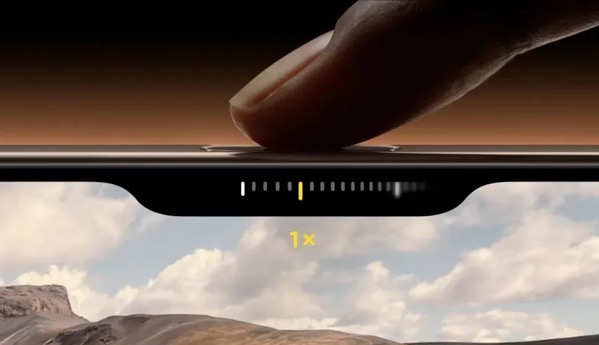
The perfect example is the big new thing on the iPhone 16 Pro: the Camera Control button.
IPhone 16 Camera Control Button 1000x576.

This looked enticing (shiny new things always do), but I just don’t find it useful. It’s too finicky and fiddly to be of use. I’ve worked hard to use it, but I find it distracting when the act of taking a photo should be instinctive. Beyond that fiiddliness, anything the functions of the camera control button offer I can do later with software and not miss the shot I’m trying to take.

Perhaps there are features to come for the Camera Control function. Apple actually added one with iOS 18.2, allowing users to press and hold on an object and then search for info on what the camera captures. But again, we’ve been able to do this through other software for some time now.

AirPods Pro 2

I didn’t purchase new AirPods this year, but the new Head Gestures feature of nodding or shaking your head to dismiss or respond to a notification is a winner. The rolling, gurgling, burbling sounds are a bit much at times, but I find I really like this feature.

Software

As I was writing most of the above about hardware I noticed myself veering into talking about software changes that impact the hardware. The obvious reason for that is that Apple makes the entire widget and functionally it’s becoming harder and harder to distinguish where success reigns and failure begins.

This year’s software releases of iOS and macOS do contain new features, but the big tent pole is Apple Intelligence. That’s a tent that is far from being fully erected and, in my opinion, not ready for the paying public.

Apple Intelligence
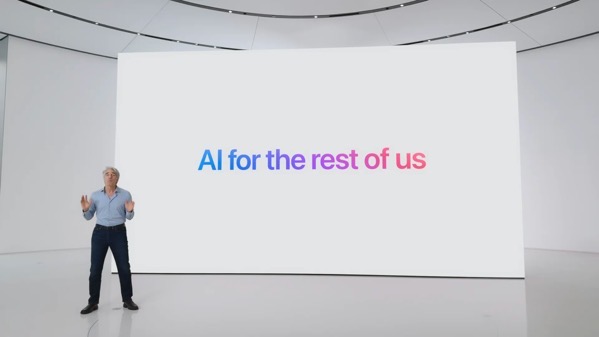
97686290 157a 4cf4 a2d1 e7c87303c1bc_1920x1080.In my use, Apple Intelligence so far is nothing more than a curiosity. On the one hand, advertised as the next big thing, on the other still labeled a beta. Yes, it’s well known Apple is playing catch up, but given how fast anything in the AI market evolves (or doesn’t), I’m not sure there will ever be a race with a destination, much less a finish line. That’s not just true for Apple, but for all the players in this game.

If I had to rate Apple Intelligence at this point I’d say it’s not worth all of the mis-placed marketing dollars Apple is spending. In fact, it is precariously close to feeling like a shell game. I’ve tried all of the currently offered features and don’t really see any at the moment that will be of continued use for me going forward.

Notification Summaries are sometimes worth a laugh, but currently not worth the candle when I try to decipher the mixed messages. I’ve stopped taking screenshots of them, because they are too numerous to collect. If I have to click a second time for understanding, what’s the point?

Summaries of web pages at the moment seems to be a feature not well implemented. I rarely see anything beyond the title when I do look.

Genmoji and Image Playground have no value to me whatsoever. (I’ve never been that big on the whole Emoji thing as I prefer language to hieroglyphics. That used to be a distinction demonstrating society was advancing.) If I want some generative AI to create an image there are much better tools around. Apple’s Writing Tools don’t have any real value for me either.

As for the changes with Siri, there’s no way to judge currently, because what’s there is not what I think we might see someday either in a galaxy far, far away or in a Kubrick film of the last century.

If the point of the Apple Intelligence rollout was to please the markets and shareholders, their “meh” reactions after this piecemeal rollout demonstrate they are even dumber than I thought, or care less than Apple thought they would. Apple seems to have successfully silenced the “Can Apple do AI?” doubters with its smoke and mirror show, but smoke eventually fades and just stinks up your clothes.

I can only base my thoughts on its usefulness on my own experiences, but I’d rate Apple Intelligence as less than “meh.”. If this is “AI For The Rest of Us,” it doesn’t feel much like Apple understands us or AI.

I guess the question becomes if we’re always on the cusp of something new and promising, then why not slow things down and focus on getting it accomplished instead of being slave to an annual release cycle? Certainly it seems that it is proving more and more burdensome. Rumors that iOS 19 might have problems meeting deadlines while Apple continues hammering on Apple Intelligence features for iOS 18 might just be rumors, but I would bet there are more than a few sparks smoldering under that smoke.

iOS 18 and macOS Sequoia Other Features

That said there are some other improvements in iOS 18 and macOS Sequoia worth mentioning. I’m going to talk about those in combination, because new features increasingly blend across device platforms via Continuity. Speaking of, I’m glad I finally got my Continuity headaches solved in 2024. Though it took an intervention from Craig Federighi.

iPhone Mirroring

The new iOS and macOS feature I remain most pleased with is iPhone Mirroring. This looked cool when it was revealed. It has proven both cool and more useful than I ever thought it would be. It’s great not to always have to pick up my iPhone when I’m heads down working but need to check a notification.

macOS Notifications

In my column of new features I like and  tied with iPhone Mirroring is the ability to see iPhone notifications on a Mac. Again, this is more useful than I thought it would be, even though I think Apple still has work to do with this on a consistency level, I rate this a winner.

That rating is also bolstered because along with it finally comes the ability to dismiss all notifications on a Mac. This has been too long in coming, so I’m glad it’s here.

I am puzzled why it is a two step process though.

When you view notifications you have three options at the bottom of the list, one being an X. Clicking on that X reveals only a single option to Clear All Notifications. That seems like an unnecessary step to me, unless there’s something else planned for the X in the future.

Photos

Lots of noise was made about the changes in Photos, but frankly I don’t think it was a big deal. I base that on my own usage and from the bevy of family and friends who I support, none of who complained.

What would be a big deal is if Apple would allow users more control to reliably sync photos. Apple actually made things a bit worse with iOS 18 by further hiding where you can see if photos are syncing behind your avatar instead of at the bottom of your Photo library.

Searching for photos is also much better in both iOS and macOS Sequoia. If that’s an Apple Intelligence feature, then it’s one of the few pluses. It isn’t perfect, but it is much better. I do wish I could delete a photo when I’m viewing search results. Currently I can only remove it from the album it creates with those results, even though I’m not saving the search as an album. This would be a great way to help delete duplicates and declutter.

Control Center

The changes here almost feel like a bad April Fools prank in that you can make changes, but playing the game to move icons around on a screen or between the new screens is nigh on near impossible and ultimately user unfriendly for a theoretically user friendly UI experience. If you think chasing Apps around a screen is fun, this will cure you of that.

Math Notes

More useful on an iPad than I find it on an iPhone or Mac, Math Notes is a significant new feature, especially when used with the Apple Pencil. Speaking of the Apple Pencil, I’m glad that both the new iPad Pro and iPad mini can use the same Apple Pencil interchangeably.

Handwriting Smoothing

This might work for some, but it is a marginal and almost negligible benefit to me as my handwriting is so awful. That said, searching notes that include my handwriting has yielded surprisingly good results even with my lousy handwriting.

Bluetooth

There seems to be something good under the hood added with Bluetooth. I base this on connectivity with my car. My car isn’t equipped with CarPlay but I do connect my iPhone via Bluetooth. Previous issues I had with connectivity seem to have vanished with iOS 18. I have to give credit to Apple, because nothing in my car has changed.

There was some early jankiness using Bluetooth on my Mac with peripherals, but that seems to have disappeared in later point releases of macOS Sequoia.

Safari and Distraction Control
Macos sequoia safari page menu distraction control hide distracting items.

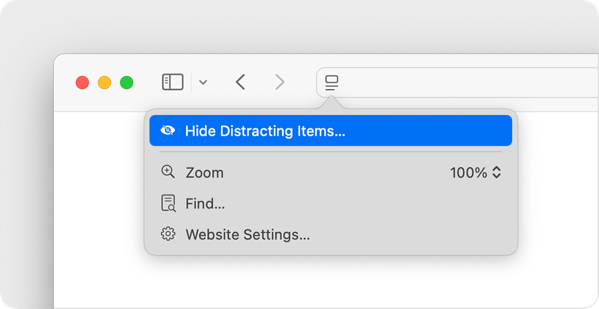
I like the new Distraction Control feature in Safari and hope Apple continues improving it. It’s a bit clunky to use at times, but it does help quite a bit with the continued enshittifcation of the web.

RCS Messaging

This is a notable improvement in my case, because it does improve messaging back and forth with some family, friend, and work threads when images are shared.

Smart Stack on Apple Watch

I find myself blowing hot and cold on the Smart Stack feature. At times it does approach the magic it promises. At other times it’s just an annoyance. I’ve tied turning it off and that can solve the annoyance factor, but I find myself wanting this to work and be smarter.

There are plenty of other new features across Apple’s platforms, but these are the ones that I find myself using the most, outside of Apple Intelligence.

Summing Up

To sum all of this up, without using any Artificial Intelligence, Apple or otherwise, I’d say this year’s hardware and software releases from Apple are one of those years we’ll look back on as a transitional one. Note that the only M4 series device I acquired this year was an iPad Pro, so I can’t speak beyond that on that new M-series evolution. Given how I use my iPad Pro, I’d say it was a winner, but not a life-changing one.

And quite frankly, AI marketing and money grubbing pitches aside, I am extremely comfortable upgrading my hardware as new generations of mobile devices roll out, and equally comfortable sitting on my computer purchases for as long as they hold out.

I am becoming increasingly uncomfortable though with the pace of operating system releases that seem to keep us all in a perpetual beta state whether or not we opt-in to the actual betas themselves. I don’t have a problem with Apple rolling out features over a period of time. I’d rather they do that than release something unfinished and full of bugs. But, I do have a problem with the heavy marketing push that trumpets what’s to come, long before the music is even ready to be played.

I’m able to keep up with what’s real and what’s not or not yet in the hype cycle, but the family and friends I support feel confused, and then become uninterested. If the goal is for folks to actually want to buy new hardware and to use new features, that’s ultimately a self-defeating strategy.

The Vision

Further summing things up, I think Apple’s release of the Vision Pro encapsulates the challenges within Apple’s vision. No, I didn’t buy one of those devices, but I did do the demo several times. I do buy the long term vision behind Spatial Computing, but I think Apple overreached with its hardware and design ambitions. Apple was able to recover from a similar overreach with the original Apple Watch, but the ante wasn’t so high for the consumer. The Vision Pro comes with a steep price to get in on the ground floor, and as of this writing it feels like it was so steep that it will actually change the floor itself.

I think a similar thing is going to take place with Artificial Intelligence, Apple’s version, and that of others. So many have ambitiously bet so much on that being the next big driver in tech, but I’m guessing in the long run it’s going to just be another passenger, perhaps in a side-car, along for the ride in an increasingly slower pace in the smartphone and mobile device race.

I feel almost Luddite-like saying this, but I wish Apple and others would focus on making what we have better than trying to make it new.

You can find more of my writings on a variety of topics on Medium at this link, including in the publications Ellemeno and Rome. I can also be found on social media under my name as above. 

 

WWDC 2024: Things I’d Like To See

Bring in the new and shiny, but fix the old and buggy too.

The Internet is filled with wish lists of things Apple fans would like to see announced next week at WWDC. New things. New capabilities. New all round. The majority of those wishes are the same and focus ahead. Nothing wrong with that. We’re always advancing. Or so we’re told.

Perhaps I’m stuck in the past, but I’d rather see Apple devote time to correcting some longstanding issues that bug me. Many of these issues are part of the glue that holds Apple’s ecosystem together, or what Apple calls iCloud and I call the unnamed operating system, iCloudOS. So, I’ve compiled a list of things I’d like Apple to fix, repair, or at least pay some real attention to.

Chances are better than good that you won’t hear much about any of this next week or in the weeks that follow. Many of these issues have existed for a few years now and seem to be such a low priority that Apple must be content to let them exist. Quite a bit of this could be considered small in comparison to the bigger challenges brought on by adding new features that bring new complexity. But one of the reasons so many prefer Apple’s way of doing things is the attention to detail in both design and practical matters. When it’s good it’s great and often magical. When Apple loses focus and doesn’t pay attention it can be like watching a magician pull a dead rabbit out of a hat.

For me these issues are rough enough and present enough inconsistency to diminish that attention to detail. The longer they are ignored or put off the more they point to glaring weaknesses in Apple’s process and I think we get farther away from that “magical” or “it just works” lore.

It’s apparent that not enough others feel the same or have the same experiences to pressure Apple into devoting the resources necessary to address these annoyances. That’s not a surprise. New always takes precedence in a market driven by delivering something new each year. And AI is the big new thing this year and Apple has assigned all hands on deck to ready what most expect to be the newly christened Apple Intelligence ship to sail.

Yes, we’ll hear quite a bit about AI. I’m also sure we’ll hear about things like emoji, flashy Messages and other novelties that show well in demos. Many of those I consider trivial or “meh” features that will be forgotten shortly after all of the reviews are written. Though the money I spend on Apple products is a small drop in Apple’s buckets of cash, I’d much rather see it spent putting resources into fixes for these annoyances. The list below certainly isn’t a complete one, but these are the things I’d love to see Apple address.


Continue reading “WWDC 2024: Things I’d Like To See”