Last week, beginning on Friday April 27, quite a few Apple users experienced a disturbance in the force when all of sudden they were prompted to relog into their Apple ID on their devices. On attempting to do so many discovered their accounts were locked for “security reasons” and needed to change their passwords in order to get back in. Eventually the situation righted itself as everyone eventually was allowed to change their passwords (there’s more to that part of the story later). It’s been a week and Apple has yet to publicly comment on what caused the issue. That’s a problem.

Apple and other companies spend enormous resources to keep users and systems safe, guarding against privacy attacks and security hacks. Apple also spends mountains of marketing money touting its approach to security and privacy as a key selling point. All that’s well and good. We live in an age of online paranoia when every security alert, every email, every text, every phone call, every link we are prompted to click on is suspect. Apple Security Notifications are now in that list.
When folks started receiving prompts on their Apple devices to change their passwords and then discovering that they were locked out of their devices, that paranoia rippled across the Internet as social networks, forums, and support networks burbled with users wondering if this was a hack, a glitch on Apple’s end, or just another run of the mill online inconvenience. Depending on which Apple Support rep you got on the phone you were told there wasn’t a problem or helped to relog back in. The event was blamed on all sorts of culprits from foreign countries to AT&T after its recently revealed compromise. There was no messaging from Apple. There’s been none since.
There are some signs that it might have been a system update on Apple’s end. Gone wrong or right no one knows. Was Apple hacked and did it pull a maneuver to protect users? Was Apple attempting to update or perform system maintanence? No one knows. No one knows still.
John Gruber on Daring Fireball pointed to Apple’s Developer System Status dashboard that showed maintenance scheduled for that Friday evening and another scheduled for the next day under “Account.” So that may be a possibility. Without any communication from Apple users are left in the dark.
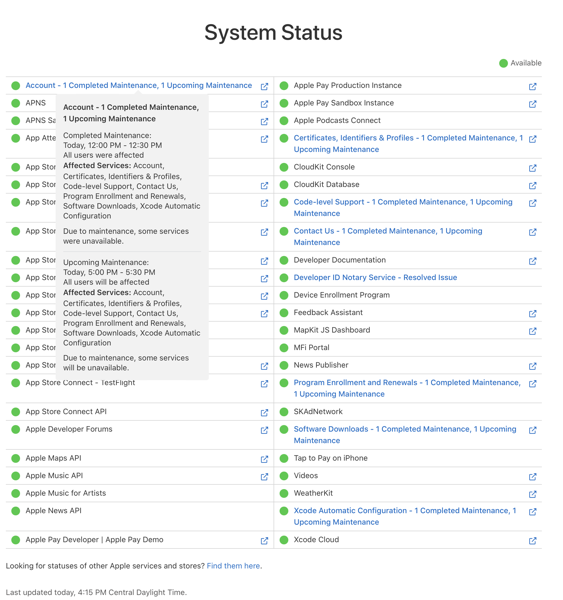
In my opinion most likely this incident may have been related to a backend maintainence issue. Yes, that’s a speculative opinion, but it’s based on my long (too long) experience trying to sort out ongoing iCloud failures with Apple Support. My personal conclusion is that Apple has problems with its backend operations that it either can’t figure out or is unwlling to devote enough resources to fix in a timely manner before it cycles into finishing up the next OS release.
Before I get to that, and what I experienced on April 27, let me just say that Apple (hell all companies because every company is online and subject to hacks) owe users open communication at the very least. Equally as important, Apple owes its own tech support personnel open and better communication on these problems. That’s the reason for the Part 2 in the title of this post. Apple not only refuses to give users accurate information, but does the same with its own tech support personnel. It’s been an ongoing issue and in the wake of this latest situation apparently extends far beyond the typically convenient and meaningless excuse that only “a small percentage of users were affected.” The events of April 27 may not have affected all users, but this time there was more than a “small percentage.”
Selfishly, as the evening unfolded and things started to feel very familiar, I actually hoped that the larger number of users reporting complaints might actually lead to some communication that could possibly help resolve my ongoing issues. But so far that’s not the case.
Friday Night’s Apple ID Fracas
My wife and I were watching an episode of Palm Royale on Apple TV+ via an Apple TV. A message popped up on the screen saying I needed to update my Apple ID password. I thought this was strange as I never recall having to enter my Apple ID password on an Apple TV before. Typically with my iPhone nearby signing in just “magically” happened.
I grabbed my iPhone and noticed the same message there and then the Apple ID Locked message appeared. My first thought, like so many others, was that I had been hacked or there was an issue on Apple’s end. I went to my iMac and fired up social media apps and also headed to Apple’s System Status webpage. Nothing helpful there, which isn’t surprising. But on social media I started seeing the typical “Is this happening to anyone else or is it just me?” posts start to scroll through my feeds. Chance Miller at 9to5 Mac was the first publication to report on the issue.
I then got the same notification on my iMac which cascaded to my other Apple devices. As the event unfolded I experienced a very similar series of events as told by Michael Tasi in his excellent blog post Janky Apple ID Security. There were some differences. Bottom line: I just couldn’t log back in after several attempts to change my password on my iPhone.

Logging in with a new password would fail, spinners would spin, and prompts would overlay causing a guessing game as to which button to push. At one point I got the following screen on my iMac.

It’s curious. The date I’m publishing this post is May 3 and as you can see above there’s supposedly a new device on my account that can’t be used to edit my information until May 3, 2024. Which device? Who knows? I’ve had use of all of my devices since I successfully relogged them back in with the new password on April 27 and I’ve since edited account details from the iMac, which I assume is the device in question since that’s were the notification popped up. But who knows?
At one point while attempting to change the password on my MacBook Air I was asked to enter the device password for my iPad mini. Again that’s curious. I had not yet attempted to change the password on that device or even attempted to wake it up.
After successfully changing my iCloud password and relogging back in to my iPhone, iPads and Macs, I was still unable to do so with my Apple TV and Apple Watch until I manually entered the new password on each device. Again, I’ve never previously had to enter an iCloud password on either device. Also curious, as of this writing I no longer am able to control my Apple TV with my iPhone or Apple Watch. Is that the mysterious “until May 3” device? So far that hasn’t resolved if it is.

The “Not” Fun and Games Didn’t Stop on Friday Night
After feeling relatively confident that my passwords on each device had been changed succesfully we finished watching the episode for Palm Royale and retired for the night. Note that my wife’s iPhone and iPad did not experience any of these issues. Neither did other family members I support.
The next morning I discovered that I had more to do in order to bring my devices back up to full speed. First, I had to relog in to Messages on each of my devices. I also discovered that all my App Speciifc Passwords had been deleted, which of course required creating new ones. To be honest, I’m not sure I’ve done so with all of the apps that require them yet because all of the passwords were erased. I can’t remember which apps required them and which ones didn’t. Those I use frequently, such as Fantastical, let me know right away. I assume I’ll hear from the others as they rotate back into usage.

After searching social media and other sites I began to notice that users who had fallen prey to whatever this was experienced a range of issues, but not all of the same issues I did. Some experienced more and different ones. Those running HomeKit and HomePods (I don’t) had their own set of different issues. Folks were confused and waiting for an answer.
One of the confusing discoveries is how Stolen Device Protection is supposed to work. Supposedly if you’re in a “Familiar Location” you don’t have to endure the waiting period unless you set up the system to require it at all times. But others, searching Settings for “Familiar” or “Significant” Locations, (Settings/Privacy&Security/Location Services/System Services/Significant Locations) discovered that their “Familiar” home or work locations were recorded outside of the radius for it to be “trusted” leading to the one hour delay.
Tying This Incident to Ongoing Issues
I won’t go into a blow by blow account with my iCloud Migraine issues. You can find those specifics in blog posts here, here, here, and here. That said, having to re-log into Messages after this event leads me to continue to believe that Apple has deeply rooted issues with iCloud. I’ve been fighting these issues (and Apple) for well over a year. Within the last five months or so a workaround that Dwight Silverman clued me into has been a way to get the ship righted in most instances when they reoccur.
Briefly, when I lose Universal Control, Sign in with Apple Watch, Handoff, Copy and Paste between devices, the fix is to sign out of Messages in iCloud and to sign back in. When these fuctions disappear from my Macs they are still available on iOS devices. I know it’s iCloud related from my conversations with Apple Support and because I always receive a notification that says I have to sign my Apple Watch into iCloud via my iPhone.

Note that there is no option to do so in the Apple Watch settings on the iPhone. An Apple Watch is signed in to iCloud when it is paired to an iPhone.
Dwight’s fix has worked most of the time. Often it will work right away. Other times I won’t be able to sign back in immediately, resulting in an endless spinner that eventaully times out.
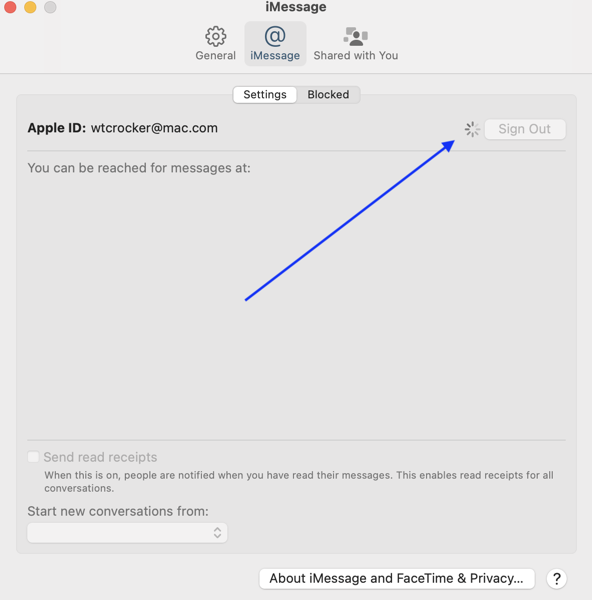
One of the other odd things about this workaround is that often executing it on one of my Macs will fix the situation on both. Sometimes it will require me to execute the fix on each Mac. Occasionally it will fix things on one Mac and not on the other even when executed on both. There seems to be no rhyme nor reason to this riddle.
I’ll know the workaround works when I get a notification that tells me WiFi calling is now an available option on my Macs follwed by notifications on my iOS devices that a new Mac is now available in iCloud. Which is strange given that a check of Settings always reveals both Macs being available on the account before, during and after the event.

When this doesn’t work I’ll perform a dance of the devices, turning them off and on in various sequences. Sometimes that works. Sometimes not. Sometimes I just need to wait things out and eventually things will right themselves.
That waiting corresponds with what I and other users have been cryptically (often very cryptically) told by Apple Support. Here’s a quote from Dan Moren’s experience:
. . . after perhaps 20 minutes on the phone, he seemed to hit on something. I heard him laugh and say something along the lines of “that explains it” and then, with my consent, put me on hold. When he came back, he said—and I’m not exactly quoting, but close enough: “I’m sorry, I can’t tell you any more than this, but all your services should be back up pretty much exactly 12 hours after they went down.”
I and others have also been told to wait 24 hours. Regardless of the length of the waiting period the “I can’t tell you any more than this” is always consistent.
Some Theories
I can’t offer any conclusion about the events of April 27 beyond what I’ve previously stated as speculation. What I can offer is that whatever caused that issue and how it was rectified by Apple has many similarities with these ongoing iCloud issues.
What is consistent is that they resurface each time Apple issues a beta update for iOS and macOS or a full release of same. What’s inconsistent is that sometimes the issues surface the morning of a release, sometimes the day after, sometimes the day before. NOTE: I do not run Betas on any of my devices.
What this tells me is that concurrent with those device operating system updates, beta or otherwise, Apple is issuing corresponding updates on the iCloud backend. That’s only logical, and it points up a flaw in the process. If you’re a beta tester you can and should expect issues. That’s what betas are for: to find issues. However, If you’re NOT a beta tester you should not be subjected to issues related to betas.
When I’ve raised this timing issue with Apple Support I’ve gotten tacit agreement that it is an issue, but no definitive answer. My support dialogues through much of 2024 have consisted of me sending sysdiag files to Apple each and every time an OS update is released.

However, while I still religiously collect sysdiags to send each time the issues occur, the requests to send them stopped in March. That followed a period of time when I was asked to wait until after the next point release before submitting any further updates.
There was also a moment last fall when I was told that Apple engineers had recently put the issue back under investigation after the officlal release of Sonoma. I was told they thought they had solved it with Sonoma but realized shortly after they had not.
My theory of the moment, which I’ve expressed to Apple Support and gotten no official response to, is that with WWDC quickly approaching Apple has once again has put this on the back burner for current users in order to possibly address it in the next OS release. If my theory holds we might see the issue disappear at some point in this summer’s beta cycle or it will continue as it has since the days of Monterey.
Another theory I have, and that may tie in with the events of April 27, is that this somehow relates to when a user first set up an Apple ID. My initial Apple ID was a mac.com address and that’s followed me through the MobileMe era into the iCloud era. A number of users who experienced the problems on April 27 had mac.com addresses. I can’t speak to whether or not that was always the case with every user, but in trying to find solutions to my ongoing problems, many I’ve spoken with also acquired their first Apple IDs in the mac.com era.
Note that my wife and the family members I support all began their relationship with Apple in the iCloud generation. None of them experienced issues on April 27. None of them have experienced any of these issues that continue to plague me. That’s a small sample, but it fits within this theory of mine. I’ve also heard from some others who did not experience this April 27 issue that some have mac.com addresses at the root and some do not. So again, who knows?
Bottom Line: Fix and Communicate
Apple needs to solve whatever this long running problem with iCloud and Apple needs to communicate with its users and support personnel better. Certainly they need to do so when there are more acute failures such as that which occured on April 27, whether they be security related or just attempts to find a better solution. A week is much too long to wait for some sort of statement. We may all be At The Mercy of The Backend, but we don’t need to be at the mercy of poor communication. That’s a choice by a company. Contrary to what some might think or fear, saying there’s an issue and we can’t yet pin it down is a less bad PR move than going silent.
I use Apple products and follow Apple news throughout the evolutions of beta cycles into full blown releases. I like to follow that news. I don’t like and choose not to live and work through them. Each time Apple tries to improve things or add new features I know I’m going to experience failures before I can actually use the products and ecosystem as designed and advertised. And even after the situation may be fixed, worked around or righted, so far there’s no solution that has been able to solve the problems. To me that’s unacceptable.
It reminds me of days from my youth when I’d go out to start my old beater of a car and hold my breath wondering if it would actually turn over and start. Always a relief when it did. Always a pain in the ass when it didn’t and I’d have to lug out the jumper cables. Apple doesn’t make or sell beaters. But these issues sure are beating me down.
You can find more of my writings on a variety of topics on Medium at this link, including in the publications Ellemeno and Rome.