Slide Over In iPadOS 26.1 Returns Just In Time

Glad to have this multi-tasking tool back.

Since I don’t run betas on any of my devices, I’ve been somewhat anxiously waiting for the release of iPadOS 26.1 which returns the Slide Over multi-tasking feature to the iPad. It got here just in the nick of time.

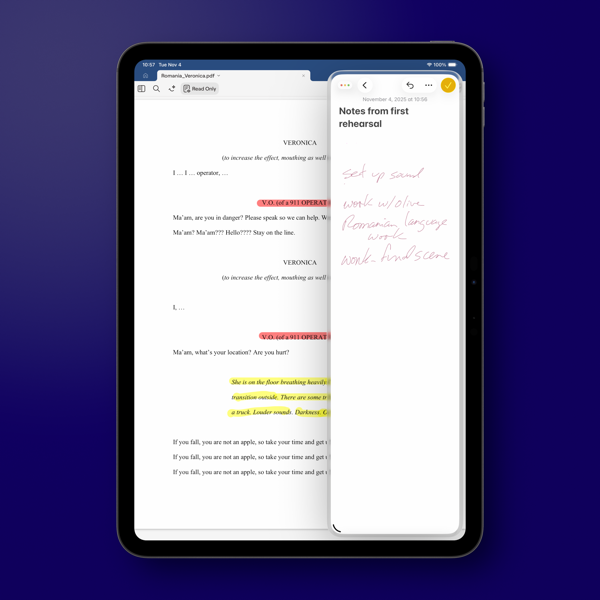
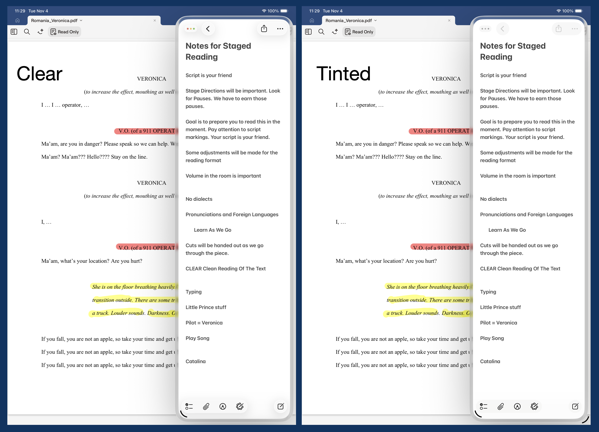
iPad OS 26.1 arrived yesterday afternoon, about 2 hours before rehearsal began and I quickly set things up for the evening’s rehearsal, using Notes in Slide Over to quickly jot down notes as rehearsal went along.

I use an 11 inch iPad Pro in my theatre work as my primary device. It contains the script I’m working on and ever since Slide Over was available I would use that multi-tasking feature to keep one or more apps tucked away for quick access conducting rehearsals.

New Shareshot.

I do question why Apple only allows one app in this returning version as opposed to multiple apps as it did before. It was always handy to keep multiple apps available throughout rehearsal, given that I prefer to have my script open full screen on the 11 inch iPad Pro.

As a side note, I’m not a fan of the Liquid Glass border around the window in Slide Over. It waists screen real estate, almost begging you to look at the feature. Even switching Liquid Glass to the new Tinted version, now also available in iOS 26, doesn’t erase or lessen that border or its distracting impact.

CleanShot 2025-11-04 at 11.37.09 2@2x.

In fact, setting the border aside, switching back and forth I don’t really see any significant difference in the apps I’m currently using between the Clear and Tinted versions of Liquid Glass. I won’t call that a complaint, but I will say it might all be much ado about nothing. At least on the iPad.

You can also find more of my writings on a variety of topics on Medium at this link, including in the publications Ellemeno and Rome. I can also be found on social media under my name as above.
iPhone and OS 26 Reviews Off The Beaten Track

Looking for some new voices.

New iPhones have been released, are being delivered, and I assume being used. Some of the usual sources have already reviewed the devices and the new operating systems and I’m guessing you’ve seen many of those.

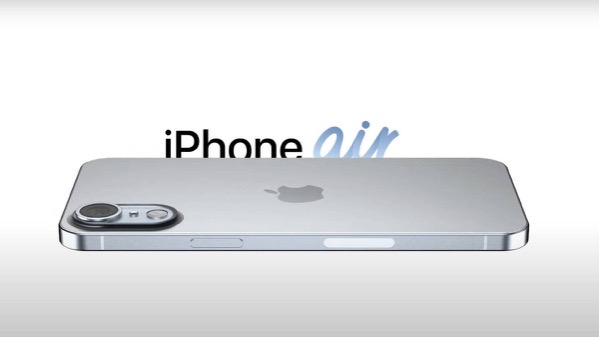
Insider explains who the iPhone 17 Air is for.

I’m enjoying reading reviews that are sort of off of the beaten track, assuming the Internet has one of those, and thought I’d link to a few of them.

First up Jason McFadden of Jason Journals talks about his experiences and impressions after installing OS 26 on several older devices. Good read.

Next up is Sebastian de With’s look at the iPhone 17 Pro cameras. Sebastian is one of the developers of the team Lux that developed the Halide camera app for the iPhone.

Olivia Lipski writing for Good HouseKeeping says I’m a Tech Reporter and a Mom. Here’s My Honest Review of the iPhone Air.

And finally Rakhim Davlekali has written a review of macOS in reverse starting with the now current Tahoe and going backwards through time. Benjamin Button Reviews macOS is worth a read for a few laughs.

I still think it’s early for any real judgements to be made about the new devices and new operating systems. But the links above are worth a look.

You can also find more of my writings on a variety of topics on Medium at this link, including in the publications Ellemeno and Rome. I can also be found on social media under my name as above.
Things Apple Won’t Fix In The Next Round of OS 26 Updates

I’d bet money these issues persist after new OS releases

Apple is announcing new iPhones, Apple Watches and possibly other things today. They’ll also announce the release date for the operating systems for all of those new devices and previous generations already in use. All of the focus is going to be on everything new, improved, changed and Liquid Glassed.

55b31eb4ba867b00263c62f538280311 XL.

I’m sure I’ll write about some of that down the road. For today I’m writing about the things I’m thinking Apple won’t address in any of the new operating systems. These are lingering issues that in some cases have not been corrected over the life of multiple operating systems. As much as I get excited about a new software release I remain frustrated year after year when Apple steps forward while dragging its feet on correcting existing problems.

Believe me, I get that Apple has created such a large ecosystem that it is impossible to pay attention to every detail and correct every mistake. I get it, but I don’t sympathize with it. Introducing new operating systems pumped out on what seems like an impossible to meet annual cycle creates other issues that need to be addressed and it is apparently too easy to just let the older ones go unattended. And from what I’ve seen from developers I follow, there are going to be a host of new issues that are going to need to be resolved over the next year. Or longer. The longer you let an existing issue hang around without attention, the more the “control the whole widget” promises seem not quite in control.

Certainly it’s a question of priorities. How the priorities are set makes me question the priorities of those that set them.

Some of these issues I’ve highlighted before, others I have not. Here are a few that continue my questioning of Apple’s priorities. I’m sure there are some that others experience that fall into the same category of hoping Apple pays attention to them someday.

Syncing

I’ve seen a decrease in syncing issues with iCloud in general. That’s a good thing. But Apple still insists on syncing Photos on its own schedule. Whether it’s battery life optimization or system optimization the delay is never optimized for the user experience.

Shared Reminder Notifications

I’ve written about this before. The fact that this one hasn’t been corrected since Shared Reminders became a thing undercuts all of the very good work Apple has done with the Reminders app in general.

Bluetooth Weirdness

I don’t know how else to describe this other than it’s just weird. There are times when Bluetooth connectivity works as designed with my AirPods and other peripherals. There are times when things just go bonkers especially with AirPods. Things will work as designed for days on end, then they won’t. AirPods switch between devices as designed, but then stop doing so. Adaptive Listening will work well sometimes and sometimes not. Connectivity with my car works well and then it doesn’t. My car isn’t smart by any stretch of the imagination and gets no software updates so it makes sense to me that it’s a Bluetooth issue on the iPhone. Note that it happens at random times unrelated to iOS updates or those mysterious AirPod firmware updates. The Magic Trackpad works 98% of the time. Then not. It’s weird.

Shortcuts

It’s become either a legend or a joke that every time Apple releases a new update (full release or point release) something goes wrong with Shortcuts. Either way it’s a problem for “the future of automation.” I particularly love it when a Shortcut just hangs with no indication that there’s a problem after working well for days on end. This inconsistent problem is consistent.

The App Store

Apple’s biggest retail outlet is the slowest loading and buggiest piece of software it has ever designed. It’s also designed abysmally.

Focus Modes

I use very few Focus Modes. I do not share them between devices. Sometimes they work. Sometimes they don’t. I’ve never set a Sleep Focus on my iMac. Yet one mysteriously appears at random during the day about twice a month. The Focus I’ve set for listening to Podcasts inconsistently fails to kick in.

Mail Rules

I think Apple has just given up on Mail Rules because the ones I’ve built just don’t work anymore.

Apple News

I enjoy that on my Mac I can choose to open an article in Safari or that I can open a webpage in Apple News. I don’t understand why that can’t happen on the iPhone.

Notification Summaries

I long ago turned Notification Summaries off because they were just confusing and caused more work than just dealing with the Notification. I recently turned them back on to check and see if there had been any improvement. There has not.

As I said, I don’t anticipate Apple fixing any of the above with all of the new ’26 releases. I’ve learned to work around them the same way I work around the passenger side backdoor on my car won’t open from the inside and I have to open it from the outside whenever I’ve got a back seat passenger. It’s a walk around workaround. It’s not ideal. And each time I have to do it I’m reminded just how imperfect things are and can be. I’m sure it will diminish the value of the car when I do decide to trade it in, but it’s already reduced the value of it in my mind.

I feel the same way when Apple doesn’t address longstanding issues that I and others have brought to their attention. Here’s hoping Apple addresses some of these issues. Here’s hunching they won’t.

You can also find more of my writings on a variety of topics on Medium at this link, including in the publications Ellemeno and Rome. I can also be found on social media under my name as above. 

Instagram Shows Up Very Late to the iPad Party

What’s the point and who cares?

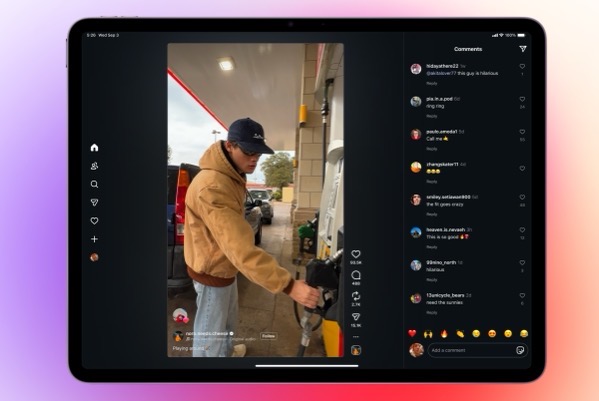
The folks at Meta must have something up their sleeve. The reason I say that is they have finally, after all of these years released an iPad version of the app, long after most folks just figured it would never happen. Other than speculating on what might be behind the late to the party move, at this point it begs the question, Who cares?

Reels with Comments 16_9.

I’m sure plenty do care. I’m not one of them. Instagram is one of a few apps that I begrudgingly use. Begrudgingly because I hate it. I use it because my family on all sides continues to do so and it’s a way to keep up with grandkids, nieces, nephews, and other family news. But I honestly despise that I have to. Believe me I’ve tried to wean them off onto other apps and services, but it never sticks.

Every time I do open Instagram I have to block somewhere between 5 and 10 spam accounts (too often porn or ridiculous come ons.) And of course the algorithm doesn’t show me what I want to see, but what it wants me to see. There’s even an increased sense of desperation from both Instagram and Facebook sending out notifications telling me someone replied, is waiting for my reply, or commented on something I haven’t seen yet. It’s like begging in the street. Apologies to those who might actually need to do so.

Sure I could turn off the notifications, but sadly, that’s the least worst way to use the app to keep up with family happenings.

I’d say that since it took 15 years for Meta to finally roll this out that perhaps the adolescents in charge finally are growing up. But then, there are those porn accounts that pop up with the frequency like prepubescent zits.

I won’t be putting it on my iPad. It’s troubling enough that I still have it on my iPhone. And as I watch the over excited coverage rolling in, I haven’t seen any image of the iPad version that makes it look the least bit appealing. It’s like Meta didn’t really care based on what I’ve seen so far.

So, Instagram is on the iPad. What’s the point and who cares?

You can also find more of my writings on a variety of topics on Medium at this link, including in the publications Ellemeno and Rome. I can also be found on social media under my name as above. 
Two Interesting Takes on iPadOS 26

iPadOS 26 beta reactions are making me think twice about installing

As I continue to live vicariously, watching from the sidelines through this summer’s Apple beta season, two interesting takes on iPadOS 26 have crossed my radar and are worth sharing.

IPadOS 26 WWDC_a.

First up, Harry McCracken says what most using iPadOS 26 are saying that Apple has made the iPad more Mac-like. But he also wonders where that might lead?  Check out his post here.

Follow that up with M.G. Seigler’s post. He thinks Apple might have created sort of a Mac, Jr. His post is from prior to the release of the public beta.

Both gentlemen delve deeper than the “what’s a computer?” discussion into other facets of the betas and both posts are worth your time, if iPads are your thing.  That “what’s a computer?” question is going to probably be with us through most of the next year.

FYI. I’m adding an iPad category to this little corner of the web. I have a feeling we’re going to be talking quite a bit about iPads in the months to come.

You can find more of my writings on a variety of topics on Medium at this link, including in the publications Ellemeno and Rome. I can also be found on social media under my name as above. 

Through A Glass Darkly: Apple’s Liquid Glass Future Isn’t Clear

Continuing to watch Apple’s Betas from the sidelines.

Apple’s adventures with its new Liquid Glass design language reminds me of the title of a terrific, yet gloomy, Ingmar Bergman film, Through a Glass Darkly. Keep in mind that I’m not running the beta and living vicariously through the reactions of those whose opinions I trust. That said, based on some of those opinions of the recently released 4th developer beta, the future of Apple’s new design approach appears less than clear. 

Image from @davemark on Mastodon

From most accounts it’s a battle between legibility and the “coolness” of the design’s featured transparency that overlays content with the intent for the content below to bleed through. The challenge seems to be finding the right amount of bleed through that also allows users to easily read a notification or a control. 

In my view, the challenge with that challenge seems to be one of fighting things you can’t control. Holding liquid in your bare hands without spilling a drop might be easier. Every website and app designer has their own preference and approach. Even Apple apparently has difficulty as some of their own apps with background bleed through obscuring text. 

Image from @viticci on Mastodon

Since Apple announced Liquid Glass there have been three iterations of the approach. In a sort of Goldilocks and the Three Bears adventure with Apple dialing transparency features back and forth. Now in the 4th version of the developer beta reengaging more transparency. Searching for a “just right” solution doesn’t yet seem to be yielding any clear direction. But then, Apple’s ambitions, perhaps by design, have created a lose-lose short term future. The eventual product will never please everyone with this design change. But to be fair, that’s always the case with design changes and the folks at Apple knew that going in.

There are other usability issues as well, including things like making it easy to tell which tab or control is in focus, and having to tap multiple times to perform a function that used to be one tap to name a couple I see repeatedly mentioned.

But the clear focus of complaints (and some praise) is Liquid Glass. I would venture that for users it’s still too early to judge, but supposedly the Public Beta is due soon and the consensus is that what we see there will be pretty close to what we see in the Fall. Developers on the other hand are increasingly worried about Apple’s search for a “just right” solution while they try to find a path forward to have their own apps ready for the big release alongside or close to the release of this new wave of operating systems. 

CleanShot 2025-07-24 at 08.38.27@2x.

The problem becomes magnified when designing for the lowest common denominator with so many users. From my perspective of supporting clients and family members, most folks just want to pick up their devices and do what they want or need to do. They don’t want a new learning curve getting in the way. They certainly don’t want legibility issues to get in the way. There’s a real tension between what Apple needs to do to keep the cash registers ringing and the familiarity users want that I don’t think the folks in Cupertino understand given the annual pace they seem locked into. 

Image from @jsnell on Mastodon

The Bigger Picture

From where I sit on the sidelines, I think Apple has also created some real and perhaps less transparent problems beyond how Liquid Glass eventually rolls out.

Coming on the heels, and at least somewhat intended as a distraction from last year’s Apple Intelligence and Siri woes, Apple needs to create a clear narrative surrounding Liquid Glass in order to sell this year’s new crop of iPhones. (I imagine the commercials have already been scripted if not filmed.)

That already seemed like quite a challenge given that the only big hardware news this year is the rumored introduction of a smaller, lighter, apparently with less features iPhone Air. I don’t imagine that Apple’s traditional iPhone lineup is going to have new features to tout that makes those familiar device form factors must haves or must upgrades. 

If you’re counting on a flashy UI design change as the distraction that gets criticized as much as the issue you’re trying to distract from you’re magnifying your problems. Unless of course, you bank on criticism of the distraction further distracting from bigger issues.

Adding to that, the larger narrative has somewhat already passed by this year’s iPhones to what comes next year, with just about everyone assuming Apple’s version of folding iPhones will be the new focus. 

Sum all of that up and this is starting to feel potentially like a lost year for Apple. Sure, Apple will sell lots of iPhones, but if it can’t capture the imagination the way Apple usually does, much of the narrative will be wait ’til next year. Apple historically takes a long view. Time will tell if they have lost control of the visible horizon.

iPadOS 26

That said, somewhat under the radar, iPad beta users continue to trumpet the success of changes made in iPadOS 26. I’m looking forward to seeing that myself. That said, as much as those potential changes will be welcome, I can’t imagine that’s the tentpole Apple wants to rely on to create excitement this year.

CleanShot 2025-07-23 at 07.19.00@2x.

I mentioned the film Through A Glass Darkly in the opening of this post. The story of that classic film is about a family that gathers to try and heal after a member diagnosed with schizophrenia is released from an asylum. If you ask me, the challenges we’re seeing at Apple with design changes, Apple Intelligence and Siri among other things demonstrate that there are multiple personalities exhibiting control at various times within Apple, at a time when some turnover at the top is already underway, with quite a few calling for more.

As always, I recommend Michael Tsai’s Blog as a good source to keep track of how all of this continues to develop.

And with that, I’ll leave this update from the sidelines with this. 

CleanShot 2025-07-24 at 08.29.28@2x.

Update: The public betas for all of Apple’s new operating systems were released shortly after this post was originally published.

You can find more of my writings on a variety of topics on Medium at this link, including in the publications Ellemeno and Rome. I can also be found on social media under my name as above. 

Federicio Viticci and Craig Federighi Go One on One about the iPad

A great article and interview for iPad users.

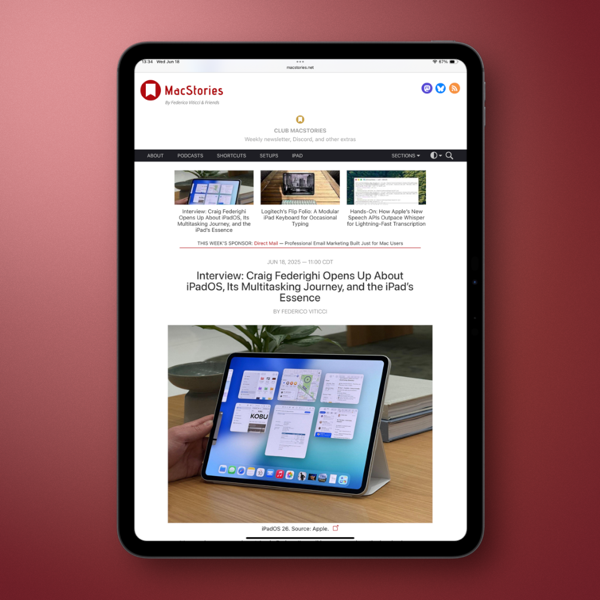
If you’re an iPad user (or even if you’re not) this post is just a quick link to recommend that you check out an excellent article containing an interview by MacStories’ Federico Viticci of Craig Federighi.

New Screenshot.

There has been much consternation and tension among iPad fans over the last few years. Viticci has long been an iPad advocate and had, like many seen his ardor cool while Apple seemingly was cooling its jets on the platform. Federighi sitting down with Viticci is quite a PR move on Apple’s part.In and of itself is a signal by choosing the iPad’s most ardent supporter and vociferous critic.

There’s a chance Apple has jumpstarted those jets a bit based on the iPadOS 26 announcements at WWDC, and from some of the early reactions we’ve seen from some developers and users. While those reactions seem genuinely positive, we’ll need to see how things shape up as the summer beta season rolls along.

The one thing is certain, there will be new life in the iPad discussion after iPadOS 26. Viticci’s article has laid great groundwork on which that discussion can take place.

Load it up on your iPad and give it a read.

You can find more of my writings on a variety of topics on Medium at this link, including in the publications Ellemeno and Rome. I can also be found on social media under my name as above. 

Apple Beta Season Is Upon Us and iPad Debates Are Around the Corner

Changes look promising. Wait and See is the operative condition.

Apple announced what it has in store for the next versions of all of its operating systems during it’s annual World Wide Developers Conference this week. Or rather Apple put out a pretty nice commercial for some of what it has in store. But that’s the way of these things whether pre-taped or live. The beta testers and pundits are off and running looking into every nook and cranny of the code, celebrating, criticizing, and screenshotting. That will go on deep into the summer.

Apple WWDC25 iPadOS 26 hero 250609_big.jpg.large_2x.

The biggest, most observable change is the new design language, Liquid Glass, that is intended to bring all of Apple’s operating systems into a more unified look and feel, sorta, kinda based on the Vision Pro. Who knew that headset would provide new Vistas ahead?

They also unified the current OS numbering system, ditching the previous version numbers. Now each operating system will increase by the last two digits of each year ahead, as in iOS 26, watchOS 26, etc… We’re going to get to iOS 50 sooner than we thought.

I no longer play the beta game with my devices so I haven’t seen anything first hand, beyond the reactions of others that range from it’s terrible to the best thing since sliced bread. Keep in mind that any reactions you see following the release of the first developer beta should always include the caveat that what you see now will probably evolve over the course of the summer. Wait and see is the operative condition that needs to be set.

As far as I’m concerned the big news was about the iPad and what iPadOS 26 is promised to offer. There has been lots of back and forth about trying to define the iPad ever since there have been iPads. But certainly since Apple, in the pre-M1 chip era, put out the What’s a Computer campaign in 2018. There were quite a few loud voices always wanting more than Apple delivered in terms of making the iPad more like a Mac. And in recent conversations many of those loud voices were putting down their megaphones and were moving on from those iPad as their main computer dreams.

But this year Apple seems to be promising most of the changes those users have been clamoring for. They include a multiple windowing UI, much more similar to MacOS than any of the previous multi-tasking attempts. There’s even a menu bar, the inclusion of a new Preview app and more Finder-like functionality in the Files app. Better background processing and enhancements to the audio system are sure to make podcasters happy. There are a host of other new tidbits as well. There are also casualties. Many are already mourning the loss of Slide Over.

To give you an idea of how big a deal this change is, noted Windows advocate, Paul Thurrott ended his first look piece with “I may need to get a Smart Cover. Or whatever it’s called. This changes everything.”

The cynic in me has to say that the depth and breadth of these new iPad features makes me suspicious as to why Apple didn’t take this path earlier. It seems obvious that it had been thought through. The hardware has certainly been capable. Regardless of those suspicions, Apple has set up another new iPad story to keep us chattering.

So, iPads are being dusted off again. Soon, and more importantly deeper into the summer, we’ll hear how successful these features may be in fulfilling the desires of those who want the iPad to be more like a Mac. What we won’t have to wait for is the debates around the iPad to heat up.

I’ve never been one that felt disappointed by the iPad’s less than Mac-like features. For my work it has always served me well and gotten better in doing so over its evolution. Stage Manager was never my thing, but Slide Over worked well for my usage as my primary multi-tasking metaphor. Will I miss it? I’m sure I will. But I’ll wait and see what this new multi-tasking UI offers before rendering judgment.

But that’s me and I’m not everybody. So, as I look forward to living vicariously through the summer as others poke around these new changes, let me close with this. Regardless of whatever differences exist between the iPad and the Mac they always had one great similar strength that these new changes appear poised to make stronger still. Different users with different needs can use an iPad or a Mac for just about anything they want and need to do.

You can find more of my writings on a variety of topics on Medium at this link, including in the publications Ellemeno and Rome. I can also be found on social media under my name as above. 

Dan Moren Questions What It Means To Be An Apple Fan These Days

Core questions for Apple users

The headline of Dan Moren’s final column for MacWorld says it all: I’m An Apple Fan In 2025. What Does That Even Mean?

Apple fanboy.

Moren has been writing for MacWorld and been a sensible voice inside the Apple community for close to 20 years. He’s signing off his regular column gig for MacWorld, but he’ll still be around on the likes of Six Colors, podcasts, and I’m sure other places. Which is good, because his voice is an important and reliable one.

In his farewell, he raises the question many are asking of themselves, and the questions many are asking of Apple in its current state and our own state of affairs. As he puts it in a nutshell of a statement:

As Apple started becoming more and more successful, I’ve become increasingly skeptical that one should ever really consider oneself a “fan”of a company.

It’s a well thought out and well reasoned post and one that I think should be read by anyone considering themselves a fan, or a no longer fan, or even someone who just doesn’t care for Apple or its products.

A big part of the self-examination I know quite a few folks are going through in assessing their current relationship with Apple deals with issues bigger than just the products. For lack of a better description call them corporate issues. Even using that label — corporate — feels dirty to type in ways that seem damning in more dangerous ways these days. But that’s a fungible feeling and thinking that’s becoming increasingly tangible.

Here’s the thing. Technology advances. Humans advance. Nothing that feels foundational or allegiance adhering, or even worth being infatuated about is going to ever stay the same. Nor are our feelings about what we first might have fallen in love with, regardless of how the object of that affection itself grows and changes. Change is constant.

Microsoft had my allegiance back in the Tablet PC days because they won it when those much maligned devices provided a better, more productive way to do my work. Microsoft changed. I did too. iPads replaced what Tablet PCs were for me in my work and my play, and those are the tools I still use today. Do I think that will be forever? Not a chance. I mourned the loss of Tablet PCs. I’m sure if Apple stopped making iPads, I’d go through a similar grieving process. But again, that’s change. That’s life.

That’s also growth. But growth on the human side of the ledger rarely equals growth on the corporate side. In my brief time on this planet the two have never added up to successful equation that yields anything other than diverging results. That’s one thing I don’t ever expect to change.

Kudos to Dan on a job and career well done, (and still going) and kudos for a lovely farewell column in MacWorld.

You can find more of my writings on a variety of topics on Medium at this link, including in the publications Ellemeno and Rome. I can also be found on social media under my name as above. 

Shared Apple Reminders That Never Disappear

A bug in Apple’s Reminders app.

Maybe one day Apple will find time to fix this bug with shared Reminders. Maybe not, given all that it keeps piling on its seemingly overflowing plate these days.

Here’s the thing. Apple has a nifty feature to share lists and Reminders in the Reminders app. It allows you to create a list and share it among family, friends, or perhaps even National Security officials but I haven’t heard of it being used that way. Yet.

It works as advertised when it comes to actually sharing a Reminder. My wife and I use it for grocery and other shopping lists. If she’s doing an inventory through the cabinets prior to a grocery run, I’ll get notifications of the Reminders she adds to the list.

The problem pokes its head up after those Reminders are completed.  Those notifications don’t disappear the way non-shared Reminders do. They hang around. Seemingly forever. At least in my case, sometimes for hours.

The two Reminders in the image above are from my iMac. My wife added them after I had already headed to the store on a day of errands. They were still there hours after I had checked them off in the Shared Reminders list on my iPhone. The notifications still remained on my iPhone as well.

You have to manually get rid of these Shared Reminder notifications, which seems like a silly bug to me. It’s been around since Shared Reminders was introduced in iOS 13. It’s a shame it’s been around so long because Apple has done a good job over the years evolving the Reminders app into something that’s really useful.

Perhaps Apple Intelligence will figure out a way to fix this somewhere down the line. I won’t set a shared Reminder to check on that though.

You can find more of my writings on a variety of topics on Medium at this link, including in the publications Ellemeno and Rome. I can also be found on social media under my name as above.