Sunday Morning Reading

Time keeps on ticking and we need to keep on reading.

Losing an hour only to gain it back in a few months feels like a capricious two-step, forward and back, never gaining ground. Something we’re all experiencing at the moment and not just because of Daylight Saving Time, but on many levels. Time marches on regardless, even as it retreats for brief periods. Regardless of what time it is, here’s some Sunday Morning Reading to share.
To kick things off this week while you’re enjoying your coffee take a look at NatashaMH’s A Sip of Revolution.

Apple did the right thing. Eventually. Finally announcing that its Apple Intelligence features for a more personalized Siri will be delayed. John Gruber got the scoop handed to him from Apple. Ian Betteridge has some good thoughts on this as well in Hardware Dreams, AI Nightmares: Apple’s Crisis of Imagination.

While I’m on the tech beat, M.G. Siegler’s newsletter always offers good insight to ponder. A perfect example this week is It’s The End of the Web as We Know It (And I Feel Fine). I’m not so sure I do.

On the political beat, Jason Sattler, perhaps better known on social media as LOLGOP, tells us Why America Is On The Verge of Committing Atrocities Against Our Neighbors.

emptywheel spins out Attention Deficit And Defiance Division Of Labor: There’s Stuff Happening Where You’re Not Looking. It’s long and worth the time and reminds us that what we see and hear isn’t all that’s happening. Although at the moment, we’d like to see and hear more.

And if you’re like many wondering why some of these evil, decidedly American streaks of cruelty seem to resurface now and then, history is never kind and always a reminder. Take a look at Why This Puritan Sculpture May Revolutionize Your Thinking About The Rise of Christian Nationalism by Christopher Knight.

And to close out this week, here’s a look at how one of our real life Bond villains took over the James Bond franchise, in Benjamin Svetkey’s License To Shill: Inside Amazon’s 007 Takeover.

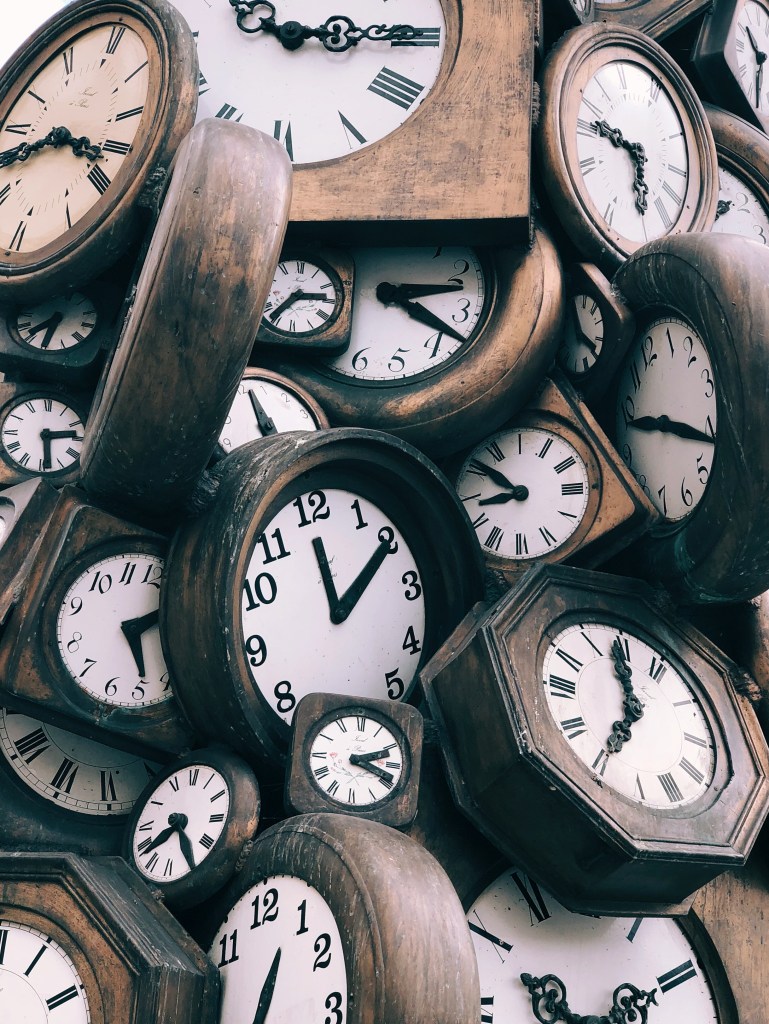
Image above by Jon Tyson

If you’re interested in just what the heck Sunday Morning Reading is all about you can read more about the origins of Sunday Morning Reading here.  You can also find more of my writings on Medium at this link, including in the publications Ellemeno and Rome.

Sunday Morning Reading

Lots to think about in this helter-skelter moment we’re living through.

Back at it after a couple of weeks of traveling and dealing with a case of pneumonia. (All is well.) Certainly there’s a lot going on and most of it is happening in a such a rush that I’m not sure anyone has enough space to accurately write or think about all that’s happening. But there is some good stuff to recommend.

Leading off this week are some articles from folks who are concerned, distressed, pissed off, and searching for tech solutions that don’t rely on America’s big tech oligarchies.

First up is I’m Tired of Pretending Tech is Making the World Better by Joan Westenberg. Follow that up with Joan’s article on How I’m Building a Trump-Proof Tech Stack Without Big Tech. Good suggestions there.

Matt Keil has also published a list of non-U.S. tech apps and services for those looking to move things offshore called Migrating Away from US Apps and Services.

With all going that’s going on, Denny Henke at Beardy Star Stuff takes a look at Apple, big tech, lock-in and the corporate colonization of life experience.

If you’re one of those searching for different tech solutions, remember no matter how long a service may have been around or how big the company behind it is, it’s all impermanent. As an example, Om Malik takes a look at Microsoft ending the run of Skype this week in Skype Is Dead. What Happened? It might take awhile, but everything eventually dies.

Moving off of the tech beat, this story by Joshua St. Clair is tough emotional read, but well worth your time. The title tells you what you’re in for: What Do You Do After You Accidentally Kill A Child?

There’s lots of rethinking of lots of things these days. David Todd McCarty is Rethinking Pride.

Adam Serwer asks the question most are asking when it comes to the words behind the ugly acronym, MAGA: Just when was America great, exactly, and for whom? Check out The Great Resegregation.

We’ve yet to feel any real impact on the economy given all of what’s happening. At some point we will. Umair at the issue takes a look at what happens if capital flight occurs in How an America the World Can’t Trust Goes from Collapse to Implosion.

Tonight is Hollywood’s big night with the Oscars. In an article from 2013, Seth Abramovitch takes us on a look inside a moment when an Oscar opening number went horribly wrong in “I Was Rob Lowe’s Snow White”: The Untold Story Of A Nightmare Opening. Show biz is hard.

And to close things out, NatashaMH takes a look at simple acts of kindness in Of Munchkins and Manners. Do be kind.

If you’re interested in just what the heck Sunday Morning Reading is all about you can read more about the origins of Sunday Morning Reading here.  You can also find more of my writings on Medium at this link, including in the publications Ellemeno and Rome.

(image from Roman Kraft on Unsplash.)

Tuesday Morning Reading: Collaboration

Collaboration colloquies

No, I’m not starting a Tuesday edition of Sunday Morning Reading. But it is a Tuesday morning, and I want to link to two pieces about collaboration that are very much worth your time given there’s a race to see who can collaborate more quickly with the current regime of evil in the U.S. Shutterstock 583369387. First up, John Gruber in Daring Fireball takes on the broad gulf in the Gulf of Mexico (America) debate in a well reasoned, often too nuanced post entitled Golfo del Gringo Loco. Follow that up with Essay: Home Of the Brave? Really? by Anand Giridharadas. Anand sets aside nuance and hits hard on collaboration and collaborating and his points are more than well made. So are Gruber’s. The opposite of collaboration is resistance. At some point that becomes self defense. When you start hearing those words, we’re not just sailing into trouble, we’re deep in the maelstrom. I expect we’ll hear them sooner rather than later. Give an inch, they’ll take everything. Illustration above by Mike_Kiev on Shutterstock. If you’re interested in just what the heck Sunday Morning Reading is all about you can read more about the origins of Sunday Morning Reading here.  You can also find more of my writings on Medium at this link, including in the publications Ellemeno and Rome.

Sunday Morning Reading

Reading to aid recovery is sometimes recommended.

This hasn’t been much of a week for reading because I’ve been down with a bout of pneumonia. Not fun. Consequently moments of clarity have been few and far between. When awake a few pieces caught my eye, so here’s links to share for  this week’s Sunday Morning Reading. Thermometer reading. Jonathan Mahler and Jim Rutenberg have put together one heckuva piece on the goings on in the Rupert Murdoch succession drama. It’s long, it’s full of gory details. It could have been a book. Of course most think it already was a streaming series. Check out ‘You’ve Blown a Hole in the Family’’: Inside The Murdoch’s Succession Drama.  McKay Coppins has published Growing Up Murdoch, which is essentially another shot in this rich folks’ war, this time from the point of view of James Murdoch, the supposedly better son. It’s surprising how totally unsurprising this is. Lots of things are being broken at the moment yielding anger, disappointment, and dismay. No sector of life or business is immune. Dominic Patten takes a look at how Dissent Grows At Disney Over Perceived “Capitulation” To Trump As DEI Initiatives Diminished.  It’s sometimes difficult to find good information in this dangerous moment we’re living through, because you never know what marching orders reporters and analysts are operating under, or what boots they’ve been licking in anticipation of a kick or kick back. Anne Applebaum is one writer you can always count on to nail not only the frame, but the stakes. Please check out Trump and Musk Are Pushing For Regime Change.  Matt Gemmell wrote a terrific piece about going Back To Mac after spending eight years using an iPad as his primary computing platform. This isn’t your typical preference piece of this type as Matt shows the attractions and flaws of both platforms and how they align with his way of working as it and he have changed. Here’s hoping someone at Apple reads this. A pot of coffee is a good start to any morning. But did you know How A Pot of Coffee Started An Imaging Revolution? Check out Alex Cooke’s excellent piece to find out. And to wrap things up this week check out NatashaMH’s A Walk Through Changing Times. We’re all doing that walk right now one way or another, even if laying in bed. If you’re interested in just what the heck Sunday Morning Reading is all about you can read more about the origins of Sunday Morning Reading here.  You can also find more of my writings on Medium at this link, including in the publications Ellemeno and Rome. *images used in Sunday Morning Reading are often generated via AI.

Picking Your Tech Poison

It’s not easy loving tech these days.

There are no good options when it comes to choosing your tech these days. Let me rephrase that slightly, if you’re hesitant or resistant to AI taking over your tech there are no good options these days. Whether it be mobile devices, laptops, or desktop rigs, the makers of the major operating systems have all jumped on the Artificial Intelligence band wagon and are doing really poor Harold Hill impersonations trying to sell us on it. Sure there are different flavors, but they’ve become or are becoming intrusively the default. We all know where this appears to be heading. Computing devices without AI will be the flip phones of tomorrow, If they are even available. Apple has turned on Apple Intelligence by default, (even though it is still in beta). Microsoft is forcing Copilot into Office 365 and its operating system and charging you more for it, wanted or not. (There are ways to ditch it.) Google is doing the same thing with Android. Even if you don’t use an Android device, but use Google services, Google’s AI now accompanies anything you do with those services. Of course other smartphone users that rely on Android are following along, but there’s really no choice. If Artificial Intelligence was a virus, we’ve all been infected and there’s no vaccine to argue over, nor will wearing a mask help, because it extends beyond our own computing lives to the interactions we have with our doctors, banks, any form of customer service, and other affiliations of our daily lives. Yes, there are still refuges where you can attempt to avoid AI, but that’s not the real world of daily commerce and daily personal interaction. Now, it sounds like I’m 100% in the anti-AI camp. I’m not. I think there are legitimate uses. Some are even quite good. Some offer promise. I actually experiment with some of that. But I also think that there’s too much that isn’t useful, too much that just doesn’t work as advertised (beta or not), and too much that’s more than potentially harmful, especially in greedy hands. I can get excited about the technology, especially on some of the exciting hardware we now see. I just consider it a shame that all of that computing power is going to be put to the uses it appears we’re in for. We’ve been here before with new technology. First it’s a curious trickle then it becomes a tidal wave that sweeps us along in its path.  It’s tough to live daily life without a smartphone these days. That’s a more recent fact than many want to acknowledge. There’s another factor. Part of the hesitancy and resistance I know I’m feeling is that I don’t feel like I can trust the likes of Apple, Google, and Microsoft, much less the social networks and other applications that run on their hardware. I’ve always been skeptical, but that trust level took a knock with the recent knee-bending by these companies, trading cash for favors from the evil regime now in place in the U.S. I’m not sure how much more capitulation will be required, but I’m betting the folks trying stay in the game will find themselves laying prostrate before this is all over. I’ve used Apple products and have been a fan for quite some time. I imagine I will continue to be a user of those products going forward, given the investment I have in that ecosystem. But I also use Microsoft and Google products and support a coterie of folks who do as well. I also use services on my Apple devices by both Google and Microsoft. In order to support the folks I do, I keep up to speed with this increasing and haphazard pace we’re all forced into. The questions I deal with lately focus on how to remove or prevent these AI features more than they do about how to guide them through new features. When every day users are asking those questions there’s obviously a problem. As for me, tasting the poison in order to understand the which antidote is needed feels unhealthy, a bit dangerous, and just plain dirty. So, I’m starting to check out other hardware to become even more familiar, but also to look at my own options. Again, there’s no easy choice. I picked up a Pixel Pro 9 recently and am checking that out. Does that mean I’m thinking of changing horses in this stream we’re in? Probably not. As I said, there are no good choices. It really is a pick your poison era we’re in. I’m not happy about it. I’ve always been tech curious, it’s just sad my current curiosity is bred from such distaste, distrust, and disgust. You can find more of my writings on a variety of topics on Medium at this link, including in the publications Ellemeno and Rome. I can also be found on social media under my name as above. 
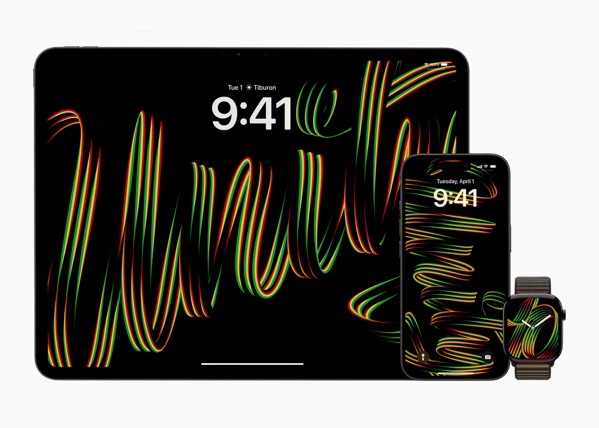
Apple’s 2025 Black Unity Collection Announced Amidst An Age Of Disunity

Timing is everything in this political circus Apple fans find themselves in.

What a planet we’ve landed on. It’s certainly a different one than a few months ago. Or is it? Apple Watch Black Unity Collection hero_big.jpg.large_2x. Today Apple announced its 2025 Black Unity collection including a new Apple Watch Band and watch face in addition to wallpapers to honor Black History Month. This has become an annual Apple tradition since 2021, and is typically met with some, but not large, fanfare given that it can be classified as an appeal to a specific segment of the market. That said, it has historically been one of Apple’s signature signals about where it’s cultural (some say woke) heart lies. But that landscape has changed a bit with the election of the new oligarchic, nakedly racist regime in the United States, and with Tim Cook’s decision to donate $1 million dollars to the inauguration and attend that knee bending ceremony. Cook’s decisions will cast shadows on any Apple announcements going forward, certainly those that historically Apple has painted as a part of its civic and human consciousness. Many Apple fans, I count myself among them, are asking tough questions of themselves and Apple. The questions are tough, everyone is touchy, and feelings are raw. As an example, The MacRumors article announcing Apple’s announcement this morning illustrates just how touchy an issue is. Take a look at the footnote to their article below. CleanShot 2025-01-27 at 08.19.33@2x.I’m not judging anyone for what had to be a tough editorial decision, but the decision to move the discussion thread to the Political News section of the MacRumors forum speaks to the moment. Timing is everything in life, with or without punch lines. Black History Month  is always in February and for those counting the bruises on Apple, unfortunately February follows an ugly inauguration month. In order for there to be a punch line though, you first need to have a joke, and sadly, we’re not in joking territory as we muddle our way through this. You can find more of my writings on a variety of topics on Medium at this link, including in the publications Ellemeno and Rome. I can also be found on social media under my name as above. 

Perhaps Tim Cook’s Severance Trailer Explains More Than Anyone Wants To Believe

You Can’t Sever This Away

A few months ago the Severance trailer featuring Tim Cook might have been received as an average, yet cute, piece of fluff marketing. Today it feels almost like a possible explanation for how some things have changed. 

 The entire premise behind Severance, being able to separate your work life from your real life, is indeed a fun bit of sci-fi story telling that I increasingly imagine the storytellers are going to have a hard time wrapping up into a successful conclusion.

Tim Cook’s recent decision to donate to the Trump inauguration certainly feels like he’s severed a part of himself from the carefully crafted persona he’s built for himself, and the reputation he built for Apple. Even, unlike some of his other tech company CEO compatriots, he made the donation out of his personal account, the understandable transactional decision has bruised Apple more than I think we might realize in this chaotic moment.

I say “understandable” because we’re in that world now. These transactional business/government relationships are no different than paying protection money to the guy who runs the neighborhood in order to keep the fruit stand open. It’s tough to bend the knee if both are broken.

Perhaps severing one’s self might make real life decisions with real life consequences easier to swallow or hide from. Or make work life more palatable. But that’s where the science fiction part of the story trails off. This is real life, and these are real people making these choices in the bright light of day. I’d say the markets will eventually give us a hint of an answer, but that’s not real life anymore either.

Time will tell how much of a blight Tim Cook infected Apple’s carefully cultivated orchard with. While many are disappointed and upset and rail about it online and in podcasts, the real question, and perhaps the cover Cook calculated upon, is that with every other tech CEO bending the knee, where else do Apple customers have to turn? And don’t say Linux. It still needs chips and hardware to run the software on. 

You can find more of my writings on a variety of topics on Medium at this link, including in the publications Ellemeno and Rome. I can also be found on social media under my name as above. 

Where’s Wanda? Is Worth A Watch

Good laughs to be had in this screwball black comedy.

Where’s Wanda on Apple TV+ is certainly worth a watch but it also begs the question my wife asked after we concluded viewing the first season, “where was the advertising and marketing for this show?”

Perhaps we missed whatever short marketing window Apple opened for the series, but it escaped our radar, and we only recently stumbled on it at the tail end of our queue by accident. Regardless, as I said, it’s worth a watch, especially if you’re in the mood for some good laughter.

Where’s Wanda? is a German language streaming series written by British writer Oliver Lansley, and directed by German director Zoltan Spirandelli. It was and is marketed as a black comedy, but I think black screwball comedy is more appropriate. Yes, there are subtitles. They also have some fun with that throughout.

The Wanda of the title is a young teenage girl gone missing and the plot ends up involving not only her family but their entire small town in searching for her. While the family drives the story, they guide us through enough of the town to be charmed and amused by the folks we meet with both recognition and surprise, as the plot evolves and involves more and more of the town in its mysteries.

The cast is uniformly excellent and I especially thought Heike Makatsch as the mother was superb. The moments between the younger cast members were some of the most engaging, hilarious, and touching scenes about the awkward moments in young people’s lives I’ve seen in a while. Where’s Wanda? gets silly, it gets serious, and it gets under your skin because of excellent work all around by the team that put it together.

You can find more of my writings on a variety of topics on Medium at this link, including in the publications Ellemeno and Rome. I can also be found on social media under my name as above. 

Apple’s 1984 Commercial Strikes A Different Chord 41 Years Later

Who is marching in lockstep now?

The legendary Apple 1984 commercial turns 41 today.

 The commercial, directed by Ridley Scott, has become as iconic as the computer and the company it advertised. Given everything going on in the world currently as we watch Tim Cook and other so-called leaders of the tech industry fall into lockstep with the new U.S. administration, the message has a much deeper and darker resonance than it did when it was just advertising a new computer. 

You can find more of my writings on a variety of topics on Medium at this link, including in the publications Ellemeno and Rome. I can also be found on social media under my name as above. 

Apple’s Latest Miscues Risk Damaging AI In The Same Way It Tarnished iCloud

Apple Intelligence Summaries Again Draw Fire

How many folks do you know who don’t trust iCloud? Or “The Cloud” in general? Quite a few, I would bet. When Apple rolled out iCloud in 2011, it offered, as all things do, a promise. Trying to move on from the problems associated with its previous troubled cloud service, MobileMe, it was a rebrand, a re-architecting, and a repeat of prior problems that missed the target and generated enough criticism to turn iCloud into a punch line for all jokes about “The Cloud.”

Shutterstock 598778588.

Apple has steadily improved iCloud (it still has issues), but not enough to remove that tarnish. The recent flap over summaries generated by Apple Intelligence threatens to do the same to that new brand, and quite frankly to the concept of Artificial Intelligence in general. Some might see that as a good thing, but that’s another issue for another day.

The issues with Apple Intelligence are compounding, largely due to mistakes of Apple’s own making in its rush to correct its way-too-late entry into a game it is losing. Overhyping the beta release as if it were a finished product certainly didn’t help. That investment in dollars essentially removed the excuse that mistakes can happen in betas. The “New Siri” remains delayed. And, like every AI release I’ve seen from other makers, once the initial shine wears off, the rough edges begin to show and cracks are revealed. I can’t count the number of users who claimed they’ve turned off most of Apple Intelligence features.

This latest flap deals with Apple Intelligence summaries. There have been legions of screenshots posted of humorous and not-so-humorous, inaccurate, confusing, and downright misleading summaries. The BBC has now twice called out Apple for misleading and inaccurate summaries. The most recent one named a darts player the winner of a competition before the match had even been played.

88895d30 c9d7 11ef 94cb 5f844ceb9e30.

Apple has now responded, reminding everyone about the beta status and that a future update will further clarify when the text being displayed is summarized by Apple Intelligence. In essence, a warning label.

Quite a few big dogs in the Apple influencer game have already barked, weighing in with possible suggestions and warnings. (See these links from John Gruber and Jason Snell.) There’s somewhat of a debate as to who should have ultimate control over whether or not users see summaries. Should developers be able to opt out of having notifications summarized from their apps, or should users have control by opting out of the feature? Either way, in my opinion, it points to essentially a defeat and also a larger problem.

First impressions matter. Screwing the pooch in a first impression typically leaves a mark.

Given what we already knew about AI hallucinations, mistakes, and problems before Apple belatedly and hurriedly entered the game, I don’t think anyone thought Apple would have solved that problem. Thus, the shield of announcing it as a beta. But the dollars spent on promoting it certainly didn’t offer enough prominent caveats to cut through the glitzy messaging. Apple Intelligence, beta or not, was the tentpole marketing feature. Heck, Apple’s announcements moved markets as if gold had been discovered.

Summaries are just one of many features that AI offers, Apple’s version and others. Arguments can be made that summaries are a good thing in a busy world, and also that they are completely unnecessary given that there is a level of mistrust that already existed pre-Apple Intelligence, that requires, almost demands, users to check the work generated by the AI before relying on it.

However Apple chooses to work its way out of this latest problem of its own making, its misplaced marketing miscues have called enough attention to Artificial Intelligence to make it a problem for that entire segment of the tech industry. What was a key selling feature is quickly becoming the butt of another joke.

If this was a game of darts, Apple’s shot would have not only missed the target but also missed the board.

You can find more of my writings on a variety of topics on Medium at this link, including in the publications Ellemeno and Rome. I can also be found on social media under my name as above.