Living in the Past with Apple Music Replay

Musical time warps

I listen to music but I’m not a voracious listener like some are. Fact is, I spend most of my listening time with podcasts and audio books. Nevertheless, it is interesting to see what music I did spend my time listening to. Apple Music, like other music services, offers a feature to summarize what tunes you’ve tuned into over the year called Apple Music Replay.

CleanShot 2025-12-02 at 08.48.09@2x.

Given all that’s going on in the U.S currently I shouldn’t find it surprising that I spent most of my time reliving parts of my youth that were just as tumultuous as our present, revisiting a lot of Crosby, Stills, Nash and Young and The Grateful Dead as well as the musical Girl From the North Country that features the music of Bob Dylan. (I spent considerably more time with that selection last year.)

It’s also interesting to me that when I do listen to music I do so through a couple of very eclectic playlists that range over quite a few genres. I never see that reflected in these generated mixes, only artists or albums I’ve selected specifically, which tells me these lists are mostly made up from selections you’re searching for. Perhaps that explains why when I ask Siri to cue up a playlist it fails as much as it succeeds. But then again, most of those playlists contain mostly music from my past, more than contemporary selections.

Seems to me, we could all do with a little more music these days that is speaking directly to these days.

You can also find more of my writings on a variety of topics on Medium at this link, including in the publications Ellemeno and Rome. I can also be found on social media under my name as above.

Alan Dye Leaving Apple For Meta

Ch..ch…changes…

Changes keep happening in the circular halls of Cupertino. The latest, as reported by Bloomberg’s Mark Gurman, is that Alan Dye, the vice president of Human Interface Design who gave us Liquid Glass and the Vision Pro interface, is leaving Apple to head up Meta’s design team responsible for hardware and software for all of Meta’s offerings.

Dye 1764792626278.

Longtime designer at Apple, Steve Lemay will take over Dye’s responsibility at Apple.

According to Bloomberg:

With the Dye hire, Meta is creating a new design studio and putting him in charge of design for hardware, software and AI integration for its interfaces.

He will be reporting to Chief Technology Officer Andrew Bosworth, who oversees Reality Labs. That group is tasked with developing wearable devices, such as smart glasses and virtual reality headsets.

Dye’s major focus will be revamping Meta’s consumer devices with artificial intelligence features. He will serve as chief design officer for the group starting Dec. 31.

Dye follows other recent Apple departures including Jeff Williams and John Giannandrea amid speculation about Tim Cook’s possible departure as CEO. Apple has also seen other departures of some of its design talent over the last few years.

You don’t need a looking glass, liquid or otherwise, to know that these personnel changes perhaps presage different thinking on the horizon for Apple’s product lines.

Frankly, I think we’re all looking forward to some change ahead.

Addendum: John Gruber’s after the news broke post on this provides some interesting Gruber-esque context. I’m certainly no where close to being connected to anyone on anything I write about Apple and how I use its products, but there’s quite a bit in Gruber’s post that strikes me as how I’ve felt about Apple design recently.

You can also find more of my writings on a variety of topics on Medium at this link, including in the publications Ellemeno and Rome. I can also be found on social media under my name as above.

Apple’s I’m Not Remarkable Ad Is More Than Remarkable

More of this please

Every now and then a company gets it right and this is one of those times. Apple got it right this time, releasing a new ad, I’m Not Remarkable. It’s REMARKABLE. 

CleanShot 2025-12-02 at 09.42.01@2x.

Highlighting Apple’s accessibility features for its product the ad features an astounding number of challenged young folks singing, dancing, and of course using Apple products, demonstrating how this young people live and work their daily lives through college. The message is bang on. The production is astoundingly good. Watching the ad is thrilling, and I also suggest you visit Apple’s website that contains the transcript of the ad. 

More of this please. 

I’m hoping Apple releases a “making of” video of this ad. If they do I’ll update this post accordingly. Meanwhile you can watch the ad below.

You can also find more of my writings on a variety of topics on Medium at this link, including in the publications Ellemeno and Rome. I can also be found on social media under my name as above.

Apple Features Puppet Forest Critters In Christmas Ad

The making of video is actually a better advertisement

Apple has released its annual Christmas ad, this one called A Critter Carol and featuring a puppet potpourri of forest creatures singing about friendship in a sort of weird twist that combines the spirt of being friends along with lyrics about roadkill and being hunted. Oh, it also highlights the new iPhone 17 Pro. 

 Intriguingly I find the behind the scenes video of the making of the ad is actually a better advertisement for the iPhone, than the finished product. It also highlights the puppeteers and their art and craftsmanship.

Thieves Get Picky And Only Want iPhones

Picky pickpockets

I find this story funny. I shouldn’t. But I do.

Shutterstock 1675274494.

Apparently thieves are picky when it comes to the smartphones they steal. According to this report in London Centric:

The thieves took Sam’s phone, his camera and even the beanie hat off his head. After checking Sam had nothing else on him, they started to run off.

What happened next was a surprise. With most of the gang already heading down the Old Kent Road, one turned around and handed Sam back his Android phone.

The thief bluntly told him why: “Don’t want no Samsung.”

As I said, I shouldn’t find anyone who finds themselves in this sort of misfortune funny. The victims. Not the thieves, obviously.

Discerning criminals are all about the resale value apparently. Which, if all of the analysts and fanboys get smart about it, might be a new metric to score the ridiculous game of which smartphones are better than another.

(Image from Donenko Okeksli on Shutterstock)

You can also find more of my writings on a variety of topics on Medium at this link, including in the publications Ellemeno and Rome. I can also be found on social media under my name as above.

macOS 26.1 Seems To Have Fixed the iconservicesagent Memory Leak

A bug fix. But who did the fixing?

A little follow up.

A few weeks back before Apple released the non-beta version of macOS 26.1 I wrote up some observations about macOS 26. One of those observations was about memory leaks.

Cleanshot 2025 10 17 at 09.35.13402x.

I cited one example I was seeing frequently with iconservicesagent, a process that the system uses to read and generate icon images. When it goes awry because of a corrupted icon or corrupted icon cache then the memory leak occurs. You can kill the process and it will restart, but that wasn’t fixing the problem and the memory leak would reoccur.

Tracking down what might be a corrupted icon is beyond my skill level, so I was hoping this was a bug that would eventually get fixed by Apple, or an app developer who might clean up an errant icon.

Apparently that happened because I haven’t seen the memory leak reoccur since installing macOS26.1. Of course quite a few apps have updated in the meantime as well. So, there’s no way for me to really know whether the fix was on Apple’s end or an app developer’s without doing some digging I don’t have time for. Nor would most users.

Keep in mind, Apple created an entirely new method for developers to build icons this year. Some developers have used the new Icon Composer already, some have not. It’s caused a few developer headaches, especially for app developers who offer multiple icon choices as a part of their app and general disgruntlement with the icons Apple itself has released. Note Apple hasn’t as of yet updated all of its own icons.

I’m glad the bug has been fixed. Whether the fault was on Apple’s end or a developer’s it points to the catch up that Apple has to do to solidify things in macOS 26 Tahoe with app developers having to follow behind as it does so. We’ll see how many other bugs get quashed in the months ahead with macOS 26.2 presumably coming sometime before the end of the year and successive  point releases following in the first half of the next year.

You can also find more of my writings on a variety of topics on Medium at this link, including in the publications Ellemeno and Rome. I can also be found on social media under my name as above.

Sunday Morning Reading

Small acts

It’s only business they say. Nothing personal. That’s the way the world works. Well, what I share each week in Sunday Morning Reading always comes from a place of personal interest. That may not be how the world works, but it works for me and I hope it does for you. Call it a small act.

Ganesh narayanan SU3zvkxttrE unsplash.

In the wake of the continuing and confounding ICE occupation of Chicago comes a terrific piece by Kyle Kingsbury called I Want You To Understand Chicago.

Follow that up with a ProPublica piece by Melissa Sanches, Jodi S. Cohen, T. Christian Miller, Sebastian Rotella and Mariam Elba about the nighttime raid on a Chicago apartment building that featured men rappelling from Black Hawk helicopters, and all of the residents emptied on to the streets with many of their belongings. The punchline is in the article’s title, “I Lost Everything”; Venezuelans Were Rounded Up In A Dramatic Midnight Raid But Never Charged With A Crime. 

A Nation of Heroes, A Senate Of Cowards by Will Bunch calls it like it is and much the way I see things after last weekend’s actions in the U.S. Senate.

Growing up, I never understood the cliché, “it’s nothing personal, it’s only business.” Frankly I still don’t. It excuses too much that I find wrong about the way the world works. Charles Broskoski examines the personal side in Personal Business.

And speaking of the way the world works (or doesn’t) in the midst of the Epstein fever I don’t think we’ll ever shake, Sarah Lyons points out that the violence in his and others’ actions is something we all live with in This Is How The World Works. It shouldn’t be.

Corbin Trent says We Didn’t Kill American Manufacturing—We Let It Die. He’s spot on.

Mark Jacob tells us How News Coverage Eases Us Into Tyranny.  However this saga we’re living through ends up, one thing is for certain. The media has killed any chance of returning to what it once was.

Hardly a day goes by that we don’t read of some nefarious business practice spilling out of Mark Zuckerberg’s Meta. Turns out Meta is knowingly leeching off of scammers to the tune of about 10 percent of its revenue. I guess that makes Meta and Zuckerberg a scammer too. Cath Virginia has the writeup with Meta Must Rein In Scammers — Or Face Consequences. I doubt they will.

The Internet Archive is under attack in the same way libraries, media organizations, and text book publishing is. It shouldn’t be. Mathew Ingram has the lowdown in The Internet Archive Should Be Protected Not Attacked.

On a more positive note, Jeff Veen tells us how Small Acts Build Great Cultures. Boy, do we need lots of small acts these days.

To close out, did you ever wonder where collective nouns like “a watch of nightingales” or “an ostentation of peacocks” come from? For many years it was assumed that the anonymous author of this collection of collective nouns was the work of a “gentleman of excellent gifts” written down in one of the first books printed after the invention of The Gutenberg Press, The Book of Hawking, Hunting, and Blazing of Arms. Turns out the author was a woman named Juliana Barnes. Maria Popova has the story in A Parliament of Owls And A Murder Of Crows: How Groups Of Birds Got Their Names, With Wondrous Vintage Illustrations By Brian Wordsmith. 

(Image form Ganesh Narahanan on Unsplash)

If you’re interested in just what the heck Sunday Morning Reading is all about you can read more about the origins of Sunday Morning Reading here. If you’d like more click on the Sunday Morning Reading link in the category column to check out what’s been shared on Sunday’s past. You can also find more of my writings on Medium at this link, including in the publications Ellemeno and Rome.
Apple Peelings

Like it or not, Apple locks us all into perpetual betas

A concerned reader asked me a question the other day. She wondered why I always seem so down on Apple even though I use lots of Apple gear.

Shutterstock 2366050051.

I have many reasons to be down on Apple. I’m not fond of how Tim Cook has sucked up to the Trump regime. I think Apple’s monopolistic policies harm developers and users alike. I think Apple can’t live up to the pace it has put themselves and us on. Apple’s “It just works” mantra long ago faded into the dustbin of history the same way Google’s “Do no evil” did.

That last one is the one that gets me riled up the most.

Things don’t “just work” anymore. They work sometimes. Sometimes they don’t. Sometimes after working for a while they just stop. Sometimes they return to working. Sometimes not. I chalk this up to the fact that every Apple user is essentially running beta software whether or not they have opted into betas. (I don’t run betas.) As I’ve stated here often, when beta software arrives for beta users on their devices, beta software is also being introduced behind the scenes on Apple’s servers. Beta users expect there to be issues. That’s the price of admission. Non-beta users do not. And in my view, they shouldn’t be exposed to those same “take your chances” experiences.

Most users aren’t aware of this and some of the signals that are easily missed are so common place that they are easily ignored.  For example, if you use an Apple Watch to log in to a Mac, every now and then you’ll see a message on your Mac that you have to sign in with your password to make that Apple Watch feature work again. Typically, that happens around the time Apple releases a new beta version. Or you may see that a notification that a device you’ve owned for quite some time has suddenly signed on as a new device to your iCloud account as a new device.

Things get muddier still as most Apple coverage is about what’s happening with each new beta and ignores the problems that backend issues may cause for non-beta users. At least I rarely see it and I try to stay current. Apple coverage is also spending as much time looking to the future as it does the current moment. That begs the question, are we just bored with the present and if so, why?

Apple is on what seems to me like a far too haphazard and perhaps reckless pace of advancing software development that is leaving users and developers playing catch up, while it does the same. It’s one thing to play catch up, it’s another to play catch up when you’re adding new features into the mix at the same time. I get it. The pace of tech, fed by the AI bubble/boom/bombast is forcing everyone into a high stakes race. But it sure isn’t taking care of the potholes on the racetrack.

The last few years there’s been a period in the spring each year where things have settled down somewhat before they start ramping up again for the next year’s betas to be released at Apple’s WWDC. That typically comes after a .3 or .4 release of that year’s current operating system. That’s typically in the Spring and often feels like a breath of fresh air. I like the Spring. I also like the Fall, but while I eagerly look forward to the leaves changing color, I approach Apple’s annual Fall operating system releases more and more with trepidation knowing that some of the Summer’s beta issues will continue as we head into Winter.

A big part of this in my opinion is Apple’s fortunate position of taking a long view in its hardware and software development. Apple may be working several generations ahead of whatever they are selling at the moment, but I don’t believe they are paying enough attention to what’s happening in the moment the majority of its users are living.

But, back to that original question. After some of the bigger issues I mentioned earlier became prominent enough to make me question my use of Apple products I did some looking around and some self examination. Given that I support a number of folks who use Apple products as well as products from other makers it was easy enough to do. The simple sum that all added up to is that Apple’s hardware is, in my opinion, the best of what’s on the market, and no one else has come up with software solutions any more reliable than Apple at the moment. I chalk that up to the AI rat race that feels more and more likely to keep companies and users frustrated for sometime to come while everyone chases promises that more than likely won’t pan out they way they were sold.

Sure, I could try to work my older geek muscles back into shape and chuck it all and buy cheaper equipment to run Linux, etc…and that has had some romantic appeal. But in the end, I am no longer that romantic and will admit to the compromise that I need something that works reliably most of the time, if not all of the time.

The fact that I felt very uncomfortable typing the phrase “most of the time” in that previous sentence is I guess the best answer to the user question I opened this post with.

In a different context, but to the same point, since I pay for the hardware and the services I use, I feel I have every right to complain when something doesn’t work reliably or as advertised. It’s no different than complaining to my grocer or my auto mechanic when they don’t live up to service I initially signed on for. Sad to say, my realization is that it’s easier to change grocers or auto shops if things don’t change for the better. And that’s the compromise I’ve let Apple (and the rest of the tech sector) force me into.

I write about my experiences mostly. I don’t regurgitate Apple’s PR for clicks and then comment how problematic something might be on a podcast down the road when something new is rolling out. If I’m having a bad experience I’m betting others are too. So, I share what’s at my fingertips, on my screen, and occasionally running rampant in a memory leak.

(Image from zebronit on Shutterstock)

You can also find more of my writings on a variety of topics on Medium at this link, including in the publications Ellemeno and Rome. I can also be found on social media under my name as above.
Smartphone Makers Need To Make Delete and Report Spam Buttons A Priority

Time to end the phone spam game

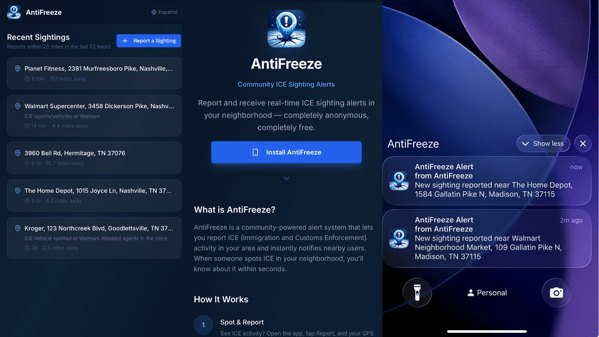
I’ve written about the changes Apple made to the Phone app before. I’m writing about it again. Apple, other smartphone makers, and the telecommunications companies need to make detecting and deleting spam calls and texts more of a priority. Yes, there’s been some progress but to call it incremental is to insult the idea of incrementalism.

Apple now sends unwanted calls to a sort of purgatory. If they’ve been already identified as spam you may never see them thanks to the new features, unless you check for them. If it’s a new phone call you will have the opportunity to banish it yourself.

It’s an improvement, but it still takes too much effort.

For example if you receive an unwanted call, you see this screen:

New Shareshot.

Unless you know to hit the delete button or to slide the number to the left for more options the design of the screen offers you only the two options, Delete and Mark as Known. Nothing on the screen gives you any indication on how to mark or delete the call as spam.

Tapping on the Delete button gives you the following options

New Shareshot.

Swiping to the left reveals the following icons with the orange one giving you the option to block the number.

New Shareshot.

My suggestion would be to design that first screen so deleting and blocking spam calls was a first page priority instead of having to make an additional tap or swipe to get rid of the number. If you asked me, in an age when spam calls are so prevalent I’d put a Block and Report screen on the main screen when a call comes in.

I also wonder why if I delete, block, and report a number as spam the number hangs around in a list, forcing me to use an edit function to actually get them off my phone. It feels very email like, reminiscent of having to check your spam folder if you think you haven’t received a message. But in these cases, the number as already been identified as such.

New Screenshot.

Apple has shown that it wants to help with the improvements I wrote about in an earlier post. Apple and other smartphone makers need to go further in helping us rid our phones of these unwanted annoyances.

Of course the telecommunications companies can do better here too. Spam filtering uses databases they maintain of phone numbers reported as spam. All well and good. But if you’ve already identified them as a spammer, don’t let the number make the call or send the text in the first place.

You can also find more of my writings on a variety of topics on Medium at this link, including in the publications Ellemeno and Rome. I can also be found on social media under my name as above.

Slide Over In iPadOS 26.1 Returns Just In Time

Glad to have this multi-tasking tool back.

Since I don’t run betas on any of my devices, I’ve been somewhat anxiously waiting for the release of iPadOS 26.1 which returns the Slide Over multi-tasking feature to the iPad. It got here just in the nick of time.

iPad OS 26.1 arrived yesterday afternoon, about 2 hours before rehearsal began and I quickly set things up for the evening’s rehearsal, using Notes in Slide Over to quickly jot down notes as rehearsal went along.

I use an 11 inch iPad Pro in my theatre work as my primary device. It contains the script I’m working on and ever since Slide Over was available I would use that multi-tasking feature to keep one or more apps tucked away for quick access conducting rehearsals.

New Shareshot.

I do question why Apple only allows one app in this returning version as opposed to multiple apps as it did before. It was always handy to keep multiple apps available throughout rehearsal, given that I prefer to have my script open full screen on the 11 inch iPad Pro.

As a side note, I’m not a fan of the Liquid Glass border around the window in Slide Over. It waists screen real estate, almost begging you to look at the feature. Even switching Liquid Glass to the new Tinted version, now also available in iOS 26, doesn’t erase or lessen that border or its distracting impact.

CleanShot 2025-11-04 at 11.37.09 2@2x.

In fact, setting the border aside, switching back and forth I don’t really see any significant difference in the apps I’m currently using between the Clear and Tinted versions of Liquid Glass. I won’t call that a complaint, but I will say it might all be much ado about nothing. At least on the iPad.

You can also find more of my writings on a variety of topics on Medium at this link, including in the publications Ellemeno and Rome. I can also be found on social media under my name as above.