Out With The Old, In With The New: Annual Tech Chores To Begin A New Year

Digital Housekeeping Chores To Start The New Year

Everyone has rituals they follow around the turning of the New Year. For some it’s making resolutions. For some it’s breaking them. Among other household chores and family obligations, those chores include doing some tech cleanup, archiving, and discarding some of the digital detritus that has accumulated over the last year.

Shutterstock 1153859410. https://www.shutterstock.com/g/apops

 I’ll be paying closer attention to cleaning things up during this year’s ritual as I anticipate moving from the M1 iMac 24 I currently own to the M4 version sometime in the first quarter. My iMac is the center of my computing tasks. External storage that I use throughout the year hangs off of that, it’s the one device I use where I don’t Optimize Photo Storage, and I download some, not all, of my music there as well. I can easily fill up 750GB of 1TB of SSD disk space throughout the course of a year, sometimes more.

That external storage contains ongoing archives and backups, as well as ripped (legally) videos I maintain that I can access on other devices, such as the Apple TV at or iPad via the app Infuse. I’m still old fashioned enough in my work habits that if I’m working on a project I keep its files local, even though I may routinely back them up to the cloud so I have access to them if I’m on the road. 

Below are some things I do in the week following the turn of the new year.

Clean Up Photos

I take a lot of photos throughout the year, mostly just for fun. Typically I’ll take multiples of the same shot, especially of my grandkids. That means there are a lot of duplicates. I’ll get rid of most of those via manual examination. That happens on my iMac. I don’t quite trust Apple’s deduping process, but I may give that a go this year. 

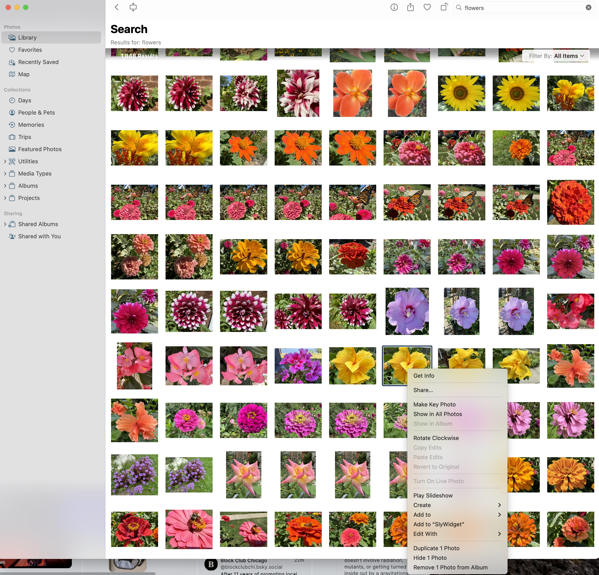
This year Apple vastly improved its search capability in Photos and I find it works quite well. Unfortunately though it delivers the results to what I assume is a “smart album.” Regardless, the problem with that is that you can’t delete a photo or series of photos from that result unless you first enlarge each photo and delete each one directly. You can remove one or multiple photos from the album created, but I would think that possibly changes whatever algorithm Apple is using to group these photos. 

As you can see in the image below I take lots of pictures of flowers.

While there are direct duplicates, there are others when I vary the shot slightly enough that it’s not an exact duplicate so any dedupe tool won’t work. Being able to delete those I don’t want from that search result would be a terrific time saver. 

Clean Up Videos

With two young grandkids we take a lot of videos. Most of the family uses iPhones so much of what’s taken and shared gets stored in Photos. I’ll go through the videos accumulated there throughout the year and put them on external storage that stays attached to my iMac so as to somewhat reduce the size of my Photo library before it inevitably expands again during the next year. That also allows me to store them alongside the videos from non iPhone family members of nieces and nephews. You never know when you’ll need one of those childhood videos to embarrass a younger relative in front of their significant other in the future. 

Change Passwords

Passwords are necessities in our digital lives, though there’s hope that Passkeys will take a firmer hold going forward. That hasn’t happened with many of the websites I use routinely yet and I wish it would. I do change passwords at the beginning of every year as a routine, one I’d love to not have to do. Of course I change various passwords throughout the year as well, which leads to me deleting some that have accumulated throughout the year.

Since I still rely on far too many passwords, I continue to use One Password for password storage, but I am increasingly transitioning to Apple’s new Passwords app. Of course that means I’ve increased my task load of changing passwords this year to make sure what’s stored is properly reconciled between the two apps.

Archive Files 

Each year there are always projects I complete and don’t need to have immediate access for those files and assets. I’ll clean up my day-to-day working environment by archiving those files both in the cloud and on local external storage media. 

For local storage it’s a multi-year process. I’ll archive files to attached external storage so I can easily retrieve things if the need arises during the next year or so. Once a series of project files have aged two-years I’ll move them to local storage on a drive that is then archived and stored away separately. At some point I’ll have to think about getting rid of some of those older archives on older drives, but I haven’t felt the need (or discovered the patience) to reexamine and accomplish that chore. 

For digital archiving I primarily use Dropbox, but I won’t sync those archived files and folders to my desktop going forward. I can always go and fetch them if needed. I’m a little more rigorous with that digital archive in that I examine it for files I can delete every year, and typically delete a good portion of those remaining digital archives two years after a project is completed. 

Delete Apps I’m No Longer Using

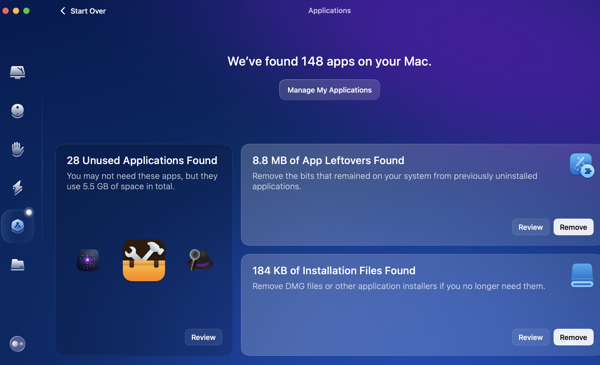
My pace of downloading apps has slowed down quite a bit, primarily because I seem to think I have most of the tools I need already. That doesn’t mean I won’t try out a new apps each year. A few will stick, but most don’t. I’ll delete those during this digital housekeeping phase. I use Clean My Mac and it provides a good utility for telling me how long it’s been since I’ve used an app, along with the other tools it includes in its suite of utilities. 

In App Archiving

I use several apps to collect webpages and articles to read later. The two I primarily use are Goodlinks and Instapaper. I used to use Pocket quite a bit for this, but its owner, Mozilla, has essentially ruined that app for me.  I’ll go through and delete any articles or links that I’m not interested in keeping and archive those I do want to keep. Instapaper provides a handy archive function. I use tags in Goodlinks to organize what I want to hang on to and a folder structure in Instapaper for things I want to keep quicker access to. 

Cancel Subscriptions

Typically I’m pretty on top of things throughout the year regarding the subscriptions I use for apps and services. Even so, I still take an inventory at the beginning of each year. While that rarely leads to a cancellation at that point, it does put me on notice to see if I think a subscription will be worth continuing as the year goes on. I’ll set reminders 10 days before a subscription is due to be renewed and if it hasn’t provided value since the beginning of the year I’ll make sure to cancel or not renew at that point. 

Clean Up Contacts

I have to admit I’ve gotten lazy here. I blame Auto-Complete in email and messaging clients, even though they are not always 100% accurate. I’ll still do a quick once through, but I’m afraid my reliance on Auto-Complete in this area has not only made me lazy, but might make me recoil at what I see if I ever had to get serious about this again.

Clean Up Cables

I don’t routinely change cables for the sake of changing them and I am not one of those in a rush to replace the few devices requiring Lightning connectors with newer USB versions. It’ll happen when it happens. But I do check out what I’ve got plugged in and cabled to to make sure everything looks in good working order and to take an inventory on whether or not I need to keep an eye out for deals on any cables I think might need replacing throughout the year. Throughout the last two years I’ve eliminated a lot of cable clutter around my desk by using MagSafe chargers. 

Check UPS Status

I review the warranties for the Uninterruptible Power Supplies (UPS) that I use to gauge if any look like they might need to be replaced during the coming year. 

Printer Check

We use an Epson ET-2760 EcoTank printer and have for a couple of years now. Our printing needs continue to diminish, but they do come in spurts, and we haven’t ordered ink since we bought the thing. Once a month I’ll check the ink supply and print a few things to make sure everything stays in good working order, but I’ll do a through maintenance check using the printer’s on device tools at the beginning of each year regardless. 

Roomba Maintenance

This is a relatively new one. We use a Roomba and it’s now become a part of our Christmas ritual that I give my wife a parts replacement kit that contains filters and brushes as a gift. Not sexy I know, but we both have routine gifts we exchange in a similar fashion. 

You can find more of my writings on a variety of topics on Medium at this link, including in the publications Ellemeno and Rome. I can also be found on social media under my name as above. 

Happy New Year!

Out with the old and in with the new.

Happy New Year!

Let’s hope it’s better than the last one. But we’ve been saying that for almost a decade now without much to show for it. So drink up and buckle up.

You can find more of my writings on a variety of topics on Medium at this link, including in the publications Ellemeno and Rome. I can also be found on social media under my name as above. 

My Picks of the Year for 2024

Complex pieces, whether successful or not, dominate my end of year list for 2024

2024 was a complex year on many fronts in my life. We moved. Politics and culture seemed to daily turn the world upside down and inside out. And for some reason the movies, TV, and books I enjoyed the most were, while not necessarily the top of class, very complex.

I certainly didn’t see or consume everything during the year. Heading into the holiday movie release schedule I found myself thinking it had been a better year for streaming TV than it had for movies. I think that still holds. Some titles may have been released prior to 2024, but they didn’t cross my radar until this year soon to pass, so they get included.

For the record I don’t believe in “Best of.” As I continue to say, there’s too much good being created by too many good (and some not so good) folks out there, that I pick what attracts and holds my attention.

This year that leaned towards complex pieces that may or may not have been utterly successful. There’s also just some well done entertainment. There is still lots of mediocrity out there, but here’s the complex cream that rose to the top of my list. If I wrote something about the titles, there will be a link.

Movies

Streaming TV

Other Video

I’m not sure where to put YouTube videos on this list, but this presentation of Ubu and The Truth Commission by the Handspring Puppet Company was high on my list of favorite viewing this year.

Books

  • James by Percival Everett
  • The Mighty Red by Louise Erdrich
  • Tyranny by Timothy Snyder
  • On Freedom by Timothy Snyder
  • The Freaks Came Out To Write by Tricia Romano
  • Infinite Detail by by Tim Maughan

Apps

Either I’m slowing down or software App development is. There’s only one new App that landed on my devices that I would recommend:

  • Croissant. A social media cross-posting app by Ben McCarthy and Aaron Veigh. It’s still got some quirks, but it is handy enough that I use it frequently hoping they’ll work the kinks out.

Have a Happy New Year!

You can find more of my writings on a variety of topics on Medium at this link, including in the publications Ellemeno and Rome. I can also be found on social media under my name as above. 

My Year With Apple: A Mixed Fruit Basket

It’s been quite a year toiling in Apple’s orchard.

For those who know me, they are familiar with my use of Apple products. Typically when I pick up a new piece of Apple gear I’ll write a review after using it for a few weeks. I didn’t do that this year. Part of the reason for that is Apple’s possibly panicky piecemeal rollout of iOS and macOS, which in many ways also changes the game for some of the new hardware releases. So to lay out my thinking I’ll post my thoughts here on the new Apple hardware I picked up along the way this year, as well as the still unfinished operating system releases.

PXL 20241230 172543463.

The Hardware

I’ll tackle the hardware first as that’s the least complicated. This year I acquired an 11 inch iPad Pro M4, and iPad mini, and iPhone 16 Pro and an Apple Watch series 10. Unlike many in the tech and gadget geek community I’m personally in a place where the lack of significant form factor changes to each new hardware version isn’t a detriment, it’s a bonus.

Essentially, each of those devices I acquired required no new learning curve. Set them up out of the box and I was back and operating the way I was before trading in the previous versions.

Yes, each is snappier, but that’s always expected. The iPads sport newer M-series chips, but with an exception or two they are essentially the same as the previous models. Some find that boring. I do not. Quite honestly, I actually prefer it this way. I “upgrade” my hardware when there is a new release and I move on. In the case of the two iPads that cycle isn’t an annual one, so it works for me and my budget.

Here’s a rundown on what is actually new that I do and don’t appreciate. (Notice I’m leaving the iPhone 16 Pro until the end.)

iPad Pro M4 (11 inch)

PXL 20241230 172903105.

 The upgrade to the display to what Apple calls Ultra Retina XDR is a clear improvement that I notice daily and very much appreciate. Beyond that marketing moniker, Apple says the “groundbreaking tandem OLED technology” is, well, groundbreaking. In my use, I will say it’s simply gorgeous to look at.

The other big change is the iPad Pro is thinner. It’s noticeable, but when I’m using the device for work it’s in a case for protection so the benefit there is often negligible for me. I do notice it when I use it with the Magic Keyboard and lift it off of that accessory to read or watch while relaxing on the sofa or in bed.

Speaking of the Magic Keyboard, I will say the newer version feels like a more significant upgrade physically than does the iPad Pro it is meant as an accessory for. It is sleeker and lighter, and I much prefer the stability of the aluminum construction to the previous model.

iPad mini

PXL 20241230 173113624.

The iPad mini is my travel device on short trips and reading device at home. While I occasionally alternate it with the iPad Pro there is no discernible difference in how I use either device, other than viewing entertainment on the iPad Pro’s screen.

The newer version brings the M-series to the iPad mini for the first time with the A17 Pro chip, and the difference in performance is notable but not overwhelmingly so. Beyond that, there’s not much else new in the hardware to speak of. Apple updates the iPad mini lineup less frequently than its other iPads, so I’m sure this one will more than suffice until the next update a few years down the road.

Apple Watch Series 10

PXL 20241230 173306742.

The most significant upgrade to the Apple Watch hardware here is a slight increase in the size of the device that allows for an even slightly larger display, alongside of a size reduction in the depth of the body of the watch itself. Both are notable, but not really significant in how the series 10 feels on my wrist as compared to the Series 9.

I’m veering into software a bit here to say that upon release, the Series 10 had much less battery life than the Series 9. We’re now currently on watchOS 11.2 and the battery life seems to have improved, getting closer to expectations. But there are still mornings when I’m puzzled as battery life will drop significantly in the first few hours after I wake up.

I’m puzzled because when I’d see the battery life drop quickly in the morning, I’ll slap the Apple Watch on its charger for a bit and then I will see expected battery life throughout the day.

I don’t take advantage of the overnight sleep and health tracking features and my watch normally sits on a charger overnight, so I don’t know what effect that might or might not have. I do run a couple of third party apps that track medical data during daylight hours and that may be a part of the battery life discrepancies and my comparison to the previous version.

iPhone 16 Pro

PXL 20241230 173421049.

Apple’s cash cow, the iPhone, is also the prime example of the paradox Apple finds itself in. You can argue, and I have, that we reached peak smartphone design a while ago. That’s evident not only with Apple but also with other companies continuing to search for something, anything to make their smartphones appear new and fresh, in parallel with the search for the next big thing that might eventually replace the smartphone. Searches that have so far been fruitless.

With the exception of the annual chip evolution and newer camera technology nothing much of substance has changed in smartphone hardware recently. Yes, there have been attempts with folding smartphones and new buttons but the core value of the hardware remains the same.

I get it. Apple has to serve multiple masters: customers, the easily distracted tech press, shareholders and the markets. Sales numbers always go up when there is a major hardware change. The siren song for something new in hardware is real, loud, and I think ultimately somewhat defeating.

The perfect example is the big new thing on the iPhone 16 Pro: the Camera Control button.
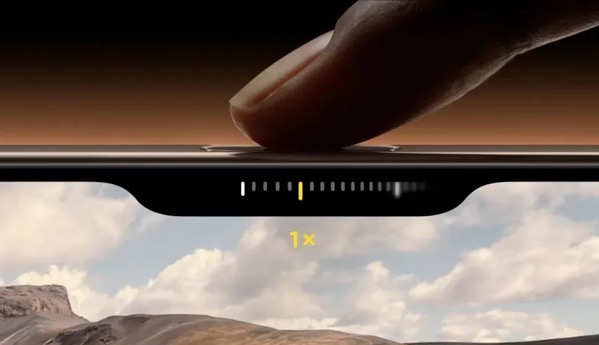
IPhone 16 Camera Control Button 1000x576.

This looked enticing (shiny new things always do), but I just don’t find it useful. It’s too finicky and fiddly to be of use. I’ve worked hard to use it, but I find it distracting when the act of taking a photo should be instinctive. Beyond that fiiddliness, anything the functions of the camera control button offer I can do later with software and not miss the shot I’m trying to take.

Perhaps there are features to come for the Camera Control function. Apple actually added one with iOS 18.2, allowing users to press and hold on an object and then search for info on what the camera captures. But again, we’ve been able to do this through other software for some time now.

AirPods Pro 2

I didn’t purchase new AirPods this year, but the new Head Gestures feature of nodding or shaking your head to dismiss or respond to a notification is a winner. The rolling, gurgling, burbling sounds are a bit much at times, but I find I really like this feature.

Software

As I was writing most of the above about hardware I noticed myself veering into talking about software changes that impact the hardware. The obvious reason for that is that Apple makes the entire widget and functionally it’s becoming harder and harder to distinguish where success reigns and failure begins.

This year’s software releases of iOS and macOS do contain new features, but the big tent pole is Apple Intelligence. That’s a tent that is far from being fully erected and, in my opinion, not ready for the paying public.

Apple Intelligence
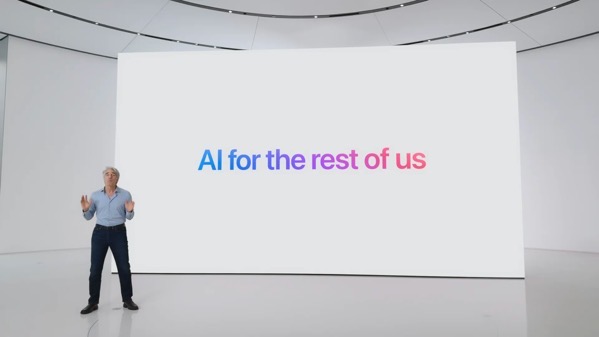
97686290 157a 4cf4 a2d1 e7c87303c1bc_1920x1080.In my use, Apple Intelligence so far is nothing more than a curiosity. On the one hand, advertised as the next big thing, on the other still labeled a beta. Yes, it’s well known Apple is playing catch up, but given how fast anything in the AI market evolves (or doesn’t), I’m not sure there will ever be a race with a destination, much less a finish line. That’s not just true for Apple, but for all the players in this game.

If I had to rate Apple Intelligence at this point I’d say it’s not worth all of the mis-placed marketing dollars Apple is spending. In fact, it is precariously close to feeling like a shell game. I’ve tried all of the currently offered features and don’t really see any at the moment that will be of continued use for me going forward.

Notification Summaries are sometimes worth a laugh, but currently not worth the candle when I try to decipher the mixed messages. I’ve stopped taking screenshots of them, because they are too numerous to collect. If I have to click a second time for understanding, what’s the point?

Summaries of web pages at the moment seems to be a feature not well implemented. I rarely see anything beyond the title when I do look.

Genmoji and Image Playground have no value to me whatsoever. (I’ve never been that big on the whole Emoji thing as I prefer language to hieroglyphics. That used to be a distinction demonstrating society was advancing.) If I want some generative AI to create an image there are much better tools around. Apple’s Writing Tools don’t have any real value for me either.

As for the changes with Siri, there’s no way to judge currently, because what’s there is not what I think we might see someday either in a galaxy far, far away or in a Kubrick film of the last century.

If the point of the Apple Intelligence rollout was to please the markets and shareholders, their “meh” reactions after this piecemeal rollout demonstrate they are even dumber than I thought, or care less than Apple thought they would. Apple seems to have successfully silenced the “Can Apple do AI?” doubters with its smoke and mirror show, but smoke eventually fades and just stinks up your clothes.

I can only base my thoughts on its usefulness on my own experiences, but I’d rate Apple Intelligence as less than “meh.”. If this is “AI For The Rest of Us,” it doesn’t feel much like Apple understands us or AI.

I guess the question becomes if we’re always on the cusp of something new and promising, then why not slow things down and focus on getting it accomplished instead of being slave to an annual release cycle? Certainly it seems that it is proving more and more burdensome. Rumors that iOS 19 might have problems meeting deadlines while Apple continues hammering on Apple Intelligence features for iOS 18 might just be rumors, but I would bet there are more than a few sparks smoldering under that smoke.

iOS 18 and macOS Sequoia Other Features

That said there are some other improvements in iOS 18 and macOS Sequoia worth mentioning. I’m going to talk about those in combination, because new features increasingly blend across device platforms via Continuity. Speaking of, I’m glad I finally got my Continuity headaches solved in 2024. Though it took an intervention from Craig Federighi.

iPhone Mirroring

The new iOS and macOS feature I remain most pleased with is iPhone Mirroring. This looked cool when it was revealed. It has proven both cool and more useful than I ever thought it would be. It’s great not to always have to pick up my iPhone when I’m heads down working but need to check a notification.

macOS Notifications

In my column of new features I like and  tied with iPhone Mirroring is the ability to see iPhone notifications on a Mac. Again, this is more useful than I thought it would be, even though I think Apple still has work to do with this on a consistency level, I rate this a winner.

That rating is also bolstered because along with it finally comes the ability to dismiss all notifications on a Mac. This has been too long in coming, so I’m glad it’s here.

I am puzzled why it is a two step process though.

When you view notifications you have three options at the bottom of the list, one being an X. Clicking on that X reveals only a single option to Clear All Notifications. That seems like an unnecessary step to me, unless there’s something else planned for the X in the future.

Photos

Lots of noise was made about the changes in Photos, but frankly I don’t think it was a big deal. I base that on my own usage and from the bevy of family and friends who I support, none of who complained.

What would be a big deal is if Apple would allow users more control to reliably sync photos. Apple actually made things a bit worse with iOS 18 by further hiding where you can see if photos are syncing behind your avatar instead of at the bottom of your Photo library.

Searching for photos is also much better in both iOS and macOS Sequoia. If that’s an Apple Intelligence feature, then it’s one of the few pluses. It isn’t perfect, but it is much better. I do wish I could delete a photo when I’m viewing search results. Currently I can only remove it from the album it creates with those results, even though I’m not saving the search as an album. This would be a great way to help delete duplicates and declutter.

Control Center

The changes here almost feel like a bad April Fools prank in that you can make changes, but playing the game to move icons around on a screen or between the new screens is nigh on near impossible and ultimately user unfriendly for a theoretically user friendly UI experience. If you think chasing Apps around a screen is fun, this will cure you of that.

Math Notes

More useful on an iPad than I find it on an iPhone or Mac, Math Notes is a significant new feature, especially when used with the Apple Pencil. Speaking of the Apple Pencil, I’m glad that both the new iPad Pro and iPad mini can use the same Apple Pencil interchangeably.

Handwriting Smoothing

This might work for some, but it is a marginal and almost negligible benefit to me as my handwriting is so awful. That said, searching notes that include my handwriting has yielded surprisingly good results even with my lousy handwriting.

Bluetooth

There seems to be something good under the hood added with Bluetooth. I base this on connectivity with my car. My car isn’t equipped with CarPlay but I do connect my iPhone via Bluetooth. Previous issues I had with connectivity seem to have vanished with iOS 18. I have to give credit to Apple, because nothing in my car has changed.

There was some early jankiness using Bluetooth on my Mac with peripherals, but that seems to have disappeared in later point releases of macOS Sequoia.

Safari and Distraction Control
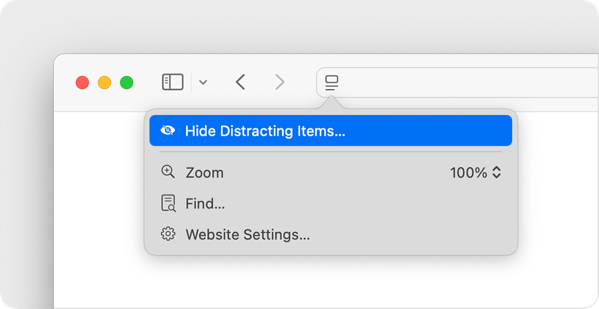
Macos sequoia safari page menu distraction control hide distracting items.

I like the new Distraction Control feature in Safari and hope Apple continues improving it. It’s a bit clunky to use at times, but it does help quite a bit with the continued enshittifcation of the web.

RCS Messaging

This is a notable improvement in my case, because it does improve messaging back and forth with some family, friend, and work threads when images are shared.

Smart Stack on Apple Watch

I find myself blowing hot and cold on the Smart Stack feature. At times it does approach the magic it promises. At other times it’s just an annoyance. I’ve tied turning it off and that can solve the annoyance factor, but I find myself wanting this to work and be smarter.

There are plenty of other new features across Apple’s platforms, but these are the ones that I find myself using the most, outside of Apple Intelligence.

Summing Up

To sum all of this up, without using any Artificial Intelligence, Apple or otherwise, I’d say this year’s hardware and software releases from Apple are one of those years we’ll look back on as a transitional one. Note that the only M4 series device I acquired this year was an iPad Pro, so I can’t speak beyond that on that new M-series evolution. Given how I use my iPad Pro, I’d say it was a winner, but not a life-changing one.

And quite frankly, AI marketing and money grubbing pitches aside, I am extremely comfortable upgrading my hardware as new generations of mobile devices roll out, and equally comfortable sitting on my computer purchases for as long as they hold out.

I am becoming increasingly uncomfortable though with the pace of operating system releases that seem to keep us all in a perpetual beta state whether or not we opt-in to the actual betas themselves. I don’t have a problem with Apple rolling out features over a period of time. I’d rather they do that than release something unfinished and full of bugs. But, I do have a problem with the heavy marketing push that trumpets what’s to come, long before the music is even ready to be played.

I’m able to keep up with what’s real and what’s not or not yet in the hype cycle, but the family and friends I support feel confused, and then become uninterested. If the goal is for folks to actually want to buy new hardware and to use new features, that’s ultimately a self-defeating strategy.

The Vision

Further summing things up, I think Apple’s release of the Vision Pro encapsulates the challenges within Apple’s vision. No, I didn’t buy one of those devices, but I did do the demo several times. I do buy the long term vision behind Spatial Computing, but I think Apple overreached with its hardware and design ambitions. Apple was able to recover from a similar overreach with the original Apple Watch, but the ante wasn’t so high for the consumer. The Vision Pro comes with a steep price to get in on the ground floor, and as of this writing it feels like it was so steep that it will actually change the floor itself.

I think a similar thing is going to take place with Artificial Intelligence, Apple’s version, and that of others. So many have ambitiously bet so much on that being the next big driver in tech, but I’m guessing in the long run it’s going to just be another passenger, perhaps in a side-car, along for the ride in an increasingly slower pace in the smartphone and mobile device race.

I feel almost Luddite-like saying this, but I wish Apple and others would focus on making what we have better than trying to make it new.

You can find more of my writings on a variety of topics on Medium at this link, including in the publications Ellemeno and Rome. I can also be found on social media under my name as above. 

 

Sunday Morning Reading

What do ugly Christmas sweaters, physics, the post office and pernicketies have in common? Check out this week’s Sunday Morning Reading.

Here we are with the last edition Sunday Morning Reading for 2024. As usual there’s links to subjects and writing I’ve found particularly interesting. I hope you do as well. Enjoy this week’s edition and see you next year.

 Christmas has come and gone, and it’s time for the decorations to come down and the ugly Christmas sweaters to be put away. Jennifer Ouellette takes a look at The Physics of Ugly Christmas Sweaters. You may want to consider how you fold yours up for seasonal storage after reading this.

I’ve laid off politics during most of this year’s holiday season, but I’ve been peripherally aware that apparently a Civil War has broken out between the tech bros and the MAGAts over immigration. Not to worry, Heather Cox Richardson has a running account of the blows and counter blows in her Letters From An American for December 27. 

One of the numerous things many are worried we might actually lose during the next administration is the troubled U.S. Postal Service. Steve Herman gives a nice rundown of some history, context, and what we might lose in Going Postal. As the son of a former post master, I appreciate Steve’s efforts here.

Thinking about how big projects get started, Joan Westenberg takes on The Ego-Legacy Complex: On Ancient Monuments and Modern Malaise. 

ProPublica writers Asia Fields, Nicole Santa Cruz, Ruth Talbot, and Maya Miller conducted a series of interviews with homeless individuals. A feature of the article is the re-printing of the notecards some of the interviewees wrote describing their losses. Check out I Have Lost Everything to see what they have lost.

Most folks have a love/hate relationship with services they subscribe to and of course that includes streaming video services like Netflix. If you subscribe to Netflix and you’ve ever wondered why Netflix gets on your nerves, check out Will Tavlin’s Casual Viewing. You’ll never stream it the same way again.

You have to love the title, but you’ll also love the article. Check out Pet Peeves and Other Pernicketies from NatashaMH.

Have a Happy New Year! 

If you’re interested in just what the heck Sunday Morning Reading is all about you can read more about the origins of Sunday Morning Reading here.  You can also find more of my writings on Medium at this link, including in the publications Ellemeno and Rome. You can also find me on social networks under my own name.

The Fun Of Early Morning Movie Going

Movie magic without the crowds.

My wife and I had a holiday tradition of going to see movies around the holidays. We always chose the earliest morning showing because, hey, they are the cheapest ticket. One of the other benefits was the crowds were less. At times it felt like a private screening.

A gentleman siitting alone in a movie theatre, with popcorn and refreshments

All of that was pre-pandemic, and of course that tradition got shelved during those years, and has remained so even longer. But this year we kicked things back off again as my wife gifted me tickets to see Wicked.

If I’m being honest, I like the private screening feel.

You can find more of my writings on a variety of topics on Medium at this link, including in the publications Ellemeno and Rome. I can also be found on social media under my name as above. 

Jon M. Chu’s Wicked Is Wicked Good

Whether big and splashy or small and detailed, Wicked hits the right notes in telling this story.

Cutting right to the chase, Jon M. Chu has done the best job of directing a musical film I have seen since Singing In The Rain. Chu’s Wicked shows what a modern day movie musical can and should be.

Wicked cynthia erivo arrianna grande

My wife and I used to have a post-Christmas tradition. In the days following Christmas Day, we’d go to an early showing of whatever movie was the hot ticket. That carried over for most of our movie going rituals as we continued to hit the earliest (read cheapest) shows available when we wanted to go to see something on the big screen. Like everyone else we broke those habits and traditions during COVID. And, though we miss it, we’ve never started it back up again post-pandemic.

Well, this year my wife kicked the tires and got us started again by gifting us tickets to an early morning showing of Wicked, a film we both were looking forward to seeing. Great gift and great time at the movies.

Speaking of, I won’t go on about the performances, they are stunningly good. If nominated in the same category for acting, it will be tough for awards show voters to pick between Cynthia Erivo and Ariana Grande, but they aren’t the only actors who are excellent. I also won’t go on about the production design. Again, stunningly good.

I will rave about Chu’s direction and the way he handled Christopher Scott’s choreography. For once, we get big, splashy musical numbers where the director actually wants us to see the details of the choreography and the character and small touches Scott brought to his dancers. It’s a revelation. I’ve enjoyed Chu’s previous work, especially Into The Heights, but even there the storytelling gets overwhelmed by the spectacle. Here, the storytelling is always front and center, even when the screen is bursting with spectacle.

There’s an intimacy to the story telling that I’ve often found in the music of Wicked, but have seldom seen play out on stage. That same intimacy applies to the small scenes as well, and Chu and his cast pull it off without a hitch.

Wicked is probably winding down its theatrical run as it is due to head to streaming soon, but if you can catch it in a theatre it’s quite a gift.

Highly recommended.

You can find more of my writings on a variety of topics on Medium at this link, including in the publications Ellemeno and Rome. I can also be found on social media under my name as above. 
Red One Will Make You Wince and Laugh

Red One won’t save Christmas, but it is quite jolly.

Red One, now streaming on Amazon Prime isn’t a classic, nor is it a loser. It’s fun in all the right places, and bad in all the right places. In the end, it’s worth streaming if you’re looking for some good brainless streaming fun over the holiday.

Overflowing with familiar names in the cast including The Rock, Chris Evans, Lucy Liu, and J.K. Simmons, among others, it’s a romp that tosses a bunch of Christmas themed traditions into the mixer, shakes them up, and sprinkles enough one liners and almost too many special effects on top to keep it entertaining.

I’m not sure it’s quite family fare if you have wee young ones, but for an older mix of generations it’s might be worth the sleigh ride. Explaining Santa Claus might never been the same again.

The different world creation is a well done enough that the movie creates its own Christmas world view allowing a pretty insane mix of mythic magic and technology to propel the story  as the characters try to save Christmas.

If you’re like my families, silly and goofy Christmas movies are a part of the holiday tradition. This one probably makes the cut going forward.

You can find more of my writings on a variety of topics on Medium at this link, including in the publications Ellemeno and Rome. I can also be found on social media under my name as above. 
Sunday Morning Reading

Some festive fare, and some not quite so for this week’s Sunday Morning Reading.

Christmas and Hanukkah are almost upon us. There’s that traditional feeling of magic in the air, but it’s tempered a bit by apprehension about what may come in the New Year. But it’s Sunday and it’s before all of that, so it’s time to share some Sunday Morning Reading.

First up are a couple of Christmas gifts that seem appropriate both for their historical holiday context and in today’s current one. Shannon Cudd takes on The Surprisingly Corporate Retail Origin Story Behind ‘Rudolph the Red-Nosed Reindeer.’ Feels appropriate in this approaching age of oligarchy even if that age seemed a bit more innocent.

Follow that up with Olivia Jordan’s A Christmas Carol in Context: Dickens’ Beloved Festive Fable. Having directed many a production of ‘The Carol,’ I’m always amazed that its story of goodwill and redemption is at once so popular, yet always so quickly forgotten. It’s a puzzler. But then the great messages told around Christmas typically lose their resonance once we move away from the season.

Speaking of puzzlers, Generative AI is still on everyone’s mind and Gary Marcus thinks Generative AI Still Needs To Prove It’s Usefulness. Yes, he means beyond the hype it’s generated that has made some fabulously wealthy.

Journalism is having a moment and not a good one in today’s political climate. Most of that is of its own making and a good deal of it is by the owners. Podcaster and tech journalist Kara Swisher might be fed up enough to try and do something about it. She is seeking to round up investors to fund a bid to buy The Washington Post, after Jeff Bezo’s weak capitulation to the incoming Trump regime. I hope she succeeds. Meanwhile, John Gruber has written a terrific piece on this titled Journalism Requires Owners Committed To The Cause. He’s spot on.

Meanwhile Om Malik takes a look at the just how dark things may be for traditional media in these dark days in Musings On Media In The Age of AI. Here’s a quote:

None of the media business models will work in the future — neither advertising nor paywalls. Today’s content deals, like the one The Atlantic signed with OpenAI, are akin to the sugar high you get from soda. The sugar high is followed by the inevitable crash.

Jennifer Berry Hawes, Nat Lash, and Mollie Simon for ProPublica take a look at The Story Of One Mississippi County Shows How Private Schools Are Exacerbating Segregation. Good reporting on a story that somehow feels more than a little Dickensian.

Folks seek validation in many ways. Climbing mountains and overcoming obstacles can be a part of that game. So too is recognizing that “not everything in life needs to be conquered.” Check out Ain’t No Mountain High Enough from NatashaMH.

And to close out this week’s Sunday Morning Reading with a bit of grace, check out The Laundromat On Sixth Avenue by Grace 🎶 @notesofgrace

May whatever holiday you celebrate this time of the year bring you some peace and perhaps some joy. Here’s hoping we all can find that comfort surrounded by the company of family and good friends.

If you’re interested in just what the heck Sunday Morning Reading is all about you can read more about the origins of Sunday Morning Reading here.  You can also find more of my writings on Medium at this link, including in the publications Ellemeno and Rome. You can also find me on social networks under my own name.