Sunday Morning Reading

It’s the Sunday after Thanksgiving here in the U.S. and also the Sunday after Black Friday which seems to have been going on since the 4th of July. To help you recover from the hustle and bustle, both behind and ahead, here’s some Sunday Morning Reading to share. There’s not a deal to be had. Just some interesting reads and good thinking.

Snowmorningreading

Kicking it off David Todd McCarty wonders just What Are We All Really Thankful For? There are times when my response would be “You got me.”

Chauncey Devega strings together a list of comments from a few pundits as they headed into Thanksgiving on the dangers they see ahead culturally and politically in Democracy’s Last Thanksgiving: Experts Imagine America in a Year if Trump Wins The 2024 Election.

Denny Henke (BeardyStarStuff) tackles the deepening political and social crisis we’re facing in this post with the looming threat of losing Democracy as we think we’ve come to know it. Here’s a quote: “It has been eroded to a thin veneer with little substance because the substance of democracy is the people. And the majority of people of the US stopped caring decades ago.” 

State of play? State of Mind? With 2023 heading to a close that means 2024 beckons and so too does another presidential election in the US. But this one seems a bit, well, let’s just call it divisive. There’s certainly tumult ahead. Some are picking up and moving to safer places. Do those exist? Timothy Noah takes a look at The Red State Brain Drain Isn’t Coming. It’s Happening Right Now. 

The bigger they are the harder they fall. But these days it just means they’re landing in a cushion of money. Douglass Rushkoff takes a look at the move fast and break things bunch in ‘We will coup whoever we want!’; The Unbearable Hubris of Musk and the Billiionaire Tech Bros. 

Speaking of broken things, what’s going on in the world of Artificial Intelligence after last week’s craziness with OpenAI and Sam Altman? No AI engine could possibly figure it out, much less a human. But Christopher Mims seems to think that ‘Acclerationists’ Come Out Ahead with Sam Altman’s Return to OpenAI. 

Apple doesn’t like to admit mistakes and makes us live with some of them far too long. *Cough* *iCloud* *Cough*. Jason Snell lays out A History of Apple’s Mistakes and Failures—and How It Hates To Fix Them.

And from the world of entertainment John Carreyrou takes a look at another episode of not admitting costly mistakes in The Strange $55 Million Saga Of A Netflix Saga You’ll Never See.

Just for fun, here’s another entertainment industry piece, Caity Weaver takes a look at the career of Flo. You know Flo. She sells insurance. But do you know the actress who plays her? Check out Everybody Knows Flo From Progressive. Who is Stephanie Courtney?

And since you’ve read all of this on some screen or the other, take a look at this piece from Scott-Ryan Abt as he wonders What Happened to the Man on the Train? Here’s quote: “Maybe there was a time when people didn’t stare at their screens, but those days are forgotten. Maybe there was a time when you’d have a shared human experience on a train, at an airport, at a coffee shop, or on the street. Screens have changed that.”

If you’re interested in just what the heck Sunday Morning Reading is all about you can read more about the origins of Sunday Morning Reading here. 

Apple Pauses Twitter Advertising After Musk Goes Anti-Semitic

Good on Apple. Today they paused advertising on Twitter after Elon Musk’s continued hate filled forary into whatever he’s  forarying into. Whatever it is, it sure isn’t making anyone any money.

1700249198747

Here’s a link to an article on Axios announcing Apple’s pause that I hope becomes permanent. Apple follows IBM, Lionsgate, and others making the move.

I’m sure somewhere this exists but I would love to see some reporting on what kind of results companies, like Apple, get from ad spends on Twitter.

Apple Taking Heat for 8GB Base Configs on New M3 Hardware

If you have to a discussion about whether 8GB of memory is enough in Apple’s latest M3 Mac hardware, then 8GB is not enough. And there’s a discussion going on. Apple’s latest Mac hardware comes with 8GB of memory in the starting configurations of the various machines. Quite a few folks think that’s not enough. Especially at the price Apple charges for larger memory capacities. And also in regards to our seemingly unstoppable AI future. I’m in that camp.

CleanShot 2023 11 08 at 07 56 26 2x

Apple is touting its new GPU Dynamic Caching on the M3 machines as industry leading and why 8GB is enough. But as Jacob Roach says nobody knows exactly how it works. He’s got a pretty plausible theory that’s worth a read.

Jason Cross takes Apple to task in this MacWorld article in a piece that focuses on the marketing and the pricing and less on the tech.

But Apple is defending its choices with an interesting statement sure to keep the discussion fires burning. MacRumors quotes a recent interview with Chinese ML enginner and content creator Lin YilYi in which Apple’s VP of worldwide product marketing Bob Borchers says this:

Comparing our memory to other system’s memory actually isn’t equivalent, because of the fact that we have such an efficient use of memory, and we use memory compression, and we have a unified memory architecture.

Actually, 8GB on an M3 MacBook Pro is probably analogous to 16GB on other systems. We just happen to be able to use it much more efficiently. And so what I would say is I would have people come in and try what they want to do on their systems, and they will I think see incredible performance. If you look at the raw data and capabilities of these systems, it really is phenomenal. And this is the place where I think people need to see beyond the specs, and actually go and look beyond the capabilities, and listen to trusted people like you who have actually used the systems.

People need to look beyond the specifications and actually go and understand how that technology is being used. That’s the true test.

That may well be true on some levels and for some users. I’m not buying it big picture though. We can talk about smaller memory allocations clogging up with browser tabs and heavy duty, poorly coded applications all we want today. That’s still real. Tomorrow’s memory migraines are all about AI as its going to be the culprit gobbling up GPU cycles going forward.

From a PR perspective it’s a dropped ball by Apple. It’s like that old saying in politics, if you’re defending you’re not winning.

Sunday Morning Reading

Time for another edition of Sunday Morning Reading. Today’s collection is a scattered selection of topics some of which might feel a bit dark. But it is a dark time scattering many of us into our corners or maybe to have an extra drink or two.

Readinginabar

For reasons, other than stupidity, we’re steal dealing with forces that want to ban books in America. This sadly isn’t a new thing, and Chris Klimek gives us A Brief History of Banned Books in America in this podcast transcript from the Smithsonian magazine podcast “There’s More To That.”

What’s happening and about to happen in the Middle East has the world on edge. Technology brings these moments to us in moments. Joanna Stern in the Wall St. Journal gives us a look in When Our Smartphones Became Windows to a War.

Continuing with that news of the moment Anne Applebaum in the Atlantic gives us There Are No Rules. As she describes it, our norms and values define how the world ought to work. We continually learn that’s not the reality.

Here’s a pallet cleanser with the first of a couple of tech topics. Jared Newman in Fast Company takes a look at the note-taking app Obsidian in The Cult of Obsidian: Why People Are Obssesed With The Note-Taking App. 

If you’ve paid attention to my tech writings here you’ll know I’m having some challenges with Apple’s iCloud failings and flailings. I’m not the only one and my challenge isn’t the only iCloud issue. In TidBits Glenn Fleishman describes his in Cloudy With A Chance of Insanity: Unsticking iCloud Drive.

And back on the politics and follies of mankind beat, this piece by Michael Tomasky, I Never Thought I’d Live to See Democracy Die. But Now I Wonder is worth a look. He’s not alone in his wondering if Democracy is just a phase.

And after all of that, if you think you might need a drink, here’s a look at The Bad Law That Made Good Bars, from Peter Suderman on The Raines Law. Never heard of it? Pour yourself a beverage of choice and take a read.

If you’re interested in just what the heck Sunday Morning Reading is all about you can read more about the origins of Sunday Morning Reading here

Sunday Morning Reading

Fall’s cooler temperatures are settling in and it’s a Sunday, so time for some Sunday Morning Reading to share with a mix of topics covering a range of interests. Enjoy!

Cfeb998b fff0 47b7 8a9e 890aba580738

Leading off is a bit of politics because, well, US politicians seem to be knocking each other over in their quest for who can do the most damage to their so-called profession. First up is an excellent piece from Will Bunch, America Needs to Talk About the Right’s ‘Red Caesar’ plan for U.S. Dictatorship. This is happening. Don’t say you haven’t been warned.

And continuing in the poltiical vein, David Todd McCarty says We’ve Seen the Best Republicans Have to Offer. Sad. But true.

Off Camera is a terrfic piece by John Paul Scotto about his visits through his memories as seen through old home videos.

And speaking of things through lenses, the debate about over what exactly is a photo is heating up as Google (and others) keep moving the goal posts on doing things in post. Check out The Pixel 8 and the What-Is-A-Photo Apocalypse by Jay Peters.

Live theatre and the arts in general are going through some tough times. Spaced Out in Chicago: When Storefront Theatres Run Out of Storefronts by Amanda Finn in American Theatre Magazine focuses on the once thriving storefront theatre scene in Chicago and the challenges when real estate becomes less real.

James Parker in The Atlantic wonders what comedy is for in Comedians Only Care About Comedy. It’s a piece on the new Comedy Book: How Comedy Conquered Culture-and the Magic That Makes it Work. The joke’s on all of us if you ask me.

And David Todd McCarty gets a second hit this Sunday with his excellent The Myth of Fingerprints. As his subhead describes it “In which I explore the wisdom and efficacy of investing emotionally in the long-term outcome of America.” Read it.

And to close out this week, the week that brought us the anniversary of Steve Jobs’ death, take a read of this piece from Lisa Melton, simply titled Memories of Steve. She republished this April 2014 piece. It’s not just terrific. It’s an amazing memory from someone who was there.

If you’re interested in just what the heck Sunday Morning Reading is all about you can read more about the origins of Sunday Morning Reading here

The Action Button: Taking Back Your iPhone

Lights! Camera!! Action!!! Well, you won’t be directing a film crew with it, but you can use the Action Button on Apple’s new iPhone 15 Pro and Pro Max models to turn on your lights or launch your camera. As I said in my first impressions post about the iPhone 15 Pro it can be so much more.

Iphone 15 action buttonIn fact, for those who already use Apple’s Shortcuts or those willing to check them out, this is a way to take a bigger step towards personalizing your iPhone than we’ve been able to in the past. In my opinion it’s the most signficant, and potentially most powerful user addressable hardware change Apple has made to an iPhone in quite some time.

Unlike The Dynamic Island, last year’s big shiny new feature, users don’t have to wait for developers to decide to implement the feature. To be honest I’m disappointed in the lack of apps I use that couldn’t find ways to take advantage of the Dynamic Island. But the Action Button, combined with Shortcuts, puts personalization at your fingertips.

When it was first introduced and once I first set up the iPhone 15 Pro my initial reaction was that this would be the latest fidget-spinning, widget-like new feature from Apple. Designed to tantalize, destined not to take hold, it would capture a lot of attention and not really mean much over time. I was wrong.

Again, if you know Shortcuts or are willing to learn a bit about them, you can set up the Action Button to run a Shortcut or quickly access a series of them. The beauty of using the Action Button with Shortcuts is that you can perform actions without unlocking your phone, or while you’re in any app. It sort of feels like taking your iPhone back and using it in a whole new way.

The Action Button is located just above the two Volume Buttons. It replaces the Mute switch that has been there since the first iPhone. Don’t worry, you can still Mute your iPhone with the Action Button or from the Control Panel. As a matter of fact the Action Button comes with the Mute/Unmute function enabled by default. Press it once after setup and you’ll Mute your iPhone. To use the Button you need to hold the Action Button for a second or two. Otherwise you’ll get a reminder on screen telling you to hold it a bit longer.

Sunday 01 Oct 2023 16 46 43

The location of the Action Button is a bit of a problem for me though. I have yet to develop a natural reach for it with one hand and wish Apple had positioned it below the Volume Buttons.

I take my cues on using Shortcuts with the Action Button from some folks who know more about Shortcuts than I do. I’m no wizard at creating Shortucts, but I know where to go when I need to discover and explore them. Stephen Robles, Federicco Viticci are indeed wizards at this. John Gruber also got me excited about these possibilites. Robles has produced a couple of videos here and here that show you how you can take advantage of using the Action Button to access Shortcuts. He shows you how to create menus and single use Shortcuts. You can find links to all of the Shortcuts he’s created in the description that accompanies his videos.

Gruber created what he calls the Action Jackson Button and posted screenshots of his Shortcuts on Threads. Jake Shaw managed to put those into a blog post here, so you can download them if you want to as opposed to creating them from screen shots.

Viticci has created what he calls a MultiButton method (using Shortcuts) to use the Action Button beyond its current single button press functionality. Apple designed the Action Button to call one action. You can configure it in Settings to bring up Silence your iPhone, Turn on a Focus Mode, Use the Magnifier, Activate the Camera, Turn on the Flashlight, Record a Voice Memo, Launch Accessibility Settings or Run a Shortcut. Viticci lets you tap twice to use the Action Button for two distinct actions. Users have already been calling for Apple to give us mulitple touch possibilities on the Action Button, but this might do in a pinch. (Make sure you also check out the MacStories archive of Shortcuts if you haven’t already.)

Do note that you’ll need to install the free Actions app on your device. Actions doesn’t have an interface but it adds and enables some essential Actions to make better use of Shortcuts than Apple provides out of the box.

You set up your Action Button to use Shortcuts by scrolling through the actions Apple provides and selecting Shortcut. At this point if you want to use one Shortcut you select it and you’re set to go.

Sunday 01 Oct 2023 16 22 16

Currently I’m doubling up on Menu options. Pressing the Action Button as I’ve configured it brings me into a graphical menu of icons (image on the right below) that allows me to Mute/Unmute the phone, Turn on the Flashlight, Launch the Camera, or launch my podcast app of choice, Overcast. I’m a Type II diabetic so the Contour and Dexcom G7 are apps I use to help manage that condition. Then there’s the red icon labled Magic Menu. Note that for this graphical menu option you can only add seven Shortcuts and you’ll always get an Open App button as the eighth entry. That will take you to the Shortcuts app. But why not create a Shortcut that launches another menu?

Sunday 01 Oct 2023 18 21 16

But let’s first get to the graphical menu. Create a folder in the Shortcuts app. Name it with the name of your choice. I chose ActionButton. Then create or move the seven Shortcuts you want to access in that folder. Go to Settings and select Action Button, choose the option presented, and look for the Show Folder option. If I remember correctly it will be on the left if you haven’t set anything up like this previoulsy. Pick the name of the Shortcut Folder you chose and the Action Button should bring it up.

What I call the Magic Menu (you can call it anything you want) is a Shortcut I created that opens up another menu that allows me to quickly access some apps and functions I use frequently. I followed the how to from Mr. Robles as linked above to create the menu you see below. You’ll need to configure each menu item separately.

Sunday 01 Oct 2023 18 22 54

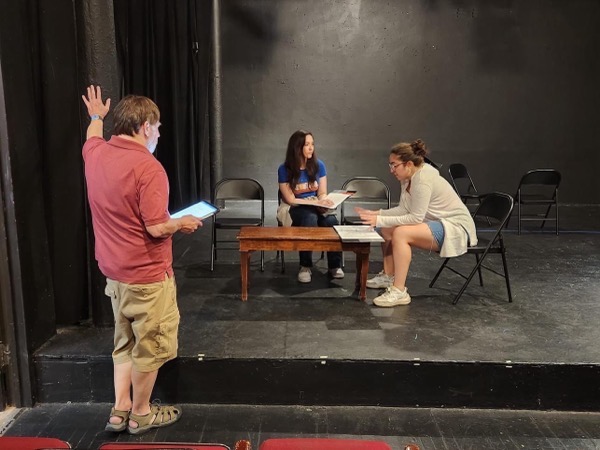
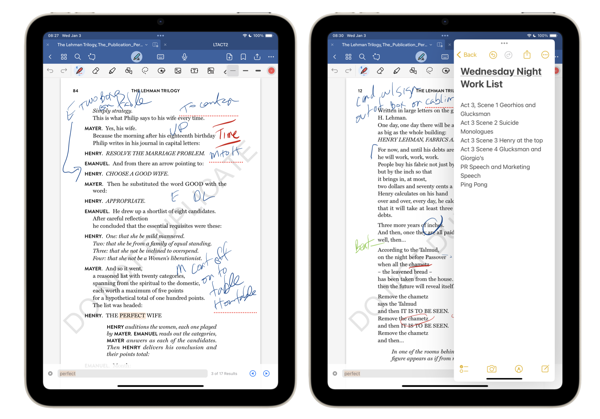
This menu includes shortcuts to access Drafts and Notes which I use for work. Text on Screen captures any text on the screen after first taking a screenshot. Current Show launches into my Notes folder for the current play I’m directing. Cheatsheet is where I store some codes and other things I need to remember. Screen Recording does just what it says. Remind Me Faster lets me enter Reminders into that App more quickly than using the app.

Again, and most importantly this functionality lets you set up things they way that works for you. I’ve seen similar menus that call up Music, Maps, Reminders, certain contacts and many more.

For different projects going forward I’m sure I may change things around, but that’s easy enough to do either by adding to the existing choices or adding more. I’m sure others will find new ways to take advantage of the Action Button as well. Exciting times.

As I said above I am not a Shortcuts wizard. I’ve created some single use Shortcuts but nothing on the level of folks like Viticci or Stephen Robles. Another great resource is Matthew Cassinelli. I highly recommend that if you want to dive deeper into this for the first time or just for great ways to take advantage of Shortcuts that you follow their adventures.

Sunday Morning Reading

It’s Sunday morning. So here’s some Sunday Morning Reading to share. There’s no theme. Just a collection of topics and writers that caught my eye and tugged a bit on the heartstrings.

Porchnewspaperreading

Chris Welch on The Verge lets us know that Samsung and NYC’s Metropolitan Museum of Art are collaborating and expanding the collection of art that is available to view in your home on Samsung’s Frame TVs. I didn’t know this was a thing. I’m sure some art lovers are glad it is. Would be nice to see this picked up by other museums and Smart TV makers. Check out Samsung Is Bringing Artwork From The Met Museum To Its Frame TVs.

On the politics beat, Susan Glaser pens The Rage of The Toddler Caucus On Capitol Hill. If they title doesn’t tell you what it’s about, you’re not paying attention.

When and why does time matter? Check out Philip Ogley’s The Clock Watcher. Make the time.

What happens if turbulence in the brain’s waves can carve indentations and pathways over time in the same way that water does in stone? Check out Newly Discovered Spirals of Brain Activity May Help Explain Cognition by Shelly Fan.

David Todd McCarty penned an excellent and very personal piece this week about his family coping with drug addiction and its aftermath entitled Bear With Me, I Want To Tell You Something. Beautiful stuff. Tough. Coconuts and plungers.

These are tough times to wade through. Ana Marie Cox says We Are Not Just Polarized. We Are Traumatized. I think she’s correct. And remember, cynicism is a trauma response.

A devilishly good piece by Natasha MH, In Bed With the Devil.

Mark Jacob in Courier Newsroom let’s us in on The Republican Trick To Spin Straw Into Gold. There are no surprises. But we all need to recognize it when it’s happening.

Changing the channel, M.G. Siegler takes a look at the end of the Cable TV bundle in Cable Bites the Dust, and predicts that we’re going to be bundling again as we continue down the path into streaming entertainment consolidation.

And as we head into a week when new iPhones are arriving around the world, finally equipped for USB-C charging, Jay Peters on The Verge writes an almost mournful obituary for the Lightning Connector in Lightning was Great Actually.

If you’re interested in just what the heck Sunday Morning Reading is all about you can read more about the origins of Sunday Morning Reading here.

Sunday Morning Reading

Summer is heading towards Fall and we’re on lake time this weekend. So a shorter list of things to share. As usual it’s a potpourri of topics and great writing. Enjoy!

IMG 3220

Mug shots were the talk of all the towns this week. David Todd McCarty takes a look at a bit of of mug shot shooting history in The Lost Art of Shooting Criminals.

Always fun to look back on the history of old school Chicago politics. Edward Robert McClelland takes just such a look back as he looks ahead in The Machine Has Given Way to Organizing.

This piece is a real pleasure from Natasha MH. Worth lingering over for more than two minutes. Check out A Two-Minute Pleasure.

In this world where the reliance on facts keeps diminishing Jonathan Taplin takes a look at How Musk, Thiel, Zuckerberg and Andresseen-Four Billionaire Techno-Oligarchs- Are Creating an Autocratic Reality.

And if Autumn is approaching so too is football. David. K. Li takes a look back at the Supreme Court case that changed the game (or rather the money behind the game), in Meet The Man Who Thinks He’s Screwed Up College Football With A Supreme Court Win.

An another harbinger of Fall is the build up and anticipation of new Apple gear. Jason Snell takes yet another look at the never ending debate surrounding the purpose of the iPad in Giving Up The iPad-only Travel Dream.

If you’re interested in just what the heck Sunday Morning Reading is all about you can read more about the origins of Sunday Morning Reading here.

Apple’s Mixed Reality Reactions

As expected Apple unmasked its new mixed reality headset, now named Apple Vision Pro, at its annual World Wide Devleopers Conference this week. No surprise that the reactions have also been as expected with some giving new meaning to the old cliché about Apple’s reality distortion field and others being quite vocal with their negative reactions, especially as regards to that $3500 price point.

Apple Vision Pro

I’ve been following along with some of the bloggers and journalists who got to try the headset on, experience the 30-minute demo and I have complied a series of links to some of the reactions. Keep in mind the responses from those who got strapped in are somewhat akin to folks reacting to a trailer for a new film. Folks are responding to a canned demo, acknowledging that, and the fact that Apple has a lot of work to do before this thing debuts to the public supposedly early in 2024.

I’ll have more to say about it at some point in the future based on my thoughts to these reactions.

Matthew Panzarino in TechCrunch says  Yes, Apple Vision Pro Works and Yes, It’s Good.

Jason Snell of Six Colors goes Eyes (and head) on with the Apple Vision Pro.

Joanna Stern in the Wall Street Journal had two reactions after the demo. “Wow. Very Cool” and “Did I just do drugs?”

John Gruber says the price might be an impediment to owning one. But the experience is something you’ll want to set aside some time to try it out.

Krista Jones in Esquire says she knew you could do futuristic FaceTime, but what she found the most interesting -shocking even-was how it made her feel. 

Harry McCracken in Fast Company gives us three things he learned and three things he didn’t about the new gizmo.

Jason Hiner on ZDNet says Apple Vision Pro is far ahead of where he expected it to be.

David Pogue on Medium brings up a recurring theme I’m seeing among those writing about these first experiences that say the device felt heavy after using it a bit in the 30 minute demo.

Roman Loyola of MacWorld didn’t want to leave the demo.

And you might want to watch this video review of the experience from MKBHD. 

There’s plenty more out there if you’re interested. There will be more digital ink spilled on this between now and the products eventual release than you can imagine. Bottom line themes I see emerging:

1. Amazing technology

2. Expensive

3. Weight is still an issue

4. Apple has lots of work to do before this releases and even more in the years ahead. They’ve staked out a vision and have the bankroll to advance it. It will be interesting to follow.

Apple WWDC Thoughts

Beginning June 5 Apple kicks off its annual World Wide Developers Conference, (WWDC). Apple will introduce new versions of its operating systems for current devices, but all of the excitement is focused on Apple’s AR/VR headset and the operating system that will run the thing. Mixed reality, augmented reality, virtual reality… who knows. I’m sure whatever it will be will somewhat unreal. I’ll certainly be interested to see how Apple tries to make it real, but it’s from a very backseat perspective. I just don’t see myself as being in the market for this kind of device/experience.

Apple WWDC 2023 770x433 jpg

Let’s face it, the next period of time is going to be focused very much on the headset and what it offers. Even though whatever Apple announces is probably going to be a years long effort towards what the product will eventually become. How that interacts with the existing ecosystem will be much more interesting for me.

To be honest, I’m not expecting much from iOS or macOS or any of their siblings. And I’m not sure anyone should. For better or worse these operating systems are quite mature. Sure there will be some new things, but for my money I’d prefer to see Apple keep tidying things up. Refining and striving for consistency are higher priorities for me than whiz bang new features.

I don’t have many big “wishes” for what I’d like to see. But I do have a few minor ones that would make my time in the orchard a bit easier.

Notifications are still problematic. Especially on the Mac. For goodness sake give us a button that allows us to bulk dismiss notifications like we can on iOS.

Last year saw some syncing up of features in Apple Mail between iOS and Mac. Keep it up. Also, make Rules work better and more consistently.

It’s time for a Clipboard Manager in the operating systems.

Bring Automations to Shortcuts on macOS.

Get rid of the consistent inconsistency with iCloud.

Fix Siri. Just do it.

The App Stores make much money for Apple and developers. It’s supposed to be a showplace. Clean it up. It should also run more efficiently than it does.

I’m hoping there will be some clarity and cleaning up of Stage Manager given that it feels very much like a building block for the AR/VR vision.

That’s it. That’s my wish list. Whatever reality we end up in after Monday I hope some of the above gets addressed.