Slide Over In iPadOS 26.1 Returns Just In Time

Glad to have this multi-tasking tool back.

Since I don’t run betas on any of my devices, I’ve been somewhat anxiously waiting for the release of iPadOS 26.1 which returns the Slide Over multi-tasking feature to the iPad. It got here just in the nick of time.

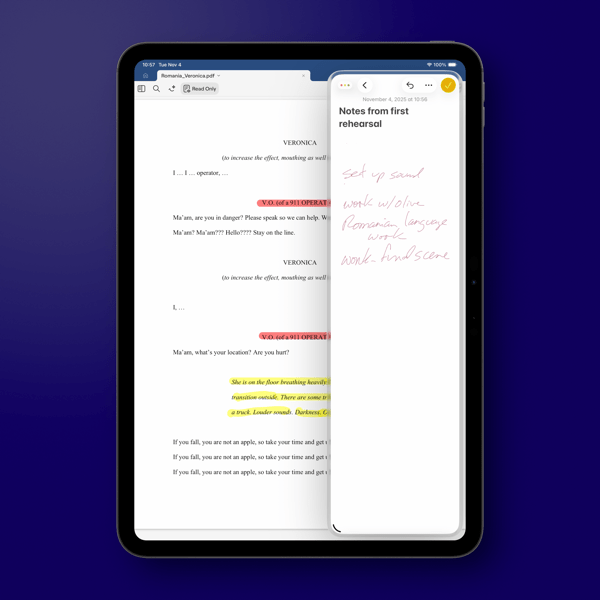
iPad OS 26.1 arrived yesterday afternoon, about 2 hours before rehearsal began and I quickly set things up for the evening’s rehearsal, using Notes in Slide Over to quickly jot down notes as rehearsal went along.

I use an 11 inch iPad Pro in my theatre work as my primary device. It contains the script I’m working on and ever since Slide Over was available I would use that multi-tasking feature to keep one or more apps tucked away for quick access conducting rehearsals.

New Shareshot.

I do question why Apple only allows one app in this returning version as opposed to multiple apps as it did before. It was always handy to keep multiple apps available throughout rehearsal, given that I prefer to have my script open full screen on the 11 inch iPad Pro.

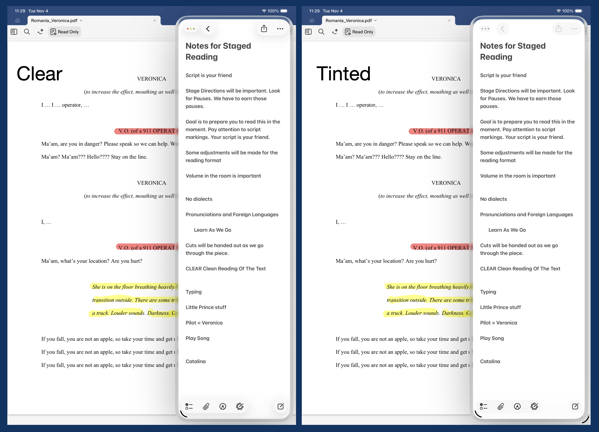
As a side note, I’m not a fan of the Liquid Glass border around the window in Slide Over. It waists screen real estate, almost begging you to look at the feature. Even switching Liquid Glass to the new Tinted version, now also available in iOS 26, doesn’t erase or lessen that border or its distracting impact.

CleanShot 2025-11-04 at 11.37.09 2@2x.

In fact, setting the border aside, switching back and forth I don’t really see any significant difference in the apps I’m currently using between the Clear and Tinted versions of Liquid Glass. I won’t call that a complaint, but I will say it might all be much ado about nothing. At least on the iPad.

You can also find more of my writings on a variety of topics on Medium at this link, including in the publications Ellemeno and Rome. I can also be found on social media under my name as above.

iPhone and OS 26 Reviews Off The Beaten Track

Looking for some new voices.

New iPhones have been released, are being delivered, and I assume being used. Some of the usual sources have already reviewed the devices and the new operating systems and I’m guessing you’ve seen many of those.

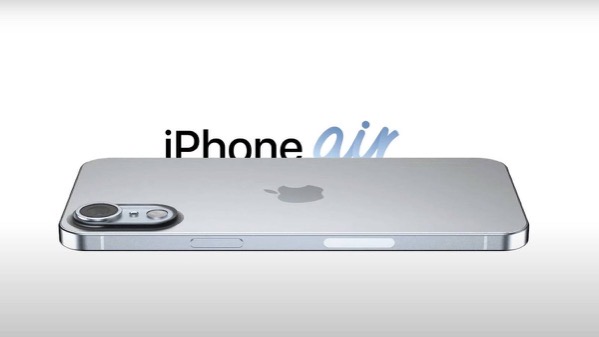
Insider explains who the iPhone 17 Air is for.

I’m enjoying reading reviews that are sort of off of the beaten track, assuming the Internet has one of those, and thought I’d link to a few of them.

First up Jason McFadden of Jason Journals talks about his experiences and impressions after installing OS 26 on several older devices. Good read.

Next up is Sebastian de With’s look at the iPhone 17 Pro cameras. Sebastian is one of the developers of the team Lux that developed the Halide camera app for the iPhone.

Olivia Lipski writing for Good HouseKeeping says I’m a Tech Reporter and a Mom. Here’s My Honest Review of the iPhone Air.

And finally Rakhim Davlekali has written a review of macOS in reverse starting with the now current Tahoe and going backwards through time. Benjamin Button Reviews macOS is worth a read for a few laughs.

I still think it’s early for any real judgements to be made about the new devices and new operating systems. But the links above are worth a look.

You can also find more of my writings on a variety of topics on Medium at this link, including in the publications Ellemeno and Rome. I can also be found on social media under my name as above.

OS 26 First Impressions

Early thoughts on OS 26 versions

Bubbles. My grandkids love bubbles. It’s a kid’s delight. Apparently bubbles also delight some Apple designers. My first impression of the look of iOS 26 on the iPhone was bubbles.
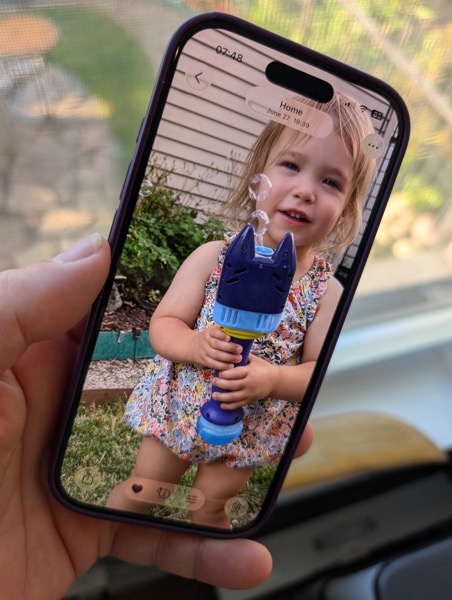
PXL 20250916 124836790.

I watched the OS 26 round of operating system betas over the summer as things evolved and have now installed the first release on all my devices. I’ve seen and heard the reactions so I was reasonably prepared for what would happen once the updates occurred. These are some first impressions after taking a look.

Liquid Glass

I’m not putting down bubbles. Bubbles are fun, whimsical, and joyful. But my overwhelming impression on the iPhone 16 Pro with iOS 26 installed was that the Liquid Glass design language, (that supposedly isn’t a design language,) felt very bubbly and child-like. To my eye I associate it more with bubbles than I do glass, liquid or not.

I also thinks Liquid Glass looks and feels better on the iPad Pro than it does on the iPhone. There’s more space for the chunkier, bubblier UI elements to float around. By and large things look cleaner on the iPad.

On the Mac, Apple didn’t go quite as far with Liquid Glass as they did with the iPhone and iPad regarding transparency and bubbly things, but there is still a more cartoonish feel to macOS 26 than the previous version. I think most of that is due to the rounded corners, rounded buttons and tab bars. I will say in this early going, I miss what I felt was a cleaner design in Sequoia on the Mac than what I see in this early going with Tahoe.

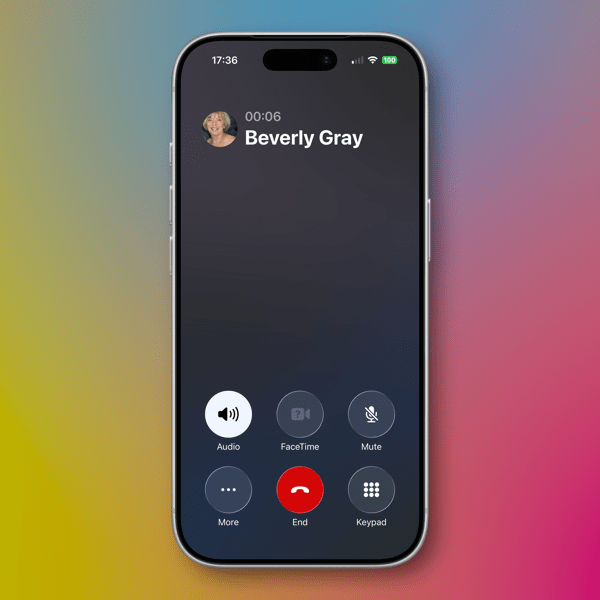
Bubbles are also messy things. Messier than glass in solid form certainly. Perhaps applying liquid properties to this glass like interface provides a license to keep things messier. That’s certainly true in some cases on the iPhone. For example, in the Phone app the reflective (or is it refractive) qualities around the buttons make it feel like light is leaking through a misapplied sticker than I think was the intent.
New Shareshot.

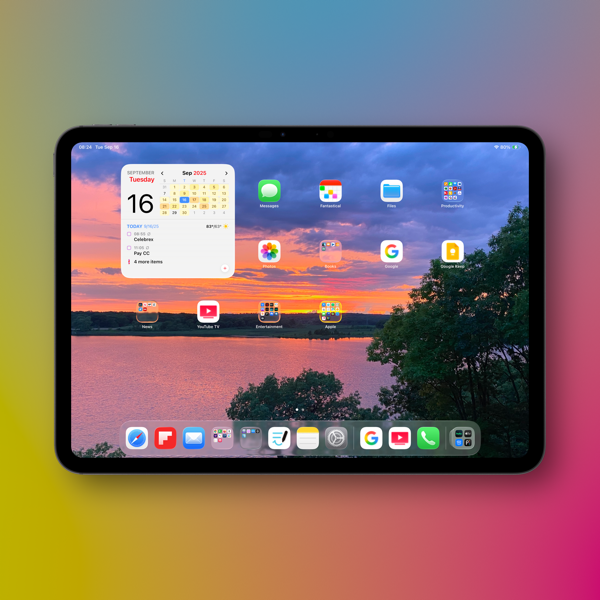
On both the iPad and the iPhone you’ll have to be careful what you choose for a wallpaper, because that same light leaking through means photos that have many colors or light contrasts within them appear more distracting than pleasing. (I like to use my own photography for wallpapers).
New Shareshot.

The issues of legibility have been discussed quite a bit over the summer, and I don’t think Apple has a complete solution for that yet when it comes to complex backgrounds, other than seemingly to force users to make simpler choices with wallpaper backgrounds. In early use, I think what we see on iPhone and iPad completely renders useless the statement of letting your content shine through. It might bleed through, but if it shines it does so in a distracting manner.

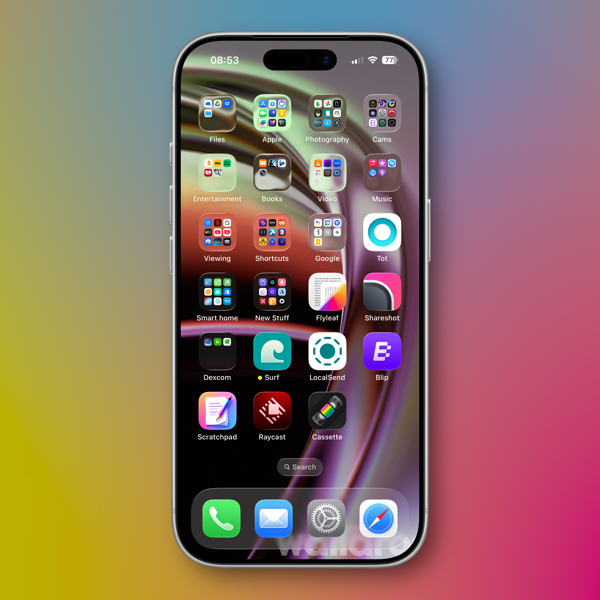
Here’s an example of one of my Home Screens that I think makes things look more bubbly than Liquid Glassy, especially in the upper two rows of folder icons.
New Shareshot.

Alan Dye, the VP of Human Interface Design, the Apple guy who spearheaded this UI change, is quoted as saying that Liquid Glass is “the foundation for new experiences in the future.” All well and good when you have a fuller view of the future as one assumes he would. But for those looking at their devices today, that means as much or as little as any tech promise or vision that have been dropped on us these last few years.

Liquid Design, in my very early looks is not to my taste. It may be to yours. the good news is that everything still appears to be functional. But to me, it’s a child-like appliqué on sophisticated devices that seem to beg for something more mature. I’m sure Liquid Glass will evolve, but until it does, I don’t think these bubbles will be popping soon.

Other Changes

I haven’t explored many of the new features of any of these new operating systems, only attempting to get things up and running. Most things appear to be running well.

A few changes I like include:

I prefer this iteration of the Photos app in iOS

I like the big multi-tasking changes for iPad and look forward to working with them more, although count me as one who will miss Slide Over. It was handy in my work in rehearsals.

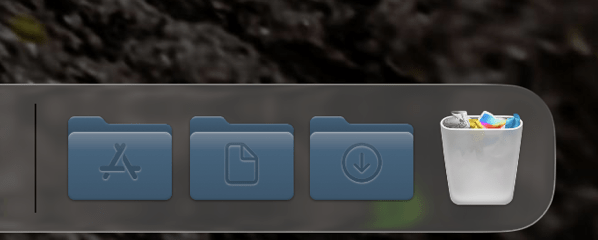
I like the new Trash Can icon on the Mac. That’s the kind of whimsy I can support.
CleanShot 2025-09-16 at 07.18.24@2x.

I love the wrist flick gesture on the Apple Watch.

Things I’m not a fan of:

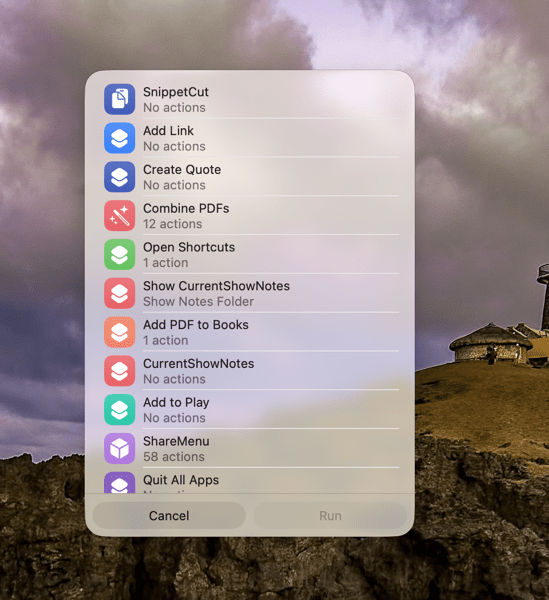
On the Mac I miss the Shortcuts item in the menu bar. Yes, you can add one, but instead of getting a straight drop down of clickable Shortcuts, it now opens a new window that requires not only the selection of the Shortcut you want to execute, but another separate action to run the Shortcut. Adding clicks isn’t much of a shortcut to me.  I see where Apple is going with this, trying to move things out of the Menu Bar into the Control Center. That’s going to require developers to make that move successful.
CleanShot 2025-09-16 at 10.04.19@2x.

I’m not a fan of some of Apple’s redesigned icons.

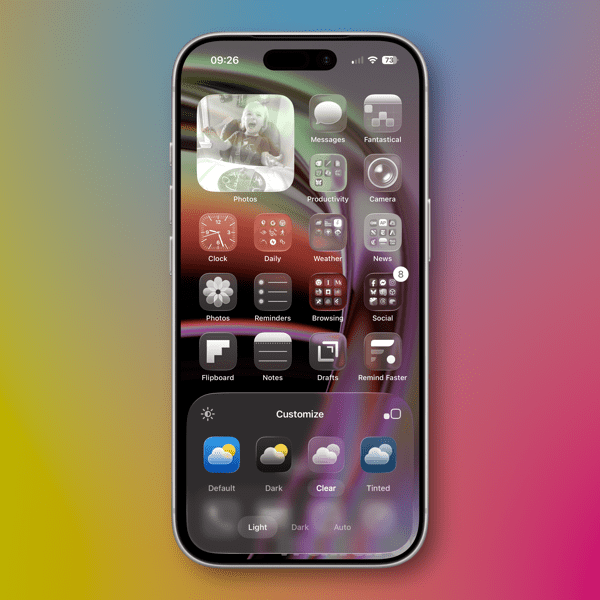
I tried out the Tinting feature for icons. I could see myself using this, if the feature didn’t tint widgets. What’s the point of a tinted Photos widget?
New Shareshot.

Some things I’m on the fence about:

I’ve previously used independent apps Bartender and Ice to control the large number of Menu Bar icons I like to have available. Both are currently in beta so I’m testing out Apple’s  feature to hide the Menu Bar until things change on those fronts. Simply put, that means the Menu Bar disappears until I hover over or click on it, revealing the icons. In using this feature when windows are at the top of the screen, Menu Commands sometimes disappear requiring some window rearrangement. This doesn’t happen consistently, so I’m guessing it’s a bug. I’m not sold on this in the early going but I’m giving it a try.

I’ve been using Raycast as an application and Shortcut launcher, along with some of its other features. I’m giving Apple’s new Spotlight features a try including the long overdue Clipboard Manager. This will require some muscle memory retraining, and it might mean leaving Raycast behind. It would be easier to do so if that Clipboard Manager copied across devices.

It’s early going. For me, as well as these new operating systems. I’ll discover more as I go along. I’m hoping the evolutionary pace for this software from Apple and most certainly developers will come close to matching mine in the days to come. I’m guessing it’s going to be sometime in 2026 before we can really evaluate what’s what in these OS 25 releases.

You can also find more of my writings on a variety of topics on Medium at this link, including in the publications Ellemeno and Rome. I can also be found on social media under my name as above.

Instagram Shows Up Very Late to the iPad Party

What’s the point and who cares?

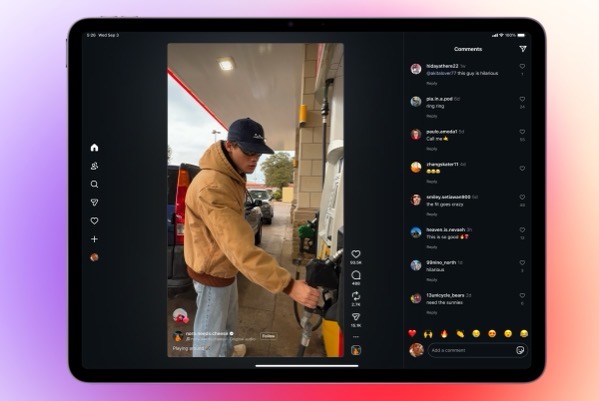
The folks at Meta must have something up their sleeve. The reason I say that is they have finally, after all of these years released an iPad version of the app, long after most folks just figured it would never happen. Other than speculating on what might be behind the late to the party move, at this point it begs the question, Who cares?

Reels with Comments 16_9.

I’m sure plenty do care. I’m not one of them. Instagram is one of a few apps that I begrudgingly use. Begrudgingly because I hate it. I use it because my family on all sides continues to do so and it’s a way to keep up with grandkids, nieces, nephews, and other family news. But I honestly despise that I have to. Believe me I’ve tried to wean them off onto other apps and services, but it never sticks.

Every time I do open Instagram I have to block somewhere between 5 and 10 spam accounts (too often porn or ridiculous come ons.) And of course the algorithm doesn’t show me what I want to see, but what it wants me to see. There’s even an increased sense of desperation from both Instagram and Facebook sending out notifications telling me someone replied, is waiting for my reply, or commented on something I haven’t seen yet. It’s like begging in the street. Apologies to those who might actually need to do so.

Sure I could turn off the notifications, but sadly, that’s the least worst way to use the app to keep up with family happenings.

I’d say that since it took 15 years for Meta to finally roll this out that perhaps the adolescents in charge finally are growing up. But then, there are those porn accounts that pop up with the frequency like prepubescent zits.

I won’t be putting it on my iPad. It’s troubling enough that I still have it on my iPhone. And as I watch the over excited coverage rolling in, I haven’t seen any image of the iPad version that makes it look the least bit appealing. It’s like Meta didn’t really care based on what I’ve seen so far.

So, Instagram is on the iPad. What’s the point and who cares?

You can also find more of my writings on a variety of topics on Medium at this link, including in the publications Ellemeno and Rome. I can also be found on social media under my name as above. 
Sunday Morning Reading

The lazy days of Summer

We’re technically out of the Dog Days of Summer, but it doesn’t feel much like it. It’s the kind of hot Summer I remember as a kid when the dogs would spend the hot part of the day lazing under the porch. I’m spending mine traveling (too much traveling) and sharing what I can here and there. Find some shade and check out this week’s Sunday Morning Reading.

Shutterstock 2623809139.

Peter Wehner thinks the only way out of the wreckage we’re in is to rewrite the cultural script. Tall task. He spells it out in The Virtue of Integrity.

Knowing is half the battle. What you do with knowledge is an altogether different story as knowing and knowledge are two different things. Check out Jim Stewartson’s piece The War on Knowing. 

Somehow in all of the wreckage we’re sorting through, empathy became a bad thing for those doing the wrecking. NatashaMH thinks this crazy Artificial Intelligence race we’re in is taking the human out of being human. If you ask me it’s all a bit too human as we look to foist off responsibility for the choices we make. The Risks of Synthetic Empathy is a great piece. Give it a read.

Then take a look at Mathew Ingram’s piece, People Fall In Love With All Kinds of Things Including AI Chatbots. When chatbots start filing for divorce I think we might have created Artificial Generative Intelligence.

Kyle Chayka is exploring The Revenge of Millennial Cringe. Home may be where the heart is, but it was a terrible song.

Stephen Marche is talking about Profound and Abiding Rage: Canada’s Answer to America’s Abandonment.  Abandonment is a good way to describe what we’re all feeling these days.

Apple’s about to unleash new operating systems for its devices in a few weeks and the one that has my interest is for iPads. From what I’ve seen (I don’t run the betas) the changes to the multi-tasking capabilities will be a positive step forward. Craig Grannell takes a look at how long it took for Apple to finally make these changes in Apple Finally Destroyed Steve Jobs’ Vision of the iPad. Good.

Chicago’s Uptown Theatre celebrated 100 years this week. Robert Loerzel takes a look in Uptown Theatre: 100 Years of Glory and Decay. 

When you think you’re the center of the universe it can rock your world when you find out you’re not. Kids learn this. Republicans in the current administration have not. Eric Berger writes about NASA’s Acting Chief Calls For the End of Earth Science at the Space Agency.

(Image from Machekhin Evgenii on Shutterstock.)

If you’re interested in just what the heck Sunday Morning Reading is all about you can read more about the origins of Sunday Morning Reading here. If you’d like more click on the Sunday Morning Reading link in the category column to check out what’s been shared on Sunday’s past. You can also find more of my writings on Medium at this link, including in the publications Ellemeno and Rome.

Two Interesting Takes on iPadOS 26

iPadOS 26 beta reactions are making me think twice about installing

As I continue to live vicariously, watching from the sidelines through this summer’s Apple beta season, two interesting takes on iPadOS 26 have crossed my radar and are worth sharing.

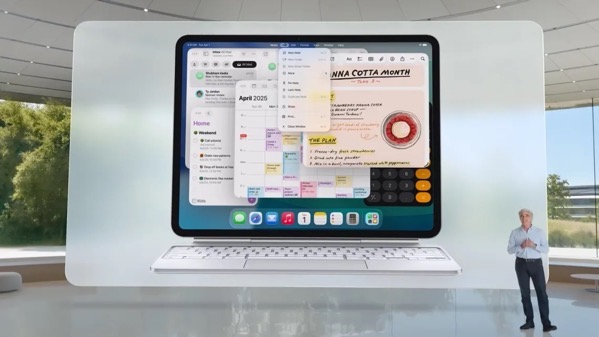
IPadOS 26 WWDC_a.

First up, Harry McCracken says what most using iPadOS 26 are saying that Apple has made the iPad more Mac-like. But he also wonders where that might lead?  Check out his post here.

Follow that up with M.G. Seigler’s post. He thinks Apple might have created sort of a Mac, Jr. His post is from prior to the release of the public beta.

Both gentlemen delve deeper than the “what’s a computer?” discussion into other facets of the betas and both posts are worth your time, if iPads are your thing.  That “what’s a computer?” question is going to probably be with us through most of the next year.

FYI. I’m adding an iPad category to this little corner of the web. I have a feeling we’re going to be talking quite a bit about iPads in the months to come.

You can find more of my writings on a variety of topics on Medium at this link, including in the publications Ellemeno and Rome. I can also be found on social media under my name as above.