You can do anything you want in the land of the free and the home of the brave. As long as you don’t get caught. Or as long as you have enough cash in the bank to hire the right legal beagles. That’s the American way. Always has been. The bigger you are the more you can toss around your weight. That works more times than it doesn’t. In the case of the United States vs. Apple, Inc, not so much. Thus far.
The Department of Justice swooped in on Apple charging that the iPhone is the crown jewel of an illegal monopoly. You can read the lawsuit here. I’m not going to get in to all of the legal issues. Not really my game. As to that lawsuit I’ll take the liberty of saying the following:
I don’t understand the equation that led to the monopoly designation. It seems odd given similar such cases in history. The fact that different percentages for different types of valuations is being tossed around in all of the first reactions I think bears that out.
I’m in deep in the Apple ecosystem. I use the hardware and software. I enjoy the tech (when it is working as designed), and I hope they’ll continue to make the high quality products and software they do. Having used hardware and software from other makers, I find Apple’s superior and better for my needs. When and if that changes so will I.
For the most part I buy Apple’s pitch about security and privacy. There are times I think the marketing around security and privacy leans too much towards myth-making, but in my experience the myth seems to have some foundation.
I’ve listened to the complaints from developers and other users through the years and find most of those I understand justified. Apple may have indeed created problems by creating and running the App Store the way it has. I personally don’t feel victimized by that, but I understand the issues presented by those that see it differently.
Bigger picture I will say the following. Apple, like some other familiar tech giants of note (Microsoft, Google, and Amazon), largely brought this on itself with a too big for its bank account britches attitude.
Arrogance and swagger isn’t just a feature of big tech companies. It’s a bug that infects any company or anyone who gets too greedy for their own good. I’ve seen it happen too many times.
History is full of these stories and many American myths are built on that foundation. You work hard, you make your pile, and you do it your way. The world beats a path to your door and you think you own the path and the world. You made your own rules along the way and bent some existing ones to your will. Perhaps broke a few.
That mythical song of good old American capitalism has been sung so often everyone knows the tune and the lyrics. When it comes to Apple’s stanza, you add in a chorus about Apple’s rise from an almost near-death experience and it becomes a siren song with a powerful resonance.
In my view, limited as it may be, Apple could have easily made some adjustments along the way and possibly avoided this current mess. But the powers that be obviously thought different. They also thought they could swagger their way through and beyond this. That may well prove out in the years to come. And it will take years.
Meanwhile, here’s some good early inning commentary on this story so far. I’m sure there will be much more ahead.
Cubism is an art form popularized by Pablo Picasso, George Braque, Jen Metzinger and a bevy of other artists. Cubism can be fun and funky. It can also be confusing. Either way it can generate some highly charged opinions. The Anker 3-1-Cube with Magsafe is certainly not what I’d call a work of art, but it is a nifty piece of Magsafe charging tech packaged in a funky little cube.
I received an Anker 3-in-1 Magsafe charging cube as a Christmas gift and am using it on my current month-and-a-half long gig away from home to charge an iPhone, Apple Watch and AirPods. Straight up I like the device quite a bit and am very grateful it was gifted to me.
Right out the box you get a small gray cube. It’s heavier than its roughly 2.5 inch footprint suggests, weighing in at 14.46 ounces. It deceptively makes you think the cube contains a battery, but it does not. It’s solidly built for the most part. Flip open the top and you can attach an iPhone via MagSafe for charging or to use in StandBy mode. You can also just plop your iPhone on top of the cube without flipping up the top. Press in on the small side shelf and out pops a small charging adapter for the Apple Watch. That watch charging shelf does feel a little finicky at times and I’m not sure if pressing it in and out constantly won’t eventually yield to failure. The lid angle is adjustable so using it for viewing something on your iPhone works well. With the lid flipped all the way to its maximum angle you can place your AirPods under that angled lid to charge them up.
Yes, you can charge all three devices at one time. With all three devices charging it takes Cubism into an sort of modern realm. The device comes with a 30-watt charging plug and a decently long cable (5 feet). No this isn’t a mobile charger, it’s meant to be used plugged in, which may mitigate the hefty weight. Anker’s cube supports 15-watt charging for compatible iPhone models and suppots fast charging for Apple Watches as far back as version 7.
The cube is a bit pricey currently running in the $150 range on Amazon, Apple and other outlets. I had looked at this when it first came out and ruled it out for my gadget collection due to the price compared with other options available. One of the things I like about it is the small compact size compared to many other charging stands and mobile charging options currently on the market that tend to look like jewelry stands. Given that some of my gigs require weeks long stays, I’m glad the Anker 3-in-1 Cube with MagSafe was gifted to me. I won’t mind its surprising weight when packing a suitcase, and I do indeed like this quirky, little, somewhat heavy cube quite a bit.
You can find more of my writings on a variety of topics on Medium at this link, including in the publications Ellemeno and Rome.
For some the iPad can be a strange beast. For some the iPad is just what they need. Of course that depends on which iPad you might have or use. That’s where the “strange” comes in. Most of the follow the leader tech press thinks the iPad lineup is confusing. Following along, I happen to agree to an extent. If you know what you’re looking for it’s not that difficult a choice. But if you are in the market for the first time it can be confusing. There’s size differences. There’s iPad Pros, iPad Airs, just plain iPads, and then there’s the iPad mini.
Apple hasn’t helped with the confusion because it’s sent mixed signals along the way. I’m not one to be that concerned because my needs are clearly defined. I’m not looking to use an iPad as full computer replacement, though there have been times I’ve used it as such and reliably well. I’m in the game for mobility for both work and play. Frankly, while the lineup may seem confusing to the easily distracted, the variety in the lineup does offer an array of choices.
My family is one example. For my wife an iPad is primarily a content consumption device. For me it serves that purpose, and is also an indispensible work platform. I keep up to date with current hardware. That’s my gadget geek side. My wife is still quite happy with a much older version. (It still has a Home button!) My wife defines the case for many that frustrates the “must have new hardware” and “growth at all costs” crowds. For lack of a better analogy, she sits in the larger main section of the theatre often referred to as the orchestra. I sit in the “always ready for the new thing” smaller mezzaine or balcony. That analogy flips the pricing equation on its head, given that the main floor tickets are usually higher priced, but I think it holds in terms of numbers.
I own the latest models of an 11-inch iPad Pro and also an iPad mini. Love them both. I use them in similar but different ways, fitting the tool to the job of the moment. I may be a gadget geek, but I’m primarily a theatre professional. Most of my work is directing plays. Both serve me well in my job. Currently, I’m working out of town on staging The Lehman Trilogy. Both the iPad Pro and the iPad mini suitably fill my down hours with entertainment and are reliable work horses for the gig. To be honest, their roles as tools are so familiar that to call my usage “rote” would be accurate.
Background
Back in the day I was a Tablet PC fan boy. I used them primarily as a work device in the theatre. I was at one time a Microsoft MVP for Tablet PC. Those devices allowed me to quit using paper scripts in rehearsal and write my notes directly into a digital script. I could set aside my beloved yellow legal pads and not so beloved folders of research and have everything handy in digital format on a Tablet PC. The debates then were over slates versus convertible Tablet PCs.
Microsoft screwed the pooch with Tablet PCs leaving the door open for Apple. And along came the iPad. It certainly wasn’t perfect for my work initially, but it offered promise. I can’t remember how many different stylus solutions I went through (from Adonit to Zagg) until the Apple Pencil came along. Along the way I’ve tried most of the other tablet solutions but as far as my work needs are concerned the iPad is hands down the only viable choice. I include Microsoft’s Surface tablets in the reject pile.
My Work
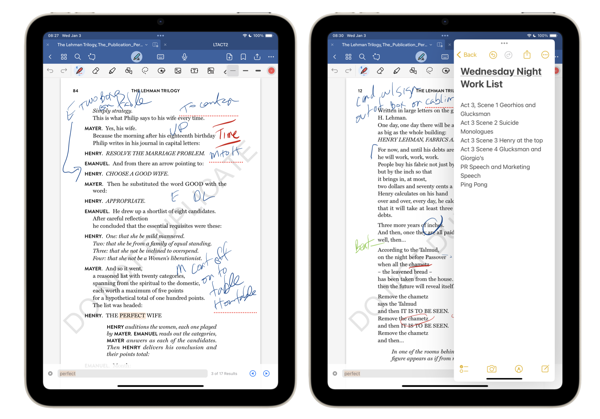
When I’m doing a show, work includes reading and working from scripts; research gathering and consumption; using, taking and making notes in rehearsal as well as on the research. Working with scripts, once a page gets too filled with my indescipherable scribbles, I simply open another copy and start afresh. GoodNotes is my app of choice for this. (I’ve tried them all.) It’s an easy solution for scribbling notes in the margins of a script in prep or in actual rehearsal. It also provides a way for me to archive scripts once I’m done with a show.
As a director I often walk into rehearsal with a clean copy of the script so that I’m more focused on the actors and the text and less on my notes. It’s a snap (swipe?) to switch back and forth when I need to reference my notes or research. Time is money and a limited commodity in rehearsal and I have to maximize what time I’m given.
In the early days of staging I’m primarily using the iPad Pro. It’s a Goldilocks device as far as size goes. The text and my notes are large enough to read at a glance and the size of the device is easy to tote when I move around the theatre or rehearsal room. In the stages of rehearsal when I’m mostly taking notes as the actors rehearse what we’ve done, I switch to the iPad mini for even more mobility and a bit of discretion.
My research is ongoing, but primarily done prior to rehearsals beginning. I do some of that on the iPads, but use a Mac for quite a bit of it. Apple Notes is my app of choice for all of that research gathering, though I’ve tried many others and still do. Prepping for a day’s rehearsal when I may need specific research I’ll create a note with links to those notes, the research directly, or a work list and have them handy via Slide Over. I’m still not a fan of Stage Manager although I’ve given it several attempts to win me over.
Marshall McLuhan coined the phrase “the medium is the message” in the 1960’s about human communication. For me, the same is true with my work tools. When I’m staging and working scenes the larger iPad Pro is the medium of choice and feels natural as I’m moving actors and scenery from moment to moment. When I’m watching and note-taking as the actors move through scenes on their own, the smaller iPad mini serves to remind me that I’m an observer, not a participant in the moment. If I move about the theatre while the actors are working it can be distracting if they see me a take a note. They can fall out of the moment and into a “what did I do wrong” mode of self-monitoring. So I try to be as discreet as possible.
Once we’re down to the final days of rehearsals and I have limited hours for giving notes I’ll actually return back to my Mac for preparation and organizing my notes for efficiently relaying them via email or in note sessions with the cast. Often I’ll use the Notes app on my iPhone when giving those notes in person. Once we invite the audience in for previews, I’ll stick with the smaller iPad mini for taking those notes, again for discretion purposes. When you tell an audience to put away their smartphones it’s not a good look to see a larger iPad light up while the director is taking notes. There was a time that I used a Samsung Galaxy Note in this scenario using OneNote or Evernote as the note-taking app. But those days are gone as my routine has become more focused.
For this current gig, we conducted some early table work and read-throughs of the script using Zoom. I’d be on my Mac, but have my script on the iPad Pro. My actors were using iPads for their scripts as well.
My work also consists of a lot of meetings and since I’m a now happily a freelance director I often travel for work. That means I’m often doing pre-production virtually using whatever video conferencing app the theatre uses. I’m also auditioning actors in virtual auditions. Video submissions also play a significant role. Both devices serve well in those aspects of the job, though I typically prefer the iPad Pro in those cases.
Play
Throughout this article I’ve also mentioned that I use both iPads for play as well as work. That is indeed the case. There’s downtime, and like many I use an iPad for consuming media and reading. I read a lot of scripts. The iPad mini is perfect for this whether I read the scripts as PDFs imported into Apple’s Books app, (my preference), in the Kindle app or in a PDF reader. As I’m working on this article on my Mac, I’m watching two football games in the background, one on the iPad Pro and one on the iPad mini.
Stall Surfing
Back in the day I often spoke and wrote about Tablet PCs as great Stall Surfing devices. Yeah, Stall Surfing. That thing you do when sitting on the toilet. You know you do it, whether it’s on a smartphone or a tablet. I’m here to tell you, that if nothing else, the iPad mini is the perfect Stall Surfing device. It’s sure beats reading scripts in paper or bound versions. I doubt we’ll ever see a marketing campaign featuring Stall Surfing, though.
Future Wishes
If I had a wish list for future iPads (both Pro and mini) it would be simple. I’ve heard talk that Apple might be moving away from the 11-inch size of the Pro models, thinking the Air liineup might be sufficient for most who need that size. I hope that’s not the case. It’s the perfect size and power house for my line of work. Sure, improve the larger Pros or make even larger ones, but don’t forget those of us who move around while we work and want a document sized device to work from that offers us power when we need it.
As for the iPad mini, I’d love to see that power up a bit in the next generation with an M-series processor. As to the design of both, I know new iPads without significant design changes can be boring to many. I’m not in that camp. I’d be content with these hardware designs for quite awhile to come. Both work exceptionally well for me as is. But I’m sure I’ll jump at the next models that come out regardless.
I’m writing you to let you know what I would like from Apple for this Christmas. It’s not new hardware. The amount of Apple gear I own is more than enough and I’m quite happy with it. So thank you for that, and thanks ahead of time because I’m sure Apple’s vision is to keep cranking out new hardware in the future.
This is a wish list about a number of nagging things that I think you and your elves need to pay more attention to in your operating systems and software. Let’s call them fixes. Most of these nagging issues have been around for a while and oft-reported so it’s surprising you’d allow them to hang around for the users who love your products. I, and many others, have been reminding you of them quite frequently and for quite a while.
I know your elves are busy, but if they could find some time to address these things it would be one of those gifts that gives all year long, and for years to come.
So, here’s my wish list for iOS and macOS.
iCloud
This is the big ticket item on my wish list. You’ve tied so many services and functionality to iCloud and a user’s AppleID. That makes good sense for the eco-system and when it works it’s great. When it doesn’t it causes problems for users, your support personnel, and completely diminishes much of the good it intends to provide. I’ve been on the hunt for solutions to my iCloud woes for quite some time now. I won’t go into detail here, but you can follow the links in this article that chronicle my journey.
But just so you know, the issues aren’t resolved, aren’t closed to being resolved, and tend to pop up with some sort of Santa-like omniscience, knowing when we users can least afford a problem.
Your elves I’ve spoken with thought this had been resolved with Sonoma and were quite disappointed to find out that wasn’t the case. So they’re as perplexed as your users.
These iCloud issues affect features like Handoff/Continuity and Sign in with Apple Watch not working. They also include Photos not syncing, Shortcuts not syncing, Mail not syncing, Reminders not syncing, iMessages not syncing, and the list goes on. To be fair, Photos, Shortcuts, Mail, Reminders and iMessages eventually do sync and catch up. But when they randomly don’t and you’re counting on them it’s like receiving a hastily scribbled note in your Christmas stocking telling you the gift you were expecting will be arriving later. Certainly survivable, but disappointing and certainly not magical.
While, at times, the reoccurrence of these issues seems random, there seems to be some predictability about it. They far too often (not always) crop up just before or just after an update is released whether it be the next official OS release or the beta for the next version. My hunch, after months of observation, and talking with other users and your elves, is that each time you issue a software update for devices (beta or official), whatever accompanies that on the back end keeps stacking problems on top of unsolved problems.
To be quite honest it feels more and more like regardless of if we run OS betas or not, (I do not), non-beta users are subject to the same vagaries that any beta can bring and/or fall prey to back end operations that are required by these updates.
Mac Notifications in General
Please, oh, please. We all know notifications are tricky. We all know they are a mess. But please, oh, please give Mac users a way to bail out and dismiss all notifications with one button the way we can on iOS devices. Or at least time them out.
Reminder Notifications
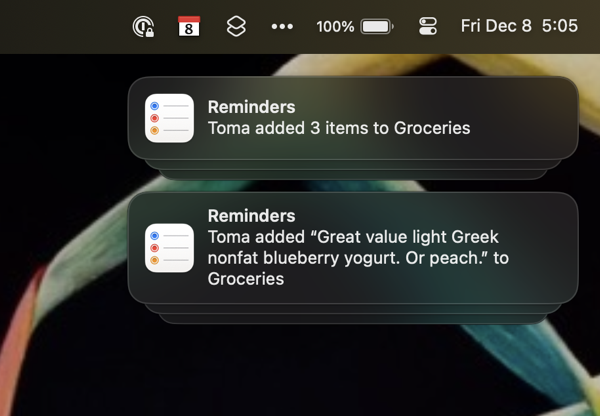
I’m very pleased with the continual progress in the Reminders app. I like using Reminders for shared lists with my wife. But the notifications when adding a shared Reminder to a list need to at least follow the same rule as other Reminder notifications do and disappear after a short time, waiting to be recalled. I used to find it humorous that my wife could add a Reminder to our shared grocery list while I was on the way to the store. But not so funny after I picked up the item and cleared the item in the Reminders app, had returned home and placed the item in the fridge only to find the shared Reminder still showed up on my devices. I let some of these linger for a day once. And they never disappeared until I manually removed the notification.
Stand By
This is a nice new feature that I like quite a bit. Please fix it so the widgets I choose to show stay on the screen and don’t change randomly after I’ve set up my preferences. This feature either needs to be less smart or much more intelligent.
Apple Mail
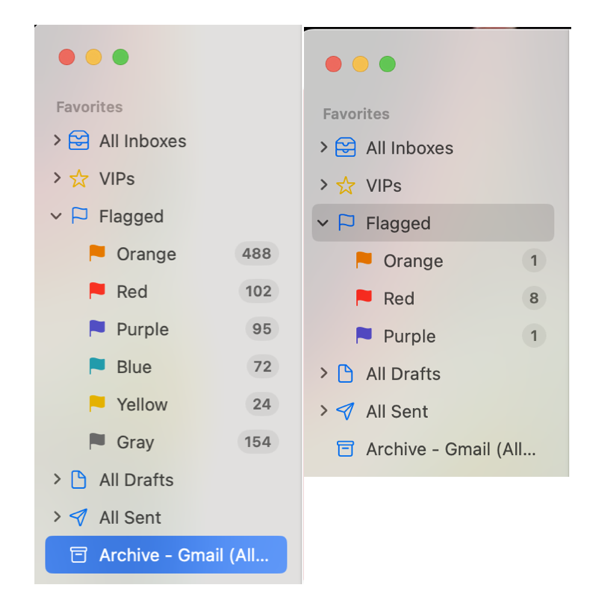
I use Flags and Rules in Apple mail to help me manage my Mail workflow between projects. Different projects have different colored Flags. That works well most of the time switching between Macs. But not always. In fact currently the counts are so drastically off between my two Macs that it’s a little ridiculous. And it’s always changing.
I watch over a course of days how those numbers can change trying to sync up. When the counts get off so drastically, it tells me something is happening server side on the back end. That doesn’t help when I am attempting to use this organization structure to accomplish a task. By the way the differences in numbers is more often than not off between Mac and OS devices also.
I’d also like to be able to more easily track via color distinction those same Flags in iOS by having another menu drop down allowing access to the different color categories instead of just a list of emails with all of the different colored Flags.
When I’m triaging email I’d like to be able to choose a colored Flag after using the swipe gesture to Flag an email instead of having to go back and choose the correct color later.
Consistency Across Platforms
I know things are different between macOS and iOS. And yet, it seems like you keep trying to bring them into more and more into sync. (“Sync” might be a poor word choice there, given all the syncing issues you have. Or maybe it’s just too darn appropriate.) In trying to sync some things up you’ve created some cognitive dissonance and user frustration. These issues cut across Apps and Services like Shortcuts, the Share Sheet, Mail, Notes, Reminders, even Apple Music, Apple TV+ and Apple News. Features are almost the same, but not quite the same enough.
There are times when using a feature on one platform is just a small enough degree different than on the other that it creates a logjam in getting things done and makes me think I’ve lost track of how to perform the task. At times it makes me wish things were more separate and not less. But I know that’s not the goal much less the desire.
Wrapping Up
So that’s it. With the exception of the issues related to iCloud, I think it’s a manageable list. Here’s hoping Apple’s vision for the future includes cleaning up these longstanding nagging issues before adding new ones on top of the old.
I use Apple products. Have for awhile. Computer and mobile tech is a hobby of mine It’s a hobby I care profoundly about for a myriad of reasons. I feed that hobby with Apple’s stuff because quite simply I prefer those products to others currently on the market. When friends tell me it’s an expensive hobby I often reply with questions about their golfing habit and course fees. (I have a lot of friends who play golf.) So, in my mind it all equals out. But yes, it’s expensive. I don’t chase tiny balls around a golf course. I do chase technology for all the fun, foibles and foolishness it can sometimes provide. I also use it for work.
Now, do I think Apple is the be all and end all? Absolutely not. Apple pisses me off almost as much as it delights me with some of its products. (Here’s looking at you iCloud.) Apple also pisses me off at how it hides behind its “majority of users are satisfied” and “small minority of users” PR lines. That does nobody any good if there’s an issue affecting them but not the majority of users. I also have come to believe that Apple’s luxury of taking the long view is starting to hurt a bit when it comes to issues with current products on the market. Lately, I also think their design acumen is not up to the standards they’ve previously set and that they’re caught in a trap of their own making. If we pay for the train ticket we’re entitled to complain about the ride.
I’ve written a bit about all of that here and in other places. I’ll continue to do so. But everything in life is a trade off, and in my view there are less of them with Apple’s products than with others.
All of that out of the way, yes, I buy a new iPhone each year. I sometimes do the same thing with the Apple Watch. I typically hang on to iPads and Macs through as many cycles as I can. This year I’ve purchased an iPhone 15 Pro and an Apple Watch Series 9. The iPhone is a year over year upgrade. So is the Apple Watch. Below are my initial thoughts on each. I’ll also link to other helpful sources of information and some reviews along the way that provide more than just the impressions I’m jotting down here.
As I’ve said before we’re in a wait and see game with most Apple products. We’re waiting to see what happens with the Vision Pro and spatial computing. In that context, everything is pointing towards that future with this year’s crop of Apple hardware and operating system releases yielding what feels like moderate, not wow inducing updates. Nothing wrong with that. The iPhone is a stable and staple product. Each year’s model deserves and demands something new. There will be plenty of folks in the market for new or upgraded devices between now and “early next year.” These products certainly look to fill the bill. As for the Apple Watch, there is also a major redesign with the user experience that I’m not sure actually works for current users looking to upgrade. Again, I think it’s pointing towards the future.
iPhone 15 Pro
I’ve had the iPhone 15 Pro for a week now so that’s what these impressions are based on. First impression: Nice. I could leave these impressions with that one word. Nice. Maybe I’ll add a second word. Nice Action.
Upgrading an iPhone year over year you don’t see great leaps, especially in the 3-4 year cycle Apple relies on for each design. Obviously there are many reasons for that from costs to the fact that most iPhone users don’t upgrade every year. But as someone who’s owned every iPhone since the 3GS, I’ve been pleased with each device’s design change. The big exception for me was the leap from the iPhone 4/4S to the iPhone 5.
Design
The first thing right out of the box I immediately noticed and liked about the iPhone 15 Pro is it feels lighter in the hand and the slightly rounded edges do make a difference. Tangibly so. The weight and small shape differences are very noticeable in my hand, my pocket, and when attached to the ESR Magnetic Wireless charger in my car driving over the very bumpy backroad to my in-law’s lake house. With the iPhone 14 Pro I’d have to take it off of the charger to keep it from tipping down or falling off. With the 15 Pro it held its orientation.
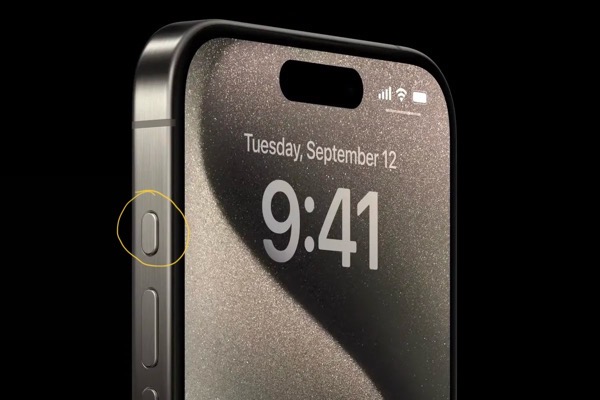
Next up is the Action Button. Great addition. I like it a lot.
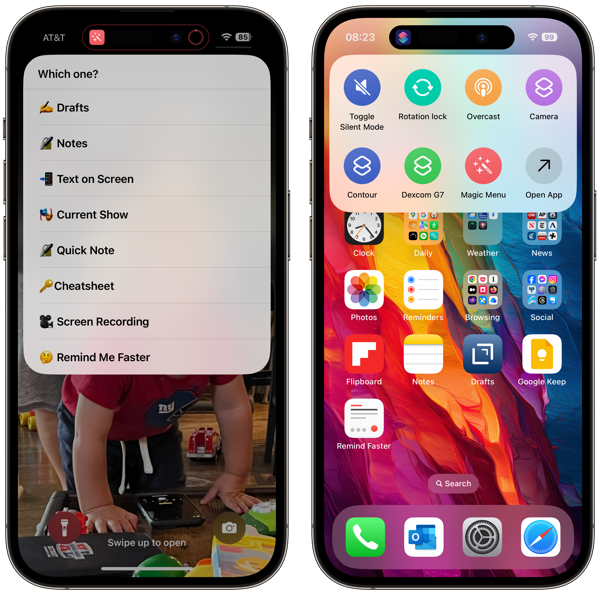
The Action Button replaces the switch to mute the phone. You can still mute the phone with the Action Button or in Control Center. You can also use it for other purposes you can configure in Settings. I’ve already configured it to use Shortcuts so that it’s more than a single use thing. And that’s why I think the Action Button is a more than significant change.
Unlike last year’s big shiny new feature the Dynamic Island, the Action Button is something users can take advantage of to make their iPhones much more personal. The Dynamic Island required developers to add features in their apps. To be honest I’m disappointed in the lack of apps I use that take advantage of it. But the Action Button, combined with Shortcuts gives users so much more to work and play with. For those not afraid to dip into Shortcuts it’s a real way to personalize an iPhone. I’ll be putting up a separate post about some of my experiments with the Action Button shortly after this one.
I do have one complaint about it though. Its placement on the device just above the volume ringers is odd. I have not yet developed enough muscle memory to consistently find it instead of the Volume Up button. To my mind, and my reach, it would have been better placed below the volume buttons. But as far as I’m concerned the Action Button is this year’s biggest, best, and winning new feature.
As for the big push to Titanium, well ok. It does improve the weight so that’s a plus. I wasn’t enamored enough of the look and feel of the devices in the Apple Store on release day to say it is that big a deal cosmetically. If going caseless is your thing, perhaps it makes a difference for you. But with this year’s color choices I don’t see it or feel it, beyond the weight difference. And perhaps that’s enough. Regarding colors the same goes for the iPhone15 non-Pro. If you ask me Apple’s color design team more than lost a step this year. Color me not impressed.
Camera
Every year Apple promises and delivers camera upgrades. This year the big upgrade came to the bigger iPhone 15 Pro Max only. Apple didn’t leave out the smaller 15 Pro however. The iPhone 15 Pro uses the sensor, machine learning algorithms and the number of pixels in different ways. That gets into more numbers, math and wizardry than I want to explain so I’m linking to this PetaPixel article by Chris Niccolls on the camera improvements in the iPhone 15 lineup if you’re looking for more details.
One big change that I think will be widely used is the new Smart Portrait mode. You no longer have to set the camera to take a shot in portrait mode. You can do that after the fact while editing in the same way Apple introduced this for video last year. This is a real win.
In my experience with the new camera I do see improvements. I’m still very impressed with what we can do with smartphone cameras. I like taking photos with them. It’s a hobby within my hobby. Below are a few images I’ve taken in various places.
One thing of note about the video capability. Pointing to the Vision Pro and spatial computing future the iPhone 15 Pro lineup has moved the lens arrangement on the back of the iPhone to better align them for spatial video. This is so that when the Vision Pro devices are released “early next year” there is an iPhone on the market that can shoot spatial video needed for that tent pole feature promised for new headset. I’m not surprised by this. Apple needed iPhones capable of shooting spatial video when the headset rolls out. They weren’t going to wait until next fall. But the spatial video feature for this year’s crop of iPhone Pros is promised for a future iOS 17 update. Pointing towards the future is a recurring them with this year’s Apple devices.
USB-C
Another big change is Apple replacing the charging port to USB-C from Lightning. A lot of folks tried to make this into a “users will be upset and this is just a cash grab from Apple” thing. The good news is I don’t think it took. From my impressions no one is that aroused with new plugs for new holes. I’m happy to see the USB-C port and everything it brings. Some have had quite a bit of fun connecting all sorts of things up to an iPhone. Check out this video from Stephen Robles. I imagine we’ll see much more of that. I also imagine we’re going to see Lightning cables still in use for other Apple accessories and earlier model iPhones for awhile to come. Evolution is a slow process even when intelligently designed or prodded along by the European Union.
Processor
The iPhone Pro lineup features a new chip in a new size. Apple reduced the chip size from 5 nanometers to 3. And this year’s version is called the A17 Pro. The size difference in the chipset is supposed to yield reduced power consumption and increased performance. The GPU (graphics) got most of the bump and Apple is making a play for the gaming market. Here’s a subtle hint from Apple on that.
The only notable difference I have seen since the release of iOS 17, a few days ahead of the iPhone 15 Pro release, is faster responsiveness with Look Ahead typing and autocorrect than on the iPhone 14 Pro. Time will tell. But really we’re reaching a point that these improvements in Apple Silicon year over year don’t yield big notable jumps that the average eye is going to notice.
There’s been some concern about these models getting warmer than some feel comfortable with. Early thoughts focused on the new chip. Noted Apple analyst Ming-Chi Kuo has cast some doubt on that. That story continues to heat up and I imagine we’re going to hear more about this in the days and weeks to come.
On that front I’ve had two experiences when I noticed warmer temperatures than I expected. I shot a little slow motion video (about 2 minutes each for several clips) and noticed the iPhone got really warm.
This morning as I was proofing this article with my iPhone sitting on my desk, not charging, and not being used for easily 40 minutes or so, I noticed when I did pick it up that it was quite warm, more so than usual. That’s almost a full week after setting up the device so I would think that all of the new phone indexing and stuff behind the scenes would have already settled down.
That’s it for initial impressions of the iPhone 15 Pro after a week of using the device. I’m pleased with it. There are some issues and some big wins. The Action Button is terrific. Smart Portrait mode is a win. The lighter weight and better feel are a win. And there’s lots of wait and see’s. Even so I’m glad I indulged my hobby again this year and I’m sure I’ll have more impressions down the line. Not being one to use these devices without a case there’s a story about that as well.
FineWoven Cases
If there’s a controversy or a -gate with this year’s products it’s with Apple’s FineWoven iPhone cases. Meant to replace Apple’s leather cases as a big nod to saving the environment, Apple’s FineWoven cases (and Apple Watch bands) were touted as a very green replacement for the leather products. I think everyone, including the powers that be, assumed Apple would get this right. That’s not the case.
I ordered one. I’ve returned it. It certainly did not feel as nice in the hand as the leather case or worth the same price. From many accounts it doesn’t hold up or age as well in normal usage. There were stories of deep scratches and unremovable stains. There were also photos of scarred cases on Apple displays in stores forcing employees to continually swap them out. That all surfaced before I received mine, so I was extra careful trying it out. But the point of using a case is to not have to be extra careful. While I didn’t object to the new feel of the case, I could easily tell it would not stand up over time.
Someone(s) at Apple goofed big time here. The leather cases certainly showed wear and tear, but that developled over time as is always happens with leather. Not just with one day’s usage. And the properties of leather vs fabric, fine woven or not, make that an entirely different and actually desired experience.
In addtion to the look, feel and durability of the cases, Apple apparently goofed on the cutout surrounding the USB C enclosure. There are reports that the cutout is misaligned so that you can’t plug in a USB cable. I don’t think that’s universal, but that actually makes the problem a bigger one. That might not be surprising in a cheap 3rd-party case. But for Apple that’s just sloppy and out of character.
Bigger pictiure, Apple not only goofed with the design and manufacture of the cases but they’ve busted a branding attempt that I’m sure cost a lot of time and money to create. Whatever happens going forward I doubt we’ll see FineWoven Apple products except as the butt of jokes and memes that rival some of Apple’s other failures.
Apple Watch Series 9
As pleased as I am with the iPhone 15 Pro year over year I’m almost the opposite with the Apple Watch Series 9. Almost. My disappointment isn’t with the hardware. How could it be? By and large it’s the same hardware as the previous two versions with a brighter screen, more memory and a faster processor. All good things. And hey, it’s Apple’s first fully carbon neutral product. So, no issues with the hardware.
I have do have irritations with the UI changes Apple has introduced. Some of these may be less irritating as I get used to them. I’d like to charge this off to something new and different that needs a period of adjustment, but I don’t think that’s going to prove out. Apple makes the whole widget, hardware and software. Usually that benefits users and the company. Apple also calls the Apple Watch it’s “most personal product.” This feels like a case when the new design and “whole widget” philosophies went too far for a device that I indeed feel very personally attached to.
Apple changed which buttons do what on the Apple Watch. Apple also introduced Widgets in what feels like a move to make them the primary interface. Swiping left to right to change watch faces is also gone. There’s logic to these changes. But I am admittedly flustered by them.
Previously, primary interactions with apps were through Complications that you could set for watch faces. Some watch faces could have more. Some could have very few, if any. I actually had different watch faces with different sets of complications for different facets of my work and play. Now, regardless of which watch face you choose you can swipe up from the bottom of the screen or scroll the Digital Crown to access the widgets you choose to place in what Apple calls the Smart Stack. Think of it as a vertically scrolling half-carousel. It doesn’t go all the way around. The logic is sound here.
While this new metaphor makes more sense for user interaction on more watch faces, you also can’t swipe back and forth to change watch faces without first long pressing on the screen. So it feels like a win that is also a loss.
The other biggest loss is that I can no longer call up a list of my favorite apps. Previously you called them up by pressing the Side Button. That interaction is now gone and replaced by using the Side Button to access the Control Center. You can also no longer set Favorite Apps. I don’t use many apps on my Apple Watch, but the few I do use I do so regularly.
I’ve added the widgets for those apps into the Smart Stack. The “smart” in that stack of widgets is supposed to show you the widget you need when you need it, or when Apple thinks you might need it. So far in my case that hasn’t proven to be anywhere close to being true. Perhaps it’s too early to make that judgment. But things just feel wrong with the constant lineup of the Smart Stack changing as Apple feels it should I have to constantly scroll back and forth to find the app I’m looking for.
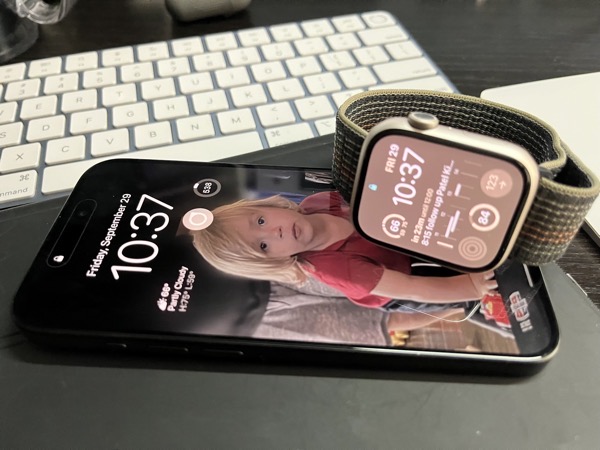
Here’s another example. The photo below is of a completed timer. That big circle in the middle is begging to be tapped to close the timer. But to actually close it, you need to hit the smaller X in the lower left. This interface shows up in several instances in several of Apple’s native apps. It just seems confusing.
So it feels like Apple goofed here. There may be a longer term vision here, but the luxury Apple has of looking far ahead seems to have confused the moment for this year’s Apple Watches.
Speaking of looking ahead, there’s also the Double Tap gesture. The feature allows you control the watch by double tapping your thumb and finger together. It’s a way to interact with the watch that is right out of the Vision Pro vision. The feature has sorta, kinda existed as an accessibility option previously but is now a part of the operating system. Or soon will be. It’s due to come later this year, even though it was ballyhooed quite a bit when it was unveiled. It’s somewhat surprising it wasn’t ready at launch. Indications are it will show up in watchOS 10.1, but it wasn’t included in the first release of that beta for developers. So we’ll see.
Siri does feel a bit faster and more accurate. That’s because some of what Siri does happens on device. Some requests still do roundtrip to the Internet, but by and large you can feel a positive change. I use Siri on my Apple Watch more than on other devices and always to mixed success. Siri is one of those features that seems to suffer through good and bad periods for no discernible reason so let’s hope there’s more consistency with some of its functionality happening on device.
One other thing that surprises me is transitions from Notifications back to the Watch Face. The animations feel janky. I noticed this after installing watchOS 10 on the previous Series 8. I thought perhaps that was just an issue that would be rectified with the new performance on the Series 9. I was wrong. Those transitions are still not smooth and still quite janky. Not optimal. Here’s a short video of what I mean.
So that’s it. Initial impressions on the iPhone 15 Pro, the Apple Watch Series 9, the FineWoven cases and some other things tossed in the mix. I’d rate this Fall’s Apple product releases as a B-. The iPhone I’d give an A-. The Apple Watch Series 9 a C. The FineWoven case is just a failure.
I’m going to list some resources here for you to find out more details and also some fun. These folks have provided good coverage since the release of the new iPhones and operating systems, but also in some cases during this past summer’s beta process. I hope you enjoy and get benefit from their stuff as I do.
Tomorrow, September 22, is new iPhone day for a lot of folks. Some will get them delivered. Some will pick them up from Apple Stores. Some will get them from carriers. And once the hype of release day passes folks will still be doing that going forward.
Regardless of how and when you get your new iPhone you have an option to set it up as a new iPhone or transfer all of your data and info from the older one. I typically choose the latter option. Let’s face it, either way you’re going to spend some time setting things up.
One of the things I’ve learned through the years is a way to save some time if you decide to transfer your data from iPhone to iPhone instead of starting with an absolute new setup. Apple gives you options if you’re transferring data. You can choose to transfer your data from iCloud or you can choose to transfer directly between your old iPhone and the new one. Both are time consuming.
The first let’s you get back to business sooner while things continue to load in via iCloud. The latter means you have to wait for the transfer to complete before you can use your new iPhone or trade-in or pass down your older one. Either way, data and Apps will transfer to the new device.
Here’s the tip. Some of your Apps are quite large. If you delete them before you do the transfer you’ll save a considerable amount of time during the transfer process. This is especially true if you’re a gamer and have large games on your device. Garage Band is another candidate. It has over a 1.5 GB footprint for the App itself. If you’ve got an App that has a large footprint on your device that entire footprint has to be transferred to be brought over to the new device.
If it’s a crucial App, obviously leave it alone and let the process do its thing. If it’s not, chances are you aren’t going to be using the App right away after you start using your new iPhone. You can reinstall the App once you’re ready for it after things settle down on your new device. (Another hint: This is a great way to do some house cleaning and delete Apps you’ve probably forgotten are on your phone.)
But what about my data?!? Well that depends on how your App stores and retrieves data. Some Apps use iCloud for storage. That data will in most cases still be in iCloud even if you delete the App. If the App uses its own storage in some other cloud, the same thing typically applies. If your App stores everything locally then this hint won’t work for that App.
If you’re unsure or confused, don’t delete the App. Better safe than blaming me.
Apple also offers you an option to delete the App and save it’s data. You can find out the size of Apps and their footprints in General/ iPhone Storage.
I typically get rid of about 10-15 gigabytes of Apps and data before transferring things to a new device. That’s a real time savings in the transfer process. And I bring back Apps as I need them after things settle in.
If you delete some apps to cut down the time on transferring from old to new, and you are going to use the iCloud option, make sure you do a backup (Settings/iCloud/iCloud Backup) after doing so. What’s in your latest backup is what will transfer over to your new iPhone.
This tip can really pay off if you’re one, like me, who likes to pick up your new iPhone at an Apple Store. Apple Stores are fun places to hang out and check out new gear. Not so much if you’re stuck standing at a table looking at your old and new devices while your data transfers.
Even if you’re transferring data between phones from the comfort of your home the time savings can be real.
It’s Sunday morning. So here’s some Sunday Morning Reading to share. There’s no theme. Just a collection of topics and writers that caught my eye and tugged a bit on the heartstrings.
Chris Welch on The Verge lets us know that Samsung and NYC’s Metropolitan Museum of Art are collaborating and expanding the collection of art that is available to view in your home on Samsung’s Frame TVs. I didn’t know this was a thing. I’m sure some art lovers are glad it is. Would be nice to see this picked up by other museums and Smart TV makers. Check out Samsung Is Bringing Artwork From The Met Museum To Its Frame TVs.
David Todd McCarty penned an excellent and very personal piece this week about his family coping with drug addiction and its aftermath entitled Bear With Me, I Want To Tell You Something. Beautiful stuff. Tough. Coconuts and plungers.
Changing the channel, M.G. Siegler takes a look at the end of the Cable TV bundle in Cable Bites the Dust, and predicts that we’re going to be bundling again as we continue down the path into streaming entertainment consolidation.
And as we head into a week when new iPhones are arriving around the world, finally equipped for USB-C charging, Jay Peters on The Verge writes an almost mournful obituary for the Lightning Connector in Lightning was Great Actually.
If you’re interested in just what the heck Sunday Morning Reading is all about you can read more about the origins of Sunday Morning Reading here.
Apple is about to unleash its annual storm of iPhone news next week when it unveils the 2023 edition of the computer that changed everything. There will be a flood of impressions initially, good and less than good, and we’ll be wading through high water right into the holiday season.
So why is it raining thoughts about iPads?
Probably because it doesn’t look there will be much in the way of iPad news at this event. And from what we know of iPadOS the big news seems to be correcting the goofy mistakes made last year with Stage Manager. I also think that since this year’s iPhones and Apple Watches are rumored to be more interative than innovative, and much of the pent up energy is focused ahead to next year’s release of Apple’s Vision Pro, AND the predominant iPad rumor is that the 2024 iPad will feature big design changes, there’s room to kvetch a bit.
Don’t get me wrong about the iPhone. I don’t think iterative is a bad thing. The iPhone is mature platform. In and of itself that’s a great thing. But that doesn’t set the tech pundit heartbeats a-fluttering as much as the potential for bigger innovations.
Nature abhors a vacuum and so does the Internet. So why not talk about everyone’s favorite Apple mystery: iPad.
Why a mystery? No one seems to know exactly how to define this device. Including Apple.
Before moving on let me say this. I’m an iPad fan. I’ve owned most of them, currently the latest versions of the 11-inch iPad Pro and iPad mini. I use them both daily (along with Macs) for both work and play. I’m typing this currently on the iPad Pro while visiting family. There hasn’t been one too far from my reach since the first version. It’s my favorite work device and my favorite stall surfing device.
Here’s a quick summary of what some are saying:
Jason Snell of Six Colors kicked off this current wave by saying he’s Giving up the iPad-Only Travel Dream. He’d like to see the iPad capable of more functionality with Apple opening the platform up for developers and users to more easily extend it to their heart’s content.
John Gruber picked up and extended that argument on Daring Fireball.
Much of the mystery isn’t really mysterious. It’s that there seems to be no Goldilocks answer. The pro-users want more and the extremes in that camp won’t be content until the Mac and the iPad are one and the same. In the middle, the iPad Air line offers most users much of what the Pro offers but holds back a bit. The iPad without a modifer offers even less, but compensates with a price point that makes it popular for those who just want to stream entertainment, do some browsing, FaceTime, or shut their kids up by letting them stream CoComelon.
And the iPad mini is caught somewhere in the middle. In my view the iPad mini is the most hindered by Apple’s attempts at segregating the lineup beyond size. Goldilocks might have called it “just right.” It’s the device I pick up the most.
Unless you measure success merely by sales charts, there’s nothing wrong with there being some confusing segmentation. On the other, what we currently know (and use) in all computing categories is constantly changing around and underneath our finger tips. Apple Silcon changed everything, including, I think, Apple’s plans. All you had to do was watch the “What’s a computer” commercials in the last decade to see where things seemed to be headed.
And if you think that spatial computing, the concept behind Apple’s Vision Pro, wasn’t in the works when those commericals were approved and aired, you’re mistaken. Whatever spatial computing is going to be it is going to profoundly change things.
It’s hard for the pundits when Apple’s cues aren’t easily decipherable. In my view it’s less, but still so for consumers. I’ve yet to read a review of any product in any category that calls it perfect without calling for more. Goodness knows how confusing things will be in the future if spatial computing’s future offers a lineup of products resembling anything close to current speculation, from contact lenses to powerhouse gaming headsets.
So I say enjoy the ride while the riding’s good. There’s no Goldilocks iPad for all. There’s no Goldilocks computing platform for all. There probably shouldn’t be and I hope that always remains the case. Niches can be nice. And besides, we’d all be bored and begging for more anyway if the game just stopped. Just look at the lack of excitement about this year’s iPhones and Apple Watches.
Beginning June 5 Apple kicks off its annual World Wide Developers Conference, (WWDC). Apple will introduce new versions of its operating systems for current devices, but all of the excitement is focused on Apple’s AR/VR headset and the operating system that will run the thing. Mixed reality, augmented reality, virtual reality… who knows. I’m sure whatever it will be will somewhat unreal. I’ll certainly be interested to see how Apple tries to make it real, but it’s from a very backseat perspective. I just don’t see myself as being in the market for this kind of device/experience.
Let’s face it, the next period of time is going to be focused very much on the headset and what it offers. Even though whatever Apple announces is probably going to be a years long effort towards what the product will eventually become. How that interacts with the existing ecosystem will be much more interesting for me.
To be honest, I’m not expecting much from iOS or macOS or any of their siblings. And I’m not sure anyone should. For better or worse these operating systems are quite mature. Sure there will be some new things, but for my money I’d prefer to see Apple keep tidying things up. Refining and striving for consistency are higher priorities for me than whiz bang new features.
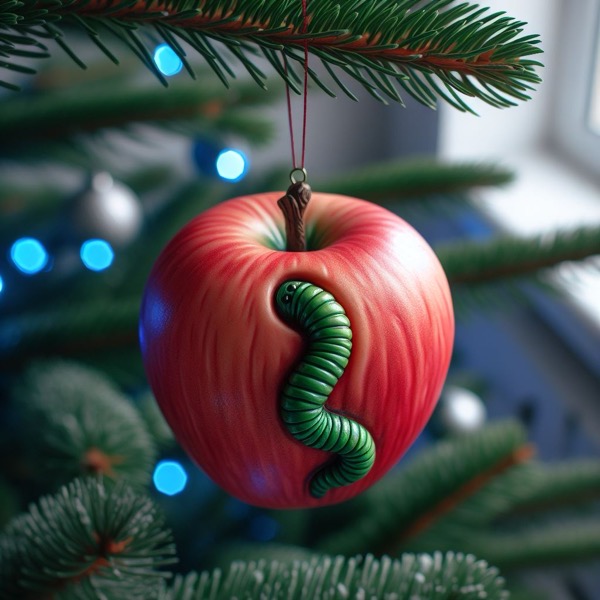
I don’t have many big “wishes” for what I’d like to see. But I do have a few minor ones that would make my time in the orchard a bit easier.
Notifications are still problematic. Especially on the Mac. For goodness sake give us a button that allows us to bulk dismiss notifications like we can on iOS.
Last year saw some syncing up of features in Apple Mail between iOS and Mac. Keep it up. Also, make Rules work better and more consistently.
It’s time for a Clipboard Manager in the operating systems.
The App Stores make much money for Apple and developers. It’s supposed to be a showplace. Clean it up. It should also run more efficiently than it does.
I’m hoping there will be some clarity and cleaning up of Stage Manager given that it feels very much like a building block for the AR/VR vision.
That’s it. That’s my wish list. Whatever reality we end up in after Monday I hope some of the above gets addressed.




















 Apple also offers you an option to delete the App and save it’s data. You can find out the size of Apps and their footprints in General/ iPhone Storage.


 Life on the Wicked Stage: Act 3