
2025 was an odd year toiling in Apple’s orchard.
Getting this out of the way upfront, it was a year that Apple’s corporate behavior, personalized by Tim Cook, made me think seriously about looking to fill my computing needs and habits elsewhere. That’s an ongoing discussion I’m having with myself. As it rattles around my brain, I don’t see an alternative that is any better or any worse from a corporate posture point of view. Apple has plenty of company.
From a technology point of view I also don’t see any better alternative beyond reliving my past hobbyist days with Linux that I’m far too old to contemplate. I used to be that geek. I’m not anymore. Aside from communal political knee bending, every tech company’s plunge into the Artificial Intelligence swamp has mucked up everything, everywhere all at once, in one way or another.
I have to touch Windows now and again and every time I do I feel like I need to take a purgative and wash my hands. I feel much the same about Google’s products. Life as a geek was already becoming increasingly more distasteful in the days when it was just the algorithms that enshittified everything, but adding Artificial Intelligence into the mix has created a slop that even hogs are beginning to turn away from. I know that’s all here to stay and I’m honestly sad that it is.
Hardware
This was the first year that I didn’t upgrade much Apple hardware. I don’t think it was a conscious choice correlating with Apple’s corporate behavior, but I won’t rule out my subconscious working against my small contribution to Apple’s bottom line. Let’s put it this way, I didn’t feel the usual gadget lust tugs and twinges over anything Apple announced this year.
I did upgrade to an iPhone 17 Pro and didn’t even think twice about taking a serious look at the iPhone Air. Apparently I wasn’t the only one. There’s nothing really remarkable to say about the 17 Pro. It’s as good and solid as it’s predecessor and if that’s incremental, than incremental is more than enough for me. I think that’s also true for most users.
I did pick up a pair of AirPods Pro 3 and wrote a quick review that you can read here. The battery life on the AirPods Pro 2 was approaching end of life, so it was time, and I use AirPods a lot.
I also upgraded to the Apple Watch Series 11 from the Series 10. It’s not that the Series 11 does anything more remarkable from a technology perspective. It doesn’t. But I’m in sort of a trap of upgrading every year due to the technology I use to monitor my diabetes.
I use the Dexcom G7 sensor that pairs with both my iPhone and Apple Watch to show me and my doctor how I’m doing with my blood sugar readings. I’ve come to rely on the constant monitoring on the Apple Watch app more than I do on the iPhone. But the two devices and their apps are married. On the Apple Watch that constant monitoring takes a heavy toll on Battery Life and Battery Health. Since I’ve been using that technology Battery Health can degrade at or below 70% in a year. That’s enough for me to upgrade every year.
That is an excellent example of one of the pitfalls of Apple’s development pace that drops new operating systems annually, but trickles out fixes over the course of a year. Dexcom developers take quite a bit of time to catch up with new hardware and software. They have to. They are a medical device company. That lag is certainly more acute with a device that monitors medical conditions, but this year’s round of operating system changes have been challenging for developers in all software categories leading us all into a perpetual year of beta software.
Summing up what I feel about Apple’s 2025 hardware releases I’ll leave it this way. Apple continues to make good improvements with each hardware iteration. Quite frankly, I’d be content to see Apple continue iterating the way it has since the dawn of the M-series chip change, but the many voices continually calling for something newer and bolder seem like they’ll have their day in the next few hardware cycles.
The current crop of Apple hardware has matured into the best I’ve seen on the market. Here’s hoping all that’s rumored continues that trend. That said, I don’t really see the appeal of a vastly more expensive folding iPhone beyond it being a regressive retro move and small enough to make it easier to stuff in a pocket. I guess the next big retro innovation will be to bring back mechanical keyboards. But, hey the Commodore 64 also made a come back this year. I’m guessing a folding iPhone will be enough to excite the faithful. For a few months.
Software
Software provided the real color on Apple’s fruit plate this year with what they shipped and what they still haven’t. The Apple Intelligence slices are browning around the edges, leaving an unappetizing anticipation for what may or may not be unveiled. I say “may not” because in Apple’s announcement last spring delaying the rollout of how Apple Intelligence integrates with the “new Siri” there was an important word that most seem to have overlooked. Here’s the statement:
“Siri helps our users find what they need and get things done quickly, and in just the past six months, we’ve made Siri more conversational, introduced new features like type to Siri and product knowledge, and added an integration with ChatGPT. We’ve also been working on a more personalized Siri, giving it more awareness of your personal context, as well as the ability to take action for you within and across your apps. It’s going to take us longer than we thought to deliver on these features and we anticipate rolling them out in the coming year.”
The key word in that statement is “anticipate.” Most conventional assumption makers believe whatever Apple is working on will roll out sometime in the first half of 2026. But that word “anticipate” is a great hedge that only a PR professional or lawyer could love. I don’t doubt the pressure is on to release something. I wouldn’t bet a dime on it happening before WWDC 2026.
As for what Apple Intelligence is currently, it’s still nothing to write home about. Notification summaries remain a comedy gold mine. I think I’ve touched the Writing Tools a few times, but fall back on other proofreading habits and tools. Whatever Siri is or is not doing, it’s gotten worse and even less predictable than it was before. Every time an accidental touch of the camera button light’s up the border of the screen it’s more a reminder of what’s not there than what it was promised to do. Whatever Apple is planning, the current iteration feels like it’s been largely abandoned like a rotting piece of fruit.
Liquid Glass was the feature that did ship. Countless words have proliferated around the Internet about the design change. I’ve written a few myself. My take at year end is that Liquid Glass is neither here nor there.
Legibility issues and design disasters need lots of work and attention, most of which won’t come while the number 26 is still affixed to the operating systems. Devices still work, even though I’m seeing more and more haphazard weirdness as app developers try to play catch up while Apple itself is still trying to chase down its own problems.
Given the leadership turmoil within Apple who knows what Liquid Glass may or may not become in the future. But then who knows what it was actually intended to be in the first place, beyond a distraction from the Apple Intelligence miss. It certainly wasn’t designed to fulfill anything Apple’s marketers thought it might. If there’s harmony in trying to unify things across platforms, someone needs a basic course in music theory.
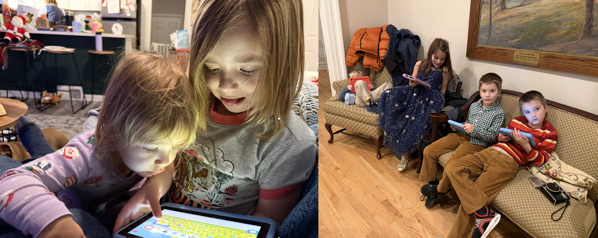
While I don’t hate Liquid Glass my continuing impression is that it still feels childish in a bubbly sort of way that doesn’t jive with the sophistication that the advanced hardware platforms seem to beg for. That was my first impression when Liquid Glass rolled out, and it was solidified after spending a large junk of time with my grandkids and other relatives’ kids watching them play children’s games on their non-Apple tablets over the holidays.
It may look cool to some, but it feels like undercarriage lighting on a car to me.
There Were Some Good Things
The most important operating system change that Apple made was iPadOS 26, finally instituting, and then continuing to iterate on, a much better windowing system for iPads.
And, the best new feature on any of the Apple devices I use the most is the Wrist Flick to dismiss a notification on my Apple Watch. It’s simple, it’s effective, it makes sense on all levels. It should have existed earlier. And it should be what Apple aspires to with everything it creates.
Spotlight was given an overhaul offering new features like a clipboard manager. I’m still experimenting with it, but can see how it might replace Raycast in the future if Apple continues iterating on it. It’s a good addition that still needs work.
I think Apple is on to something with the changes it made for the Phone app to try and help alleviate spam calls. I hope they continue to improve this, because as good an effort as it is, I and others still find it confusing.
Perhaps the best thing about the OS 26 releases beyond that is that all of my devices are working as I anticipate if I look past (not through) Liquid Glass and avoid Apple Intelligence.
Summing Up
In the end, I think 2025 will be considered a lost year for Apple. I maintain that Apple’s ability to take the long view strategically hindered more than it helped. And I think that some of the executive level changes reflect that. But the fact that it takes a long time to see any new substantial change in an already crowded and confused orchard didn’t argue well for the year to be a success. The political posturing alongside the product missteps has led to my personal disgruntlement and I know it has for many others as well.
One of the many Apple mantras that we’ve become accustomed to is that Apple designs its products for 90% of its users. That may indeed still be true. As much as I feel comfortable with steady iteration in hardware and software, it feels to me increasingly that Apple is reaching more and more for innovations that excite the remaining 10%. I get that. And to a degree it’s commendable. But in my experience with the users I support, the majority of those in that 90% probably never even attempt to use many of these new innovations. It’s not a case of reach exceeding grasp in my opinion. Rather, it’s reaching in the wrong direction.
Apple has already made some noise that the next OS versions will be more fixing and futzing rather than feature rich. How could it not be? By the same token, how could it be if, I as feel is increasingly likely, it will be the first time we see what the new Siri and Apple Intelligence will really offer.
I also think Apple and the other tech companies need to pay attention to the warning signs that are starting to bubble up about Artificial Intelligence. I think most of the growing distaste of AI comes not from what these tech companies are offering on computing platforms, but from the day to day encounters people are experiencing in their daily lives as more and more non-tech companies roll out versions of AI support. The way I’m hearing and feeling it, jokes and complaints about AI at holiday gatherings this year are starting to compete in numbers with ones about government and politics.
I don’t think that’s an accomplishment that augurs well.
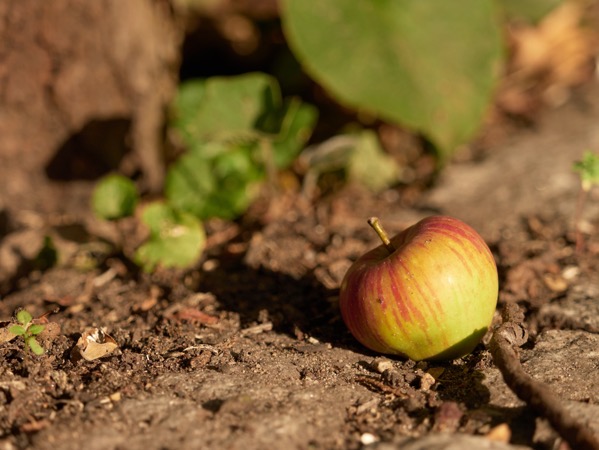
(First image from Johann Lensless on Shutterstock)
You can also find more of my writings on a variety of topics on Medium at this link, including in the publications Ellemeno and Rome. I can also be found on social media under my name as above.





 Life on the Wicked Stage: Act 3