A WWDC 2024 Reading List

A reading list of predictions and commentary heading into WWDC 2024.

There are always lots of predictions about what Apple will announce at its annual World Wide Developer’s Conference each year and this year is no different. I’ve written a few of them myself. Here’s a quick list of some pieces from others and myself that I think provide a good pre-WWDC reading list.

Cleanshot 2024 06 04 at 08.54.35402x.

Mark Gurman of Bloomberg seems to have gotten quite a few of the details, whether leaked or planted who really knows, on what’s about to unfold. Check out Here’s Everything Apple Plans to Show at It’s AI-Focused WWDC Event. It almost feels like a story board of the event.

Gurman also expands on his thoughts about Apple Intelligence here.

As a companion to that check out John Gruber’s take on Gurman’s Epic Pre-WWDC Leak Report. Gruber seems to think it’s indeed a leak and the folks inside Apple aren’t too happy. IYKYK

Perhaps the best pre-WWDC piece for providing some pre-perspective comes from Om Malik in Apple + AI: What to Expect at WWDC 2024.

Wayne Dixon tackles his Wish List by platform and tosses in a Bluetooth wish for good measure.

David Lewis doesn’t think we should hold our breath.

Since Artificial Intelligence, or as it appears soon to be christened Apple Intelligence, seems to be the order of the day, Craig Grannell has some intriguing thoughts on how Apple can avoid the pitfalls others have made in this great AI gold rush.

Nathan Edwards at The Verge wants to know if WWDC 2024 and AI will unlock the potential of the iPad Pro.

And here are the three pieces I’ve written:

WWDC 2024: iCloudy Forecasts Ahead Amidst Dampening Expectations 

WWDC 2024: Apple Needs To Do Some Serious Work with iCloud

WWDC 2024: Things I’d Like To See

It’s always interesting to see what comes out of each year’s WWDC announcements because one way or the other they set much of the agenda for the next year and beyond.

You can find more of my writings on a variety of topics on Medium at this link, including in the publications Ellemeno and Rome. I can also be found on social media under my name as above. 

WWDC 2024: Things I’d Like To See

Bring in the new and shiny, but fix the old and buggy too.

The Internet is filled with wish lists of things Apple fans would like to see announced next week at WWDC. New things. New capabilities. New all round. The majority of those wishes are the same and focus ahead. Nothing wrong with that. We’re always advancing. Or so we’re told.

Perhaps I’m stuck in the past, but I’d rather see Apple devote time to correcting some longstanding issues that bug me. Many of these issues are part of the glue that holds Apple’s ecosystem together, or what Apple calls iCloud and I call the unnamed operating system, iCloudOS. So, I’ve compiled a list of things I’d like Apple to fix, repair, or at least pay some real attention to.

Chances are better than good that you won’t hear much about any of this next week or in the weeks that follow. Many of these issues have existed for a few years now and seem to be such a low priority that Apple must be content to let them exist. Quite a bit of this could be considered small in comparison to the bigger challenges brought on by adding new features that bring new complexity. But one of the reasons so many prefer Apple’s way of doing things is the attention to detail in both design and practical matters. When it’s good it’s great and often magical. When Apple loses focus and doesn’t pay attention it can be like watching a magician pull a dead rabbit out of a hat.

For me these issues are rough enough and present enough inconsistency to diminish that attention to detail. The longer they are ignored or put off the more they point to glaring weaknesses in Apple’s process and I think we get farther away from that “magical” or “it just works” lore.

It’s apparent that not enough others feel the same or have the same experiences to pressure Apple into devoting the resources necessary to address these annoyances. That’s not a surprise. New always takes precedence in a market driven by delivering something new each year. And AI is the big new thing this year and Apple has assigned all hands on deck to ready what most expect to be the newly christened Apple Intelligence ship to sail.

Yes, we’ll hear quite a bit about AI. I’m also sure we’ll hear about things like emoji, flashy Messages and other novelties that show well in demos. Many of those I consider trivial or “meh” features that will be forgotten shortly after all of the reviews are written. Though the money I spend on Apple products is a small drop in Apple’s buckets of cash, I’d much rather see it spent putting resources into fixes for these annoyances. The list below certainly isn’t a complete one, but these are the things I’d love to see Apple address.


Continue reading “WWDC 2024: Things I’d Like To See”

WWDC 2024: Apple Needs To Do Some Serious Work With iCloud

iCloud OS: Apple’s Unnamed Operating System. The second in a series heading into Apple’s WWDC 2024.

WWDC is designed to highlight future directions for Apple’s increasing number of operating systems and how they work together. The OS list is long and getting longer, but there’s actually one that Apple has never mentioned as an operating system, yet it’s the one that glues every other piece of the ecosystem together. I call it iCloudOS. Like any glue it can fasten and bind, but apply it without care and you can end up with a sticky mess. iCloudOS is a bit of both.

If you use multiple Apple devices iCloud ties them all together creating a supposedly fluid connection between devices and services. That’s the attraction of the ecosystem. When it works as designed it can feel magical. Copy and paste between devices, universal control, handoff, shared Notes and Reminders and others all make Apple computing life more productive and often more fun.

When things don’t work it reminds every parent of raising a child. There are moments of sheer wonder and joy, but you know at some point the kid is going to shit the bed. There’s too much of the latter to ignore.

I’ve written extensively about my iCloud woes (here, here, here, here, and here). I’ve had numerous conversations with Apple tech support personnel. What I’ve discovered is that there are ongoing iCloud backend issues that Apple hasn’t been able to solve. They keep trying, but they keep getting put on the back burner once Apple gears up to roll out its next big new thing, as is the case with this year’s now well predicted AI announcement. Things reach a point when a “wait until next year” mandate takes hold that would test even a Chicago Cubs fan’s patience.

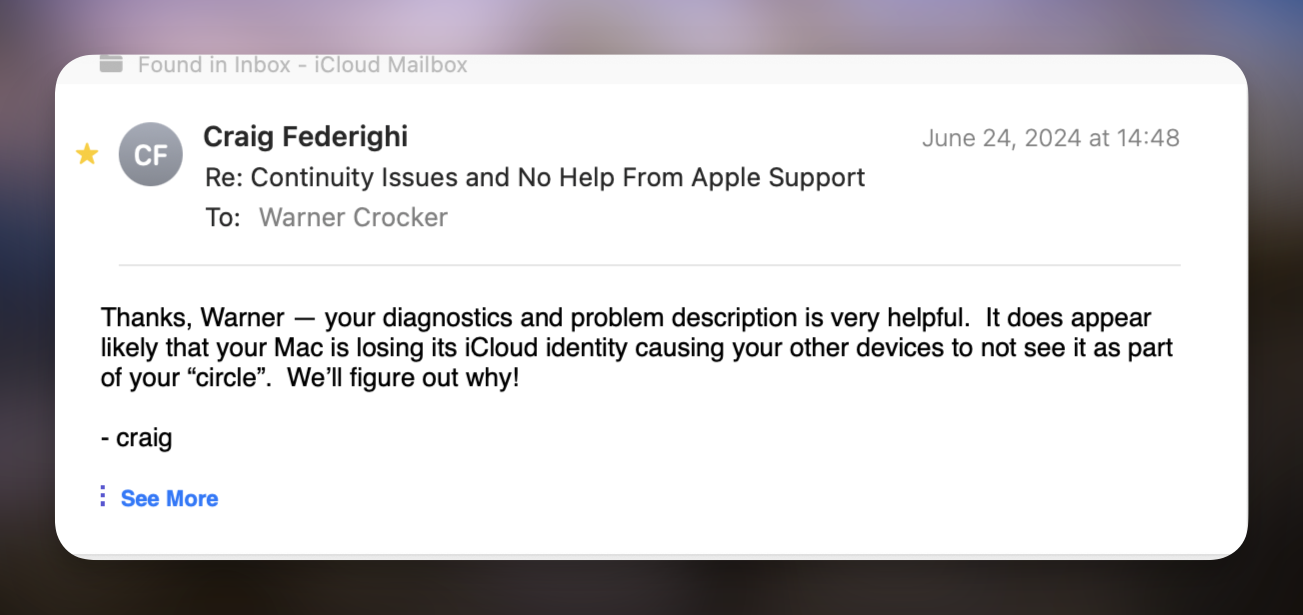
In my most recent adventures into the backend of iCloudOS it has been acknowledged that all of the work we were doing to pin down the issues I and others have been seeing has been put on hold until after whatever is coming next in the various operating systems due to be announced next week. All well and good, I suppose, but here’s the problem with that. That approach essentially makes all users of the ecosystem beta testers. I do not run betas on my devices but I’ll suffer through the numerous summer releases and whatever changes Apple makes on the backend during the summer beta season. That will continue with each point release throughout the year. Keep in mind, we’re all, always at the mercy of the backend. 

I’ve already seen this begin to happen and the betas don’t roll out for a week or so yet. One of the early warning signs(and there are quite a few) that things are happening in iCloudOS is when notifications for Apple’s Reminders app get out of sync between my macOS devices and iOS devices.


Continue reading “WWDC 2024: Apple Needs To Do Some Serious Work With iCloud”

WWDC 2024: iCloudy Forecasts Ahead Amidst Dampening Expectations

iCloudy Forecast Ahead for Apple at WWDC

Here it comes. Apple is heading into its annual World Wide Developer’s Conference (WWDC) with announcements of its next big things beginning June 10th. By all accounts, this year those next big things will center on AI which is short for Artificial Intelligence. There won’t be any shortage of AI in a tech world that has grown both AI crazy and AI fearful, putting Apple is in the unusual position of playing follow the leader in more obvious ways than in the past.

CleanShot 2024-06-04 at 08.54.35@2x.

There will be other new features announced for iPhones, Macs, Apple Watches, perhaps even the Vision Pro, but as always the focus will be on what’s new. Even though a goodly portion of what’s new and exciting each year often ends up being a bit “meh” in the end. Either “meh” or rolled out and forgotten as Apple shifts its attention to what next year’s next big things will be. That seems to be what’s happening this year as Apple has turned most of its focus to AI.

Apple is also unfortunately positioned to have to work harder in making its splashy announcements splashy and dodging seemingly already diminished expectations on a number of fronts. Most anticipate Apple’s AI announcements to be less than sexy and the iPad faithful/hopeful seemed to be poised to continue piling on the criticism (some necessary, some not) that greeted newer iPads less than a month ago.

So, on two big fronts, AI and iPadOS, Apple has some tougher challenges ahead than it usually does this time of year. And bad timing is at the root of both.

The iPad Issue Is Touchy

On the iPad front, for whatever reason Apple went more than a year before releasing new iPads. When they did debut them last month they surprised everyone by including new M4 chips in the new Pro lineup, upsetting every pundit’s attempts at trying to assign a predictable timetable to the continued Apple Silicon evolution. Coming just weeks ahead of WWDC, and without any new operating system software to accompany it, Apple opened up a slew of doors for the salivating pundit class to rush through, cranking up the complaints about iPadOS not taking advantage of very powerful and much loved hardware. And, as always, the married at the hip debates about being able to run macOS on an iPad or adding a touch screen to the Mac tagged along as noisy bridesmaids.

It’s a bit frustrating for a regular and religious iPad user. While the issues are genuine, they negatively dominate the conversation given that they come from the influential voices that helped turn the iPad into a success in the first place. I know the issues are long simmering, well intentioned, and come from the heart of those who love the device, but the recent sudden crescendo was deafening enough to fire up a Loud Environment warning on an Apple Watch. With WWDC just around the corner everyone knew the new devices alone were not going to offer anything remotely close to a new and different iPad experience. It just seemed premature to me. If they were meant as a warning to Apple, then I would call it not only premature, but a misfire given the timing.

Those debates and complaints probably aren’t going to end in the foreseeable future as entertaining and exhausting as they can be. Between manifestos, and well thought through lists of what some desire on iPads, there was some general vitriolic piling on. It heralds a tough year ahead for Apple and its iPad lineup.

My prediction is that no one is going to be remotely satisfied with this year’s iPadOS release. Most rumors say not much of consequence will be announced. It’s certainly going to be interesting to follow the commentariat class as they wrestle with how many different ways they can say the iPads are great devices but Apple keeps holding them back for another year.

Perhaps this year changes things, but typically big OS changes come to the iPhone first with iPads and Macs bringing up the rear in the year or years that follow. Given Apple’s push into AI as this year’s big iPhone tent pole, if the iPad doesn’t get included it will add even more to those complaints and increase the volume.

Continue reading “WWDC 2024: iCloudy Forecasts Ahead Amidst Dampening Expectations”

Thoughts on Thoughts About New iPad Pros

Let iPads be iPads. Trying to be all things to all people doesn’t work in life, and I don’t think it works in tech.

Years ago when I was a Microsoft MVP for Tablet PCs I attended an MVP Summit in Redmond. It was an exciting and stresssful moment for Tablet PC advocates, of which I was one. The winds of change were kicking up and hinting that Microsoft would favor Touch over pen based Tablet PCs in the future. For broader context, the PC Pundit industry had already declared the Tablet PC a largely failed niche device. 

Then Microsoft CEO Steve Ballmer was to give the keynote and take questions from the audience. As I lined up to ask a question I noticed that he was taking notes on a piece of legal paper. I never got a chance to ask my question which is probably a good thing because I changed what I had prepared to ask. Had I gotten the chance I was going to ask why he wasn’t using a Tablet PC to take notes. It certainly would have made a big statement if he had done so. It certainly did make one that he didn’t. 

Preparing to watch Apple’s recent Let Loose announcement about new iPads I was reminded of that moment in watching the usual, now almost cliché, iPad criticism flow through my social media timelines. There are two routinely rhetorical responses about the iPad:

  • The iPad lineup is confusing. 
  • The iPad Pro needs to be more Mac like and/or run macOS. 

Each of the above is true. Clichés are rooted in variants of truth. Yes, there is confusion, but on the first point I think Apple largely let loose the air out of a that balloon.

There’s now an easy roadmap to follow if you’re interested in a full-sized iPad. $349 will get you an iPad without many of the bells and whistles, perfect for a child or a mother-in-law. You can spend upwards of $3000 for the fully kitted out iPad Pro. Or you can settle in the middle for a $700 starting point for the iPad Air that now includes most of the technology previously only seen in the iPad Pro lineup. That all makes good sense to me. Oh, and the iPad mini is still around and I’m guessing we’ll see an update of that later this fall.

Apple is largely to blame for the second confusion point, due to a rare misfire in its marketing years ago. Before we had Apple Silicon in MacBooks things weren’t looking great for the MacBook. There was lots of talk about the iPad being the future and what it would take to make it so.  Apple even launched a What’s a Computer? campaign in 2017 promoting iPads that helped confused the issue. 

Tech pundits took their cue. They pushed the envelope on their devices and pushed Apple to keep on keeping on and the iPad Pro (introduced in 2015) kept getting more powerful and more capable right along side the “The iPad is the only computer I need but it needs more” stories. But hardware is only part of the story.

Things continued to get confusing when Apple split the iOS operating system into two and birthed iPadOS in 2019. Certainly that hinted at more to come from the software. Even so, the software narrative continued to feel incomplete while the parallel story of the immediate success of Apple Silicon Macs intensified the dissatisfaction. 

Now, let me be clear. I’m not one of those who feels the iPad needs to be more Mac like or run macOS. Could there be advancements to iOS? Yes. I’d love the File system to work more intuitively. Quite frankly, I’m fine with how iPads sort of multi-task now, Stage Manager being the exception.

I use an iPad Pro with a keyboard at times, but I mostly use it as a tablet in landscape mode for work with an Apple Pencil. I’m a use the right tool for the job kind of guy when it comes to tech. Since both Microsoft and I abandoned Tablet PCS, an iPad has always been the right tool for most of my work in the theatre, alongside a Mac for portions of that and other work. I don’t see that changing, given that I’ve tried most of the other tablet options out there. Let iPads be iPads and Macs be Macs. Trying to be all things to all people doesn’t work in life, and I don’t think it works in tech.

In my view, the “iPadOS isn’t complete until it can be a Mac software” story has created a myth like reverse branding similar to the negative one of Microsoft’s Tablet PC. So much so at this point, I don’t think Apple will ever be able to counteract it, even if it did create an iPadOS that runs macOS or some version of it. And that’s a damn shame.

I made this comment prior to the Let Loose event, yesterday.


I could very easily be wrong, but I don’t think we’ll ever see that mythical iPad that some wish for. Personally I don’t think it’s necessary and I’d be more than happy if we just let iPads be iPads and Macs be Macs. We’ll see how and if the story changes at WWDC in a few weeks. I’m guessing it won’t and I’m just fine with that.

You can find more of my writings on a variety of topics on Medium at this link, including in the publications Ellemeno and Rome.

Time for Apple To Come Clean About iCloud: Part 2

It’s been a week and Apple needs to tell users what happened on April 27 when so many had to change their passwords causing confusion

Last week, beginning on Friday April 27, quite a few Apple users experienced a disturbance in the force when all of sudden they were prompted to relog into their Apple ID on their devices. On attempting to do so many discovered their accounts were locked for “security reasons” and needed to change their passwords in order to get back in.  Eventually the situation righted itself as everyone eventually was allowed to change their passwords (there’s more to that part of the story later). It’s been a week and Apple has yet to publicly comment on what caused the issue. That’s a problem.

Apple and other companies spend enormous resources to keep users and systems safe, guarding against privacy attacks and security hacks. Apple also spends mountains of marketing money touting its approach to security and privacy as a key selling point. All that’s well and good. We live in an age of online paranoia when every security alert, every email, every text, every phone call, every link we are prompted to click on is suspect. Apple Security Notifications are now in that list.

When folks started receiving prompts on their Apple devices to change their passwords and then discovering that they were locked out of their devices, that paranoia rippled across the Internet as social networks, forums, and support networks burbled with users wondering if this was a hack, a glitch on Apple’s end, or just another run of the mill online inconvenience. Depending on which Apple Support rep you got on the phone you were told there wasn’t a problem or helped to relog back in. The event was blamed on all sorts of culprits from foreign countries to AT&T after its recently revealed compromise. There was no messaging from Apple. There’s been none since.

There are some signs that it might have been a system update on Apple’s end. Gone wrong or right no one knows. Was Apple hacked and did it pull a maneuver to protect users? Was Apple attempting to update or perform system maintanence? No one knows. No one knows still.

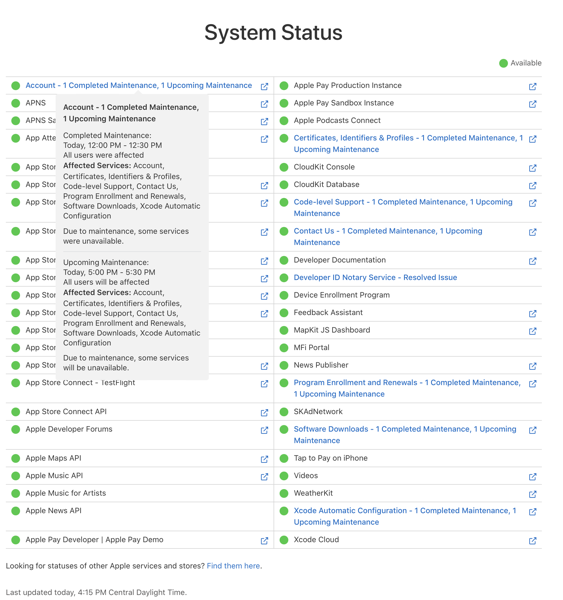
John Gruber on Daring Fireball pointed to Apple’s Developer System Status dashboard that showed maintenance scheduled for that Friday evening and another scheduled for the next day under “Account.” So that may be a possibility. Without any communication from Apple users are left in the dark.

In my opinion most likely this incident may have been related to a backend maintainence issue. Yes, that’s a speculative opinion, but it’s based on my long (too long) experience trying to sort out ongoing iCloud failures with Apple Support. My personal conclusion is that Apple has problems with its backend operations that it either can’t figure out or is unwlling to devote enough resources to fix in a timely manner before it cycles into finishing up the next OS release.

Before I get to that, and what I experienced on April 27, let me just say that Apple (hell all companies because every company is online and subject to hacks) owe users open communication at the very least. Equally as important, Apple owes its own tech support personnel open and better communication on these problems. That’s the reason for the Part 2 in the title of this post. Apple not only refuses to give users accurate information, but does the same with its own tech support personnel. It’s been an ongoing issue and in the wake of this latest situation apparently extends far beyond the typically convenient and meaningless excuse that only “a small percentage of users were affected.” The events of April 27 may not have affected all users, but this time there was more than a “small percentage.

Selfishly, as the evening unfolded and things started to feel very familiar, I actually hoped that the larger number of users reporting complaints might actually lead to some communication that could possibly help resolve my ongoing issues. But so far that’s not the case.

Friday Night’s Apple ID Fracas

My wife and I were watching an episode of Palm Royale on Apple TV+ via an Apple TV. A message popped up on the screen saying I needed to update my Apple ID password. I thought this was strange as I never recall having to enter my Apple ID password on an Apple TV before. Typically with my iPhone nearby signing in just “magically” happened.

I grabbed my iPhone and noticed the same message there and then the Apple ID Locked message appeared. My first thought, like so many others, was that I had been hacked or there was an issue on Apple’s end. I went to my iMac and fired up social media apps and also headed to Apple’s System Status webpage. Nothing helpful there, which isn’t surprising. But on social media I started seeing the typical “Is this happening to anyone else or is it just me?” posts start to scroll through my feeds. Chance Miller at 9to5 Mac was the first publication to report on the issue.

I then got the same notification on my iMac which cascaded to my other Apple devices. As the event unfolded I experienced a very similar series of events as told by Michael Tasi in his excellent blog post Janky Apple ID Security. There were some differences. Bottom line: I just couldn’t log back in after several attempts to change my password on my iPhone.

Logging in with a new password would fail, spinners would spin, and prompts would overlay causing a guessing game as to which button to push. At one point I got the following screen on my iMac.

It’s curious. The date I’m publishing this post is May 3 and as you can see above there’s supposedly a new device on my account that can’t be used to edit my information until May 3, 2024. Which device? Who knows? I’ve had use of all of my devices since I successfully relogged them back in with the new password on April 27 and I’ve since edited account details from the iMac, which I assume is the device in question since that’s were the notification popped up. But who knows?

At one point while attempting to change the password on my MacBook Air I was asked to enter the device password for my iPad mini. Again that’s curious. I had not yet attempted to change the password on that device or even attempted to wake it up.

After successfully changing my iCloud password and relogging back in to my iPhone, iPads and Macs, I was still unable to do so with my Apple TV and Apple Watch until I manually entered the new password on each device. Again, I’ve never previously had to enter an iCloud password on either device. Also curious, as of this writing I no longer am able to control my Apple TV with my iPhone or Apple Watch. Is that the mysterious “until May 3” device? So far that hasn’t resolved if it is.

The “Not” Fun and Games Didn’t Stop on Friday Night

After feeling relatively confident that my passwords on each device had been changed succesfully we finished watching the episode for Palm Royale and retired for the night. Note that my wife’s iPhone and iPad did not experience any of these issues. Neither did other family members I support.

The next morning I discovered that I had more to do in order to bring my devices back up to full speed. First, I had to relog in to Messages on each of my devices. I also discovered that all my App Speciifc Passwords had been deleted, which of course required creating new ones. To be honest, I’m not sure I’ve done so with all of the apps that require them yet because all of the passwords were erased. I can’t remember which apps required them and which ones didn’t. Those I use frequently, such as Fantastical, let me know right away. I assume I’ll hear from the others as they rotate back into usage.

After searching social media and other sites I began to notice that users who had fallen prey to whatever this was experienced a range of issues, but not all of the same issues I did. Some experienced more and different ones. Those running HomeKit and HomePods (I don’t) had their own set of different issues. Folks were confused and waiting for an answer.

One of the confusing discoveries is how Stolen Device Protection is supposed to work. Supposedly if you’re in a “Familiar Location” you don’t have to endure the waiting period unless you set up the system to require it at all times. But others, searching Settings for “Familiar” or “Significant” Locations, (Settings/Privacy&Security/Location Services/System Services/Significant Locations) discovered that their “Familiar” home or work locations were recorded outside of the radius for it to be “trusted” leading to the one hour delay.

Tying This Incident to Ongoing Issues 

I won’t go into a blow by blow account with my iCloud Migraine issues. You can find those specifics in blog posts here, here, here, and here. That said, having to re-log into Messages after this event leads me to continue to believe that Apple has deeply rooted issues with iCloud. I’ve been fighting these issues (and Apple) for well over a year. Within the last five months or so a workaround that Dwight Silverman clued me into has been a way to get the ship righted in most instances when they reoccur.

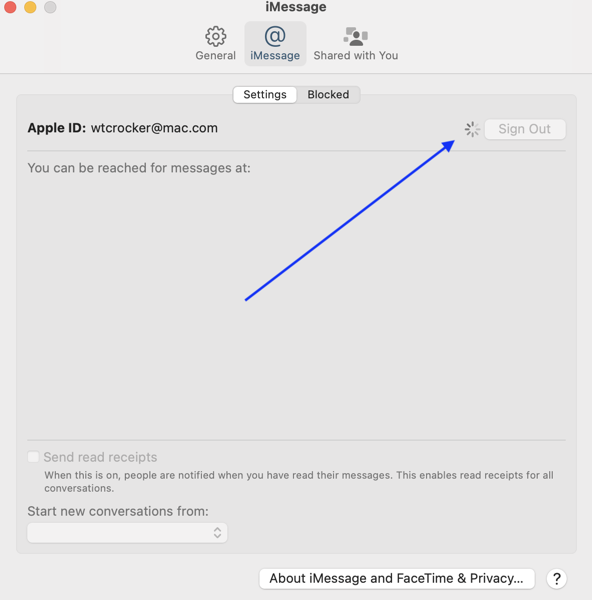
Briefly, when I lose Universal Control, Sign in with Apple Watch, Handoff, Copy and Paste between devices, the fix is to sign out of Messages in iCloud and to sign back in. When these fuctions disappear from my Macs they are still available on iOS devices. I know it’s iCloud related from my conversations with Apple Support and because I always receive a notification that says I have to sign my Apple Watch into iCloud via my iPhone.

Note that there is no option to do so in the Apple Watch settings on the iPhone. An Apple Watch is signed in to iCloud when it is paired to an iPhone.

Dwight’s fix has worked most of the time. Often it will work right away. Other times I won’t be able to sign back in immediately, resulting in an endless spinner that eventaully times out.

One of the other odd things about this workaround is that often executing it on one of my Macs will fix the situation on both. Sometimes it will require me to execute the fix on each Mac. Occasionally it will fix things on one Mac and not on the other even when executed on both. There seems to be no rhyme nor reason to this riddle.

I’ll know the workaround works when I get a notification that tells me WiFi calling is now an available option on my Macs follwed by notifications on my iOS devices that a new Mac is now available in iCloud. Which is strange given that a check of Settings always reveals both Macs being available on the account before, during and after the event.

When this doesn’t work I’ll perform a dance of the devices, turning them off and on in various sequences. Sometimes that works. Sometimes not. Sometimes I just need to wait things out and eventually things will right themselves.

That waiting corresponds with what I and other users have been cryptically (often very cryptically) told by Apple Support. Here’s a quote from Dan Moren’s experience:

. . . after perhaps 20 minutes on the phone, he seemed to hit on something. I heard him laugh and say something along the lines of “that explains it” and then, with my consent, put me on hold. When he came back, he said—and I’m not exactly quoting, but close enough: “I’m sorry, I can’t tell you any more than this, but all your services should be back up pretty much exactly 12 hours after they went down.”

I and others have also been told to wait 24 hours. Regardless of the length of the waiting period the “I can’t tell you any more than this” is always consistent.

Some Theories

I can’t offer any conclusion about the events of April 27 beyond what I’ve previously stated as speculation. What I can offer is that whatever caused that issue and how it was rectified by Apple has many similarities with these ongoing iCloud issues.

What is consistent is that they resurface each time Apple issues a beta update for iOS and macOS or a full release of same. What’s inconsistent is that sometimes the issues surface the morning of a release, sometimes the day after, sometimes the day before. NOTE: I do not run Betas on any of my devices.

What this tells me is that concurrent with those device operating system updates, beta or otherwise, Apple is issuing corresponding updates on the iCloud backend. That’s only logical, and it points up a flaw in the process. If you’re a beta tester you can and should expect issues. That’s what betas are for: to find issues. However, If you’re NOT a beta tester you should not be subjected to issues related to betas. 

When I’ve raised this timing issue with Apple Support I’ve gotten tacit agreement that it is an issue, but no definitive answer. My support dialogues through much of 2024 have consisted of me sending sysdiag files to Apple each and every time an OS update is released.

However, while I still religiously collect sysdiags to send each time the issues occur, the requests to send them stopped in March. That followed a period of time when I was asked to wait until after the next point release before submitting any further updates.

There was also a moment last fall when I was told that Apple engineers had recently put the issue back under investigation after the officlal release of Sonoma. I was told they thought they had solved it with Sonoma but realized shortly after they had not.

My theory of the moment, which I’ve expressed to Apple Support and gotten no official response to, is that with WWDC quickly approaching Apple has once again has put this on the back burner for current users in order to possibly address it in the next OS release. If my theory holds we might see the issue disappear at some point in this summer’s beta cycle or it will continue as it has since the days of Monterey.

Another theory I have, and that may tie in with the events of April 27, is that this somehow relates to when a user first set up an Apple ID. My initial Apple ID was a mac.com address and that’s followed me through the MobileMe era into the iCloud era. A number of users who experienced the problems on April 27 had mac.com addresses. I can’t speak to whether or not that was always the case with every user, but in trying to find solutions to my ongoing problems, many I’ve spoken with also acquired their first Apple IDs in the mac.com era.

Note that my wife and the family members I support all began their relationship with Apple in the iCloud generation. None of them experienced issues on April 27. None of them have experienced any of these issues that continue to plague me. That’s a small sample, but it fits within this theory of mine. I’ve also heard from some others who did not experience this April 27 issue that some have mac.com addresses at the root and some do not. So again, who knows?

Bottom Line: Fix and Communicate

Apple needs to solve whatever this long running problem with iCloud and Apple needs to communicate with its users and support personnel better. Certainly they need to do so when there are more acute failures such as that which occured on April 27, whether they be security related or just attempts to find a better solution. A week is much too long to wait for some sort of statement. We may all be At The Mercy of The Backend, but we don’t need to be at the mercy of poor communication. That’s a choice by a company. Contrary to what some might think or fear, saying there’s an issue and we can’t yet pin it down is a less bad PR move than going silent.

I use Apple products and follow Apple news throughout the evolutions of beta cycles into full blown releases. I like to follow that news. I don’t like and choose not to live and work through them. Each time Apple tries to improve things or add new features I know I’m going to experience failures before I can actually use the products and ecosystem as designed and advertised. And even after the situation may be fixed, worked around or righted, so far there’s no solution that has been able to solve the problems. To me that’s unacceptable.

It reminds me of days from my youth when I’d go out to start my old beater of a car and hold my breath wondering if it would actually turn over and start. Always a relief when it did. Always a pain in the ass when it didn’t and I’d have to lug out the jumper cables. Apple doesn’t make or sell beaters. But these issues sure are beating me down.

You can find more of my writings on a variety of topics on Medium at this link, including in the publications Ellemeno and Rome.

Apple and the DOJ: You Can Do Anything You Want As Long As You Don’t Get Caught

You can do anything you want in the land of the free and the home of the brave. As long as you don’t get caught. Or as long as you have enough cash in the bank to hire the right legal beagles. That’s the American way. Always has been. The bigger you are the more you can toss around your weight. That works more times than it doesn’t. In the case of the United States vs. Apple, Inc, not so much. Thus far.

The Department of Justice swooped in on Apple charging that the iPhone is the crown jewel of an illegal monopoly. You can read the lawsuit here. I’m not going to get in to all of the legal issues. Not really my game. As to that lawsuit I’ll take the liberty of saying the following:

  • I don’t understand the equation that led to the monopoly designation. It seems odd given similar such cases in history. The fact that different percentages for different types of valuations is being tossed around in all of the first reactions I think bears that out.
  • I’m in deep in the Apple ecosystem. I use the hardware and software. I enjoy the tech (when it is working as designed), and I hope they’ll continue to make the high quality products and software they do. Having used hardware and software from other makers, I find Apple’s superior and better for my needs. When and if that changes so will I. 
  • For the most part I buy Apple’s pitch about security and privacy. There are times I think the marketing around security and privacy leans too much towards myth-making, but in my experience the myth seems to have some foundation.
  • I’ve listened to the complaints from developers and other users through the years and find most of those I understand justified. Apple may have indeed created problems by creating and running the App Store the way it has. I personally don’t feel victimized by that, but I understand the issues presented by those that see it differently. 

Bigger picture I will say the following. Apple, like some other familiar tech giants of note (Microsoft, Google, and Amazon), largely brought this on itself with a too big for its bank account britches attitude. 

Arrogance and swagger isn’t just a feature of big tech companies. It’s a bug that infects any company or anyone who gets too greedy for their own good. I’ve seen it happen too many times.

History is full of these stories and many American myths are built on that foundation. You work hard, you make your pile, and you do it your way. The world beats a path to your door and you think you own the path and the world. You made your own rules along the way and bent some existing ones to your will. Perhaps broke a few.

That mythical song of good old American capitalism has been sung so often everyone knows the tune and the lyrics. When it comes to Apple’s stanza, you add in a chorus about Apple’s rise from an almost near-death experience and it becomes a siren song with a powerful resonance.  

In my view, limited as it may be, Apple could have easily made some adjustments along the way and possibly avoided this current mess. But the powers that be obviously thought different. They also thought they could swagger their way through and beyond this. That may well prove out in the years to come. And it will take years. 

Meanwhile, here’s some good early inning commentary on this story so far. I’m sure there will be much more ahead.

John Gruber on Daring Fireball

Jason Snell on Six Colors

M.G. Siegler on Spyglass.org

Stephen Robles on Beard.fm

You can find more of my writings on a variety of topics on Medium at this link, including in the publications Ellemeno and Rome.

Charged Up Cubism: The Anker 3-in-1 Cube with Magsafe

Cubism is an art form popularized by Pablo Picasso, George Braque, Jen Metzinger and a bevy of other artists. Cubism can be fun and funky. It can also be confusing. Either way it can generate some highly charged opinions. The Anker 3-1-Cube with Magsafe is certainly not what I’d call a work of art, but it is a nifty piece of Magsafe charging tech packaged in a funky little cube.

I received an Anker 3-in-1 Magsafe charging cube as a Christmas gift and am using it on my current month-and-a-half long gig away from home to charge an iPhone, Apple Watch and AirPods. Straight up I like the device quite a bit and am very grateful it was gifted to me.

Right out the box you get a small gray cube. It’s heavier than its roughly 2.5 inch footprint suggests, weighing in at 14.46 ounces. It deceptively makes you think the cube contains a battery, but it does not. It’s solidly built for the most part. Flip open the top and you can attach an iPhone via MagSafe for charging or to use in StandBy mode. You can also just plop your iPhone on top of the cube without flipping up the top. Press in on the small side shelf and out pops a small charging adapter for the Apple Watch. That watch charging shelf does feel a little finicky at times and I’m not sure if pressing it in and out constantly won’t eventually yield to failure. The lid angle is adjustable so using it for viewing something on your iPhone works well. With the lid flipped all the way to its maximum angle you can place your AirPods under that angled lid to charge them up.

Yes, you can charge all three devices at one time. With all three devices charging it takes Cubism into an sort of modern realm. The device comes with a 30-watt charging plug and a decently long cable (5 feet). No this isn’t a mobile charger, it’s meant to be used plugged in, which may mitigate the hefty weight. Anker’s cube supports 15-watt charging for compatible iPhone models and suppots fast charging for Apple Watches as far back as version 7.

The cube is a bit pricey currently running in the $150 range on Amazon, Apple and other outlets. I had looked at this when it first came out and ruled it out for my gadget collection due to the price compared with other options available. One of the things I like about it is the small compact size compared to many other charging stands and mobile charging options currently on the market that tend to look like jewelry stands. Given that some of my gigs require weeks long stays, I’m glad the Anker 3-in-1 Cube with MagSafe was gifted to me. I won’t mind its surprising weight when packing a suitcase, and I do indeed like this quirky, little, somewhat heavy cube quite a bit.

You can find more of my writings on a variety of topics on Medium at this link, including in the publications Ellemeno and Rome.

The iPad Is My Perfect Theatre Rehearsal Tool

For some the iPad can be a strange beast. For some the iPad is just what they need. Of course that depends on which iPad you might have or use. That’s where the “strange” comes in. Most of the follow the leader tech press thinks the iPad lineup is confusing. Following along, I happen to agree to an extent. If you know what you’re looking for it’s not that difficult a choice. But if you are in the market for the first time it can be confusing. There’s size differences. There’s iPad Pros, iPad Airs, just plain iPads, and then there’s the iPad mini.

Apple hasn’t helped with the confusion because it’s sent mixed signals along the way. I’m not one to be that concerned because my needs are clearly defined. I’m not looking to use an iPad as full computer replacement, though there have been times I’ve used it as such and reliably well. I’m in the game for mobility for both work and play. Frankly, while the lineup may seem confusing to the easily distracted,  the variety in the lineup does offer an array of choices.

My family is one example. For my wife an iPad is primarily a content consumption device. For me it serves that purpose, and is also an indispensible work platform. I keep up to date with current hardware. That’s my gadget geek side. My wife is still quite happy with a much older version. (It still has a Home button!) My wife defines the case for many that frustrates the “must have new hardware” and “growth at all costs” crowds. For lack of a better analogy, she sits in the larger main section of the theatre often referred to as the orchestra. I sit in the “always ready for the new thing” smaller mezzaine or balcony. That analogy flips the pricing equation on its head, given that the main floor tickets are usually higher priced, but I think it holds in terms of numbers.

I own the latest models of an 11-inch iPad Pro and also an iPad mini. Love them both. I use them in similar but different ways, fitting the tool to the job of the moment. I may be a gadget geek, but I’m primarily a theatre professional. Most of my work is directing plays. Both serve me well in my job. Currently, I’m working out of town on staging The Lehman Trilogy. Both the iPad Pro and the iPad mini suitably fill my down hours with entertainment and are reliable work horses for the gig. To be honest, their roles as tools are so familiar that to call my usage “rote” would be accurate.

Background

Back in the day I was a Tablet PC fan boy. I used them primarily as a work device in the theatre. I was at one time a Microsoft MVP for Tablet PC. Those devices allowed me to quit using paper scripts in rehearsal and write my notes directly into a digital script. I could set aside my beloved yellow legal pads and not so beloved folders of research and have everything handy in digital format on a Tablet PC. The debates then were over slates versus convertible Tablet PCs.

Microsoft screwed the pooch with Tablet PCs leaving the door open for Apple. And along came the iPad. It certainly wasn’t perfect for my work initially, but it offered promise. I can’t remember  how many different stylus solutions I went through (from Adonit to Zagg) until the Apple Pencil came along. Along the way I’ve tried most of the other tablet solutions but as far as my work needs are concerned the iPad is hands down the only viable choice. I include Microsoft’s Surface tablets in the reject pile.

My Work

When I’m doing a show, work includes reading and working from scripts; research gathering and consumption; using, taking and making notes in rehearsal as well as on the research. Working with scripts, once a page gets too filled with my indescipherable scribbles, I simply open another copy and start afresh. GoodNotes is my app of choice for this. (I’ve tried them all.) It’s an easy solution for scribbling notes in the margins of a script in prep or in actual rehearsal. It also provides a way for me to archive scripts once I’m done with a show.

As a director I often walk into rehearsal with a clean copy of the script so that I’m more focused on the actors and the text and less on my notes. It’s a snap (swipe?) to switch back and forth when I need to reference my notes or research. Time is money and a limited commodity in rehearsal and I have to maximize what time I’m given.

In the early days of staging I’m primarily using the iPad Pro. It’s a Goldilocks device as far as size goes. The text and my notes are large enough to read at a glance and the size of the device is easy to tote when I move around the theatre or rehearsal room. In the stages of rehearsal when I’m mostly taking notes as the actors rehearse what we’ve done, I switch to the iPad mini for even more mobility and a bit of discretion.

My research is ongoing, but primarily done prior to rehearsals beginning. I do some of that on the iPads, but use a Mac for quite a bit of it. Apple Notes is my app of choice for all of that research gathering, though I’ve tried many others and still do. Prepping for a day’s rehearsal when I may need specific research I’ll create a note with links to those notes, the research directly, or a work list and have them handy via Slide Over. I’m still not a fan of Stage Manager although I’ve given it several attempts to win me over.

Marshall McLuhan coined the phrase “the medium is the message” in the 1960’s about human communication. For me, the same is true with my work tools. When I’m staging and working scenes the larger iPad Pro is the medium of choice and feels natural as I’m moving actors and scenery from moment to moment. When I’m watching and note-taking as the actors move through scenes on their own, the smaller iPad mini serves to remind me that I’m an observer, not a participant in the moment. If I move about the theatre while the actors are working it can be distracting if they see me a take a note. They can fall out of the moment and into a “what did I do wrong” mode of self-monitoring. So I try to be as discreet as possible.

Once we’re down to the final days of rehearsals and I have limited hours for giving notes I’ll actually return back to my Mac for preparation and organizing my notes for efficiently relaying them via email or in note sessions with the cast. Often I’ll use the Notes app on my iPhone when giving those notes in person. Once we invite the audience in for previews, I’ll stick with the smaller iPad mini for taking those notes, again for discretion purposes. When you tell an audience to put away their smartphones it’s not a good look to see a larger iPad light up while the director is taking notes. There was a time that I used a Samsung Galaxy Note in this scenario using OneNote or Evernote as the note-taking app. But those days are gone as my routine has become more focused.

For this current gig, we conducted some early table work and read-throughs of the script using Zoom. I’d be on my Mac, but have my script on the iPad Pro. My actors were using iPads for their scripts as well.

My work also consists of a lot of meetings and since I’m a now happily a freelance director I often travel for work. That means I’m often doing pre-production virtually using whatever video conferencing app the theatre uses. I’m also auditioning actors in virtual auditions. Video submissions also play a significant role. Both devices serve well in those aspects of the job, though I typically prefer the iPad Pro in those cases.

Play

Throughout this article I’ve also mentioned that I use both iPads for play as well as work. That is indeed the case. There’s downtime, and like many I use an iPad for consuming media and reading. I read a lot of scripts. The iPad mini is perfect for this whether I read the scripts as PDFs imported into Apple’s Books app, (my preference), in the Kindle app or in a PDF reader. As I’m working on this article on my Mac, I’m watching two football games in the background, one on the iPad Pro and one on the iPad mini.

Stall Surfing

Back in the day I often spoke and wrote about Tablet PCs as great Stall Surfing devices. Yeah, Stall Surfing. That thing you do when sitting on the toilet. You know you do it, whether it’s on a smartphone or a tablet. I’m here to tell you, that if nothing else, the iPad mini is the perfect Stall Surfing device. It’s sure beats reading scripts in paper or bound versions. I doubt we’ll ever see a marketing campaign featuring Stall Surfing, though.

Future Wishes

If I had a wish list for future iPads (both Pro and mini) it would be simple. I’ve heard talk that Apple might be moving away from the 11-inch size of the Pro models, thinking the Air liineup might be sufficient for most who need that size. I hope that’s not the case. It’s the perfect size and power house for my line of work. Sure, improve the larger Pros or make even larger ones, but don’t forget those of us who move around while we work and want a document sized device to work from that offers us power when we need it.

As for the iPad mini, I’d love to see that power up a bit in the next generation with an M-series processor. As to the design of both, I know new iPads without significant design changes can be boring to many. I’m not in that camp. I’d be content with these hardware designs for quite awhile to come. Both work exceptionally well for me as is. But I’m sure I’ll jump at the next models that come out regardless.

After all, I’m both a gadget and theatre geek.

An Apple Christmas Wish List for 2023

Dear Santa Tim Cook,

I’m writing you to let you know what I would like from Apple for this Christmas. It’s not new hardware. The amount of Apple gear I own is more than enough and I’m quite happy with it. So thank you for that, and thanks ahead of time because I’m sure Apple’s vision is to keep cranking out new hardware in the future.

This is a wish list about a number of nagging things that I think you and your elves need to pay more attention to in your operating systems and software. Let’s call them fixes. Most of these nagging issues have been around for a while and oft-reported so it’s surprising you’d allow them to hang around for the users who love your products. I, and many others, have been reminding you of them quite frequently and for quite a while.

I know your elves are busy, but if they could find some time to address these things it would be one of those gifts that gives all year long, and for years to come.

So, here’s my wish list for iOS and macOS.

iCloud

This is the big ticket item on my wish list. You’ve tied so many services and functionality to iCloud and a user’s AppleID. That makes good sense for the eco-system and when it works it’s great. When it doesn’t it causes problems for users, your support personnel, and completely diminishes much of the good it intends to provide. I’ve been on the hunt for solutions to my iCloud woes for quite some time now. I won’t go into detail here, but you can follow the links in this article that chronicle my journey.

But just so you know, the issues aren’t resolved, aren’t closed to being resolved, and tend to pop up with some sort of Santa-like omniscience, knowing when we users can least afford a problem.

Your elves I’ve spoken with thought this had been resolved with Sonoma and were quite disappointed to find out that wasn’t the case. So they’re as perplexed as your users.

These iCloud issues affect features like Handoff/Continuity and Sign in with Apple Watch not working. They also include Photos not syncing, Shortcuts not syncing, Mail not syncing, Reminders not syncing, iMessages not syncing, and the list goes on. To be fair, Photos, Shortcuts, Mail, Reminders and iMessages eventually do sync and catch up. But when they randomly don’t and you’re counting on them it’s like receiving a hastily scribbled note in your Christmas stocking telling you the gift you were expecting will be arriving later. Certainly survivable, but disappointing and certainly not magical.

While, at times, the reoccurrence of these issues seems random, there seems to be some predictability about it. They far too often (not always) crop up just before or just after an update is released whether it be the next official OS release or the beta for the next version. My hunch, after months of observation, and talking with other users and your elves, is that each time you issue a software update for devices (beta or official), whatever accompanies that on the back end keeps stacking problems on top of unsolved problems.

To be quite honest it feels more and more like regardless of if we run OS betas or not, (I do not), non-beta users are subject to the same vagaries that any beta can bring and/or fall prey to back end operations that are required by these updates.

Mac Notifications in General

Please, oh, please. We all know notifications are tricky. We all know they are a mess. But please, oh, please give Mac users a way to bail out and dismiss all notifications with one button the way we can on iOS devices. Or at least time them out.

Reminder Notifications

I’m very pleased with the continual progress in the Reminders app. I like using Reminders for shared lists with my wife. But the notifications when adding a shared Reminder to a list need to at least follow the same rule as other Reminder notifications do and disappear after a short time, waiting to be recalled. I used to find it humorous that my wife could add a Reminder to our shared grocery list while I was on the way to the store. But not so funny after I picked up the item and cleared the item in the Reminders app, had returned home and placed the item in the fridge only to find the shared Reminder still showed up on my devices. I let some of these linger for a day once. And they never disappeared until I manually removed the notification.

Stand By

This is a nice new feature that I like quite a bit. Please fix it so the widgets I choose to show stay on the screen and don’t change randomly after I’ve set up my preferences. This feature either needs to be less smart or much more intelligent.

Apple Mail

I use Flags and Rules in Apple mail to help me manage my Mail workflow between projects. Different projects have different colored Flags. That works well most of the time switching between Macs. But not always. In fact currently the counts are so drastically off between my two Macs that it’s a little ridiculous. And it’s always changing.

I watch over a course of days how those numbers can change trying to sync up. When the counts get off so drastically, it tells me something is happening server side on the back end. That doesn’t help when I am attempting to use this organization structure to accomplish a task. By the way the differences in numbers is more often than not off between Mac and OS devices also.

I’d also like to be able to more easily track via color distinction those same Flags in iOS by having another menu drop down allowing access to the different color categories instead of just a list of emails with all of the different colored Flags.

When I’m triaging email I’d like to be able to choose a colored Flag after using the swipe gesture to Flag an email instead of having to go back and choose the correct color later.

Consistency Across Platforms

I know things are different between macOS and iOS. And yet, it seems like you keep trying to bring them into more and more into sync. (“Sync” might be a poor word choice there, given all the syncing issues you have. Or maybe it’s just too darn appropriate.) In trying to sync some things up you’ve created some cognitive dissonance and user frustration. These issues cut across Apps and Services like Shortcuts, the Share Sheet, Mail, Notes, Reminders, even Apple Music, Apple TV+ and Apple News. Features are almost the same, but not quite the same enough.

There are times when using a feature on one platform is just a small enough degree different than on the other that it creates a logjam in getting things done and makes me think I’ve lost track of how to perform the task. At times it makes me wish things were more separate and not less. But I know that’s not the goal much less the desire.

Wrapping Up

So that’s it. With the exception of the issues related to iCloud, I think it’s  a manageable list. Here’s hoping Apple’s vision for the future includes cleaning up these longstanding nagging issues before adding new ones on top of the old.

Merry Christmas!