
For those who know me, they are familiar with my use of Apple products. Typically when I pick up a new piece of Apple gear I’ll write a review after using it for a few weeks. I didn’t do that this year. Part of the reason for that is Apple’s possibly panicky piecemeal rollout of iOS and macOS, which in many ways also changes the game for some of the new hardware releases. So to lay out my thinking I’ll post my thoughts here on the new Apple hardware I picked up along the way this year, as well as the still unfinished operating system releases.

The Hardware
I’ll tackle the hardware first as that’s the least complicated. This year I acquired an 11 inch iPad Pro M4, and iPad mini, and iPhone 16 Pro and an Apple Watch series 10. Unlike many in the tech and gadget geek community I’m personally in a place where the lack of significant form factor changes to each new hardware version isn’t a detriment, it’s a bonus.
Essentially, each of those devices I acquired required no new learning curve. Set them up out of the box and I was back and operating the way I was before trading in the previous versions.
Yes, each is snappier, but that’s always expected. The iPads sport newer M-series chips, but with an exception or two they are essentially the same as the previous models. Some find that boring. I do not. Quite honestly, I actually prefer it this way. I “upgrade” my hardware when there is a new release and I move on. In the case of the two iPads that cycle isn’t an annual one, so it works for me and my budget.
Here’s a rundown on what is actually new that I do and don’t appreciate. (Notice I’m leaving the iPhone 16 Pro until the end.)
iPad Pro M4 (11 inch)

The upgrade to the display to what Apple calls Ultra Retina XDR is a clear improvement that I notice daily and very much appreciate. Beyond that marketing moniker, Apple says the “groundbreaking tandem OLED technology” is, well, groundbreaking. In my use, I will say it’s simply gorgeous to look at.
The other big change is the iPad Pro is thinner. It’s noticeable, but when I’m using the device for work it’s in a case for protection so the benefit there is often negligible for me. I do notice it when I use it with the Magic Keyboard and lift it off of that accessory to read or watch while relaxing on the sofa or in bed.
Speaking of the Magic Keyboard, I will say the newer version feels like a more significant upgrade physically than does the iPad Pro it is meant as an accessory for. It is sleeker and lighter, and I much prefer the stability of the aluminum construction to the previous model.
iPad mini

The iPad mini is my travel device on short trips and reading device at home. While I occasionally alternate it with the iPad Pro there is no discernible difference in how I use either device, other than viewing entertainment on the iPad Pro’s screen.
The newer version brings the M-series to the iPad mini for the first time with the A17 Pro chip, and the difference in performance is notable but not overwhelmingly so. Beyond that, there’s not much else new in the hardware to speak of. Apple updates the iPad mini lineup less frequently than its other iPads, so I’m sure this one will more than suffice until the next update a few years down the road.
Apple Watch Series 10

The most significant upgrade to the Apple Watch hardware here is a slight increase in the size of the device that allows for an even slightly larger display, alongside of a size reduction in the depth of the body of the watch itself. Both are notable, but not really significant in how the series 10 feels on my wrist as compared to the Series 9.
I’m veering into software a bit here to say that upon release, the Series 10 had much less battery life than the Series 9. We’re now currently on watchOS 11.2 and the battery life seems to have improved, getting closer to expectations. But there are still mornings when I’m puzzled as battery life will drop significantly in the first few hours after I wake up.
I’m puzzled because when I’d see the battery life drop quickly in the morning, I’ll slap the Apple Watch on its charger for a bit and then I will see expected battery life throughout the day.
I don’t take advantage of the overnight sleep and health tracking features and my watch normally sits on a charger overnight, so I don’t know what effect that might or might not have. I do run a couple of third party apps that track medical data during daylight hours and that may be a part of the battery life discrepancies and my comparison to the previous version.
iPhone 16 Pro

Apple’s cash cow, the iPhone, is also the prime example of the paradox Apple finds itself in. You can argue, and I have, that we reached peak smartphone design a while ago. That’s evident not only with Apple but also with other companies continuing to search for something, anything to make their smartphones appear new and fresh, in parallel with the search for the next big thing that might eventually replace the smartphone. Searches that have so far been fruitless.
With the exception of the annual chip evolution and newer camera technology nothing much of substance has changed in smartphone hardware recently. Yes, there have been attempts with folding smartphones and new buttons but the core value of the hardware remains the same.
I get it. Apple has to serve multiple masters: customers, the easily distracted tech press, shareholders and the markets. Sales numbers always go up when there is a major hardware change. The siren song for something new in hardware is real, loud, and I think ultimately somewhat defeating.
The perfect example is the big new thing on the iPhone 16 Pro: the Camera Control button.
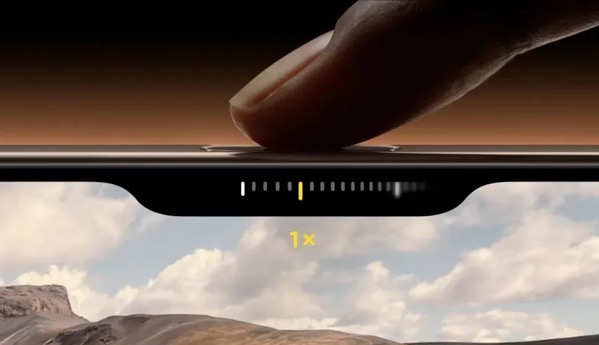
This looked enticing (shiny new things always do), but I just don’t find it useful. It’s too finicky and fiddly to be of use. I’ve worked hard to use it, but I find it distracting when the act of taking a photo should be instinctive. Beyond that fiiddliness, anything the functions of the camera control button offer I can do later with software and not miss the shot I’m trying to take.
Perhaps there are features to come for the Camera Control function. Apple actually added one with iOS 18.2, allowing users to press and hold on an object and then search for info on what the camera captures. But again, we’ve been able to do this through other software for some time now.
AirPods Pro 2
I didn’t purchase new AirPods this year, but the new Head Gestures feature of nodding or shaking your head to dismiss or respond to a notification is a winner. The rolling, gurgling, burbling sounds are a bit much at times, but I find I really like this feature.
Software
As I was writing most of the above about hardware I noticed myself veering into talking about software changes that impact the hardware. The obvious reason for that is that Apple makes the entire widget and functionally it’s becoming harder and harder to distinguish where success reigns and failure begins.
This year’s software releases of iOS and macOS do contain new features, but the big tent pole is Apple Intelligence. That’s a tent that is far from being fully erected and, in my opinion, not ready for the paying public.
Apple Intelligence
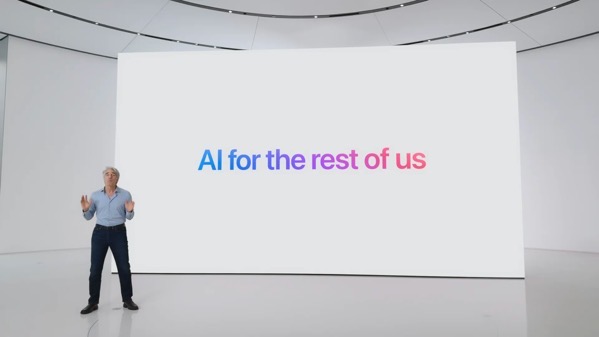 In my use, Apple Intelligence so far is nothing more than a curiosity. On the one hand, advertised as the next big thing, on the other still labeled a beta. Yes, it’s well known Apple is playing catch up, but given how fast anything in the AI market evolves (or doesn’t), I’m not sure there will ever be a race with a destination, much less a finish line. That’s not just true for Apple, but for all the players in this game.
If I had to rate Apple Intelligence at this point I’d say it’s not worth all of the mis-placed marketing dollars Apple is spending. In fact, it is precariously close to feeling like a shell game. I’ve tried all of the currently offered features and don’t really see any at the moment that will be of continued use for me going forward.
Notification Summaries are sometimes worth a laugh, but currently not worth the candle when I try to decipher the mixed messages. I’ve stopped taking screenshots of them, because they are too numerous to collect. If I have to click a second time for understanding, what’s the point?
Summaries of web pages at the moment seems to be a feature not well implemented. I rarely see anything beyond the title when I do look.
Genmoji and Image Playground have no value to me whatsoever. (I’ve never been that big on the whole Emoji thing as I prefer language to hieroglyphics. That used to be a distinction demonstrating society was advancing.) If I want some generative AI to create an image there are much better tools around. Apple’s Writing Tools don’t have any real value for me either.

As for the changes with Siri, there’s no way to judge currently, because what’s there is not what I think we might see someday either in a galaxy far, far away or in a Kubrick film of the last century.
If the point of the Apple Intelligence rollout was to please the markets and shareholders, their “meh” reactions after this piecemeal rollout demonstrate they are even dumber than I thought, or care less than Apple thought they would. Apple seems to have successfully silenced the “Can Apple do AI?” doubters with its smoke and mirror show, but smoke eventually fades and just stinks up your clothes.
I can only base my thoughts on its usefulness on my own experiences, but I’d rate Apple Intelligence as less than “meh.”. If this is “AI For The Rest of Us,” it doesn’t feel much like Apple understands us or AI.
I guess the question becomes if we’re always on the cusp of something new and promising, then why not slow things down and focus on getting it accomplished instead of being slave to an annual release cycle? Certainly it seems that it is proving more and more burdensome. Rumors that iOS 19 might have problems meeting deadlines while Apple continues hammering on Apple Intelligence features for iOS 18 might just be rumors, but I would bet there are more than a few sparks smoldering under that smoke.
iOS 18 and macOS Sequoia Other Features
That said there are some other improvements in iOS 18 and macOS Sequoia worth mentioning. I’m going to talk about those in combination, because new features increasingly blend across device platforms via Continuity. Speaking of, I’m glad I finally got my Continuity headaches solved in 2024. Though it took an intervention from Craig Federighi.
iPhone Mirroring

The new iOS and macOS feature I remain most pleased with is iPhone Mirroring. This looked cool when it was revealed. It has proven both cool and more useful than I ever thought it would be. It’s great not to always have to pick up my iPhone when I’m heads down working but need to check a notification.
macOS Notifications
In my column of new features I like and tied with iPhone Mirroring is the ability to see iPhone notifications on a Mac. Again, this is more useful than I thought it would be, even though I think Apple still has work to do with this on a consistency level, I rate this a winner.
That rating is also bolstered because along with it finally comes the ability to dismiss all notifications on a Mac. This has been too long in coming, so I’m glad it’s here.
I am puzzled why it is a two step process though.

When you view notifications you have three options at the bottom of the list, one being an X. Clicking on that X reveals only a single option to Clear All Notifications. That seems like an unnecessary step to me, unless there’s something else planned for the X in the future.
Photos
Lots of noise was made about the changes in Photos, but frankly I don’t think it was a big deal. I base that on my own usage and from the bevy of family and friends who I support, none of who complained.
What would be a big deal is if Apple would allow users more control to reliably sync photos. Apple actually made things a bit worse with iOS 18 by further hiding where you can see if photos are syncing behind your avatar instead of at the bottom of your Photo library.

Searching for photos is also much better in both iOS and macOS Sequoia. If that’s an Apple Intelligence feature, then it’s one of the few pluses. It isn’t perfect, but it is much better. I do wish I could delete a photo when I’m viewing search results. Currently I can only remove it from the album it creates with those results, even though I’m not saving the search as an album. This would be a great way to help delete duplicates and declutter.
Control Center

The changes here almost feel like a bad April Fools prank in that you can make changes, but playing the game to move icons around on a screen or between the new screens is nigh on near impossible and ultimately user unfriendly for a theoretically user friendly UI experience. If you think chasing Apps around a screen is fun, this will cure you of that.
Math Notes
More useful on an iPad than I find it on an iPhone or Mac, Math Notes is a significant new feature, especially when used with the Apple Pencil. Speaking of the Apple Pencil, I’m glad that both the new iPad Pro and iPad mini can use the same Apple Pencil interchangeably.
Handwriting Smoothing
 This might work for some, but it is a marginal and almost negligible benefit to me as my handwriting is so awful. That said, searching notes that include my handwriting has yielded surprisingly good results even with my lousy handwriting.
Bluetooth
There seems to be something good under the hood added with Bluetooth. I base this on connectivity with my car. My car isn’t equipped with CarPlay but I do connect my iPhone via Bluetooth. Previous issues I had with connectivity seem to have vanished with iOS 18. I have to give credit to Apple, because nothing in my car has changed.
There was some early jankiness using Bluetooth on my Mac with peripherals, but that seems to have disappeared in later point releases of macOS Sequoia.
Safari and Distraction Control
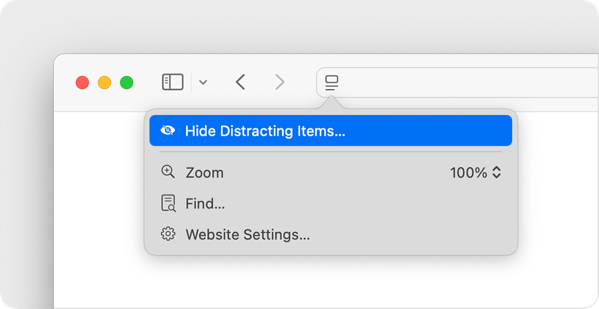
I like the new Distraction Control feature in Safari and hope Apple continues improving it. It’s a bit clunky to use at times, but it does help quite a bit with the continued enshittifcation of the web.
RCS Messaging
This is a notable improvement in my case, because it does improve messaging back and forth with some family, friend, and work threads when images are shared.
Smart Stack on Apple Watch

I find myself blowing hot and cold on the Smart Stack feature. At times it does approach the magic it promises. At other times it’s just an annoyance. I’ve tied turning it off and that can solve the annoyance factor, but I find myself wanting this to work and be smarter.
There are plenty of other new features across Apple’s platforms, but these are the ones that I find myself using the most, outside of Apple Intelligence.
Summing Up
To sum all of this up, without using any Artificial Intelligence, Apple or otherwise, I’d say this year’s hardware and software releases from Apple are one of those years we’ll look back on as a transitional one. Note that the only M4 series device I acquired this year was an iPad Pro, so I can’t speak beyond that on that new M-series evolution. Given how I use my iPad Pro, I’d say it was a winner, but not a life-changing one.
And quite frankly, AI marketing and money grubbing pitches aside, I am extremely comfortable upgrading my hardware as new generations of mobile devices roll out, and equally comfortable sitting on my computer purchases for as long as they hold out.
I am becoming increasingly uncomfortable though with the pace of operating system releases that seem to keep us all in a perpetual beta state whether or not we opt-in to the actual betas themselves. I don’t have a problem with Apple rolling out features over a period of time. I’d rather they do that than release something unfinished and full of bugs. But, I do have a problem with the heavy marketing push that trumpets what’s to come, long before the music is even ready to be played.
I’m able to keep up with what’s real and what’s not or not yet in the hype cycle, but the family and friends I support feel confused, and then become uninterested. If the goal is for folks to actually want to buy new hardware and to use new features, that’s ultimately a self-defeating strategy.
The Vision
Further summing things up, I think Apple’s release of the Vision Pro encapsulates the challenges within Apple’s vision. No, I didn’t buy one of those devices, but I did do the demo several times. I do buy the long term vision behind Spatial Computing, but I think Apple overreached with its hardware and design ambitions. Apple was able to recover from a similar overreach with the original Apple Watch, but the ante wasn’t so high for the consumer. The Vision Pro comes with a steep price to get in on the ground floor, and as of this writing it feels like it was so steep that it will actually change the floor itself.
I think a similar thing is going to take place with Artificial Intelligence, Apple’s version, and that of others. So many have ambitiously bet so much on that being the next big driver in tech, but I’m guessing in the long run it’s going to just be another passenger, perhaps in a side-car, along for the ride in an increasingly slower pace in the smartphone and mobile device race.
I feel almost Luddite-like saying this, but I wish Apple and others would focus on making what we have better than trying to make it new.
You can find more of my writings on a variety of topics on Medium at this link, including in the publications Ellemeno and Rome. I can also be found on social media under my name as above.



 Life on the Wicked Stage: Act 3