Apple’s Changes To The Phone App Are Helpful and Confusing

Apple tries to improve the Phone experience

When the iPhone was first announced Steve Jobs uttered the now famous words about three products that would be combined into one:

Well, today we’re introducing three revolutionary products of this class. The first one is a widescreen iPod with touch controls. The second is a revolutionary mobile phone. And the third is a breakthrough Internet communications device.

The app for that “revolutionary mobile phone” has undergone few changes through the years since 2007, but nothing really to call home about. It can be argued that of those original three products, the phone has become perhaps the least important as users relied more and more on other methods of communication. This year with iOS 26, the Phone app got some significant changes. Some of which, at the moment, are proving quite helpful even if a bit confusing.

Let’s talk about the confusion first.

Apple introduced a new Unified View in the Phone app that consolidates Favorites, Recents, and Voicemails all under a single Calls tab. It sounds good to try and combine these features into one hub as a concept, but I find it confusing and some of the folks I support do as well. Apple also knew it could be confusing, providing users with a way to switch back to the prior Classic View with the familiar separate tabs for Favorites, Recents and Voicemail. Those folks I support are choosing to stick with the Classic View rather than learning something new. I’m swinging back and forth. 

New Shareshot.

Like anything else new this Unified View breaks muscle memory. That sort of change isn’t necessarily a bad thing, but coming after years of users trained on the same interface, it’s about as confusing as flipping the mouthpiece and the earpiece on an old landline phone would be.

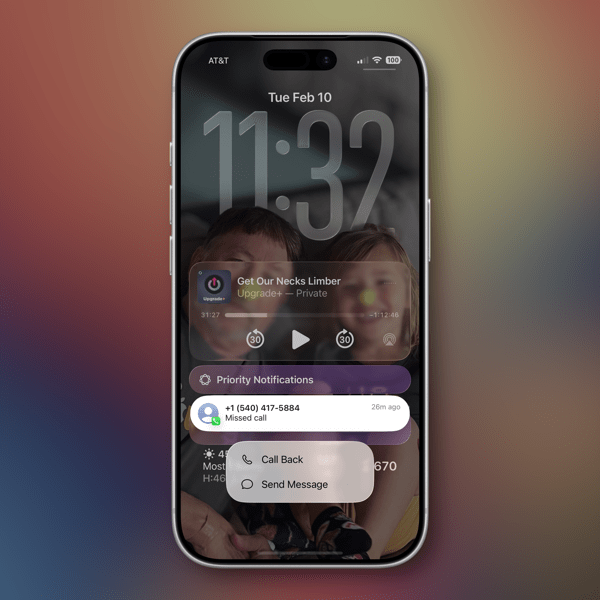
If you choose the Unified View and designate enough contacts as Favorites, it’s also a damn ugly interface to look at.  Your Favorites are arrayed at the top with recent calls below.. If you tap on Show All, (the catch all bucket if you have more than seven Favorites) you’re taken back to the same list view from the older UI of the Classic View. (The Unified View is on the left and the Classic View is on the right in the image below.)

CleanShot 2025-10-24 at 15.28.27@2x.

I’m also confused at times about the differences between what’s a Missed Call and What’s an Unknown Caller as notifications sometimes, not all the time, appear in both places. Sometimes a call record will show up in three places if it’s also identified as a Spam call.

New and Newish Features

Hold Assist Detection sounds like a winner of a feature. In some cases it is. In some not. It makes me think that the designers of this feature have never used the Phone app to call a pharmacy or a doctor’s office where the person answering the phone is so busy that when they answer they speak so fast that you can’t understand what they’re saying. In my experiences attempting to use this feature in cases like those, the person on the other end just hangs up and I have to make the call again. I’ve yet to have a successful attempt at using this feature as designed other than testing it with friends.

New Shareshot.

As an intriguing side note, the same thing happened with a call to Apple Support.

Screen Unknown Callers is another new feature that works well in some cases yet not in others. It has certainly reduced the number of unwanted calls I’ve received since turning it on. The call screening happens before your phone rings, which apparently is enough to bring an end to a number of those calls. Sometimes those calls appear in the Missed Calls list, sometimes not. What I don’t understand is that some of these calls also show up as Priority Notifications while others do not.

There are three options for screening unknown callers. The first is Never, which means you aren’t screening and all calls come through. The second is Ask Reason for Calling, which queries the caller. The third is Silence which silences any unsaved numbers and sends them to voicemail, placing the log of the call in the Recents List.

I’ve been using the Ask Reason for Calling option and, as I said, it has cut down on the number of unknown calls I receive in a day. My wife and I received our current phone numbers when we lived in another state and area code, so we essentially reject any calls with that area code as unwanted. I do wonder if this will become a whack-a-mole game with spam callers in the future as they look for ways to get around this feature.

Call Filtering silences missed calls and voicemail from unknown numbers. Those calls end up in the Unknown Callers List. Sometimes in other lists.

Spam Calls, as identified by your carrier, are silenced, sent to voicemail and moved to the Spam List. Yet, sometimes are flagged as Priority notifications.

Live Voice Mail has been around since iOS 17 and is supposed to show you a live transcription of a voice mail so you can pick up if the call is important. I tried this a couple of times during the iOS 17 era but never used it regularly to gauge how well it worked. I’ve tried it a few times in iOS 26 and have not been able to see the live transcription until after the caller ended things on their end. So I’m guessing Apple has some work to do there.

The good news about all of this is that Apple in the last couple of years is working to make your iPhone less of a nuisance when it comes to dealing with unwanted calls.

The not-so-good news comes in two buckets. The new user interface will require quite an adjustment. Kudos to Apple for providing an option to switch back easily. The other bucket is that phone makers have to rely on carriers for reducing Spam. Spam lists are the province of the carriers. That push and pull is reflected somewhat in the design of the Phone app interface when it comes to blocking unwanted calls.

In order to Block or Block and Report a phone number as Spam there are two options. If you swipe left on the record of an unknown phone call a small orange icon with a white hand appears that reveals the blocking actions.

New Shareshot.

You can also open up a Contact card by hitting the Info button on the right of a Contact card, scroll all the way down to the bottom of the card and choose to Block the number from there.

Either method described above is more cumbersome than it needs to be in my opinion and it would be much simpler if Apple could design an incoming call screen that had a prominent Block button on it.

These new features Apple has added to the Phone app in my opinion demand better curation of contacts by a user to work effectively. At least in my case they do. Numbers you may use once in a while need to be in your contacts in order for these new phone features to identify them appropriately. By the same token, numbers you never want to hear from again need to be blocked or blocked and reported as spam.

All methods of communication eventually devolve into this kind of tedium and you’d think by now there would be money enough to find better technological methods to relieve us of it.

My other concern is one that I have about how Apple handles its apps in general. With a few exceptions, (Notes and Reminders) Apple tends to release new features for an app and then let them go years without continuing to improve them. I hope that’s not the case with these new features in the Phone app. Apple made a good, certainly overdue, next step with these changes. They can’t just leave us all on hold until they take the next one. We could all use a little more sanity and perhaps a bit more revolution from the “revolutionary mobile phone.”

Who knows? Maybe one day Apple will even turn its attention to the long neglected Contacts app.

You can also find more of my writings on a variety of topics on Medium at this link, including in the publications Ellemeno and Rome. I can also be found on social media under my name as above.

More Thoughts and Issues With macOS 26 Tahoe

Unfinished Tahoe is not a friend to developers or users

I wrote a bit earlier about some of my early thoughts on the new OS 26 releases and here’s a few more to share about macOS 26 Tahoe. I continually beat a drum about the fact that we’re all on Apple’s beta bus, whether we opt in to receiving betas or not. I don’t opt in. Several of these thoughts keep that percussive refrain rumbling along through the issues below.

MacOS 26 Tahoe purple.

Memory Leaks

Since the release of macOS Tahoe 26.0.1 I’ve seen strange memory leaks increasing for what I think are odd reasons. For example, a process known as IconServicesAgent increases the longer I go between rebooting sessions. According to documentation I’ve found online, one of the causes of this can be an overly large or corrupted icon cache, or specific icon causing the problem. A solution is to clear the icon cache, which I’ve done, but the problem reoccurs.

I don’t have the expertise or the patience to tray and track down which icon(s) may be the issue, so hopefully this gets fixed in an upcoming release.

CleanShot 2025-10-17 at 09.35.13@2x.

My hunch is this has to do with icons being a lower priority for developers who still have a lot of other work to do on their apps. I base that on the number of non Apple app icons I see that haven’t been updated for Liquid Glass.

Notifications Memory Leak

There’s another memory leak that I see less frequently and seems a bit more random. You can see in the image above the amount of memory NotifcationsCenter is consuming. Apparently this “occurs when a program holds onto references to objects, like activities or other resources, even after they are no longer needed, and uses the notification system as a way to do so.”  It’s tough to pin down whether these memory leaks are the fault of developers hindered by Apple’s choices, or just a system bug. Either way it’s far from optimal.

Again, I don’t have the expertise to sort this out, so I’m hoping for a fix in an update down the road.

Notification Summaries

Prior to macOS 26 Tahoe I had long ago turned off Apple Intelligence’s Notification Summaries on macOS Sequoia. I turned them back on with this new release to see if things improved. They did not. In my experience they are just as bad and just as useless as they were previously. So I’ve turned them off again.

Liquid Glass, Corners, and Such

I find the general acceptance that Apple made Liquid Glass less of a priority than it did on other device platforms amusing because it’s not only true, it’s true in the way a red wine stain shows up on a white shirt or blouse. That said, the somewhat half-way approach we do have, while not a deal breaker, is becoming increasingly more visually annoying.

CleanShot 2025-10-17 at 16.19.10@2x.

The lack of contrast for Sidebars always jerks my attention away when I have a sidebar open because for someone who once had real vision issues due to cataracts, it triggers a flashback to when I first started noticing those since corrected eye issues. The screen shot above makes it look like there is greater contrast than what I see in actual practice.

I’m also just not buying the entire concept of bringing “more focus to content.” Again, it’s more distracting than focusing. The more I see it the more distracting it becomes, which I’m guessing is antithetical to what Apple’s designers were hoping. This is true on iPhones and iPads as well.

CleanShot 2025-10-17 at 16.20.14@2x.

Widgets

This is one instance when the drum beat of bad beta behavior sounds loudest. Again, I do not run betas on any of my devices. Yet, each time that Apple releases a beta for the next version of macOS 26 all of the widgets I use on a secondary screen will disappear the morning before the release. I can set my clock by it. I’ll go to the trouble of restoring them. Within the next day or so duplicates of those widgets will appear, but strangely now revealed under Notifications.

CleanShot 2025-10-17 at 13.11.28@2x.

At first I deleted the duplicates but after this week’s beta release I noticed that they eventually disappeared on their own. It’s odd behavior to say the least.

Control Center

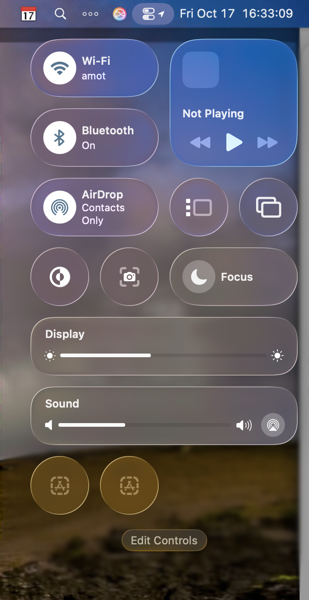
Speaking of Control Center, Apple is obviously hoping to move a lot of what functionality available in Menu Bar icons into the Mac Control Center. Apple has provided an API for developers to make that possible so that user can access those functions from the Control Center instead of the Menu Bar. I have very few apps that have taken advantage of this so far, again speaking to the slow pace of adoption by developers with other priorities.

CleanShot 2025-10-17 at 16.33.03@2x.

Even so, the two I have placed in the Control Center are sometimes present and sometimes not. To my surprise they appeared this morning. Not surprisingly they do not appear this afternoon, merely showing a place holder.

Control Center Notifications

Apple moved Notifications for things like Bluetooth and WiFi connections, volume sliders, and other functions so they animate out of the Control Center. That means they pop out in the upper right hand corner of the screen. That said, I find when they do animate they either distract me from what I’m doing, since I’m typically looking at the center of the screen, or my muscle memory of looking for them in different locations causes me to miss them entirely.

CleanShot 2025-10-17 at 16.39.54@2x.

The beta drumbeat pounds on

It’s been obvious since the release of macOS 26 Tahoe that Apple has a lot of work still to do. Some of that obviously was by design due to time and resources. Fine, but not fine. You can’t expect high performance out of a F1 race car unless your pit crew can nail the basics. As it currently stands Apple has its shiny new car well polished for pictures and demos, but is obviously still behind with its own engineering, throwing more delays at developers in the pit, in turn leaving users wondering about the turns ahead.

I frankly don’t see these gaps closing until sometime next spring at this point. Just in time for Apple to begin shifting resources to whatever comes next. I find that sloppy, unsettling, and like a lot of things Apple-like, not very Apple-like these days.

You can also find more of my writings on a variety of topics on Medium at this link, including in the publications Ellemeno and Rome. I can also be found on social media under my name as above.

Stop Snoozing and Wake Up: Apple Changes Alarm Shutoff Screen

If you snooze, you lose

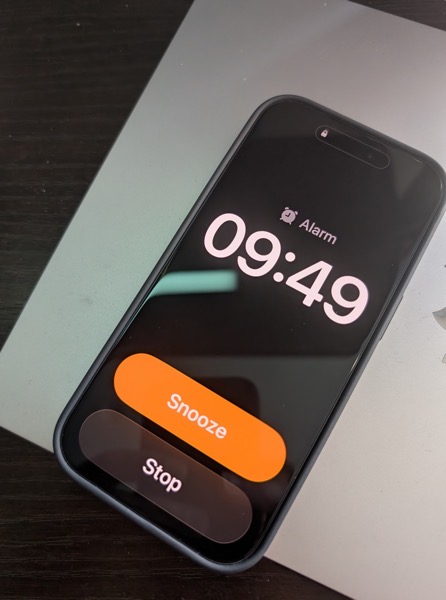
It was a real wake up call for me when news broke recently that in the next major update to iOS 26 Apple will be changing the wake up screen for alarms. The change means that instead of having two buttons, one above the other to either Snooze the alarm or Stop the alarm, users will now have to Slide a button to turn off the alarm.

PXL 20251013 144935012.

This shouldn’t have been that much of a surprise for me as prior to iOS 26, the snooze button was a big orange one and the “button” to turn off the alarm was below it and much smaller. I can’t tell you the number of times I, and my wife, accidentally hit the snooze button instead of turning off the alarm.

To my tastes, Apple fixed that in the initial release of iOS 26 by making the buttons of similar size, even if the Snooze button still grabbed all the glory and color.

Here’s the thing. Of course how you wake it up is a very personal preference. Personally, I’m not a snoozer. When it’s time to wake I want to wake up and get moving. But apparently the majority of the world prefers snoozing, as do the folks making decisions in Cupertino. When you think about it explains quite a bit about so much when it comes to meeting the challenges of each day, whether in the real world or in tech.

What’s that old saying, if you snooze, you lose? I think that’s it.

I can only imagine how many iPhones are going to be knocked off of bedside tables as semi-awake users attempt to slide the button to silence an alarm. If I was responsible for the design, I’d have made it more challenging to hit a snooze button than to hit the wake up button.

But that’s just me.

You can also find more of my writings on a variety of topics on Medium at this link, including in the publications Ellemeno and Rome. I can also be found on social media under my name as above.

Craig Hockenberry’s Take on the Why of Liquid Glass

Is Liquid Glass an edge case?

There is a quote largely attributed to Robert F. Kennedy. No not the one rampaging through the U.S. healthcare system. It goes “some men see things as they are and ask why. I dream things that never were, and ask why not?” But, it actually came first from George Bernard Shaw in his play Back to Methuselah. 

Apple WWDC25 Liquid Glass hero 250609_big.jpg.large_2x.

The text gets mangled often enough as does the attribution. Regardless, the point is made. In my experience as a theatre producer/director/designer/playwright the biggest part of the game is the “dreaming” part. The next hurdle is finding a way to turn that into reality. The dreams often come when least expected, occasionally after many attempts at finding a solution, and sometimes at random moments. They sometimes come into focus as almost impossible, or perhaps wrong-headed. 

Typically, in something completely uncharacteristic for me, when I find I can’t articulate what I’m feeling or seeing, I know I’m on to something, and that’s the moment to ask “why not?” rather than “why?”

I’m also very familiar with the desire or temptation to do something new instead of doing again what I know works. Speaking from my experience that’s yielded both positive and negative results. There’s a reason some things are called “tried and true.” There’s also a reason to hold your breath, roll the dice and gamble it all on something new.

Honestly, either way is a risk. And that’s how it should be. But if you feel the need for change, go for it and don’t reverse course. 

But what do I know? I’m just a theatre guy who’s produced hits and flops along the way and comfortable taking slings and arrows along with occasional accolades. I’m not sure what feels better, being admired for a courageous leap of faith, or feeling accomplished for sticking the landing. In the end, I’m not sure it matters.

Liquid Glass 

A lot has already been said, good, bad, or indifferent about how Apple’s designers dreamed up its new Liquid Glass design approach. But that doesn’t answer the “why?” Was it a compulsion for something new? Time for a change? A diversion to distract? Or a romantic new vision spurred on by a heavy new headset?

App developer and designer Craig Hockenberry of the

, in an interesting post recently asked that question and provided what he thinks is a possible answer. It’s titled simply Liquid Glass. Why? I don’t want to spoil the post. You should go read it yourself. But his answer points to a possible future of devices “with screens that disappear seamlessly into the physical edge.” 

A cautionary note here. For several years Apple trumpeted “edge-to-edge screens” that still had bezels. Marketing mavens often outrace product dreamers to the destination.

I joked with Craig on Mastodon that he should have subtitled the piece Liquid Glass is an Edge Case. 

The joke may indeed prove to be true, but it’s a truth we’ll live with in some form or fashion for the next few years, edge case or not, regardless of the good, bad, or indifferent reactions.

Anyway, go read Craig’s piece. However Liquid Glass is received in a few weeks, I’m looking forward to discovering it myself.

I mean, why not?

You can also find more of my writings on a variety of topics on Medium at this link, including in the publications Ellemeno and Rome. I can also be found on social media under my name as above. 

Thoughts and Prayers Heading into WWDC 2025

A new coat of paint won’t fix the cracks in the wall.

In a week Apple will unveil what it has in store for us during its annual World Wide Developer’s Conference (WWDC). Beginning June 9, the microscope will be focused more intently and with a greater scrutiny given the myriad of issues Apple is facing. That scrutiny might just overwhelm any message Apple has planned for the year ahead depending on how Apple handles it.

WWDC 2025 Apple Logo

The reason I titled this post “Thoughts and Prayers Heading into WWDC 2025” isn’t that I’m offering up good vibes for Apple as they try to work out of the messes they’ve mostly created for themselves. I’m actually hoping — most likely against hope — that Apple will finally clean up some of the annoyances they’ve neglected over several generations of iOS and macOS.

I’m not going to discuss the bigger picture issues Apple is facing here. I’ve written about some already, as have many others. Instead I’m going to focus on the smaller software reliability annoyances that add up to make me think Apple just doesn’t care.

It’s become almost a running joke that Apple allows some of these flaws to continue year over year. But I don’t find it funny. You can put new wallpaper over a water damaged section of a wall, but if you don’t fix the leak then the problem isn’t the stain on the wall, it’s you not caring. Or maybe you don’t have the money to get it fixed. Apple certainly has the money. As John Siracusa says in an excellent post called Apple Turnaround:

It’s been 15 years since Apple’s leadership last demonstrated that it’s willing to emphasize software reliability at the cost of new features. Since then, bugs in major features have been allowed to fester, unfixed, for years on end.

I’ll quibble with John on one point. If you allow a reliable, yet ignored “bug” to remain through several operating systems, it essentially becomes a feature the longer it’s not addressed.

I’m a stubborn old coot in my life as a theatre director. Deeply ingrained in my way of directing is something a mentor laid on me year’s ago. “If it’s on the stage it’s yours. If it fails or distracts, it’s your failure.”

Here’s a short list of bugs and annoyances that have existed over several versions of the operating systems and several versions of Apple’s hardware that I encounter routinely. That’s based on how I work and play with Apple hardware and software. I’m sure there are many more depending on how others use their devices.

Focus

I know there are folks who swear by the Focus feature, but to me it’s one of those features that works and then randomly doesn’t. I’d call it unfocused. I keep trying to use it, but abandoning it because I already have enough random failures in my life.

Shared Reminders Notifications

I’ve written about this previously. Shared Reminders are terrific for grocery lists and other things, especially of a checklist nature. But when you complete a Reminder, the notification needs to disappear for all of the users who are sharing the Reminder. I’ve had Shared Reminders hang around for hours after I’ve checked it off of a list.

Syncing Photos

This one just gets more and more puzzling and has become the butt of so many jokes, it’s almost become a part of the Apple brand. You take a photo on your iPhone and whenever it syncs to iCloud and subsquently to other devices is a wild guess. I get that if you’re running low on battery you may want to delay syncing. But if my iPhone is plugged in telling me that it won’t sync so that it can optimize battery it is a little silly. Also telling me syncing is paused for “optimizing the system” makes me wonder just what system is being optimized. Apple’s or mine?

Bluetooth Connectivity and AirPods 

I’m a big fan of AirPods. I’m also a big fan of AirPods and the way they are designed to work within Apple’s ecosystem. When they work as designed it’s magic. When not, it is frustrating. Again, random failures to disconnect, which always seem to come at just that moment when you need to quickly plop them in your ears for a phone call are never fun. Neither is it a good time when one of your devices you might have previously been connected to refuses to let go of the connection.

Deleting Media from Messages

I support a few family members who keep their Messages set to retain their Messages forever. That’s all well and good, except this can quickly fill up storage on an iPhone. Apple needs to make it possible for users to select and bulk delete media on an iPhone the same way you can in Mail. The UI looks like you can swipe down the list of circles, but you can’t. The fact that you can only view these attachments sorted by size also makes it a more difficult chore to remove unwanted media attachments.

Shortcuts

I have a love/hate relationship with Shortcuts. Love it when they work. Hate it when something changes and a Shortcut I’ve relied on suddenly stops working or stops appearing in Spotlight. This happens more frequently in beta season even though I don’t run betas.

Beta Badness

Again, I don’t run betas on any of my devices. That said, I’ve been told by Apple Support personnel that changes are always happening behind the scenes on the backend during beta season that can sometimes affect all users. That stands to reason, given how much of what you do on an Apple device is tied into Apple’s servers and iCloud. I suspect this may only become more prevalent with Apple Intelligence as Apple tries to remain competitive with other AI providers that seem to constantly be updating their software. Perhaps there needs to be a way to create a wall or silo off users running betas from those who do not.

App Store 

With M-series chips we’re able to get great performance and fast loading times from apps. With one notable exception being Apple’s own App Stores. For the life of me I don’t understand why they can’t improve performance on their own point-of-sale outlets. It’s like not cleaning the glass on the front of your storefront.

Settings and Permissions

I get that there are a large number of Settings. I don’t get that there’s such a haphazard way of addressing the problem of making them discoverable. I’m sure it’s a challenge, but the only way to address a challenge is to set it as a priority. The same is true with Permissions. Certainly there’s a way to force developers (including Apple) to send us to the correct Permissions screen to choose to make a selection.

Rules in Mail

I’ve set up a number of Rules in Mail in macOS over the years. Currently they all seem to be non-functioning, or randomly functioning. I have a suspicion this may have something to do with Apple’s tinkering with Apple Intelligence based mail categories (a feature I tried but turned off). Having to manually choose to Apply Rules is not the same as having a Rule that runs automatically. It defeats the purpose. Let’s face it, no company has found a way to win the cat and mouse game of spam filtering. I doubt they ever will even with AI. The Rules feature wasn’t perfect, but when it worked it was a help in weeding out some of the spam.

Consistency between iOS and macOS

Speaking of Mail, I’d like to see consistency across the board regarding features between the macOS and iOS versions. In fact, I’d like to see consistency across the board in all of Apple’s native apps. This is especially true given that there is a rumor that Apple is redesigning most of its operating system user interfaces to try and unify the look and feel between different device categories. Carry that through with how you treat app functionality between platforms. Other examples include Shortcuts and Apple News+. I enjoy being able to open an article via the Share Menu from Apple News in Safari on a Mac. I should have the same option on iOS and iPadOS.

As I said, these are mostly annoyances. But I’m annoyed that no one at Apple seems to be annoyed enough to take care of them.

You can find more of my writings on a variety of topics on Medium at this link, including in the publications Ellemeno and Rome. I can also be found on social media under my name as above. 

Apple’s Latest Miscues Risk Damaging AI In The Same Way It Tarnished iCloud

Apple Intelligence Summaries Again Draw Fire

How many folks do you know who don’t trust iCloud? Or “The Cloud” in general? Quite a few, I would bet. When Apple rolled out iCloud in 2011, it offered, as all things do, a promise. Trying to move on from the problems associated with its previous troubled cloud service, MobileMe, it was a rebrand, a re-architecting, and a repeat of prior problems that missed the target and generated enough criticism to turn iCloud into a punch line for all jokes about “The Cloud.”

Shutterstock 598778588.

Apple has steadily improved iCloud (it still has issues), but not enough to remove that tarnish. The recent flap over summaries generated by Apple Intelligence threatens to do the same to that new brand, and quite frankly to the concept of Artificial Intelligence in general. Some might see that as a good thing, but that’s another issue for another day.

The issues with Apple Intelligence are compounding, largely due to mistakes of Apple’s own making in its rush to correct its way-too-late entry into a game it is losing. Overhyping the beta release as if it were a finished product certainly didn’t help. That investment in dollars essentially removed the excuse that mistakes can happen in betas. The “New Siri” remains delayed. And, like every AI release I’ve seen from other makers, once the initial shine wears off, the rough edges begin to show and cracks are revealed. I can’t count the number of users who claimed they’ve turned off most of Apple Intelligence features.

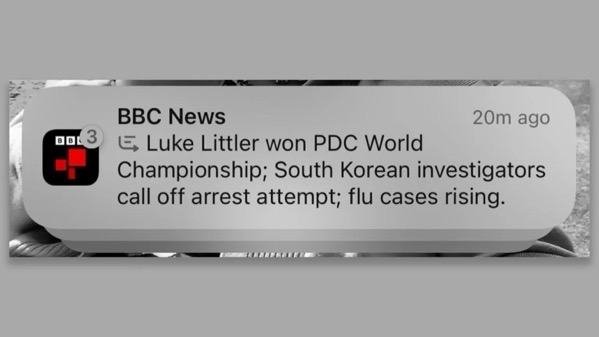
This latest flap deals with Apple Intelligence summaries. There have been legions of screenshots posted of humorous and not-so-humorous, inaccurate, confusing, and downright misleading summaries. The BBC has now twice called out Apple for misleading and inaccurate summaries. The most recent one named a darts player the winner of a competition before the match had even been played.

88895d30 c9d7 11ef 94cb 5f844ceb9e30.

Apple has now responded, reminding everyone about the beta status and that a future update will further clarify when the text being displayed is summarized by Apple Intelligence. In essence, a warning label.

Quite a few big dogs in the Apple influencer game have already barked, weighing in with possible suggestions and warnings. (See these links from John Gruber and Jason Snell.) There’s somewhat of a debate as to who should have ultimate control over whether or not users see summaries. Should developers be able to opt out of having notifications summarized from their apps, or should users have control by opting out of the feature? Either way, in my opinion, it points to essentially a defeat and also a larger problem.

First impressions matter. Screwing the pooch in a first impression typically leaves a mark.

Given what we already knew about AI hallucinations, mistakes, and problems before Apple belatedly and hurriedly entered the game, I don’t think anyone thought Apple would have solved that problem. Thus, the shield of announcing it as a beta. But the dollars spent on promoting it certainly didn’t offer enough prominent caveats to cut through the glitzy messaging. Apple Intelligence, beta or not, was the tentpole marketing feature. Heck, Apple’s announcements moved markets as if gold had been discovered.

Summaries are just one of many features that AI offers, Apple’s version and others. Arguments can be made that summaries are a good thing in a busy world, and also that they are completely unnecessary given that there is a level of mistrust that already existed pre-Apple Intelligence, that requires, almost demands, users to check the work generated by the AI before relying on it.

However Apple chooses to work its way out of this latest problem of its own making, its misplaced marketing miscues have called enough attention to Artificial Intelligence to make it a problem for that entire segment of the tech industry. What was a key selling feature is quickly becoming the butt of another joke.

If this was a game of darts, Apple’s shot would have not only missed the target but also missed the board.

You can find more of my writings on a variety of topics on Medium at this link, including in the publications Ellemeno and Rome. I can also be found on social media under my name as above. 
At Last: A Cure for Apple iCloud Migraines Thanks to Craig Federighi

Finally, a solution to those Apple iCloud Migraines thanks to Craig Federighi

Relief. At last. All it took was the right doctor.

We’ve all been there with health situations. You lay out your symptoms and whatever checklist your medical professional follows leads to a course of treatment that might or might not work. Perhaps after repeated tests and possible cures you might finally get the attention of someone who actually listens, goes beyond the symptom check list, and you get treatment that works to solve your problem.

If your situation and symptoms don’t fit those of the majority of patients it can be an exhausting, frustrating, and dehumanizing experience.

The same is sadly true with technical support. You have a problem. You call or chat (hopefully with a human). Lay out your symptoms and you get served up solutions from a playbook that don’t solve your problem. Striking out on your own you search the Internet for solutions, (increasingly a frustrating and useless experience), only to discover others facing the same issues.

At least you find comfort in knowing you’re not alone. Even so, there’s not enough strength in numbers if you and your compatriots fall into that ever popular yet corporately dismissed category of a “small minority of users.”

Like with your medical condition, if your technical issue falls outside of the range that most experience, then you better hope that you are talking to someone who actually listens and isn’t just a part of a solution mill that rewards quick dispensing of the call the way restaurants hope for quick table turnovers.


The Diagnosis

Perhaps you’ve read my previous chronicles discussing the Apple iCloud Migraines. I’ve been suffering with these headaches for a number of years and through a tourist guide map of California named macOS operating systems. I won’t go into detail, but you can find links to them here, here, here, here, and here. I will offer a brief summary (non AI generated) of the problem :

At each point that Apple released an operating system update, whether beta or final release, my Macs would mysteriously lose all Continuity based or related features. Continuity is the system Apple uses to connect its devices allowing users to copy and paste between them, sign in to Macs with an Apple Watch, display iPhone widgets on a Mac Screen, and connect Macs and iPads together via Universal Control. Your iCloud account is a key to Continuity.

Note that I haven’t been on a beta since owning any of my current devices. So, in theory, none of these beta updates should have affected me. However, I might as well have been downloading betas like a beta junkie, given the return of these migraines with each beta release and subsequent full releases.

Communications over the years with Apple Support yielded nothing that would help until Dan Moren of Six Colors posted about a similar issue he was facing and the responses he got from Apple Support.

That second agent proved quite capable, not only agreeing that the situation was strange, but also looking into issues on Apple’s side. Which led to the somewhat bizarre conclusion of this story: after perhaps 20 minutes on the phone, he seemed to hit on something. I heard him laugh and say something along the lines of “that explains it” and then, with my consent, put me on hold. When he came back, he said—and I’m not exactly quoting, but close enough: “I’m sorry, I can’t tell you any more than this, but all your services should be back up pretty much exactly 12 hours after they went down.”

Now, in my initial forays on social media, I had gotten a reply from someone on Mastodon mentioning that Apple’s iCloud servers were sometimes put in maintenance mode for 12 hours—but upon going back and looking for that specific reply, it was nowhere to be found.

It did, however, support the theory that something had gone wrong with the particular iCloud server on which my account was located.

There was, according to this support agent, nothing to do but sit back and wait, then call back if service hadn’t returned by the 12-hour mark and reference my case number. He was again apologetic for not being able to give me any more information, but reiterated his confidence that everything would be resolved.

After Dan’s post turned the heat up a bit on the issue my calls with Apple Support changed in tone and substance. I got moved a couple of rungs up the ladder to an advanced support level. (Draw your own conclusions). Initially that seemed promising. I also got the “just wait it out” response as Dan.

Suffice it to say that eventually yielded no real solution and there were two periods of time when things just seemed to stall. The first being prior to the Apple Vision Pro release and the second in the run-up to WWDC 2024. I chalked those up to resource allocations.


Reaching the Right Doctor

Following WWDC I decided on one frustrating evening to drop an email to Craig Federighi, Apple’s honcho on all things software. I didn’t expect any response. My previous emails to Tim Cook were met with a brush off.

In the context of my email I appealed to Craig quite explicitly that I was very interested in the new iPhone Mirroring feature coming in Sequoia that relied on Continuity and how he had discussed Continuity during the WWDC presentation. I also expressed that I imagined this feature would be at best a hit and miss for me given the ongoing migraines.

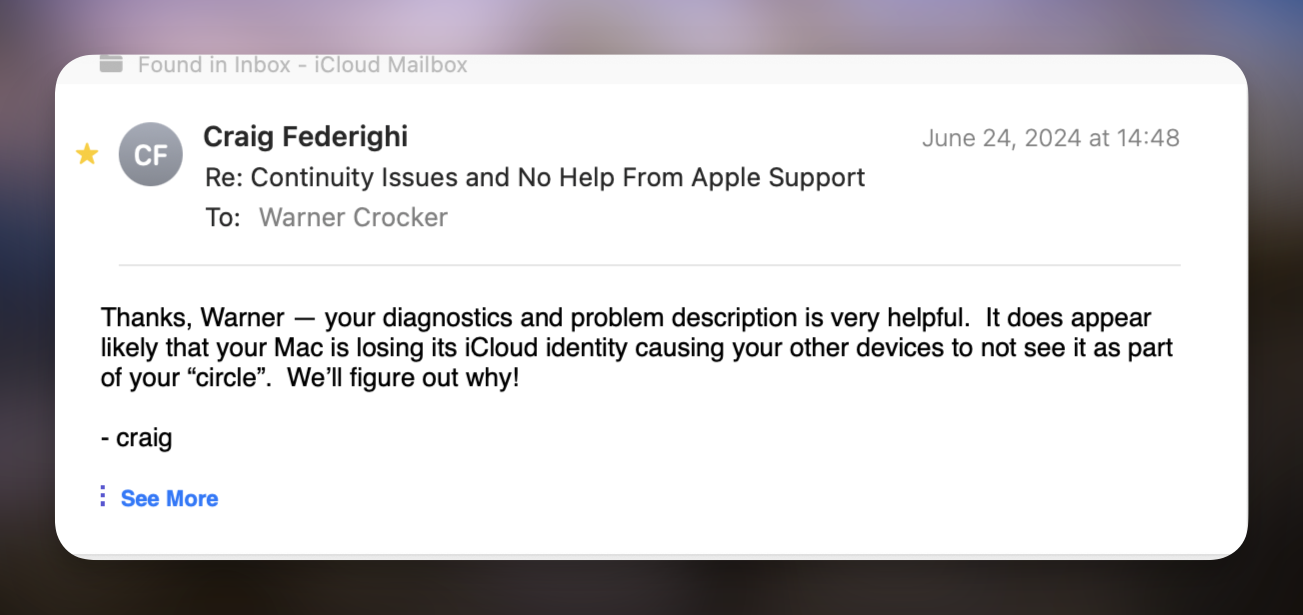
Lo and behold, I got a response from Federighi requesting I share diagnostic files with him. Note I don’t know if I was actually communicating with him directly or one of his staff, but after submitting another round of diagnostic files I received the emails below:

And then I received the following:

Once macOS Sonoma 14.6 and iOS 17.6 were released the problem did indeed appear to be solved, but I knew I would have to wait through the next few beta releases and also the release of Sequoia to determine if the fix would indeed hold.

The good news is that I can report the fix did indeed hold through the remainder of the beta cycle and also through the final releases of macOS Sequoia 15 and iOS 18. As of today it has held through developer betas and also public release of the betas for 15.1 and 18.1 since installing the final versions of macOS 15 and iOS 18 the day of their release. It has also held through upgrading my iPhone and Apple Watch.

I’m glad this seems to be resolved but I’m going to remain skeptical until we see the .ox and .x releases of Sequoia and iOS 18 roll out. To be honest, it feels like I’m waiting for any sign of a possible reoccurrence of a medical symptom.


Wrapping Up

I’ve always tied my migraines to problems somehow related to my iCloud account and it appears those suspicions were by and large correct. I don’t have a definitive answer but given that only a “small percentage of users” experienced this issue combined with comments from support personnel and a few clues from Dan Moren’s post, that is what logically makes the most sense to me and a few others I’ve consulted, social network buddy Dwight Silverman among them. By the way Dwight led me to a workaround involving signing out and back in to Messages in iCloud.

I’m certainly appreciative of Craig Federighi or his office pushing this forward to a resolution. I’m reasonably convinced it helped that iPhone Mirroring, which relies on Continuity, is one of the sexy tent pole features of this year’s new releases finally probably brought quicker attention to the issue. That and a stroke of good luck with my timing.

Unfortunately, for whatever reason, users in situations that don’t have a large podcast or online audience and can’t stir up a major hullabaloo in the tech press are left to piece these clues together. Unless on a rare occasion they catch the attention of a higher up at Apple to find a resolution. That shouldn’t be the case.

Certainly the bigger a company becomes it’s easier for all sorts of issues for a “small minority of users” to fall through the cracks and for priorities to shift. That’s just a reality. And it shouldn’t take the luck of good timing in sending an email to a top executive, certainly busy with many other tasks, to suss out an issue.

As I’ve said all along, Apple needs to find a way to come clean with both users and its front line support personnel when these issue present themselves. Listening should be the key because sometimes the patient/user has all the clues you need to help them.

You can find more of my writings on a variety of topics on Medium at this link, including in the publications Ellemeno and Rome. I can also be found on social media under my name as above. 

A WWDC 2024 Reading List

A reading list of predictions and commentary heading into WWDC 2024.

There are always lots of predictions about what Apple will announce at its annual World Wide Developer’s Conference each year and this year is no different. I’ve written a few of them myself. Here’s a quick list of some pieces from others and myself that I think provide a good pre-WWDC reading list.

Cleanshot 2024 06 04 at 08.54.35402x.

Mark Gurman of Bloomberg seems to have gotten quite a few of the details, whether leaked or planted who really knows, on what’s about to unfold. Check out Here’s Everything Apple Plans to Show at It’s AI-Focused WWDC Event. It almost feels like a story board of the event.

Gurman also expands on his thoughts about Apple Intelligence here.

As a companion to that check out John Gruber’s take on Gurman’s Epic Pre-WWDC Leak Report. Gruber seems to think it’s indeed a leak and the folks inside Apple aren’t too happy. IYKYK

Perhaps the best pre-WWDC piece for providing some pre-perspective comes from Om Malik in Apple + AI: What to Expect at WWDC 2024.

Wayne Dixon tackles his Wish List by platform and tosses in a Bluetooth wish for good measure.

David Lewis doesn’t think we should hold our breath.

Since Artificial Intelligence, or as it appears soon to be christened Apple Intelligence, seems to be the order of the day, Craig Grannell has some intriguing thoughts on how Apple can avoid the pitfalls others have made in this great AI gold rush.

Nathan Edwards at The Verge wants to know if WWDC 2024 and AI will unlock the potential of the iPad Pro.

And here are the three pieces I’ve written:

WWDC 2024: iCloudy Forecasts Ahead Amidst Dampening Expectations 

WWDC 2024: Apple Needs To Do Some Serious Work with iCloud

WWDC 2024: Things I’d Like To See

It’s always interesting to see what comes out of each year’s WWDC announcements because one way or the other they set much of the agenda for the next year and beyond.

You can find more of my writings on a variety of topics on Medium at this link, including in the publications Ellemeno and Rome. I can also be found on social media under my name as above. 
WWDC 2024: Things I’d Like To See

Bring in the new and shiny, but fix the old and buggy too.

The Internet is filled with wish lists of things Apple fans would like to see announced next week at WWDC. New things. New capabilities. New all round. The majority of those wishes are the same and focus ahead. Nothing wrong with that. We’re always advancing. Or so we’re told.

Perhaps I’m stuck in the past, but I’d rather see Apple devote time to correcting some longstanding issues that bug me. Many of these issues are part of the glue that holds Apple’s ecosystem together, or what Apple calls iCloud and I call the unnamed operating system, iCloudOS. So, I’ve compiled a list of things I’d like Apple to fix, repair, or at least pay some real attention to.

Chances are better than good that you won’t hear much about any of this next week or in the weeks that follow. Many of these issues have existed for a few years now and seem to be such a low priority that Apple must be content to let them exist. Quite a bit of this could be considered small in comparison to the bigger challenges brought on by adding new features that bring new complexity. But one of the reasons so many prefer Apple’s way of doing things is the attention to detail in both design and practical matters. When it’s good it’s great and often magical. When Apple loses focus and doesn’t pay attention it can be like watching a magician pull a dead rabbit out of a hat.

For me these issues are rough enough and present enough inconsistency to diminish that attention to detail. The longer they are ignored or put off the more they point to glaring weaknesses in Apple’s process and I think we get farther away from that “magical” or “it just works” lore.

It’s apparent that not enough others feel the same or have the same experiences to pressure Apple into devoting the resources necessary to address these annoyances. That’s not a surprise. New always takes precedence in a market driven by delivering something new each year. And AI is the big new thing this year and Apple has assigned all hands on deck to ready what most expect to be the newly christened Apple Intelligence ship to sail.

Yes, we’ll hear quite a bit about AI. I’m also sure we’ll hear about things like emoji, flashy Messages and other novelties that show well in demos. Many of those I consider trivial or “meh” features that will be forgotten shortly after all of the reviews are written. Though the money I spend on Apple products is a small drop in Apple’s buckets of cash, I’d much rather see it spent putting resources into fixes for these annoyances. The list below certainly isn’t a complete one, but these are the things I’d love to see Apple address.


Continue reading “WWDC 2024: Things I’d Like To See”

Time for Apple To Come Clean About iCloud: Part 2

It’s been a week and Apple needs to tell users what happened on April 27 when so many had to change their passwords causing confusion

Last week, beginning on Friday April 27, quite a few Apple users experienced a disturbance in the force when all of sudden they were prompted to relog into their Apple ID on their devices. On attempting to do so many discovered their accounts were locked for “security reasons” and needed to change their passwords in order to get back in.  Eventually the situation righted itself as everyone eventually was allowed to change their passwords (there’s more to that part of the story later). It’s been a week and Apple has yet to publicly comment on what caused the issue. That’s a problem.

Apple and other companies spend enormous resources to keep users and systems safe, guarding against privacy attacks and security hacks. Apple also spends mountains of marketing money touting its approach to security and privacy as a key selling point. All that’s well and good. We live in an age of online paranoia when every security alert, every email, every text, every phone call, every link we are prompted to click on is suspect. Apple Security Notifications are now in that list.

When folks started receiving prompts on their Apple devices to change their passwords and then discovering that they were locked out of their devices, that paranoia rippled across the Internet as social networks, forums, and support networks burbled with users wondering if this was a hack, a glitch on Apple’s end, or just another run of the mill online inconvenience. Depending on which Apple Support rep you got on the phone you were told there wasn’t a problem or helped to relog back in. The event was blamed on all sorts of culprits from foreign countries to AT&T after its recently revealed compromise. There was no messaging from Apple. There’s been none since.

There are some signs that it might have been a system update on Apple’s end. Gone wrong or right no one knows. Was Apple hacked and did it pull a maneuver to protect users? Was Apple attempting to update or perform system maintanence? No one knows. No one knows still.

John Gruber on Daring Fireball pointed to Apple’s Developer System Status dashboard that showed maintenance scheduled for that Friday evening and another scheduled for the next day under “Account.” So that may be a possibility. Without any communication from Apple users are left in the dark.

In my opinion most likely this incident may have been related to a backend maintainence issue. Yes, that’s a speculative opinion, but it’s based on my long (too long) experience trying to sort out ongoing iCloud failures with Apple Support. My personal conclusion is that Apple has problems with its backend operations that it either can’t figure out or is unwlling to devote enough resources to fix in a timely manner before it cycles into finishing up the next OS release.

Before I get to that, and what I experienced on April 27, let me just say that Apple (hell all companies because every company is online and subject to hacks) owe users open communication at the very least. Equally as important, Apple owes its own tech support personnel open and better communication on these problems. That’s the reason for the Part 2 in the title of this post. Apple not only refuses to give users accurate information, but does the same with its own tech support personnel. It’s been an ongoing issue and in the wake of this latest situation apparently extends far beyond the typically convenient and meaningless excuse that only “a small percentage of users were affected.” The events of April 27 may not have affected all users, but this time there was more than a “small percentage.

Selfishly, as the evening unfolded and things started to feel very familiar, I actually hoped that the larger number of users reporting complaints might actually lead to some communication that could possibly help resolve my ongoing issues. But so far that’s not the case.

Friday Night’s Apple ID Fracas

My wife and I were watching an episode of Palm Royale on Apple TV+ via an Apple TV. A message popped up on the screen saying I needed to update my Apple ID password. I thought this was strange as I never recall having to enter my Apple ID password on an Apple TV before. Typically with my iPhone nearby signing in just “magically” happened.

I grabbed my iPhone and noticed the same message there and then the Apple ID Locked message appeared. My first thought, like so many others, was that I had been hacked or there was an issue on Apple’s end. I went to my iMac and fired up social media apps and also headed to Apple’s System Status webpage. Nothing helpful there, which isn’t surprising. But on social media I started seeing the typical “Is this happening to anyone else or is it just me?” posts start to scroll through my feeds. Chance Miller at 9to5 Mac was the first publication to report on the issue.

I then got the same notification on my iMac which cascaded to my other Apple devices. As the event unfolded I experienced a very similar series of events as told by Michael Tasi in his excellent blog post Janky Apple ID Security. There were some differences. Bottom line: I just couldn’t log back in after several attempts to change my password on my iPhone.

Logging in with a new password would fail, spinners would spin, and prompts would overlay causing a guessing game as to which button to push. At one point I got the following screen on my iMac.

It’s curious. The date I’m publishing this post is May 3 and as you can see above there’s supposedly a new device on my account that can’t be used to edit my information until May 3, 2024. Which device? Who knows? I’ve had use of all of my devices since I successfully relogged them back in with the new password on April 27 and I’ve since edited account details from the iMac, which I assume is the device in question since that’s were the notification popped up. But who knows?

At one point while attempting to change the password on my MacBook Air I was asked to enter the device password for my iPad mini. Again that’s curious. I had not yet attempted to change the password on that device or even attempted to wake it up.

After successfully changing my iCloud password and relogging back in to my iPhone, iPads and Macs, I was still unable to do so with my Apple TV and Apple Watch until I manually entered the new password on each device. Again, I’ve never previously had to enter an iCloud password on either device. Also curious, as of this writing I no longer am able to control my Apple TV with my iPhone or Apple Watch. Is that the mysterious “until May 3” device? So far that hasn’t resolved if it is.

The “Not” Fun and Games Didn’t Stop on Friday Night

After feeling relatively confident that my passwords on each device had been changed succesfully we finished watching the episode for Palm Royale and retired for the night. Note that my wife’s iPhone and iPad did not experience any of these issues. Neither did other family members I support.

The next morning I discovered that I had more to do in order to bring my devices back up to full speed. First, I had to relog in to Messages on each of my devices. I also discovered that all my App Speciifc Passwords had been deleted, which of course required creating new ones. To be honest, I’m not sure I’ve done so with all of the apps that require them yet because all of the passwords were erased. I can’t remember which apps required them and which ones didn’t. Those I use frequently, such as Fantastical, let me know right away. I assume I’ll hear from the others as they rotate back into usage.

After searching social media and other sites I began to notice that users who had fallen prey to whatever this was experienced a range of issues, but not all of the same issues I did. Some experienced more and different ones. Those running HomeKit and HomePods (I don’t) had their own set of different issues. Folks were confused and waiting for an answer.

One of the confusing discoveries is how Stolen Device Protection is supposed to work. Supposedly if you’re in a “Familiar Location” you don’t have to endure the waiting period unless you set up the system to require it at all times. But others, searching Settings for “Familiar” or “Significant” Locations, (Settings/Privacy&Security/Location Services/System Services/Significant Locations) discovered that their “Familiar” home or work locations were recorded outside of the radius for it to be “trusted” leading to the one hour delay.

Tying This Incident to Ongoing Issues 

I won’t go into a blow by blow account with my iCloud Migraine issues. You can find those specifics in blog posts here, here, here, and here. That said, having to re-log into Messages after this event leads me to continue to believe that Apple has deeply rooted issues with iCloud. I’ve been fighting these issues (and Apple) for well over a year. Within the last five months or so a workaround that Dwight Silverman clued me into has been a way to get the ship righted in most instances when they reoccur.

Briefly, when I lose Universal Control, Sign in with Apple Watch, Handoff, Copy and Paste between devices, the fix is to sign out of Messages in iCloud and to sign back in. When these fuctions disappear from my Macs they are still available on iOS devices. I know it’s iCloud related from my conversations with Apple Support and because I always receive a notification that says I have to sign my Apple Watch into iCloud via my iPhone.

Note that there is no option to do so in the Apple Watch settings on the iPhone. An Apple Watch is signed in to iCloud when it is paired to an iPhone.

Dwight’s fix has worked most of the time. Often it will work right away. Other times I won’t be able to sign back in immediately, resulting in an endless spinner that eventaully times out.

One of the other odd things about this workaround is that often executing it on one of my Macs will fix the situation on both. Sometimes it will require me to execute the fix on each Mac. Occasionally it will fix things on one Mac and not on the other even when executed on both. There seems to be no rhyme nor reason to this riddle.

I’ll know the workaround works when I get a notification that tells me WiFi calling is now an available option on my Macs follwed by notifications on my iOS devices that a new Mac is now available in iCloud. Which is strange given that a check of Settings always reveals both Macs being available on the account before, during and after the event.

When this doesn’t work I’ll perform a dance of the devices, turning them off and on in various sequences. Sometimes that works. Sometimes not. Sometimes I just need to wait things out and eventually things will right themselves.

That waiting corresponds with what I and other users have been cryptically (often very cryptically) told by Apple Support. Here’s a quote from Dan Moren’s experience:

. . . after perhaps 20 minutes on the phone, he seemed to hit on something. I heard him laugh and say something along the lines of “that explains it” and then, with my consent, put me on hold. When he came back, he said—and I’m not exactly quoting, but close enough: “I’m sorry, I can’t tell you any more than this, but all your services should be back up pretty much exactly 12 hours after they went down.”

I and others have also been told to wait 24 hours. Regardless of the length of the waiting period the “I can’t tell you any more than this” is always consistent.

Some Theories

I can’t offer any conclusion about the events of April 27 beyond what I’ve previously stated as speculation. What I can offer is that whatever caused that issue and how it was rectified by Apple has many similarities with these ongoing iCloud issues.

What is consistent is that they resurface each time Apple issues a beta update for iOS and macOS or a full release of same. What’s inconsistent is that sometimes the issues surface the morning of a release, sometimes the day after, sometimes the day before. NOTE: I do not run Betas on any of my devices.

What this tells me is that concurrent with those device operating system updates, beta or otherwise, Apple is issuing corresponding updates on the iCloud backend. That’s only logical, and it points up a flaw in the process. If you’re a beta tester you can and should expect issues. That’s what betas are for: to find issues. However, If you’re NOT a beta tester you should not be subjected to issues related to betas. 

When I’ve raised this timing issue with Apple Support I’ve gotten tacit agreement that it is an issue, but no definitive answer. My support dialogues through much of 2024 have consisted of me sending sysdiag files to Apple each and every time an OS update is released.

However, while I still religiously collect sysdiags to send each time the issues occur, the requests to send them stopped in March. That followed a period of time when I was asked to wait until after the next point release before submitting any further updates.

There was also a moment last fall when I was told that Apple engineers had recently put the issue back under investigation after the officlal release of Sonoma. I was told they thought they had solved it with Sonoma but realized shortly after they had not.

My theory of the moment, which I’ve expressed to Apple Support and gotten no official response to, is that with WWDC quickly approaching Apple has once again has put this on the back burner for current users in order to possibly address it in the next OS release. If my theory holds we might see the issue disappear at some point in this summer’s beta cycle or it will continue as it has since the days of Monterey.

Another theory I have, and that may tie in with the events of April 27, is that this somehow relates to when a user first set up an Apple ID. My initial Apple ID was a mac.com address and that’s followed me through the MobileMe era into the iCloud era. A number of users who experienced the problems on April 27 had mac.com addresses. I can’t speak to whether or not that was always the case with every user, but in trying to find solutions to my ongoing problems, many I’ve spoken with also acquired their first Apple IDs in the mac.com era.

Note that my wife and the family members I support all began their relationship with Apple in the iCloud generation. None of them experienced issues on April 27. None of them have experienced any of these issues that continue to plague me. That’s a small sample, but it fits within this theory of mine. I’ve also heard from some others who did not experience this April 27 issue that some have mac.com addresses at the root and some do not. So again, who knows?

Bottom Line: Fix and Communicate

Apple needs to solve whatever this long running problem with iCloud and Apple needs to communicate with its users and support personnel better. Certainly they need to do so when there are more acute failures such as that which occured on April 27, whether they be security related or just attempts to find a better solution. A week is much too long to wait for some sort of statement. We may all be At The Mercy of The Backend, but we don’t need to be at the mercy of poor communication. That’s a choice by a company. Contrary to what some might think or fear, saying there’s an issue and we can’t yet pin it down is a less bad PR move than going silent.

I use Apple products and follow Apple news throughout the evolutions of beta cycles into full blown releases. I like to follow that news. I don’t like and choose not to live and work through them. Each time Apple tries to improve things or add new features I know I’m going to experience failures before I can actually use the products and ecosystem as designed and advertised. And even after the situation may be fixed, worked around or righted, so far there’s no solution that has been able to solve the problems. To me that’s unacceptable.

It reminds me of days from my youth when I’d go out to start my old beater of a car and hold my breath wondering if it would actually turn over and start. Always a relief when it did. Always a pain in the ass when it didn’t and I’d have to lug out the jumper cables. Apple doesn’t make or sell beaters. But these issues sure are beating me down.

You can find more of my writings on a variety of topics on Medium at this link, including in the publications Ellemeno and Rome.