Here’s some Sunday Morning Reading to share on a day when the political world is fixated on diatribes about age, infirmity, and a tottering judicial system that’s too long in the tooth and already rotted out with decay. Meanwhile a majority of eyeballs are getting ready to tune all of that out and watch some talented young athletes bash each other’s brains out on a playing field, hoping for a moment of glory. But hey, you can always do some reading.
And speaking of bordering on extinction, David Brooks in The New York Times pens an interesting piece titled Trump Came for Their Party But Took Over Their Souls.A bit like that old axiom about shutting barn doors after the horses have galloped away, but worth a read.
Smart Is Not Always Wise, says David Todd McCarty. He’s right. I may have linked to this already, but it’s worth you catching up to if you haven’t yet. Also check out The Scale of Evil Things. Smart and wise.
One of the mysteries of our time is how so many got suckered into so much bullshit thinking about things that used to feel like touchstones in our lives. In this piece, Reed Galen is talking about religion. The scary thing is how spot on the title is: Hiding in Plain Sight.
NatashaMH thinks she needs to be fucked up in order to be creative in her piece The Fucked Up Creative. Here’s to being fucked up if that’s the case.
Back on the politics beat, but also the fucked up beat, Ronald Brownstein talks about the non-secret plans the decaying orange turd has if he gets elected again in Trump’s ‘Knock on the Door’. We can’t say we didn’t see it coming this time around.
If you’re interested in just what the heck Sunday Morning Reading is all about you can read more about the origins of Sunday Morning Reading here. You can also find more of my writings on Medium at this link, including in the publications Ellemeno and Rome.
They say you can’t teach an old dog new tricks. That may be so. But this old dog is certainly willing to try out a few new things, tricks or not. And the Apple Vision Pro certainly qualifies as a new thing. It is certainly not a trick. Understand I don’t own one. I’m not currently contemplating owning one. But I did schedule a demo at a local Apple Store and I’m very glad I did. These are my thoughts about the demo and after.
First, let’s talk about the demo. If you’re remotely interested and live close enough to make a trip to an Apple Store I’d highly recommend you do so. Certainly to check out the device and the limited look at the technology Apple lets you experience for 30 minutes, but also because in the end it’s as much fun as any entertainment experience you might put on your calendar. It’s also free. It’s well done and it’s a no pressure to buy interaction.
I equate it to the first time I attended an IMAX screening back in the day when that was a brand new thing (old dog here, remember.) The number of IMAX screens was small and the brand actually meant something beyond a higher ticket price. I remember marveling at the pre-show demo revealing all of those speakers and the technology more than I remember whatever movie I watched. The Apple Vision Pro demo is that sort of experience. At least it was for me.
As I mentioned, the demo is indeed limited. You don’t get to watch the entire movie. You learn the basics of using the device and what it feels like to strap this thing on your face. After your face is scanned with an iPhone to get the right fit, the device is shortly served up to you on a wooden platter with a panache that feels like you’re being served in a fine dining establishment.
It might feel like the main course, but think of it instead as being served up a large Charcuterie or a Mezza. You get to sample bits of the magic: 3D/Spatial video and photo experiences, the pass through mode, and moving windows up down and around. You don’t get a full course meal. For example, you don’t get to experience using it with a Mac which is understandable, but also a disappointment.
On the day I had my demo there were two folks completing demos in front of me and two waiting when I finished up. I was in a smaller Apple Store, so your experiences may vary depending on where you go. It will be interesting to see how this goes in the days and weeks ahead once the novelty has worn off.
So, those are my thoughts on the demo. Again, my recommendation is to do it if you’re even mildly interested. It’s worth the 30 minutes and whatever travel time it takes to get to an Apple Store. And it’s the only way you’re really going to discover whether or not this device and what it may or may not offer might be right for you. It’s also a lot of fun.
Now that I’ve experienced this small taste here are some of my thoughts about this new thing. Again, these are based only on the demo and along with what I’ve read, viewed and listened to online. I mention that because by and large I think most of the reviewers and early adopters are being quite fair in their praise and criticism of the Apple Vision Pro. Sure, there’s some over the top excitement, but that is well tempered with some realistic descriptions of issues and pitfalls that some are experiencing.
I included some links to early reviews in a prevous post after the review embargo dropped and I’ll include a few more below that have come out since. I don’t think you’ll go wrong checking these out because folks are putting this device and its operating system in what I view as the proper context: something brand new that’s attainable now, but is largely undefined as to its future.
And undefined it remains for me. If I lived alone I could see the Apple Vision Pro as how I possibly would choose to watch entertainment. In this first version it offers a very cool way to do so whether you’re in the immersive experiences or not. Even with the demo’s soupçon of this viewing magic it’s easy to see the appeal and be drawn to it. But that’s not enough alone for me to make the investment in this first generation.
I think the isolation factor many have mentioned shouldn’t be overlooked. I can see it being very easy to get lost in the world of spatial computing. That may be just fine for some, but this old dog wants to spend some time with friends and grandkids, sharing experiences and not keeping them to myself. How that part of Apple’s “vision” plays out is yet to be seen or really discussed in these early days, but it will need to be sooner rather than later in my opinion.
That said, the opposite could also be very true when it comes to providing shared experiences for folks already living in an isolated situation. For example, I was out of town on a gig for portions of December and most of January, with travel plans to be back home for a break during the holidays. COVID intervened and I spent the holidays on the road in isolation until the illness resolved. I can imagine folks in similar isolated situations, being able to share spatial videos or photos in the future. And yes, those are amazing, and indeed somewhat emotional experiences. But we’re far from that being even close to our current reality of quickly firing up a Zoom or FaceTime session and sitting in as a talking head during a holiday dinner.
As for the interface and working with the device, Apple has made it pretty easy to get acquainted with controling what you see with your eyes and gestures. The eye tracking worked as advertised with a few quirks. I expect it is only going to continue to improve. So that’s a win.
The biggest adjustment (and a number of reviewers have mentioned this as well) is that you have to keep your eyes focused on what you want to manipulate in order to excercise control with gestures. Certainly that probably becomes second nature with longer use, but it is certainly different than the way I use a trackpad, keyboard, or touch in relating to what’s on a screen. In the limited demo I found that I had to slow myself down in order to make selections, zoom, or move windows about and was encouraged to do so by the Apple rep guiding me. I do often use a multiple screen setup and this is a different way of working from how I may take a glance at one thing on one window, while scrolling through another almost without thinking about it.
As I mentioned earlier the demo understandably doesn’t offer a chance for you to see how the Apple Vision Pro will work with a Mac. There are plenty of videos and reviews online that discuss this in good detail. Many describe how effortlessly this works with Universal Control, using a keyboard and trackpad to go back and forth between a Mac and the Vision Pro. That’s encouraging, although I hope that doesn’t fall prey to some of the iCloud related issues with Universal Control that I’ve been experiencing for quite some time now that Apple doesn’t seem to have an answer for.
Honestly, this would be a headline feature for me and from what I’ve read it is designed and works well enough to warrant that sort of headline. Couple that with entertainment viewing and the Apple Vision Pro might be a bigger temptation for me a generation or two down the road, and again, I see this feature only getting better in versions ahead.
Apple Stores are very well lit. Much better than the environments where I work and how I actually prefer to work. In those bright light conditions everything I saw was crisp and easily readable. However, there was a noticeable difference between the brightness of the real world before and after putting the headset on. It does feel as if you’re entering into a darker place. I’ve read that in low light conditions the visuals aren’t quite as crisp or stunning, but there’s no way to verify that from the my participation in the demo.
As to the comfort of the device there’s no doubt it is something heavy on your face. We checked the fit several times in my demo, but the device kept wanting to slide down my face slightly. I was wearing the Solo Band. When that occured I had to constantly adjust my neck and viewing angle in much the same way I used to do with my eyeglasses back when I wore progressive lenses prior to catarct surgery several years ago. That adjustment felt minor with eyeglasses. It felt a bit more burdensome with the Apple Vision Pro. I’ve read and heard that the Dual Loop band included in the package that fits over the head might prevent that sort of slippage. I had no opportunity to try that out in my demo.
I hesitate to share this next bit of info because it’s very personal and it’s not necessarily something that can be attributed directly to the Apple Vision Pro. Later in the day of my demo I experienced some dizziness and disorientation that turned into what my doctors described as a Vertigo episode. I have never had or been diagnosed with anything resembling Vertigo previously. Because my blood pressure also rose significantly I ended up in the ER that evening. I was quite disorientated and out of whack.
Again, I am not saying there is a direct correlation here with the Apple Vision Pro. I have other health issues that could be the cause and it could very well be coincidental. I am in the process of doing quite a few tests to try and figure out the cause as some of the issues still persist. That said, Apple does have a support document about motion sickness, dizziness and nausea and I did take note that it mentions it can take up to 30 minutes for symptoms to start. My symptoms began well after that time frame, but when something scary like that happens you consider all external and unique possibilities and circumstances leading up to the event.
The point of including this info here is that it is just possible I fit one of the pre-existing medical conditions that might make me more susceptible to motion sickness symptoms as Apple mentions in the support document. So, while I encourage follks to take advantage of the free demo Apple is providing, I’d also urge them to follow Apple’s guidance and check with your medical provider if you have any of the conditions mentioned in this other document. The larger point here is that as much potential as the Apple Vision Pro offers, it may not, at least in its current form, be a device for everybody. Especially if you’re an older dog with some existing medical issues.
Is there a future here in Apple’s Vision Pro? I think so. I don’t know what it is or will be. I don’t know who it’s for or not for. I doubt Apple actually does either and is anxious to find out in the months ahead. What is certain is the elements of something exciting is here and we’re living in a time when we can experience that as its story reveals itself in the years to come. Note I said “years to come.” I think it will take awhile. But this is now. Take advantage of the demo if you can or are able. It’s a chance to see and try something brand new for yourself. Trust this old dog, that doesn’t happen every day.
Here’s some additional review links that are worth your time::
You can find more of my writings on a variety of topics on Medium at this link, including in the publications Ellemeno and Rome and check out The Lehman Trilogy Diarieshere.
Well now. I wish I could say I’m surprised. But I can’t. After reading and watching reviews of Apple Vison Pro there weren’t many suprises in the many lists of pros anc cons. Well, maybe one. I’ll still be looking forward to real users trying it out and posting their reactions, along with the tech press that didn’t get in on the review cycle. But by and large everything I’ve seen confirms what I’d already imagined..
It’s a terrific piece of tech by all accounts, albeit a bit heavy. Yes, there’s some intriguing tech and quite a few innovations. Yet it is still a very version 1.0 device that I’m perfectly happy to let others discover the ins and outs of as Apple continues to advance this new platform. $3500-$4000 is a steep price for beta hardware and a software eco-system, no matter how much of a new paradigm it seeks to introduce. The interesting thing to watch will be how many developers work to create for the device.
The other interesting theme that runs through these early reviews is that while Apple Vision Pro might open up new worlds it only does so for the wearer. It’s a solitary device. There’s no escaping that this is a device for isolating yourself in those worlds separate from the one around you.
The one surprise I mentioned is that Apple marketing apparently goofed big time when they rolled out the device regarding the EyeSight feature. You know the one when someone can see your eyes, or rather a digital representation of your eyes. Those pictures were everywhere, and apparently the reality is most of the reviews indicate that the feature doesn’t match the hype. No wonder there have been rumors that the EyeSight feature might not survive into future versions.
As for me, I’ll journey to an Apple Store and try it out at some point. Meanwhile I’m stting this one out for who knows how long. I still find the spatial computing concept intriguing and promising. I imagine that might be the way long after I’m gone. In the meantgime I hope it actually turns into something useful beyond just watching entertainment. But maybe that will be enough.
That said, here are some links to some of the reviews and articles, (one featuring Tim Cook wearing the thing), that I found worthwhile. There are plenty more out there. There’s a combination of writing and video, so pick your poison. The first two links really offer comprehensive coverage. Or as comprehensive as you can get this early in the game. The real story will be told down the line.
You can find more of my writings on a variety of topics on Medium at this link, including in the publications Ellemeno and Rome and check out The Lehman Trilogy Diarieshere.
I use Apple products. Have for awhile. Computer and mobile tech is a hobby of mine It’s a hobby I care profoundly about for a myriad of reasons. I feed that hobby with Apple’s stuff because quite simply I prefer those products to others currently on the market. When friends tell me it’s an expensive hobby I often reply with questions about their golfing habit and course fees. (I have a lot of friends who play golf.) So, in my mind it all equals out. But yes, it’s expensive. I don’t chase tiny balls around a golf course. I do chase technology for all the fun, foibles and foolishness it can sometimes provide. I also use it for work.
Now, do I think Apple is the be all and end all? Absolutely not. Apple pisses me off almost as much as it delights me with some of its products. (Here’s looking at you iCloud.) Apple also pisses me off at how it hides behind its “majority of users are satisfied” and “small minority of users” PR lines. That does nobody any good if there’s an issue affecting them but not the majority of users. I also have come to believe that Apple’s luxury of taking the long view is starting to hurt a bit when it comes to issues with current products on the market. Lately, I also think their design acumen is not up to the standards they’ve previously set and that they’re caught in a trap of their own making. If we pay for the train ticket we’re entitled to complain about the ride.
I’ve written a bit about all of that here and in other places. I’ll continue to do so. But everything in life is a trade off, and in my view there are less of them with Apple’s products than with others.
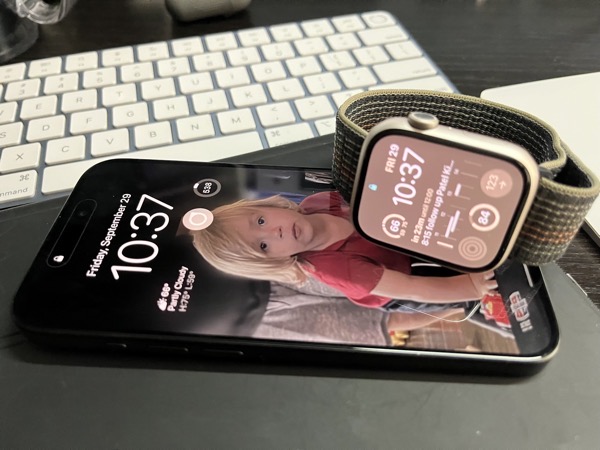
All of that out of the way, yes, I buy a new iPhone each year. I sometimes do the same thing with the Apple Watch. I typically hang on to iPads and Macs through as many cycles as I can. This year I’ve purchased an iPhone 15 Pro and an Apple Watch Series 9. The iPhone is a year over year upgrade. So is the Apple Watch. Below are my initial thoughts on each. I’ll also link to other helpful sources of information and some reviews along the way that provide more than just the impressions I’m jotting down here.
As I’ve said before we’re in a wait and see game with most Apple products. We’re waiting to see what happens with the Vision Pro and spatial computing. In that context, everything is pointing towards that future with this year’s crop of Apple hardware and operating system releases yielding what feels like moderate, not wow inducing updates. Nothing wrong with that. The iPhone is a stable and staple product. Each year’s model deserves and demands something new. There will be plenty of folks in the market for new or upgraded devices between now and “early next year.” These products certainly look to fill the bill. As for the Apple Watch, there is also a major redesign with the user experience that I’m not sure actually works for current users looking to upgrade. Again, I think it’s pointing towards the future.
iPhone 15 Pro
I’ve had the iPhone 15 Pro for a week now so that’s what these impressions are based on. First impression: Nice. I could leave these impressions with that one word. Nice. Maybe I’ll add a second word. Nice Action.
Upgrading an iPhone year over year you don’t see great leaps, especially in the 3-4 year cycle Apple relies on for each design. Obviously there are many reasons for that from costs to the fact that most iPhone users don’t upgrade every year. But as someone who’s owned every iPhone since the 3GS, I’ve been pleased with each device’s design change. The big exception for me was the leap from the iPhone 4/4S to the iPhone 5.
Design
The first thing right out of the box I immediately noticed and liked about the iPhone 15 Pro is it feels lighter in the hand and the slightly rounded edges do make a difference. Tangibly so. The weight and small shape differences are very noticeable in my hand, my pocket, and when attached to the ESR Magnetic Wireless charger in my car driving over the very bumpy backroad to my in-law’s lake house. With the iPhone 14 Pro I’d have to take it off of the charger to keep it from tipping down or falling off. With the 15 Pro it held its orientation.
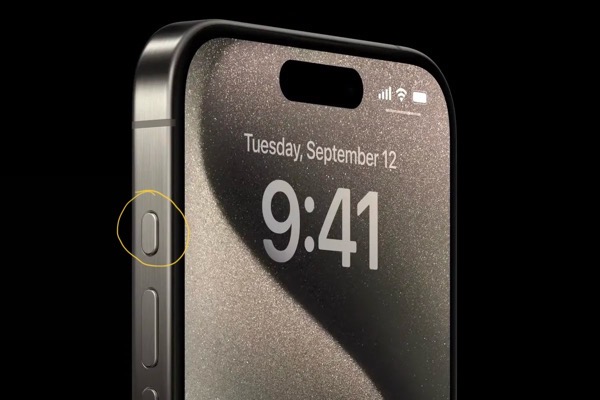
Next up is the Action Button. Great addition. I like it a lot.
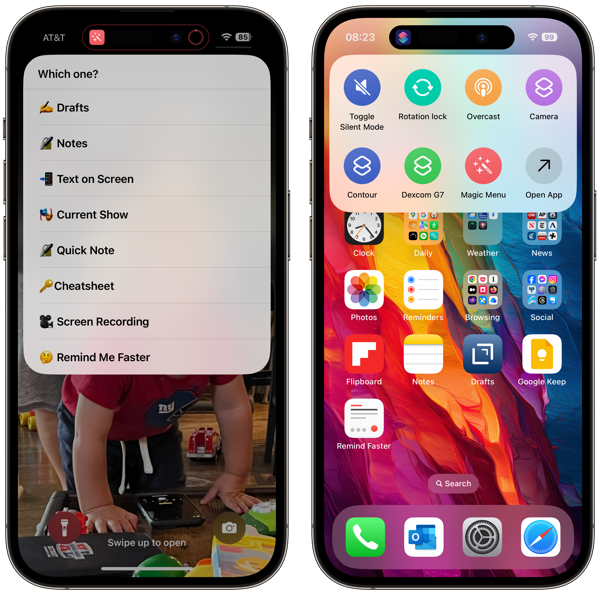
The Action Button replaces the switch to mute the phone. You can still mute the phone with the Action Button or in Control Center. You can also use it for other purposes you can configure in Settings. I’ve already configured it to use Shortcuts so that it’s more than a single use thing. And that’s why I think the Action Button is a more than significant change.
Unlike last year’s big shiny new feature the Dynamic Island, the Action Button is something users can take advantage of to make their iPhones much more personal. The Dynamic Island required developers to add features in their apps. To be honest I’m disappointed in the lack of apps I use that take advantage of it. But the Action Button, combined with Shortcuts gives users so much more to work and play with. For those not afraid to dip into Shortcuts it’s a real way to personalize an iPhone. I’ll be putting up a separate post about some of my experiments with the Action Button shortly after this one.
I do have one complaint about it though. Its placement on the device just above the volume ringers is odd. I have not yet developed enough muscle memory to consistently find it instead of the Volume Up button. To my mind, and my reach, it would have been better placed below the volume buttons. But as far as I’m concerned the Action Button is this year’s biggest, best, and winning new feature.
As for the big push to Titanium, well ok. It does improve the weight so that’s a plus. I wasn’t enamored enough of the look and feel of the devices in the Apple Store on release day to say it is that big a deal cosmetically. If going caseless is your thing, perhaps it makes a difference for you. But with this year’s color choices I don’t see it or feel it, beyond the weight difference. And perhaps that’s enough. Regarding colors the same goes for the iPhone15 non-Pro. If you ask me Apple’s color design team more than lost a step this year. Color me not impressed.
Camera
Every year Apple promises and delivers camera upgrades. This year the big upgrade came to the bigger iPhone 15 Pro Max only. Apple didn’t leave out the smaller 15 Pro however. The iPhone 15 Pro uses the sensor, machine learning algorithms and the number of pixels in different ways. That gets into more numbers, math and wizardry than I want to explain so I’m linking to this PetaPixel article by Chris Niccolls on the camera improvements in the iPhone 15 lineup if you’re looking for more details.
One big change that I think will be widely used is the new Smart Portrait mode. You no longer have to set the camera to take a shot in portrait mode. You can do that after the fact while editing in the same way Apple introduced this for video last year. This is a real win.
In my experience with the new camera I do see improvements. I’m still very impressed with what we can do with smartphone cameras. I like taking photos with them. It’s a hobby within my hobby. Below are a few images I’ve taken in various places.
One thing of note about the video capability. Pointing to the Vision Pro and spatial computing future the iPhone 15 Pro lineup has moved the lens arrangement on the back of the iPhone to better align them for spatial video. This is so that when the Vision Pro devices are released “early next year” there is an iPhone on the market that can shoot spatial video needed for that tent pole feature promised for new headset. I’m not surprised by this. Apple needed iPhones capable of shooting spatial video when the headset rolls out. They weren’t going to wait until next fall. But the spatial video feature for this year’s crop of iPhone Pros is promised for a future iOS 17 update. Pointing towards the future is a recurring them with this year’s Apple devices.
USB-C
Another big change is Apple replacing the charging port to USB-C from Lightning. A lot of folks tried to make this into a “users will be upset and this is just a cash grab from Apple” thing. The good news is I don’t think it took. From my impressions no one is that aroused with new plugs for new holes. I’m happy to see the USB-C port and everything it brings. Some have had quite a bit of fun connecting all sorts of things up to an iPhone. Check out this video from Stephen Robles. I imagine we’ll see much more of that. I also imagine we’re going to see Lightning cables still in use for other Apple accessories and earlier model iPhones for awhile to come. Evolution is a slow process even when intelligently designed or prodded along by the European Union.
Processor
The iPhone Pro lineup features a new chip in a new size. Apple reduced the chip size from 5 nanometers to 3. And this year’s version is called the A17 Pro. The size difference in the chipset is supposed to yield reduced power consumption and increased performance. The GPU (graphics) got most of the bump and Apple is making a play for the gaming market. Here’s a subtle hint from Apple on that.
The only notable difference I have seen since the release of iOS 17, a few days ahead of the iPhone 15 Pro release, is faster responsiveness with Look Ahead typing and autocorrect than on the iPhone 14 Pro. Time will tell. But really we’re reaching a point that these improvements in Apple Silicon year over year don’t yield big notable jumps that the average eye is going to notice.
There’s been some concern about these models getting warmer than some feel comfortable with. Early thoughts focused on the new chip. Noted Apple analyst Ming-Chi Kuo has cast some doubt on that. That story continues to heat up and I imagine we’re going to hear more about this in the days and weeks to come.
On that front I’ve had two experiences when I noticed warmer temperatures than I expected. I shot a little slow motion video (about 2 minutes each for several clips) and noticed the iPhone got really warm.
This morning as I was proofing this article with my iPhone sitting on my desk, not charging, and not being used for easily 40 minutes or so, I noticed when I did pick it up that it was quite warm, more so than usual. That’s almost a full week after setting up the device so I would think that all of the new phone indexing and stuff behind the scenes would have already settled down.
That’s it for initial impressions of the iPhone 15 Pro after a week of using the device. I’m pleased with it. There are some issues and some big wins. The Action Button is terrific. Smart Portrait mode is a win. The lighter weight and better feel are a win. And there’s lots of wait and see’s. Even so I’m glad I indulged my hobby again this year and I’m sure I’ll have more impressions down the line. Not being one to use these devices without a case there’s a story about that as well.
FineWoven Cases
If there’s a controversy or a -gate with this year’s products it’s with Apple’s FineWoven iPhone cases. Meant to replace Apple’s leather cases as a big nod to saving the environment, Apple’s FineWoven cases (and Apple Watch bands) were touted as a very green replacement for the leather products. I think everyone, including the powers that be, assumed Apple would get this right. That’s not the case.
I ordered one. I’ve returned it. It certainly did not feel as nice in the hand as the leather case or worth the same price. From many accounts it doesn’t hold up or age as well in normal usage. There were stories of deep scratches and unremovable stains. There were also photos of scarred cases on Apple displays in stores forcing employees to continually swap them out. That all surfaced before I received mine, so I was extra careful trying it out. But the point of using a case is to not have to be extra careful. While I didn’t object to the new feel of the case, I could easily tell it would not stand up over time.
Someone(s) at Apple goofed big time here. The leather cases certainly showed wear and tear, but that developled over time as is always happens with leather. Not just with one day’s usage. And the properties of leather vs fabric, fine woven or not, make that an entirely different and actually desired experience.
In addtion to the look, feel and durability of the cases, Apple apparently goofed on the cutout surrounding the USB C enclosure. There are reports that the cutout is misaligned so that you can’t plug in a USB cable. I don’t think that’s universal, but that actually makes the problem a bigger one. That might not be surprising in a cheap 3rd-party case. But for Apple that’s just sloppy and out of character.
Bigger pictiure, Apple not only goofed with the design and manufacture of the cases but they’ve busted a branding attempt that I’m sure cost a lot of time and money to create. Whatever happens going forward I doubt we’ll see FineWoven Apple products except as the butt of jokes and memes that rival some of Apple’s other failures.
Apple Watch Series 9
As pleased as I am with the iPhone 15 Pro year over year I’m almost the opposite with the Apple Watch Series 9. Almost. My disappointment isn’t with the hardware. How could it be? By and large it’s the same hardware as the previous two versions with a brighter screen, more memory and a faster processor. All good things. And hey, it’s Apple’s first fully carbon neutral product. So, no issues with the hardware.
I have do have irritations with the UI changes Apple has introduced. Some of these may be less irritating as I get used to them. I’d like to charge this off to something new and different that needs a period of adjustment, but I don’t think that’s going to prove out. Apple makes the whole widget, hardware and software. Usually that benefits users and the company. Apple also calls the Apple Watch it’s “most personal product.” This feels like a case when the new design and “whole widget” philosophies went too far for a device that I indeed feel very personally attached to.
Apple changed which buttons do what on the Apple Watch. Apple also introduced Widgets in what feels like a move to make them the primary interface. Swiping left to right to change watch faces is also gone. There’s logic to these changes. But I am admittedly flustered by them.
Previously, primary interactions with apps were through Complications that you could set for watch faces. Some watch faces could have more. Some could have very few, if any. I actually had different watch faces with different sets of complications for different facets of my work and play. Now, regardless of which watch face you choose you can swipe up from the bottom of the screen or scroll the Digital Crown to access the widgets you choose to place in what Apple calls the Smart Stack. Think of it as a vertically scrolling half-carousel. It doesn’t go all the way around. The logic is sound here.
While this new metaphor makes more sense for user interaction on more watch faces, you also can’t swipe back and forth to change watch faces without first long pressing on the screen. So it feels like a win that is also a loss.
The other biggest loss is that I can no longer call up a list of my favorite apps. Previously you called them up by pressing the Side Button. That interaction is now gone and replaced by using the Side Button to access the Control Center. You can also no longer set Favorite Apps. I don’t use many apps on my Apple Watch, but the few I do use I do so regularly.
I’ve added the widgets for those apps into the Smart Stack. The “smart” in that stack of widgets is supposed to show you the widget you need when you need it, or when Apple thinks you might need it. So far in my case that hasn’t proven to be anywhere close to being true. Perhaps it’s too early to make that judgment. But things just feel wrong with the constant lineup of the Smart Stack changing as Apple feels it should I have to constantly scroll back and forth to find the app I’m looking for.
Here’s another example. The photo below is of a completed timer. That big circle in the middle is begging to be tapped to close the timer. But to actually close it, you need to hit the smaller X in the lower left. This interface shows up in several instances in several of Apple’s native apps. It just seems confusing.
So it feels like Apple goofed here. There may be a longer term vision here, but the luxury Apple has of looking far ahead seems to have confused the moment for this year’s Apple Watches.
Speaking of looking ahead, there’s also the Double Tap gesture. The feature allows you control the watch by double tapping your thumb and finger together. It’s a way to interact with the watch that is right out of the Vision Pro vision. The feature has sorta, kinda existed as an accessibility option previously but is now a part of the operating system. Or soon will be. It’s due to come later this year, even though it was ballyhooed quite a bit when it was unveiled. It’s somewhat surprising it wasn’t ready at launch. Indications are it will show up in watchOS 10.1, but it wasn’t included in the first release of that beta for developers. So we’ll see.
Siri does feel a bit faster and more accurate. That’s because some of what Siri does happens on device. Some requests still do roundtrip to the Internet, but by and large you can feel a positive change. I use Siri on my Apple Watch more than on other devices and always to mixed success. Siri is one of those features that seems to suffer through good and bad periods for no discernible reason so let’s hope there’s more consistency with some of its functionality happening on device.
One other thing that surprises me is transitions from Notifications back to the Watch Face. The animations feel janky. I noticed this after installing watchOS 10 on the previous Series 8. I thought perhaps that was just an issue that would be rectified with the new performance on the Series 9. I was wrong. Those transitions are still not smooth and still quite janky. Not optimal. Here’s a short video of what I mean.
So that’s it. Initial impressions on the iPhone 15 Pro, the Apple Watch Series 9, the FineWoven cases and some other things tossed in the mix. I’d rate this Fall’s Apple product releases as a B-. The iPhone I’d give an A-. The Apple Watch Series 9 a C. The FineWoven case is just a failure.
I’m going to list some resources here for you to find out more details and also some fun. These folks have provided good coverage since the release of the new iPhones and operating systems, but also in some cases during this past summer’s beta process. I hope you enjoy and get benefit from their stuff as I do.
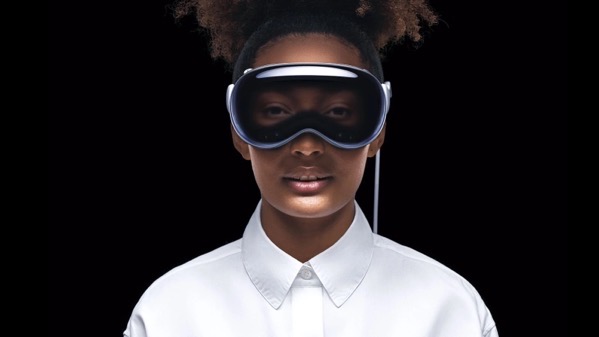
As expected Apple unmasked its new mixed reality headset, now named Apple Vision Pro, at its annual World Wide Devleopers Conference this week. No surprise that the reactions have also been as expected with some giving new meaning to the old cliché about Apple’s reality distortion field and others being quite vocal with their negative reactions, especially as regards to that $3500 price point.
I’ve been following along with some of the bloggers and journalists who got to try the headset on, experience the 30-minute demo and I have complied a series of links to some of the reactions. Keep in mind the responses from those who got strapped in are somewhat akin to folks reacting to a trailer for a new film. Folks are responding to a canned demo, acknowledging that, and the fact that Apple has a lot of work to do before this thing debuts to the public supposedly early in 2024.
I’ll have more to say about it at some point in the future based on my thoughts to these reactions.
David Pogue on Medium brings up a recurring theme I’m seeing among those writing about these first experiences that say the device felt heavy after using it a bit in the 30 minute demo.
And you might want to watch this video review of the experience from MKBHD.
There’s plenty more out there if you’re interested. There will be more digital ink spilled on this between now and the products eventual release than you can imagine. Bottom line themes I see emerging:
1. Amazing technology
2. Expensive
3. Weight is still an issue
4. Apple has lots of work to do before this releases and even more in the years ahead. They’ve staked out a vision and have the bankroll to advance it. It will be interesting to follow.

















 Life on the Wicked Stage: Act 3