Musings on life, the theatre, technology, culture and the occasional emu sighting
Author: Warner Crocker
I stumble through life as a theatre director and playwright as well as a gadget geek...commenting along the way. Every day I learn something new is a good day, so I share what I find exciting, new, stupid and often worthwhile.
Lights! Camera!! Action!!! Well, you won’t be directing a film crew with it, but you can use the Action Button on Apple’s new iPhone 15 Pro and Pro Max models to turn on your lights or launch your camera. As I said in my first impressions post about the iPhone 15 Pro it can be so much more.
In fact, for those who already use Apple’s Shortcuts or those willing to check them out, this is a way to take a bigger step towards personalizing your iPhone than we’ve been able to in the past. In my opinion it’s the most signficant, and potentially most powerful user addressable hardware change Apple has made to an iPhone in quite some time.
Unlike The Dynamic Island, last year’s big shiny new feature, users don’t have to wait for developers to decide to implement the feature. To be honest I’m disappointed in the lack of apps I use that couldn’t find ways to take advantage of the Dynamic Island. But the Action Button, combined with Shortcuts, puts personalization at your fingertips.
When it was first introduced and once I first set up the iPhone 15 Pro my initial reaction was that this would be the latest fidget-spinning, widget-like new feature from Apple. Designed to tantalize, destined not to take hold, it would capture a lot of attention and not really mean much over time. I was wrong.
Again, if you know Shortcuts or are willing to learn a bit about them, you can set up the Action Button to run a Shortcut or quickly access a series of them. The beauty of using the Action Button with Shortcuts is that you can perform actions without unlocking your phone, or while you’re in any app. It sort of feels like taking your iPhone back and using it in a whole new way.
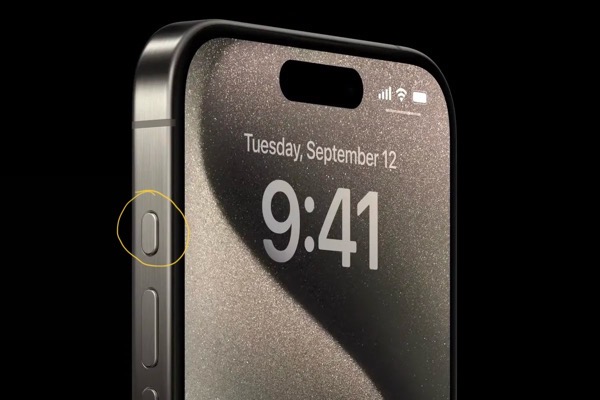
The Action Button is located just above the two Volume Buttons. It replaces the Mute switch that has been there since the first iPhone. Don’t worry, you can still Mute your iPhone with the Action Button or from the Control Panel. As a matter of fact the Action Button comes with the Mute/Unmute function enabled by default. Press it once after setup and you’ll Mute your iPhone. To use the Button you need to hold the Action Button for a second or two. Otherwise you’ll get a reminder on screen telling you to hold it a bit longer.
The location of the Action Button is a bit of a problem for me though. I have yet to develop a natural reach for it with one hand and wish Apple had positioned it below the Volume Buttons.
I take my cues on using Shortcuts with the Action Button from some folks who know more about Shortcuts than I do. I’m no wizard at creating Shortucts, but I know where to go when I need to discover and explore them. Stephen Robles, Federicco Viticci are indeed wizards at this. John Gruber also got me excited about these possibilites. Robles has produced a couple of videos here and here that show you how you can take advantage of using the Action Button to access Shortcuts. He shows you how to create menus and single use Shortcuts. You can find links to all of the Shortcuts he’s created in the description that accompanies his videos.
Gruber created what he calls the Action Jackson Button and posted screenshots of his Shortcuts on Threads. Jake Shaw managed to put those into a blog post here, so you can download them if you want to as opposed to creating them from screen shots.
Viticci has created what he calls a MultiButton method (using Shortcuts) to use the Action Button beyond its current single button press functionality. Apple designed the Action Button to call one action. You can configure it in Settings to bring up Silence your iPhone, Turn on a Focus Mode, Use the Magnifier, Activate the Camera, Turn on the Flashlight, Record a Voice Memo, Launch Accessibility Settings or Run a Shortcut. Viticci lets you tap twice to use the Action Button for two distinct actions. Users have already been calling for Apple to give us mulitple touch possibilities on the Action Button, but this might do in a pinch. (Make sure you also check out the MacStories archive of Shortcuts if you haven’t already.)
Do note that you’ll need to install the free Actions app on your device. Actions doesn’t have an interface but it adds and enables some essential Actions to make better use of Shortcuts than Apple provides out of the box.
You set up your Action Button to use Shortcuts by scrolling through the actions Apple provides and selecting Shortcut. At this point if you want to use one Shortcut you select it and you’re set to go.
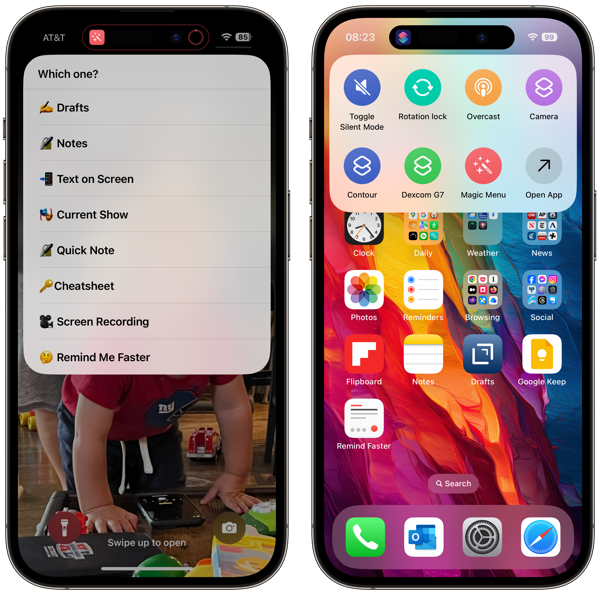
Currently I’m doubling up on Menu options. Pressing the Action Button as I’ve configured it brings me into a graphical menu of icons (image on the right below) that allows me to Mute/Unmute the phone, Turn on the Flashlight, Launch the Camera, or launch my podcast app of choice, Overcast. I’m a Type II diabetic so the Contour and Dexcom G7 are apps I use to help manage that condition. Then there’s the red icon labled Magic Menu. Note that for this graphical menu option you can only add seven Shortcuts and you’ll always get an Open App button as the eighth entry. That will take you to the Shortcuts app. But why not create a Shortcut that launches another menu?
But let’s first get to the graphical menu. Create a folder in the Shortcuts app. Name it with the name of your choice. I chose ActionButton. Then create or move the seven Shortcuts you want to access in that folder. Go to Settings and select Action Button, choose the option presented, and look for the Show Folder option. If I remember correctly it will be on the left if you haven’t set anything up like this previoulsy. Pick the name of the Shortcut Folder you chose and the Action Button should bring it up.
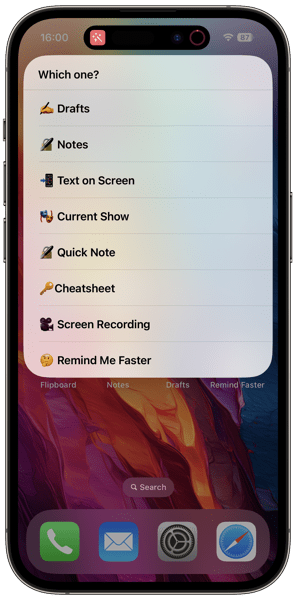
What I call the Magic Menu (you can call it anything you want) is a Shortcut I created that opens up another menu that allows me to quickly access some apps and functions I use frequently. I followed the how to from Mr. Robles as linked above to create the menu you see below. You’ll need to configure each menu item separately.
This menu includes shortcuts to access Drafts and Notes which I use for work. Text on Screen captures any text on the screen after first taking a screenshot. Current Show launches into my Notes folder for the current play I’m directing. Cheatsheet is where I store some codes and other things I need to remember. Screen Recording does just what it says. Remind Me Faster lets me enter Reminders into that App more quickly than using the app.
Again, and most importantly this functionality lets you set up things they way that works for you. I’ve seen similar menus that call up Music, Maps, Reminders, certain contacts and many more.
For different projects going forward I’m sure I may change things around, but that’s easy enough to do either by adding to the existing choices or adding more. I’m sure others will find new ways to take advantage of the Action Button as well. Exciting times.
As I said above I am not a Shortcuts wizard. I’ve created some single use Shortcuts but nothing on the level of folks like Viticci or Stephen Robles. Another great resource is Matthew Cassinelli. I highly recommend that if you want to dive deeper into this for the first time or just for great ways to take advantage of Shortcuts that you follow their adventures.
Interesting moment in US Politics. Goofball Gaetz is going to try and push out McCarthy. No surprise.
If McCarthy’s only motivation is to hang on to his gavel, he’s got an option he won’t take for fear of angering what little of the base still supports him. That includes that decaying orange turd he’s suckled up to.
Forge a coalition from the center of both parties to keep his seat and McCarthy actually has a chance to silence the extremes on both sides. I think we’d all be surprised at how many votes he’d get. Then pass the appropriation bills with that majority and provide a chance to move past all of the insanity that now prevails.
But that would require some sorely lacking adulting on both sides of the aisle and a pretty courageous leap by all. I doubt the Dems, or anyone really, trusts McCarthy enough to pitch in for a bigger than party objective. Both parties are so wrapped up in their own bows to even begin to untie the knots they’re strangling everyone with.
Everyone would lose something. But there’s a chance of not losing the whole ballgame.
But there’s a moment here. If anyone can find the courage to seize it.
It’s Sunday and that means Sunday Morning Reading to share. This week was new iPhone week so I’m sharing some great coverage of the new iPhones and the operating system that runs them, as well as macOS Sonoma. In addition, excellent writing on lying and other topics will lead the list.
First up is the always excellent Natasha MH with Our Panche for Lies, Art and Storytelling. Using comedian and storyteller Hasan Minhaj as her point of entry she wonders why we get so upset when comedians do the same thing those less funny do: Lie.
I’m not a fan of giving up meat. This dog is too old to learn any new tricks. But Matthew Clapham does have a good piece of writing about just that in Rewording the Golden Rule to Cause No Suffering.
Much of the US political focus is on the gamesmanship over keeping the government open and some washed up TV reality star that got lucky and appointed too many Supreme Court Justices. Well, that Supreme Court is going to take up a few cases that might, or might not, have profound implications for the Internet. Take a look at Caroline Mimbs Nyce’s piece The Supreme Court Cases That Could Redfine The Internet to see why.
And as for those writers about Apple things I’ll lead that off with the always excellent Federico Vitcci and his review of iOS 17 and iPadOS 17 on MacStories. I highly advise keeping this one in your bookmarks or read later app of choice to refer back to now and again.
I use Apple products. Have for awhile. Computer and mobile tech is a hobby of mine It’s a hobby I care profoundly about for a myriad of reasons. I feed that hobby with Apple’s stuff because quite simply I prefer those products to others currently on the market. When friends tell me it’s an expensive hobby I often reply with questions about their golfing habit and course fees. (I have a lot of friends who play golf.) So, in my mind it all equals out. But yes, it’s expensive. I don’t chase tiny balls around a golf course. I do chase technology for all the fun, foibles and foolishness it can sometimes provide. I also use it for work.
Now, do I think Apple is the be all and end all? Absolutely not. Apple pisses me off almost as much as it delights me with some of its products. (Here’s looking at you iCloud.) Apple also pisses me off at how it hides behind its “majority of users are satisfied” and “small minority of users” PR lines. That does nobody any good if there’s an issue affecting them but not the majority of users. I also have come to believe that Apple’s luxury of taking the long view is starting to hurt a bit when it comes to issues with current products on the market. Lately, I also think their design acumen is not up to the standards they’ve previously set and that they’re caught in a trap of their own making. If we pay for the train ticket we’re entitled to complain about the ride.
I’ve written a bit about all of that here and in other places. I’ll continue to do so. But everything in life is a trade off, and in my view there are less of them with Apple’s products than with others.
All of that out of the way, yes, I buy a new iPhone each year. I sometimes do the same thing with the Apple Watch. I typically hang on to iPads and Macs through as many cycles as I can. This year I’ve purchased an iPhone 15 Pro and an Apple Watch Series 9. The iPhone is a year over year upgrade. So is the Apple Watch. Below are my initial thoughts on each. I’ll also link to other helpful sources of information and some reviews along the way that provide more than just the impressions I’m jotting down here.
As I’ve said before we’re in a wait and see game with most Apple products. We’re waiting to see what happens with the Vision Pro and spatial computing. In that context, everything is pointing towards that future with this year’s crop of Apple hardware and operating system releases yielding what feels like moderate, not wow inducing updates. Nothing wrong with that. The iPhone is a stable and staple product. Each year’s model deserves and demands something new. There will be plenty of folks in the market for new or upgraded devices between now and “early next year.” These products certainly look to fill the bill. As for the Apple Watch, there is also a major redesign with the user experience that I’m not sure actually works for current users looking to upgrade. Again, I think it’s pointing towards the future.
iPhone 15 Pro
I’ve had the iPhone 15 Pro for a week now so that’s what these impressions are based on. First impression: Nice. I could leave these impressions with that one word. Nice. Maybe I’ll add a second word. Nice Action.
Upgrading an iPhone year over year you don’t see great leaps, especially in the 3-4 year cycle Apple relies on for each design. Obviously there are many reasons for that from costs to the fact that most iPhone users don’t upgrade every year. But as someone who’s owned every iPhone since the 3GS, I’ve been pleased with each device’s design change. The big exception for me was the leap from the iPhone 4/4S to the iPhone 5.
Design
The first thing right out of the box I immediately noticed and liked about the iPhone 15 Pro is it feels lighter in the hand and the slightly rounded edges do make a difference. Tangibly so. The weight and small shape differences are very noticeable in my hand, my pocket, and when attached to the ESR Magnetic Wireless charger in my car driving over the very bumpy backroad to my in-law’s lake house. With the iPhone 14 Pro I’d have to take it off of the charger to keep it from tipping down or falling off. With the 15 Pro it held its orientation.
Next up is the Action Button. Great addition. I like it a lot.
The Action Button replaces the switch to mute the phone. You can still mute the phone with the Action Button or in Control Center. You can also use it for other purposes you can configure in Settings. I’ve already configured it to use Shortcuts so that it’s more than a single use thing. And that’s why I think the Action Button is a more than significant change.
Unlike last year’s big shiny new feature the Dynamic Island, the Action Button is something users can take advantage of to make their iPhones much more personal. The Dynamic Island required developers to add features in their apps. To be honest I’m disappointed in the lack of apps I use that take advantage of it. But the Action Button, combined with Shortcuts gives users so much more to work and play with. For those not afraid to dip into Shortcuts it’s a real way to personalize an iPhone. I’ll be putting up a separate post about some of my experiments with the Action Button shortly after this one.
I do have one complaint about it though. Its placement on the device just above the volume ringers is odd. I have not yet developed enough muscle memory to consistently find it instead of the Volume Up button. To my mind, and my reach, it would have been better placed below the volume buttons. But as far as I’m concerned the Action Button is this year’s biggest, best, and winning new feature.
As for the big push to Titanium, well ok. It does improve the weight so that’s a plus. I wasn’t enamored enough of the look and feel of the devices in the Apple Store on release day to say it is that big a deal cosmetically. If going caseless is your thing, perhaps it makes a difference for you. But with this year’s color choices I don’t see it or feel it, beyond the weight difference. And perhaps that’s enough. Regarding colors the same goes for the iPhone15 non-Pro. If you ask me Apple’s color design team more than lost a step this year. Color me not impressed.
Camera
Every year Apple promises and delivers camera upgrades. This year the big upgrade came to the bigger iPhone 15 Pro Max only. Apple didn’t leave out the smaller 15 Pro however. The iPhone 15 Pro uses the sensor, machine learning algorithms and the number of pixels in different ways. That gets into more numbers, math and wizardry than I want to explain so I’m linking to this PetaPixel article by Chris Niccolls on the camera improvements in the iPhone 15 lineup if you’re looking for more details.
One big change that I think will be widely used is the new Smart Portrait mode. You no longer have to set the camera to take a shot in portrait mode. You can do that after the fact while editing in the same way Apple introduced this for video last year. This is a real win.
In my experience with the new camera I do see improvements. I’m still very impressed with what we can do with smartphone cameras. I like taking photos with them. It’s a hobby within my hobby. Below are a few images I’ve taken in various places.
One thing of note about the video capability. Pointing to the Vision Pro and spatial computing future the iPhone 15 Pro lineup has moved the lens arrangement on the back of the iPhone to better align them for spatial video. This is so that when the Vision Pro devices are released “early next year” there is an iPhone on the market that can shoot spatial video needed for that tent pole feature promised for new headset. I’m not surprised by this. Apple needed iPhones capable of shooting spatial video when the headset rolls out. They weren’t going to wait until next fall. But the spatial video feature for this year’s crop of iPhone Pros is promised for a future iOS 17 update. Pointing towards the future is a recurring them with this year’s Apple devices.
USB-C
Another big change is Apple replacing the charging port to USB-C from Lightning. A lot of folks tried to make this into a “users will be upset and this is just a cash grab from Apple” thing. The good news is I don’t think it took. From my impressions no one is that aroused with new plugs for new holes. I’m happy to see the USB-C port and everything it brings. Some have had quite a bit of fun connecting all sorts of things up to an iPhone. Check out this video from Stephen Robles. I imagine we’ll see much more of that. I also imagine we’re going to see Lightning cables still in use for other Apple accessories and earlier model iPhones for awhile to come. Evolution is a slow process even when intelligently designed or prodded along by the European Union.
Processor
The iPhone Pro lineup features a new chip in a new size. Apple reduced the chip size from 5 nanometers to 3. And this year’s version is called the A17 Pro. The size difference in the chipset is supposed to yield reduced power consumption and increased performance. The GPU (graphics) got most of the bump and Apple is making a play for the gaming market. Here’s a subtle hint from Apple on that.
The only notable difference I have seen since the release of iOS 17, a few days ahead of the iPhone 15 Pro release, is faster responsiveness with Look Ahead typing and autocorrect than on the iPhone 14 Pro. Time will tell. But really we’re reaching a point that these improvements in Apple Silicon year over year don’t yield big notable jumps that the average eye is going to notice.
There’s been some concern about these models getting warmer than some feel comfortable with. Early thoughts focused on the new chip. Noted Apple analyst Ming-Chi Kuo has cast some doubt on that. That story continues to heat up and I imagine we’re going to hear more about this in the days and weeks to come.
On that front I’ve had two experiences when I noticed warmer temperatures than I expected. I shot a little slow motion video (about 2 minutes each for several clips) and noticed the iPhone got really warm.
This morning as I was proofing this article with my iPhone sitting on my desk, not charging, and not being used for easily 40 minutes or so, I noticed when I did pick it up that it was quite warm, more so than usual. That’s almost a full week after setting up the device so I would think that all of the new phone indexing and stuff behind the scenes would have already settled down.
That’s it for initial impressions of the iPhone 15 Pro after a week of using the device. I’m pleased with it. There are some issues and some big wins. The Action Button is terrific. Smart Portrait mode is a win. The lighter weight and better feel are a win. And there’s lots of wait and see’s. Even so I’m glad I indulged my hobby again this year and I’m sure I’ll have more impressions down the line. Not being one to use these devices without a case there’s a story about that as well.
FineWoven Cases
If there’s a controversy or a -gate with this year’s products it’s with Apple’s FineWoven iPhone cases. Meant to replace Apple’s leather cases as a big nod to saving the environment, Apple’s FineWoven cases (and Apple Watch bands) were touted as a very green replacement for the leather products. I think everyone, including the powers that be, assumed Apple would get this right. That’s not the case.
I ordered one. I’ve returned it. It certainly did not feel as nice in the hand as the leather case or worth the same price. From many accounts it doesn’t hold up or age as well in normal usage. There were stories of deep scratches and unremovable stains. There were also photos of scarred cases on Apple displays in stores forcing employees to continually swap them out. That all surfaced before I received mine, so I was extra careful trying it out. But the point of using a case is to not have to be extra careful. While I didn’t object to the new feel of the case, I could easily tell it would not stand up over time.
Someone(s) at Apple goofed big time here. The leather cases certainly showed wear and tear, but that developled over time as is always happens with leather. Not just with one day’s usage. And the properties of leather vs fabric, fine woven or not, make that an entirely different and actually desired experience.
In addtion to the look, feel and durability of the cases, Apple apparently goofed on the cutout surrounding the USB C enclosure. There are reports that the cutout is misaligned so that you can’t plug in a USB cable. I don’t think that’s universal, but that actually makes the problem a bigger one. That might not be surprising in a cheap 3rd-party case. But for Apple that’s just sloppy and out of character.
Bigger pictiure, Apple not only goofed with the design and manufacture of the cases but they’ve busted a branding attempt that I’m sure cost a lot of time and money to create. Whatever happens going forward I doubt we’ll see FineWoven Apple products except as the butt of jokes and memes that rival some of Apple’s other failures.
Apple Watch Series 9
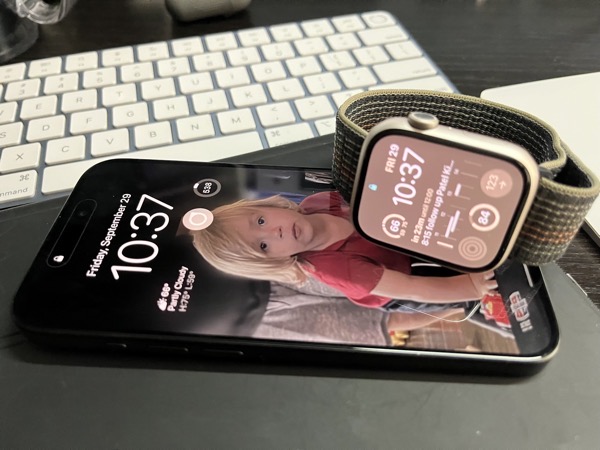
As pleased as I am with the iPhone 15 Pro year over year I’m almost the opposite with the Apple Watch Series 9. Almost. My disappointment isn’t with the hardware. How could it be? By and large it’s the same hardware as the previous two versions with a brighter screen, more memory and a faster processor. All good things. And hey, it’s Apple’s first fully carbon neutral product. So, no issues with the hardware.
I have do have irritations with the UI changes Apple has introduced. Some of these may be less irritating as I get used to them. I’d like to charge this off to something new and different that needs a period of adjustment, but I don’t think that’s going to prove out. Apple makes the whole widget, hardware and software. Usually that benefits users and the company. Apple also calls the Apple Watch it’s “most personal product.” This feels like a case when the new design and “whole widget” philosophies went too far for a device that I indeed feel very personally attached to.
Apple changed which buttons do what on the Apple Watch. Apple also introduced Widgets in what feels like a move to make them the primary interface. Swiping left to right to change watch faces is also gone. There’s logic to these changes. But I am admittedly flustered by them.
Previously, primary interactions with apps were through Complications that you could set for watch faces. Some watch faces could have more. Some could have very few, if any. I actually had different watch faces with different sets of complications for different facets of my work and play. Now, regardless of which watch face you choose you can swipe up from the bottom of the screen or scroll the Digital Crown to access the widgets you choose to place in what Apple calls the Smart Stack. Think of it as a vertically scrolling half-carousel. It doesn’t go all the way around. The logic is sound here.
While this new metaphor makes more sense for user interaction on more watch faces, you also can’t swipe back and forth to change watch faces without first long pressing on the screen. So it feels like a win that is also a loss.
The other biggest loss is that I can no longer call up a list of my favorite apps. Previously you called them up by pressing the Side Button. That interaction is now gone and replaced by using the Side Button to access the Control Center. You can also no longer set Favorite Apps. I don’t use many apps on my Apple Watch, but the few I do use I do so regularly.
I’ve added the widgets for those apps into the Smart Stack. The “smart” in that stack of widgets is supposed to show you the widget you need when you need it, or when Apple thinks you might need it. So far in my case that hasn’t proven to be anywhere close to being true. Perhaps it’s too early to make that judgment. But things just feel wrong with the constant lineup of the Smart Stack changing as Apple feels it should I have to constantly scroll back and forth to find the app I’m looking for.
Here’s another example. The photo below is of a completed timer. That big circle in the middle is begging to be tapped to close the timer. But to actually close it, you need to hit the smaller X in the lower left. This interface shows up in several instances in several of Apple’s native apps. It just seems confusing.
So it feels like Apple goofed here. There may be a longer term vision here, but the luxury Apple has of looking far ahead seems to have confused the moment for this year’s Apple Watches.
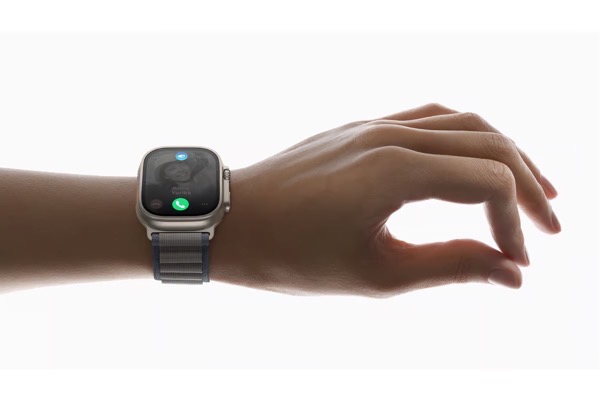
Speaking of looking ahead, there’s also the Double Tap gesture. The feature allows you control the watch by double tapping your thumb and finger together. It’s a way to interact with the watch that is right out of the Vision Pro vision. The feature has sorta, kinda existed as an accessibility option previously but is now a part of the operating system. Or soon will be. It’s due to come later this year, even though it was ballyhooed quite a bit when it was unveiled. It’s somewhat surprising it wasn’t ready at launch. Indications are it will show up in watchOS 10.1, but it wasn’t included in the first release of that beta for developers. So we’ll see.
Siri does feel a bit faster and more accurate. That’s because some of what Siri does happens on device. Some requests still do roundtrip to the Internet, but by and large you can feel a positive change. I use Siri on my Apple Watch more than on other devices and always to mixed success. Siri is one of those features that seems to suffer through good and bad periods for no discernible reason so let’s hope there’s more consistency with some of its functionality happening on device.
One other thing that surprises me is transitions from Notifications back to the Watch Face. The animations feel janky. I noticed this after installing watchOS 10 on the previous Series 8. I thought perhaps that was just an issue that would be rectified with the new performance on the Series 9. I was wrong. Those transitions are still not smooth and still quite janky. Not optimal. Here’s a short video of what I mean.
So that’s it. Initial impressions on the iPhone 15 Pro, the Apple Watch Series 9, the FineWoven cases and some other things tossed in the mix. I’d rate this Fall’s Apple product releases as a B-. The iPhone I’d give an A-. The Apple Watch Series 9 a C. The FineWoven case is just a failure.
I’m going to list some resources here for you to find out more details and also some fun. These folks have provided good coverage since the release of the new iPhones and operating systems, but also in some cases during this past summer’s beta process. I hope you enjoy and get benefit from their stuff as I do.
As summer transitons into Fall we’re back at lovely Lake LuLu for the last weekend of the season. So lake time takes precedence over reading. But with cooler climes ahead that will change, much like the seasons. Nevertheless here’s a few Sunday Morning Reading topics to share. Enjoy.
The world of politics seems crazier and crazier by the moment. Much of the current focus in on, well you know what and who it is on. There’s also focus on the Supreme Court for the cauldron of corruption that place is, leading us to often overlook some of the cases. Consumer Financial Protection Bureau v Community Financial Services Association is one we should keep an eye on. Essentially, if the plantiff prevails much of the Federal Government would be declared unconstitutional. Ian Millhiser has a good luck at the case in A New Supreme Court Case Could Trigger A Second Great Depression. On the one hand it seems seems silly, but on the other quite dangerous, given the climate we’re in.
The Man Who Trapped Us in Databases by McKenize Funk tells us a bit about Hank Asher, the ‘King of Databrokers.’ He’s had and his legacy continues to have more influence on our lives than most of us realize. Did you know you have a Shadow SSN?
David Todd McCarthy takes on the legacy of Jimmy Buffet and the culture he created and the business he crafted from it in The Lost Shaker of Salt Has a Dark Side.
Is there such a thing as children having a Nature Deficit Disorder? Chris Thompson tackles that while Sliding Down Hills on Cardboard.
Tomorrow, September 22, is new iPhone day for a lot of folks. Some will get them delivered. Some will pick them up from Apple Stores. Some will get them from carriers. And once the hype of release day passes folks will still be doing that going forward.
Regardless of how and when you get your new iPhone you have an option to set it up as a new iPhone or transfer all of your data and info from the older one. I typically choose the latter option. Let’s face it, either way you’re going to spend some time setting things up.
One of the things I’ve learned through the years is a way to save some time if you decide to transfer your data from iPhone to iPhone instead of starting with an absolute new setup. Apple gives you options if you’re transferring data. You can choose to transfer your data from iCloud or you can choose to transfer directly between your old iPhone and the new one. Both are time consuming.
The first let’s you get back to business sooner while things continue to load in via iCloud. The latter means you have to wait for the transfer to complete before you can use your new iPhone or trade-in or pass down your older one. Either way, data and Apps will transfer to the new device.
Here’s the tip. Some of your Apps are quite large. If you delete them before you do the transfer you’ll save a considerable amount of time during the transfer process. This is especially true if you’re a gamer and have large games on your device. Garage Band is another candidate. It has over a 1.5 GB footprint for the App itself. If you’ve got an App that has a large footprint on your device that entire footprint has to be transferred to be brought over to the new device.
If it’s a crucial App, obviously leave it alone and let the process do its thing. If it’s not, chances are you aren’t going to be using the App right away after you start using your new iPhone. You can reinstall the App once you’re ready for it after things settle down on your new device. (Another hint: This is a great way to do some house cleaning and delete Apps you’ve probably forgotten are on your phone.)
But what about my data?!? Well that depends on how your App stores and retrieves data. Some Apps use iCloud for storage. That data will in most cases still be in iCloud even if you delete the App. If the App uses its own storage in some other cloud, the same thing typically applies. If your App stores everything locally then this hint won’t work for that App.
If you’re unsure or confused, don’t delete the App. Better safe than blaming me.
Apple also offers you an option to delete the App and save it’s data. You can find out the size of Apps and their footprints in General/ iPhone Storage.
I typically get rid of about 10-15 gigabytes of Apps and data before transferring things to a new device. That’s a real time savings in the transfer process. And I bring back Apps as I need them after things settle in.
If you delete some apps to cut down the time on transferring from old to new, and you are going to use the iCloud option, make sure you do a backup (Settings/iCloud/iCloud Backup) after doing so. What’s in your latest backup is what will transfer over to your new iPhone.
This tip can really pay off if you’re one, like me, who likes to pick up your new iPhone at an Apple Store. Apple Stores are fun places to hang out and check out new gear. Not so much if you’re stuck standing at a table looking at your old and new devices while your data transfers.
Even if you’re transferring data between phones from the comfort of your home the time savings can be real.
I wrote a little something on the Medium publication Rome Magazine about poltics, my grandfather, and how nothing much has really changed when it comes to the political animals that we are. We just don’t hide behind the facades we like to show the world as much.
It’s Sunday morning. So here’s some Sunday Morning Reading to share. There’s no theme. Just a collection of topics and writers that caught my eye and tugged a bit on the heartstrings.
Chris Welch on The Verge lets us know that Samsung and NYC’s Metropolitan Museum of Art are collaborating and expanding the collection of art that is available to view in your home on Samsung’s Frame TVs. I didn’t know this was a thing. I’m sure some art lovers are glad it is. Would be nice to see this picked up by other museums and Smart TV makers. Check out Samsung Is Bringing Artwork From The Met Museum To Its Frame TVs.
David Todd McCarty penned an excellent and very personal piece this week about his family coping with drug addiction and its aftermath entitled Bear With Me, I Want To Tell You Something. Beautiful stuff. Tough. Coconuts and plungers.
Changing the channel, M.G. Siegler takes a look at the end of the Cable TV bundle in Cable Bites the Dust, and predicts that we’re going to be bundling again as we continue down the path into streaming entertainment consolidation.
And as we head into a week when new iPhones are arriving around the world, finally equipped for USB-C charging, Jay Peters on The Verge writes an almost mournful obituary for the Lightning Connector in Lightning was Great Actually.
If you’re interested in just what the heck Sunday Morning Reading is all about you can read more about the origins of Sunday Morning Reading here.
Apple has announced new iPhones and Apple Watches for 2023. They look nice. They always do. Apple by and large held prices at the same level. There are improved cameras in the iPhones. There’s Titanium on the Pro models. The Apple Watches get a new chip set, more memory and brighter screens. There’s a new 3 nanometer chip in the Pro iPhones and Apple is working hard to save the environment and tell you about saving lives.
And it all sorta, kinda feels obligatory.
Even coverage of the event and the devices feels a bit underwhelming. (Except for the derision being tossed around over Apple’s environmental efforts video featuring Octavia Spencer.) I’m betting the reviews will feel lackluster too. There’s a reason for that. Until at least “early next year” Apple’s vision for the Vision Pro and spatial computing is sucking up all the space, time and energy. What we’re seeing with this fall’s release of new iPhones and Apple Watches, and anything else that might come later, is merely marking time to keep the money machine churning until Apple flips the switch on its new paradigm.
Don’t get me wrong. The new iPhones and Apple Watches look like very nice devices. For those ready to upgrade or jump on the Apple bus for the first time I’m confident they will feel good about the devices they choose. We’re certainly not in any post-iPhone period. As I’ve said here and other places this is a mature product line and we’re seeing more iteration than innovation. It’s tough to make big splashes with iteration. And it seems like even Apple’s design folks responsible for colors are putting their focus elsewhere. For the most part, this is not going to change until after “early next year.” And maybe not even for awhile after.
But Apple did drop a few clues and if you’re paying attention it’s not hard to piece them together to suss out where things are headed.
We’ve become accustomed to the iPhone being the center of Apple’s universe. That will continue for quite some time to come. But in Apple’s universe the future belongs to spatial computing. No one knows when and exactly how that future will arrive, but Tim Cook is taking steps to make it possible. And we saw some of those steps and clues at this iPhone and Apple Watch event.
The first clue was lifting and refining the Double Tap gesture for the Apple Watch out of the Accessibiility options, where it has already been available, and making it a full-fledged feature of watchOS. The Double Tap got tent pole time at the event. And if you’ve been paying any attention at all to Vision Pro and spatial computing you immediately recognized that gesture from what Apple has revealed one of the ways users will interact in that new world.
Another big clue was the announcement that the new iPhone 15 Pro models will be able to record spatial video. That only makes sense. Spatial video from what everyone who has demoed the headsets says is pretty amazing to view in those devices. If Apple meets its target and releases Vision Pro devices “early next year” with spatial video as one of the signature features it doesn’t want to wait until next fall to have an iPhone that can record it. Yes, you can use the Vision Pro headset to record spatial video, but just about everyone agreed that poor dad at the birthday party looked pretty darned creepy.
iCloud storage capacity levels are getting a bump up to 6TB and 12TB (at a price). I’m guessing those spatial videos will take up quite a bit of room.
Apple told us up front in the event that the focus would only be on new iPhones and Apple Watches. The pre-event rumor mill had pretty much quieted down talk about new iPads and Macs, much less anything about Apple TVs and other gear. So this annual fall event happened in essentially routine fashion. No big surprises, no “one more thing.”
There are folks that think we may see another event this fall regarding Macs and iPads. But I don’t think so. We’re not going to see new Macs until after we see the Vision Pro released. The reason I think that is one of the signature features of the Vision Pro and spatial computing: the ability to see and work spatially with the apps on your Mac.
I may be completely off base, but “early next year” sure seems like the perfect marketing one-two timing punch to sell newer Macs. I’m not sure how the iPad fits into that picture though. Which, as an iPad user is slightly concerning.
Spatial computing is the vision for the future. For better or worse Apple is taking us there. Until “early next year” things are going to feel a bit obligatory and routine when it comes to the current product lineup and maybe next year’s as well given that we probably aren’t going to see mass consumer take up of the Vision Pro in year one.
There’s nothing wrong with that. If Apple’s spatial computing bet on the future pays off then, at the moment, it feels like Tim Cook has timed this transition well. There are certainly enough iPhone users out there who will need and want to upgrade and there’s going to be a new iPhone every year going forward for quite awhile. But the vision is shifting and so too should our expectations.
Celebrating the grandson’s second birthday this weekend but there’s still a bit of Sunday Morning Reading to share. As usual it’s a myriad collection of writing on different topics featuring some history, some politics, some Shakespeare, and some writers with some personal things to share.
First up are a couple of interesting pieces about Shakespeare. In August Drew Lichtenberg wrote a provoking piece in the New York Times about the latest attempts to cancel Shakespeare in the wake of all of the current nonsense going on in educational and political circles. The title, Cancel Shakespeare, might turn you off. Don’t let it. It’s worth a read for the turn.
And while I’m sharing pieces on how politicians think banning and banishing books, topics and history can change the future, this Politico piece by James Traub, Virginia Went to War Over History. And Students Actually Came Out on Top is worth considering. This in depth piece is worth hanging on to if we ever come to our senses and someone chronicles this period of insanity for future generations.
And speaking of history, you might not (or might) be sipping some whiskey with your Sunday Morning Reading, but this piece from Jason Willick on What a 1790’s Rebellion Shows About the Campaign to Disqualify Trump takes us back to the Whisky Rebellion. It’s worth considering in light of all the talk about the 14th Amendment disqualifying Trump from holding office again. FWIW I wrote a little something about that here.
Jay Rosen is always worth following if you’re interested in what’s going on in journalism. This sketch of a lecture he was going to give in 2013 resurfaced in my feeds and I thought “Old Testatment and New Testatment Journalism” was worth sharing.
And on a somewhat personal note, I’ve contributed a few pieces to a Medium publiciation Ellemeno, thanks to the prodding of David Todd McCarty. The publication hosts some excellent writers with fantastic writing from a personal perspective.
I recommend two such pieces here if you want to get a taste. First up is McCarty’s All On My Own. As he describes it: “The art of being alone without being lonely, or one man’s semi-solitary adventure through time and space.”

 In fact, for those who already use Apple’s Shortcuts or those willing to check them out, this is a way to take a bigger step towards personalizing your iPhone than we’ve been able to in the past. In my opinion it’s the most signficant, and potentially most powerful user addressable hardware change Apple has made to an iPhone in quite some time.




















 Apple also offers you an option to delete the App and save it’s data. You can find out the size of Apps and their footprints in General/ iPhone Storage.


 iCloud storage capacity levels are getting a bump up to 6TB and 12TB (at a price). I’m guessing those spatial videos will take up quite a bit of room.

 Life on the Wicked Stage: Act 3