For some the iPad can be a strange beast. For some the iPad is just what they need. Of course that depends on which iPad you might have or use. That’s where the “strange” comes in. Most of the follow the leader tech press thinks the iPad lineup is confusing. Following along, I happen to agree to an extent. If you know what you’re looking for it’s not that difficult a choice. But if you are in the market for the first time it can be confusing. There’s size differences. There’s iPad Pros, iPad Airs, just plain iPads, and then there’s the iPad mini.
Apple hasn’t helped with the confusion because it’s sent mixed signals along the way. I’m not one to be that concerned because my needs are clearly defined. I’m not looking to use an iPad as full computer replacement, though there have been times I’ve used it as such and reliably well. I’m in the game for mobility for both work and play. Frankly, while the lineup may seem confusing to the easily distracted, the variety in the lineup does offer an array of choices.
My family is one example. For my wife an iPad is primarily a content consumption device. For me it serves that purpose, and is also an indispensible work platform. I keep up to date with current hardware. That’s my gadget geek side. My wife is still quite happy with a much older version. (It still has a Home button!) My wife defines the case for many that frustrates the “must have new hardware” and “growth at all costs” crowds. For lack of a better analogy, she sits in the larger main section of the theatre often referred to as the orchestra. I sit in the “always ready for the new thing” smaller mezzaine or balcony. That analogy flips the pricing equation on its head, given that the main floor tickets are usually higher priced, but I think it holds in terms of numbers.
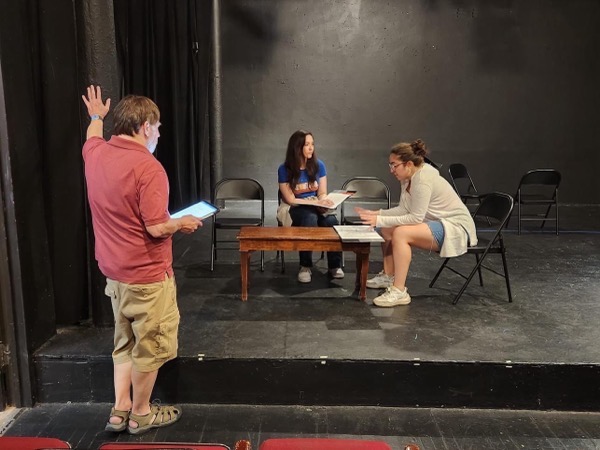
I own the latest models of an 11-inch iPad Pro and also an iPad mini. Love them both. I use them in similar but different ways, fitting the tool to the job of the moment. I may be a gadget geek, but I’m primarily a theatre professional. Most of my work is directing plays. Both serve me well in my job. Currently, I’m working out of town on staging The Lehman Trilogy. Both the iPad Pro and the iPad mini suitably fill my down hours with entertainment and are reliable work horses for the gig. To be honest, their roles as tools are so familiar that to call my usage “rote” would be accurate.
Background
Back in the day I was a Tablet PC fan boy. I used them primarily as a work device in the theatre. I was at one time a Microsoft MVP for Tablet PC. Those devices allowed me to quit using paper scripts in rehearsal and write my notes directly into a digital script. I could set aside my beloved yellow legal pads and not so beloved folders of research and have everything handy in digital format on a Tablet PC. The debates then were over slates versus convertible Tablet PCs.
Microsoft screwed the pooch with Tablet PCs leaving the door open for Apple. And along came the iPad. It certainly wasn’t perfect for my work initially, but it offered promise. I can’t remember how many different stylus solutions I went through (from Adonit to Zagg) until the Apple Pencil came along. Along the way I’ve tried most of the other tablet solutions but as far as my work needs are concerned the iPad is hands down the only viable choice. I include Microsoft’s Surface tablets in the reject pile.
My Work
When I’m doing a show, work includes reading and working from scripts; research gathering and consumption; using, taking and making notes in rehearsal as well as on the research. Working with scripts, once a page gets too filled with my indescipherable scribbles, I simply open another copy and start afresh. GoodNotes is my app of choice for this. (I’ve tried them all.) It’s an easy solution for scribbling notes in the margins of a script in prep or in actual rehearsal. It also provides a way for me to archive scripts once I’m done with a show.
As a director I often walk into rehearsal with a clean copy of the script so that I’m more focused on the actors and the text and less on my notes. It’s a snap (swipe?) to switch back and forth when I need to reference my notes or research. Time is money and a limited commodity in rehearsal and I have to maximize what time I’m given.
In the early days of staging I’m primarily using the iPad Pro. It’s a Goldilocks device as far as size goes. The text and my notes are large enough to read at a glance and the size of the device is easy to tote when I move around the theatre or rehearsal room. In the stages of rehearsal when I’m mostly taking notes as the actors rehearse what we’ve done, I switch to the iPad mini for even more mobility and a bit of discretion.
My research is ongoing, but primarily done prior to rehearsals beginning. I do some of that on the iPads, but use a Mac for quite a bit of it. Apple Notes is my app of choice for all of that research gathering, though I’ve tried many others and still do. Prepping for a day’s rehearsal when I may need specific research I’ll create a note with links to those notes, the research directly, or a work list and have them handy via Slide Over. I’m still not a fan of Stage Manager although I’ve given it several attempts to win me over.
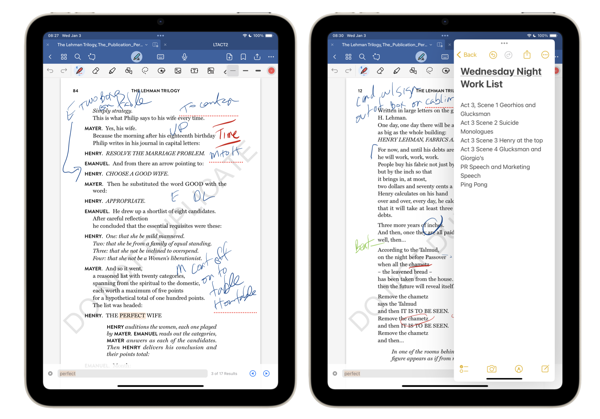
Marshall McLuhan coined the phrase “the medium is the message” in the 1960’s about human communication. For me, the same is true with my work tools. When I’m staging and working scenes the larger iPad Pro is the medium of choice and feels natural as I’m moving actors and scenery from moment to moment. When I’m watching and note-taking as the actors move through scenes on their own, the smaller iPad mini serves to remind me that I’m an observer, not a participant in the moment. If I move about the theatre while the actors are working it can be distracting if they see me a take a note. They can fall out of the moment and into a “what did I do wrong” mode of self-monitoring. So I try to be as discreet as possible.
Once we’re down to the final days of rehearsals and I have limited hours for giving notes I’ll actually return back to my Mac for preparation and organizing my notes for efficiently relaying them via email or in note sessions with the cast. Often I’ll use the Notes app on my iPhone when giving those notes in person. Once we invite the audience in for previews, I’ll stick with the smaller iPad mini for taking those notes, again for discretion purposes. When you tell an audience to put away their smartphones it’s not a good look to see a larger iPad light up while the director is taking notes. There was a time that I used a Samsung Galaxy Note in this scenario using OneNote or Evernote as the note-taking app. But those days are gone as my routine has become more focused.
For this current gig, we conducted some early table work and read-throughs of the script using Zoom. I’d be on my Mac, but have my script on the iPad Pro. My actors were using iPads for their scripts as well.

My work also consists of a lot of meetings and since I’m a now happily a freelance director I often travel for work. That means I’m often doing pre-production virtually using whatever video conferencing app the theatre uses. I’m also auditioning actors in virtual auditions. Video submissions also play a significant role. Both devices serve well in those aspects of the job, though I typically prefer the iPad Pro in those cases.
Play
Throughout this article I’ve also mentioned that I use both iPads for play as well as work. That is indeed the case. There’s downtime, and like many I use an iPad for consuming media and reading. I read a lot of scripts. The iPad mini is perfect for this whether I read the scripts as PDFs imported into Apple’s Books app, (my preference), in the Kindle app or in a PDF reader. As I’m working on this article on my Mac, I’m watching two football games in the background, one on the iPad Pro and one on the iPad mini.
Stall Surfing
Back in the day I often spoke and wrote about Tablet PCs as great Stall Surfing devices. Yeah, Stall Surfing. That thing you do when sitting on the toilet. You know you do it, whether it’s on a smartphone or a tablet. I’m here to tell you, that if nothing else, the iPad mini is the perfect Stall Surfing device. It’s sure beats reading scripts in paper or bound versions. I doubt we’ll ever see a marketing campaign featuring Stall Surfing, though.

Future Wishes
If I had a wish list for future iPads (both Pro and mini) it would be simple. I’ve heard talk that Apple might be moving away from the 11-inch size of the Pro models, thinking the Air liineup might be sufficient for most who need that size. I hope that’s not the case. It’s the perfect size and power house for my line of work. Sure, improve the larger Pros or make even larger ones, but don’t forget those of us who move around while we work and want a document sized device to work from that offers us power when we need it.
As for the iPad mini, I’d love to see that power up a bit in the next generation with an M-series processor. As to the design of both, I know new iPads without significant design changes can be boring to many. I’m not in that camp. I’d be content with these hardware designs for quite awhile to come. Both work exceptionally well for me as is. But I’m sure I’ll jump at the next models that come out regardless.
After all, I’m both a gadget and theatre geek.



 Life on the Wicked Stage: Act 3