
It was a real wake up call for me when news broke recently that in the next major update to iOS 26 Apple will be changing the wake up screen for alarms. The change means that instead of having two buttons, one above the other to either Snooze the alarm or Stop the alarm, users will now have to Slide a button to turn off the alarm.
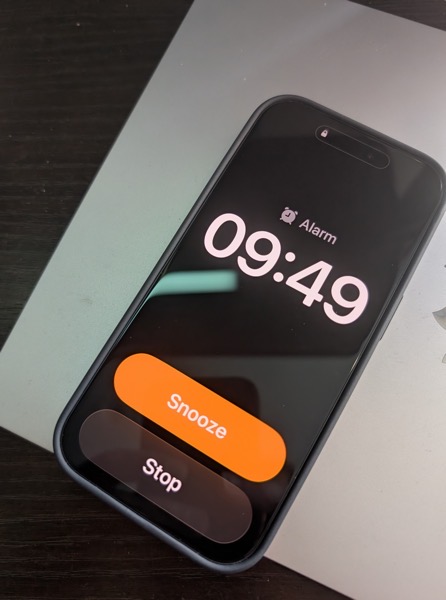
This shouldn’t have been that much of a surprise for me as prior to iOS 26, the snooze button was a big orange one and the “button” to turn off the alarm was below it and much smaller. I can’t tell you the number of times I, and my wife, accidentally hit the snooze button instead of turning off the alarm.
To my tastes, Apple fixed that in the initial release of iOS 26 by making the buttons of similar size, even if the Snooze button still grabbed all the glory and color.
Here’s the thing. Of course how you wake it up is a very personal preference. Personally, I’m not a snoozer. When it’s time to wake I want to wake up and get moving. But apparently the majority of the world prefers snoozing, as do the folks making decisions in Cupertino. When you think about it explains quite a bit about so much when it comes to meeting the challenges of each day, whether in the real world or in tech.
What’s that old saying, if you snooze, you lose? I think that’s it.
I can only imagine how many iPhones are going to be knocked off of bedside tables as semi-awake users attempt to slide the button to silence an alarm. If I was responsible for the design, I’d have made it more challenging to hit a snooze button than to hit the wake up button.
But that’s just me.
You can also find more of my writings on a variety of topics on Medium at this link, including in the publications Ellemeno and Rome. I can also be found on social media under my name as above.
 Life on the Wicked Stage: Act 3