
Tossing this tidbit on the growing bonfire that burns around Apple’s design flaws, this Apple Watch screen drives me nuts.
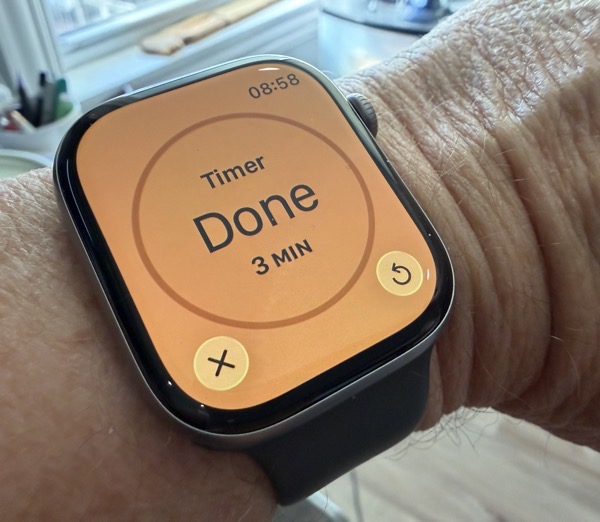
It shows up when a Timer expires. I get that there needs to be two options: stop the Timer or reset it to go round again, but if that gigantic circle in the middle doesn’t scream STOP, I don’t know what else does. I reach to press it each time.
And in the context of design being not just about how something looks, but also how it works, there is that repeat button. Its functionality doesn’t make sense. If I set a Timer for something I’m cooking for 20 minutes or so, why would I want it to completely reset to 20 minutes if I determine whatever I’m cooking needs another minute or two?
Also interesting, if you use the Wrist Flick gesture it doesn’t provide you with options, it just stops the Timer. It’s not that I think options are needed, but if the only one besides stopping the Timer is to repeat the full Timer than the watch face UI makes no sense to me.
I think the entirety of this needs to be rethought.
You can also find more of my writings on a variety of topics on Medium at this link, including in the publications Ellemeno and Rome. I can also be found on social media under my name as above.

 Life on the Wicked Stage: Act 3